Updating npm dependencies safely is one of those tasks that sounds straightforward until it is not. You run npm update, everything looks fine, your CI pipeline goes green, and then three days later a user reports that login is broken. The culprit is a minor version bump in an auth library that changed a default behavior in its changelog footnotes. You missed it because nobody reads changelogs at 11pm.
This is not a rare experience. Third-party dependencies are now the primary vulnerability vector for web applications, responsible for more breaches than direct application logic flaws. And the problem is accelerating. 92% of developers use AI tools daily, and AI-generated package.json files routinely pin outdated versions because the model's training data stops at some past cutoff. Your app ships with yesterday's dependencies from day one.
The quarterly dependency routine described here gives you a repeatable process for staying current without breaking things. It works whether you built the app yourself or let an AI build it for you.
Why Quarterly Is the Right Cadence
Daily updates are operationally unsustainable. Annual updates create migration debt that turns a two-hour job into a two-week project. Monthly is reasonable for patches. Quarterly is the right cadence for the full upgrade cycle.
Here is why the math works out. A typical Node.js application has 30 to 80 direct dependencies. Each of those has its own dependency tree. Over 90 days, roughly 15 to 25 percent of your direct dependencies will release a new minor or major version. Doing that upgrade all at once, four times a year, is more efficient than the constant context-switching of weekly reviews. You get into a rhythm, you have a testing window, and you can batch the breaking changes together rather than dealing with them one at a time.
The other reason quarterly works is that it aligns with your security posture. Most vulnerability disclosures have a 90-day responsible disclosure window. If you are updating quarterly, you are catching the vast majority of published CVEs before they sit unpatched long enough to attract automated exploitation.
The Pre-Work Before You Touch Anything
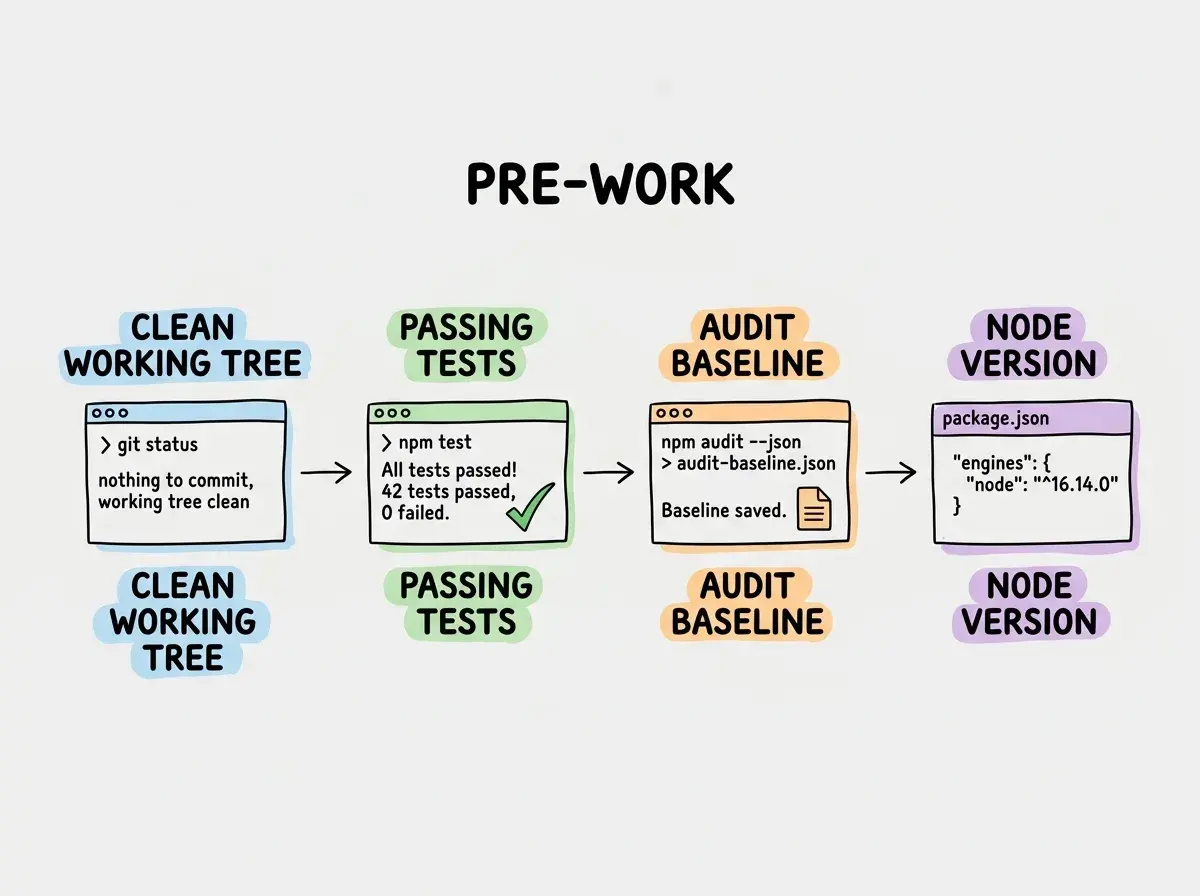
Updating npm dependencies safely starts before you run a single command. If you skip this pre-work, you will have no way to confirm that the update was safe, and no clean rollback path if something breaks.
Commit or stash everything first. Your working tree should be clean. Run git status and confirm there are no uncommitted changes. If there are, stash them. You want a clean baseline so that a git diff after the upgrade shows only dependency changes.
Run your test suite and confirm it passes. This is not optional. If you have tests that are already failing before you start, you cannot tell whether a new failure was caused by your upgrade or was already there. Fix or skip the pre-existing failures, document why, then proceed.
Check your current vulnerability baseline. Run npm audit and save the output. You are creating a before snapshot. After the upgrade, you will run it again and compare. If the audit output gets worse after an upgrade, you upgraded something that introduced a new vulnerability.
Note your Node.js version. Some package upgrades require a newer Node.js runtime. Check the engines field in the changelogs of any major version bumps you are planning. Getting blindsided by a Node.js version requirement mid-upgrade wastes time.
The Three-Layer Upgrade Process
Updating npm dependencies safely requires treating patches, minor versions, and major versions as three separate jobs. Running npm update on everything at once is how you get a green CI pipeline that masks a broken production feature.
Layer 1: Security patches (zero risk). Run npm audit fix to apply patches for known vulnerabilities. These are almost always safe. The --force flag is a different story. Never use npm audit fix --force without reviewing what it will do. The forced version can involve major version jumps that break APIs. Run npm audit fix without flags, review the diff, confirm the affected packages are behaving normally, and commit.
Layer 2: Minor and patch versions (low risk, needs testing). Run npm outdated to see every package behind its current release. For anything showing a minor version bump (1.4.2 to 1.7.0), update in small batches grouped by category. Update your testing utilities together. Update your UI library dependencies together. Update your authentication stack together. Never update your auth stack and your database client in the same commit. When something breaks, you want to know exactly which change caused it.
For each batch: update the packages, run the full test suite, manually test the affected user flows, then commit. Do not let the batches accumulate in your working tree without committing the clean ones.
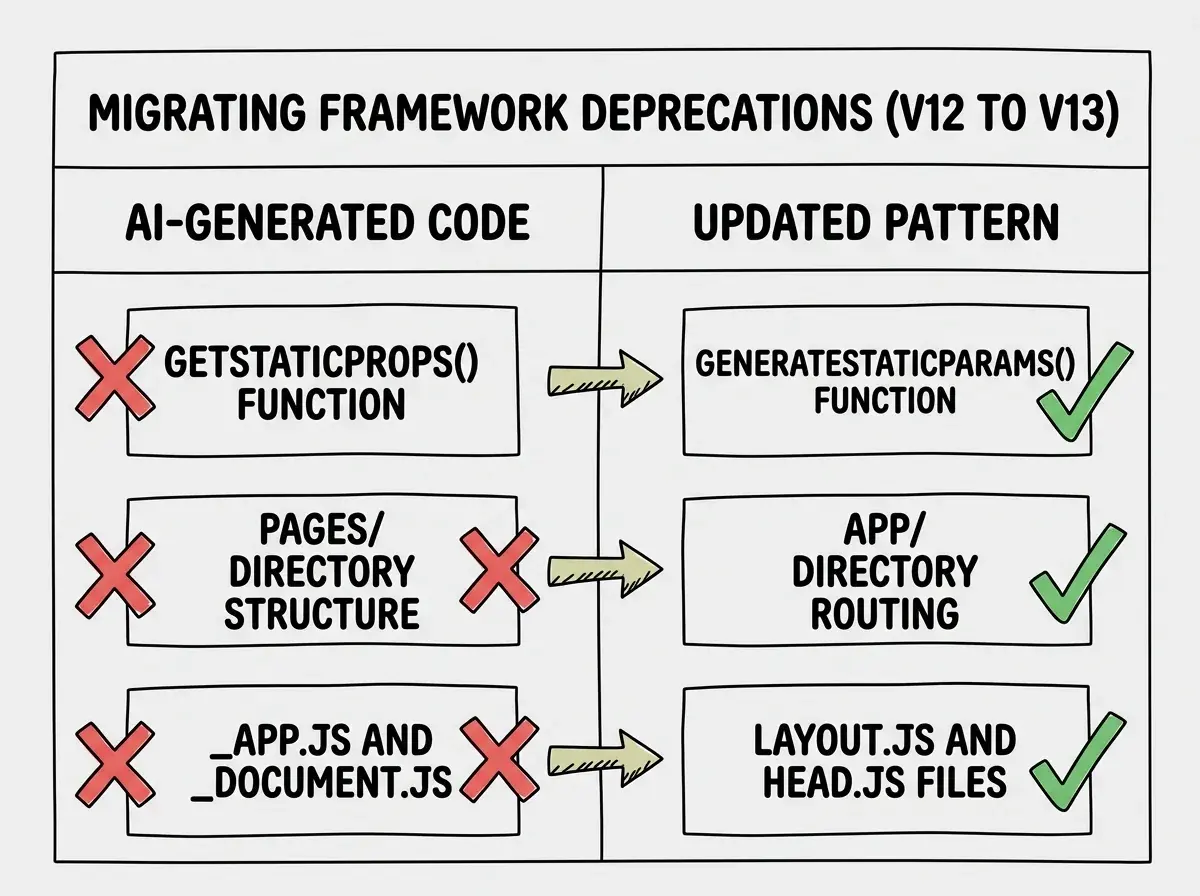
Layer 3: Major versions (high risk, plan ahead). A major version bump (1.x to 2.x) means breaking changes by definition. These are not automatic updates. They are mini migrations. For each major version upgrade, read the full migration guide, check whether your AI-generated code is using any of the deprecated patterns, update the code alongside the package, and test in isolation before merging.
Major version upgrades should get their own branch. If the migration is more than a few hours of work, treat it as a separate task from the rest of the quarterly routine.
Is npm update Safe
The honest answer is: npm update is safe for patch and minor versions under the ranges already in your package.json. It respects your semver constraints and will not jump major versions on its own.
The unsettling part is that "respects semver" does not mean "nothing will break." Minor versions can introduce behavioral changes. The semver contract only guarantees that the public API signature has not changed, not that every behavior is identical. Packages with poor release hygiene sometimes introduce breaking changes in minor versions.
This is why the three-layer process matters. Running npm update on everything at once is technically safe by semver definitions. In practice, it creates an untested surface area that is hard to debug when something goes wrong. The batched approach trades a small amount of speed for a large amount of confidence.
npm update respects semver ranges but it does not guarantee nothing breaks. Minor versions can change behavior without changing the API signature. Updating in small batches by category and running tests after each batch is the only way to know for sure that an upgrade did not introduce a regression.
Handling Breaking Changes in AI-Generated Code
AI-generated code has a particular vulnerability when it comes to major version upgrades. The model often uses patterns that were popular at the time of its training data cutoff but were deprecated or removed in later releases. When you upgrade to React 19 or Next.js 16 or any other major version, you may find that the AI-generated code is using three different deprecated patterns that were all fine a year ago.
The workflow that makes this manageable is search-and-replace guided by the migration guide. When a major version upgrade lists a breaking change, search your codebase for every instance of the old pattern before you update the package. Know the scope of the work before you start. An upgrade with six breaking changes and twelve instances of deprecated code is a multi-hour task. An upgrade with two breaking changes and one instance is thirty minutes.
Tools like jscodeshift and @next/codemod automate some of this for popular frameworks. Use them. They exist specifically because manual search-and-replace at scale produces errors.
The Dependabot Setup That Handles the Easy Work
A quarterly manual routine handles major versions and complex upgrades. Dependabot handles the low-friction work in between so that patch-level vulnerabilities do not age for three months.
A minimal .github/dependabot.yml that groups updates by category (testing, UI, auth) and runs weekly on Mondays is enough. Enable auto-merge for patch-level updates that pass CI. By the time your quarterly session arrives, the patch-level noise is already handled and you can focus on major version upgrades that need real attention.
The Post-Upgrade Verification Checklist
A dependency update is not done when the tests pass. It is done when production behavior is confirmed normal. The verification steps that catch what tests miss are worth running before you push.
Check your bundle size. Run npm run build and compare the output size to the previous build. A legitimate upgrade should not add significant bundle weight. A 20 percent size increase after a minor version bump is a signal that something in the dependency tree brought in a large new transitive dependency.
Test the auth flow manually. Authentication is the highest-risk area in any application and AI-generated auth code is often the least robust. After any upgrade that touches auth-adjacent packages (JWT libraries, session management, OAuth clients), log out and log back in before pushing.
Verify external integrations. Payment providers, email services, and third-party APIs are often the downstream victims of dependency changes that look unrelated. An HTTP client upgrade that changes how it handles redirects or authentication headers can silently break an integration that was working fine. Test any integration that touches money or user data manually before calling the upgrade complete.
Treating a passing test suite as the final check before merging a dependency upgrade. Automated tests cover what you wrote tests for. They do not cover the integration behaviors, bundle size impacts, and runtime edge cases that only show up in actual browser testing. The post-upgrade verification checklist closes the gap between green CI and confirmed production safety.
This post is part of the S15 Maintenance Handbook series. Get the full maintenance picture.
Browse all articlesPutting the Quarterly Session on the Calendar
Create a recurring calendar event right now. Ninety minutes, once per quarter, labeled "Dependency Upgrade Session." Put it on a Tuesday or Wednesday. A session structure that works: 20 minutes for pre-work and audit baseline, 30 minutes for patch and minor version upgrades in batches, 20 minutes for verification and testing, 10 minutes to document any major version upgrades that need a dedicated session later.
That last step matters. Major version upgrades that cannot be finished in 90 minutes get a date in the next sprint. They do not get deferred indefinitely.
Updating npm dependencies safely is not a heroic act. It is a maintenance habit, done quarterly, that prevents the silent accumulation of risk that turns a healthy codebase into a liability.
Build the habits that keep your app running well past launch day.
Read more on the blog