Security patching nodejs and its surrounding ecosystem is not glamorous maintenance work. It is the difference between a production app that stays clean and one that quietly becomes someone else's infrastructure. Veracode's research found that 45% of AI-generated code introduces security flaws. With 92% of US developers now using AI tools daily, there is an enormous surface area of vulnerable production applications that nobody is actively patching.
The Lovable CVE-2025-48757 exposed over 170 production apps through a single misconfiguration that AI tooling introduced and no automated process caught. Slopsquatting attacks specifically target package names that AI models are likely to hallucinate, meaning your AI assistant can add a malicious dependency just by generating an install command with a plausible-sounding but nonexistent package name. Security patching is not a one-time task at launch. It is a recurring operational discipline.
This guide gives you the system: how to scan, how to prioritize, how to apply patches, and how to automate enough of this that it actually gets done.
Why AI-Built Apps Drift Toward Vulnerability
AI models are trained on code up to a cutoff date. They generate dependency versions that were current when the training data was collected, not today. A project scaffolded six months ago is already running packages that may have published critical patches since then.
The problem compounds because AI tools add dependencies freely. They reach for a utility package to parse dates, another for phone numbers, another for CSV parsing. Human developers pause and ask whether a dependency is worth the maintenance cost. AI tools do not have that friction. A medium-complexity vibe-coded app can accumulate 300 to 500 transitive dependencies without any single decision feeling significant.
Slopsquatting sharpens this further. AI models occasionally generate npm install commands with package names that sound plausible but do not exist in the official registry. Attackers register those names with malicious code and wait. If your AI tool suggests npm install format-phone-utils and an attacker registered that name targeting AI-generated code patterns, you have a supply chain compromise the moment you run the install.
Your patch discipline is the backstop for all of this.
Running npm audit Effectively
npm audit checks your dependency tree against the Node Security Platform database and returns a report of known vulnerabilities, their severity, and whether a fix is available. Running it is trivial. Running it in a way that produces actionable signal is slightly less obvious.
Running npm audit with no flags shows everything, which overwhelms. Start with this instead:
npm audit --audit-level=high
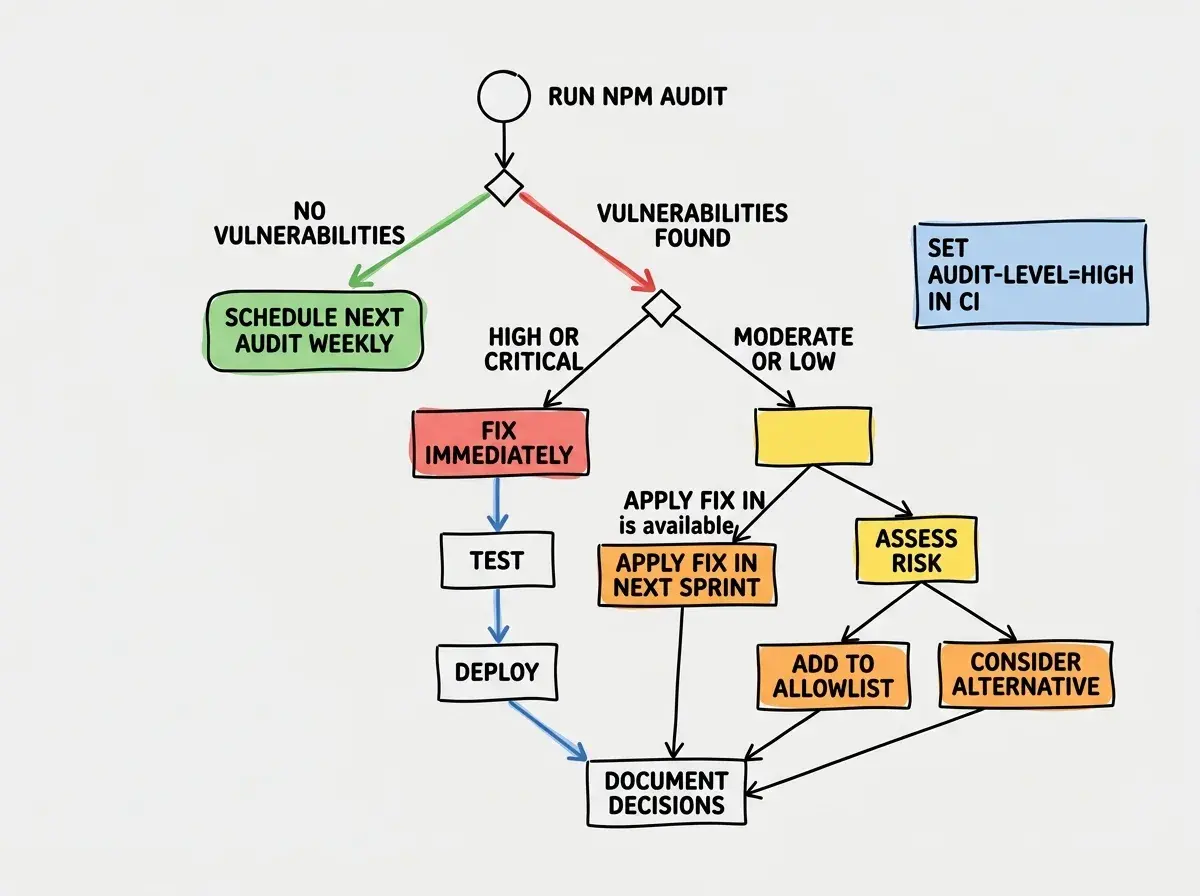
This returns only high and critical severity vulnerabilities. It is a focused list. If this list is empty, your immediate risk is low. If it has entries, fix them before anything else.
For CI enforcement, pipe the output through audit-ci:
npm audit --json | npx audit-ci --config audit-ci.json
The audit-ci config sets your threshold and allowlists vulnerabilities you have assessed and accepted:
{
  "high": true,
  "critical": true,
  "allowlist": []
}
Start with an empty allowlist. An allowlist that grows without entries ever being removed is a list of accepted risks nobody remembers accepting.
Applying Patches Without Breaking Your App
Knowing a patch exists and applying it safely are different problems. npm audit fix applies non-breaking version bumps automatically. It is safe to run routinely:
npm audit fix
The dangerous variant is npm audit fix --force, which upgrades across major versions to resolve vulnerabilities that have no fix within the current major. Major version bumps frequently include breaking changes. Running --force without testing will break things. Use it deliberately, not automatically.
When npm audit fix reports that it cannot resolve a vulnerability without --force, your process should be:
- Identify which package in your direct dependencies pulls in the vulnerable transitive dependency.
- Check whether that direct dependency has a newer version that pulls in a safe transitive version.
- Upgrade the direct dependency to the latest compatible version and test.
- If upgrading the direct dependency still leaves the vulnerability, check whether an alternative package exists.
The npm why command tells you which dependency chain is pulling in a vulnerable package:
npm why vulnerable-package-name
This output is the map you follow to find the right upgrade target. You almost always want to upgrade the direct dependency at the top of the chain rather than trying to force a specific version of a transitive package through overrides.
Run npm audit --audit-level=high on a weekly schedule, not only before deploys. Vulnerabilities are disclosed continuously, and a package that was clean last week may have a published CVE this week. Catching vulnerabilities between deployments gives you time to patch without deployment pressure. Catching them only during a deploy puts you in a position of either shipping a known vulnerability or holding up a release.
Prioritizing CVEs When You Have Limited Time
Not every CVE requires immediate action. A critical-severity vulnerability in a package your app uses for CLI tooling during development is not the same threat as a critical vulnerability in a package your server uses to parse user-supplied input at runtime.
The factors that elevate urgency for a given CVE:
Runtime vs. devDependency. A vulnerability in a package under devDependencies cannot be exploited in production. These still matter for developer machine security, but they do not expose your users directly.
Exploitability. The CVE description tells you what an attacker needs to exploit the vulnerability. "Requires authenticated attacker with admin privileges to send a crafted request" is very different from "exploitable by any unauthenticated user via a GET request." Read the description, not just the severity score.
Attack surface. If the vulnerable code path is only reachable when processing user-supplied input, the risk is higher than if it is only reachable from trusted internal calls. Map the code path before deciding urgency.
Fix availability. A vulnerability with no published fix requires a different response than one with a patched version available. If no fix exists, assess whether you can isolate or wrap the vulnerable code, and set a reminder to check weekly for a published fix.
The CVSS score is a starting point, not a verdict. A 9.8 critical in a package your app calls zero times in production is less urgent than a 7.5 high in a package that parses every request body.
GitHub Security Alerts and Dependabot
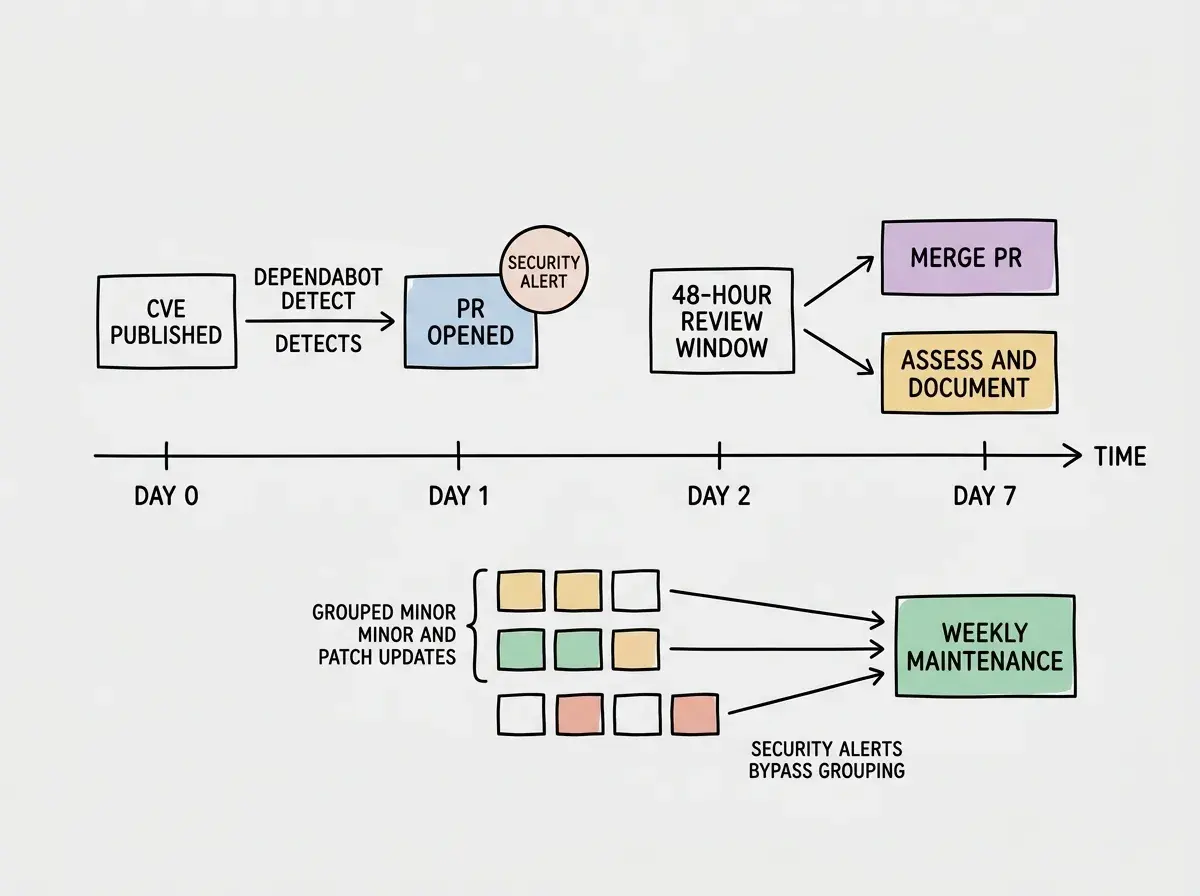
Manual audits catch what you run them on. GitHub Dependabot runs continuously and opens pull requests automatically when vulnerabilities are discovered in your dependencies. This converts security patching from a task you remember to schedule into pull requests you review.
Enable Dependabot in your repository settings under Security. You can configure dependabot.yml to control which ecosystems it watches, how frequently it checks, and whether it groups minor and patch updates together:
version: 2
updates:
  - package-ecosystem: "npm"
    directory: "/"
    schedule:
      interval: "weekly"
      day: "monday"
    groups:
      minor-and-patch:
        update-types:
          - "minor"
          - "patch"
    open-pull-requests-limit: 10
Grouping minor and patch updates reduces the number of individual PRs. Security alerts bypass grouping and always appear as individual PRs so you can review the CVE context in isolation.
The workflow that works: review Dependabot security PRs within 48 hours. Grouped minor/patch PRs get reviewed weekly. Major version PRs get a sprint allocation because they require testing.
Catching Slopsquatting Before It Reaches Your Repo
Slopsquatting is a supply chain attack specifically designed for AI-generated code. An attacker identifies package names that language models commonly suggest, registers those names on npm with malicious code, and waits for developers to install them after their AI tool suggests an npm install command.
The defense is verification before install. Before running any npm install command that your AI tool generates, check the package on npmjs.com:
- When was it first published?
- How many weekly downloads does it have?
- Does it have a repository link? Does that repository look legitimate?
- Is the package scope what you would expect (most legitimate packages have clear maintainer history)?
A package published last week with 12 downloads and no repository link is a red flag even if the name sounds legitimate. For packages your AI tool suggests that you have never heard of, find the functionality in a package already in your dependency tree or use a known alternative. Most utility operations do not require a novel package.
The Weekly Security Patching Routine
Security patching is most sustainable as a fixed weekly ritual rather than a reactive scramble. The routine takes 20 to 30 minutes when maintained weekly. It takes 4 to 6 hours when ignored for three months.
Monday morning, 20 minutes:
- Run
npm audit --audit-level=highand note any new high or critical issues. - Review any open Dependabot security PRs and merge or document them.
- Review grouped dependency update PR (if open) and merge after confirming CI passes.
- Check your hosting platform's security dashboard (Vercel, Cloudflare, Railway all surface dependency alerts in their dashboards).
That is the complete routine for a stable app. It expands when you have active vulnerabilities to track, but the baseline is that simple.
Log what you do. Dates and actions in a SECURITY.md or project notes give you an audit trail. If the same package keeps needing patches, that is a signal to evaluate whether it belongs in your dependency tree at all.
Running npm audit fix --force without testing because a security scan in CI is blocking a deployment. The pressure to unblock a deploy causes developers to apply major version upgrades without reading the changelog, which breaks production and causes an incident that takes longer to resolve than the original vulnerability would have. When a security fix requires --force, treat it as a planned upgrade. Schedule a test cycle. A known vulnerability with a documented risk assessment is safer than an untested breaking change deployed under pressure.
What This Means For You
Security patching nodejs dependencies is not something you do once and forget. Vulnerabilities are disclosed continuously. AI tools introduce packages at a pace that exceeds what most developers actively track. The attack surface of a vibe-coded app in production grows every week without deliberate maintenance.
The system described here gives you automation (Dependabot, audit-ci in CI), a triage framework (severity plus exploitability plus attack surface), a weekly ritual (20 minutes, Monday morning), and a verification habit for new packages (check npmjs.com before installing anything your AI tool suggests). Together, these close the gap between AI-generated code that is fast to build and production code that is actually safe to run.
- If you are a developer shipping on a deadline: Start with the two non-negotiables. Add
npm audit --audit-level=highto your CI pipeline so high and critical vulnerabilities block deploys. Enable Dependabot on your repository so you are not relying on memory to catch CVEs. Both take under 10 minutes to set up and reduce your exposure without requiring ongoing manual effort. - If you are an indie hacker maintaining a live product: The weekly 20-minute routine is your protection. Block time on Monday morning. Run the audit, review the Dependabot PRs, merge what passes CI, and document what you defer. Three months of consistent 20-minute sessions prevents the 6-hour emergency catchup that kills weekends and ships stressed code.
Security patching is one part of keeping AI-built apps healthy. Get the full S15 Maintenance Handbook.
Start the seriesThe goal is not zero vulnerability exposure at every moment. That is impossible. New CVEs are published every day. Your goal is a short mean time to patch. Dependabot plus weekly audits plus CI enforcement gets most teams under 7 days for high and critical vulnerabilities. That is a defensible posture. When a vulnerability is exploited in the wild, your app is already patched rather than silently exposed.
The npm audit command takes 30 seconds to run. Start there and work through the results with this guide.
See all maintenance guides