An expired SSL certificate is one of the most avoidable outages a vibe-coded app can suffer. When a certificate expires, visitors do not get a slow page or a broken feature. They get a full-screen browser warning that says "Your connection is not private." Most users never click past it. Your app is effectively offline.
92% of US developers use AI coding tools daily, and the apps being built this way are going live faster than ever. But speed at the build stage creates a maintenance gap at the operations stage. The AI that built your app has no idea when your certificate expires. Nobody set a reminder. Nobody built a monitoring check. Six months after launch, your certificate silently lapses at 3 AM on a Tuesday, and you wake up to a support inbox full of users who think your site got hacked.
The fix is not complicated. The gap is awareness and routine. This article covers how SSL certificates work for AI-built apps, what auto-renewal does and does not handle, how to set up monitoring, and what to do when things go wrong.
What SSL Certificate Renewal Actually Means
SSL/TLS certificates are the mechanism behind HTTPS. They do two things: they encrypt the connection between a visitor's browser and your server, and they verify that your domain belongs to who it claims to belong to. Browsers trust certificates issued by recognized certificate authorities (CAs). When a certificate expires, browsers stop trusting it and display the warning.
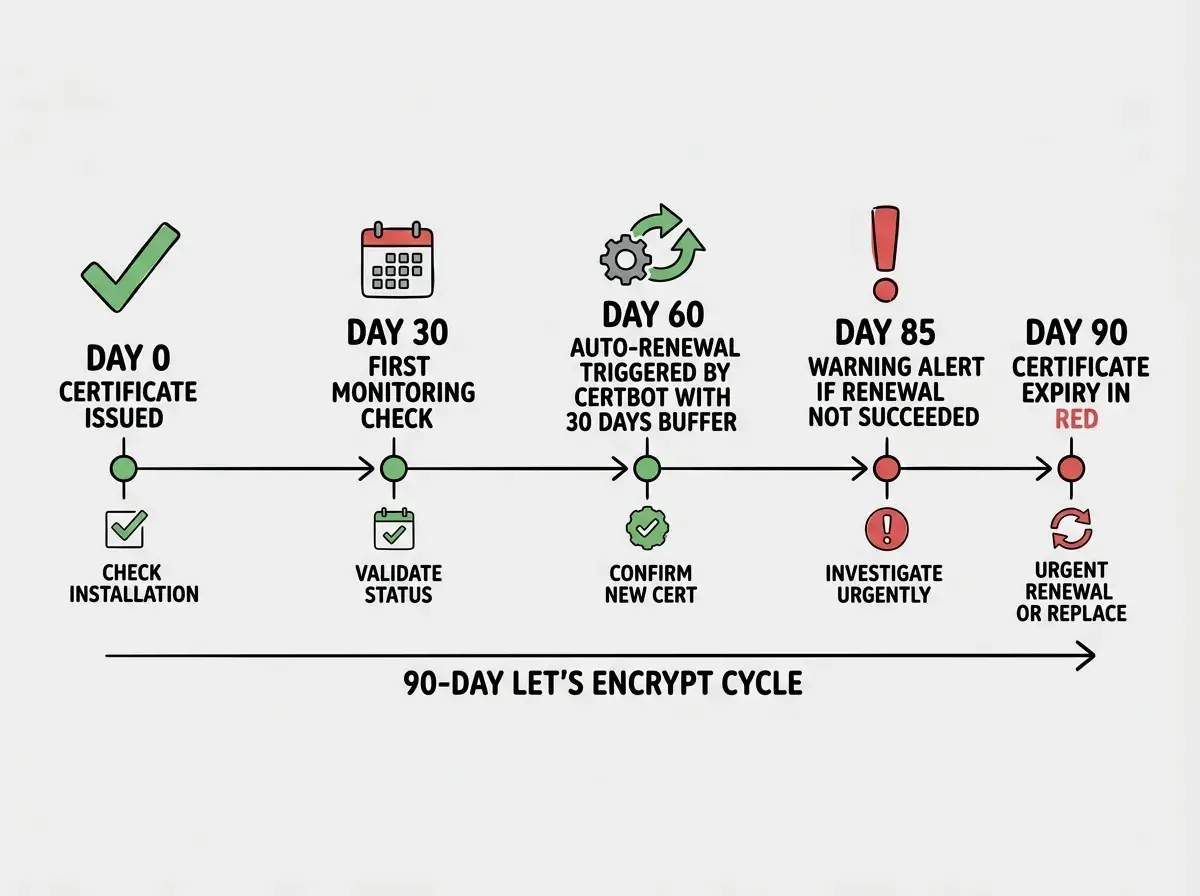
Certificates are issued with a fixed validity period. Let's Encrypt, which powers the overwhelming majority of HTTPS on small and medium apps, issues certificates valid for 90 days. This is intentional. Short validity periods reduce the window of exposure if a private key is compromised. The tradeoff is that renewal must happen more frequently.
Certbot and other automated tools renew when a certificate is 60 days old, leaving a 30-day buffer before expiry. The 90-day cycle means renewal is a recurring operations requirement, not a once-a-year event. Managed platforms like Vercel and Cloudflare Pages handle this automatically for custom domains. The problem appears when that assumption breaks.
When Auto-Renewal Breaks
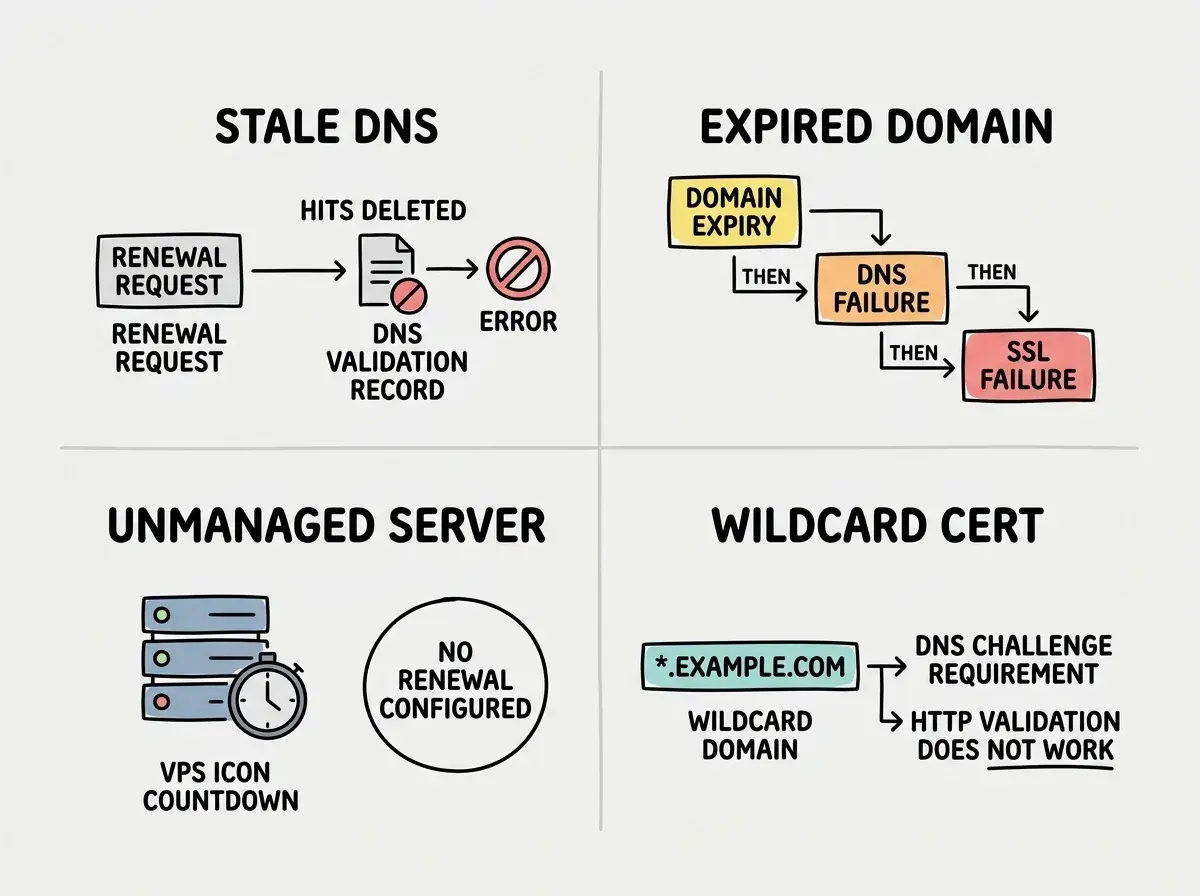
Managed platforms handle certificates automatically until they do not. Four situations break the auto-renewal assumption.
DNS records go stale. Certificate authorities validate domain ownership via DNS records (CNAME or TXT challenges) before issuing or renewing a certificate. If you migrated DNS providers, changed nameservers, or let a validation record lapse without updating it, the renewal fails silently. The certificate stays valid until it expires, at which point the renewal fails and the site goes down. The failure mode is delayed and hard to trace back to the root cause.
The domain registration expires first. An expired domain registration takes down your DNS, which takes down your certificate validation, which takes down your app. These three systems are linked but tracked separately. Many builders manage domain registration through a registrar with a different renewal cycle than their SSL provider. A domain expiry event cascades into an SSL failure even though the certificate itself was fine.
Self-managed servers have no automation at all. If your app runs on a VPS (DigitalOcean Droplet, EC2 instance, Fly.io machine), the server does not auto-renew certificates unless you explicitly configured Certbot or a similar tool. AI coding tools that generate server configuration often include the Nginx or Caddy config needed to serve HTTPS, but do not always generate the renewal automation that keeps it running. An app deployed this way starts with a working certificate and has a 90-day countdown to its first outage.
Wildcard certificates need different validation. Wildcard certificates (e.g., *.yourdomain.com) require DNS-based validation rather than HTTP-based validation. The renewal process is different, and tools that auto-renew standard certificates may not handle wildcards without additional configuration.
Setting Up Auto-Renewal on a Self-Managed Server
If your app runs on a VPS with Nginx or Apache, Certbot handles certificate issuance and renewal. The setup is straightforward. On Ubuntu:
# Install Certbot and the Nginx plugin
sudo apt install certbot python3-certbot-nginx

# Issue a certificate and configure Nginx automatically
sudo certbot --nginx -d yourdomain.com -d www.yourdomain.com

# Confirm the renewal timer is active
sudo systemctl status certbot.timer
Certbot installs a systemd timer that runs twice daily and renews any certificate within 30 days of expiry. Run sudo certbot renew --dry-run to confirm the renewal process works without actually replacing the certificate. If the dry run succeeds, your auto-renewal is working.
Caddy is a simpler alternative. It issues and renews certificates on first request without any explicit setup. For apps on Fly.io, Railway, or Render, the platform handles certificates automatically once you add the domain and configure the required DNS records.
Certificate Monitoring That Actually Alerts You
Auto-renewal works most of the time. Monitoring catches the cases when it does not.
The simplest monitoring approach is a free third-party check. Several services monitor certificate expiry and send email alerts before a certificate lapses.
UptimeRobot (free tier) monitors HTTP uptime and SSL expiry simultaneously. Set up an HTTPS monitor and it will alert you 30 days before a certificate lapses. The free tier covers 50 monitors at 5-minute intervals. After any DNS or certificate change, run a scan at ssllabs.com/ssltest to confirm the certificate is properly chained and not using deprecated protocols. An A grade is the target.
For a command-line check without any external service, this shows the expiry date directly:
echo | openssl s_client -connect yourdomain.com:443 -servername yourdomain.com 2>/dev/null \
  | openssl x509 -noout -dates
A weekly cron job running this and emailing you when the result is under 30 days is a complete monitoring solution for a single domain.
Auto-renewal on managed platforms is reliable but not guaranteed. DNS changes, domain registrar migrations, and configuration drift can silently break the renewal process. Set up at least one external monitoring check (UptimeRobot is free) so you are alerted before expiry rather than discovering the problem from a user report.
Manual Renewal When Automation Fails
When auto-renewal has failed and a certificate is expired or about to expire, manual renewal is the recovery path.
On a Certbot-managed server, manual renewal is straightforward:
# Check which certificates are installed and their expiry
sudo certbot certificates

# Force a renewal regardless of the 30-day threshold
sudo certbot renew --force-renewal

# Or renew a specific certificate
sudo certbot renew --cert-name yourdomain.com --force-renewal
If the renewal fails, two causes cover most failures. First, DNS propagation delays: the CA cannot yet see the validation record you just added. Wait 30 minutes and retry. Second, port 80 is blocked by a firewall. Let's Encrypt's HTTP-01 challenge requires port 80 to be reachable even for HTTPS-only apps. Allow port 80 during renewal, or switch to DNS-01 validation which does not use port 80.
On Vercel, open the project Domains tab and check the certificate status for each custom domain. A pending or invalid certificate will show the specific DNS validation record required. Add the record, then click "Verify" to retry provisioning.
On Cloudflare, SSL is handled at the edge. Most Cloudflare-managed certificates never expire from the user's perspective because Cloudflare renews them in the background and serves the certificate from the edge. If you are using a custom certificate uploaded to Cloudflare (rather than a Cloudflare-managed one), check the expiry date in the SSL/TLS dashboard and replace it before expiry.
Fixing Common Certificate Errors
Three errors account for most SSL failures in AI-built apps.
ERR_CERT_DATE_INVALID is the expired certificate error. Check Certbot logs at /var/log/letsencrypt/ to find why auto-renewal failed, then run sudo certbot renew --force-renewal to recover.
ERR_SSL_VERSION_OR_CIPHER_MISMATCH means the server is offering TLS 1.0 or 1.1. On Nginx, update ssl_protocols to TLSv1.2 TLSv1.3. On managed platforms, this is handled automatically.
Mixed content warnings appear when an HTTPS page loads scripts, images, or API calls over http://. AI-generated apps frequently hardcode http:// URLs that only surface in production. Check the browser console for mixed content warnings and update any http:// references to https://.
Letting your domain registration expire while the SSL certificate is still valid. The certificate looks fine in all your monitoring checks because the domain is still resolving from DNS cache. Then the domain actually drops, DNS stops resolving, your app goes offline, and the SSL certificate is no longer even relevant. Check your domain registration expiry date in your registrar dashboard and set a calendar reminder 60 days before it is due. Domain registrations renew annually and are easy to forget between certificate renewals.
The Maintenance Routine for SSL
SSL certificate management does not need to be a major operational burden. The right setup reduces it to a quarterly confirmation that nothing is broken.
At setup: Configure auto-renewal immediately. Confirm certbot.timer is active and run --dry-run before calling the deployment complete.
Monthly: Check your UptimeRobot dashboard. If any certificate expiry is within 45 days, confirm auto-renewal has not silently failed.
Quarterly: Run sudo certbot certificates on self-managed servers and verify expiry dates are advancing. Check domain registration dates in your registrar. Audit wildcard certificates separately since they require DNS validation rather than HTTP.
After any DNS migration: This is the highest-risk moment. Verify all certificate validation records exist in the new DNS provider before assuming auto-renewal will work. Allow 24 to 48 hours for propagation, then check certificate statuses manually.
Before the Next Expiry Date Arrives
Check your current certificates today. Add UptimeRobot if you have not yet. On self-managed servers, confirm Certbot's timer is active. On managed platforms, open the Domains settings and check certificate status for each custom domain.
Most renewals will happen automatically. The monitoring exists for the ones that do not.
This article covers SSL certificates as part of the full operational routine for AI-built apps.
Browse the maintenance seriesThe apps that stay online are not the ones built on better infrastructure. They are the ones where someone is checking. UptimeRobot is free. Running openssl s_client takes five seconds. The gap between a broken site and a working one is usually not the certificate itself. It is whether anyone noticed before the expiry date arrived.
Pair your SSL maintenance routine with a complete pre-deploy and post-deploy verification process.
Read the deployment guide