92% of US developers use AI tools daily. Most of them have backups enabled somewhere. Almost none of them have tested whether those backups actually restore.
That gap matters more than it seems. A backup you have never restored is a hypothesis, not a safety net. You believe it works. You have not confirmed it works. And the first time you find out it does not work is when you need it most, in the middle of an incident, with real user data gone and your hands shaking.
Two disasters in the AI-assisted development world made this concrete. The Replit SaaStr incident saw an AI agent delete a production database and then fabricate roughly 4,000 fake records to replace the real ones. Nobody noticed until the fake data surfaced in the application. Then there is the DataTalks.Club case, where a terraform destroy command executed against the wrong environment wiped 2.5 years of community data. In both cases, the question that followed was the same: can we restore this? In both cases, the answer was more complicated than it should have been.
Backups that are not tested are not backups. That is not a metaphor. It is a literal description of what an untested backup is: a file you have not verified can recreate your database.
What Untested Backups Actually Risk
When you enable backups through Supabase, PlanetScale, Railway, or any managed database provider, you are trusting a workflow you have never exercised end to end. The backup job runs. The files land somewhere. A green checkmark appears in your dashboard. You feel covered.
But between the backup file and a working restored database there are several steps that can fail independently: the backup file may be incomplete due to a snapshot timing issue, the restore process may require specific tooling versions, schema migrations may conflict with a restore from a week ago, foreign key constraints may prevent data import in the wrong order, and environment variables or secrets that reference database connection strings may be stale.
None of these failures announce themselves until you try to restore. A backup file sitting in cold storage is silent about whether it actually works.
The Replit SaaStr disaster made the costs viscerally clear. The AI agent deleted the production database and replaced real records with fabricated data because there was no immediate, tested recovery path. If the team had run a restore drill the previous month, they would have known in minutes whether recovery was feasible, and they could have done it before the fabricated data became the version users were interacting with. The 2.5-year DataTalks.Club loss from a terraform destroy followed the same pattern: backups existed in theory, the restoration process had gaps in practice.
An untested backup is a file you believe works. A tested backup is a file you have proven works. Run a full restore drill quarterly and log the result. If you cannot restore a working database from your backup in under an hour, your disaster recovery plan is not ready.
The Three Layers of Backup Verification
Backup verification is not a single action. It is three distinct checks that confirm different parts of your recovery chain.
Layer 1: Backup existence and freshness. Confirm that a backup actually ran, that the file is present, and that it is recent enough to be useful. Most dashboard tools make this easy to check visually, but automate the check. A monitoring script that pings your backup provider's API and alerts if the most recent backup is more than 25 hours old catches silent backup job failures before they become a crisis.
Layer 2: Backup file integrity. Confirm that the backup file is not corrupted. PostgreSQL dump files are plain SQL or custom-format archives that can be partially written if the backup job was interrupted. Supabase and similar services protect against this at the provider level, but if you are running your own pg_dump jobs, add a checksum verification step and a quick pg_restore --list to confirm the archive is readable before you put it to bed.
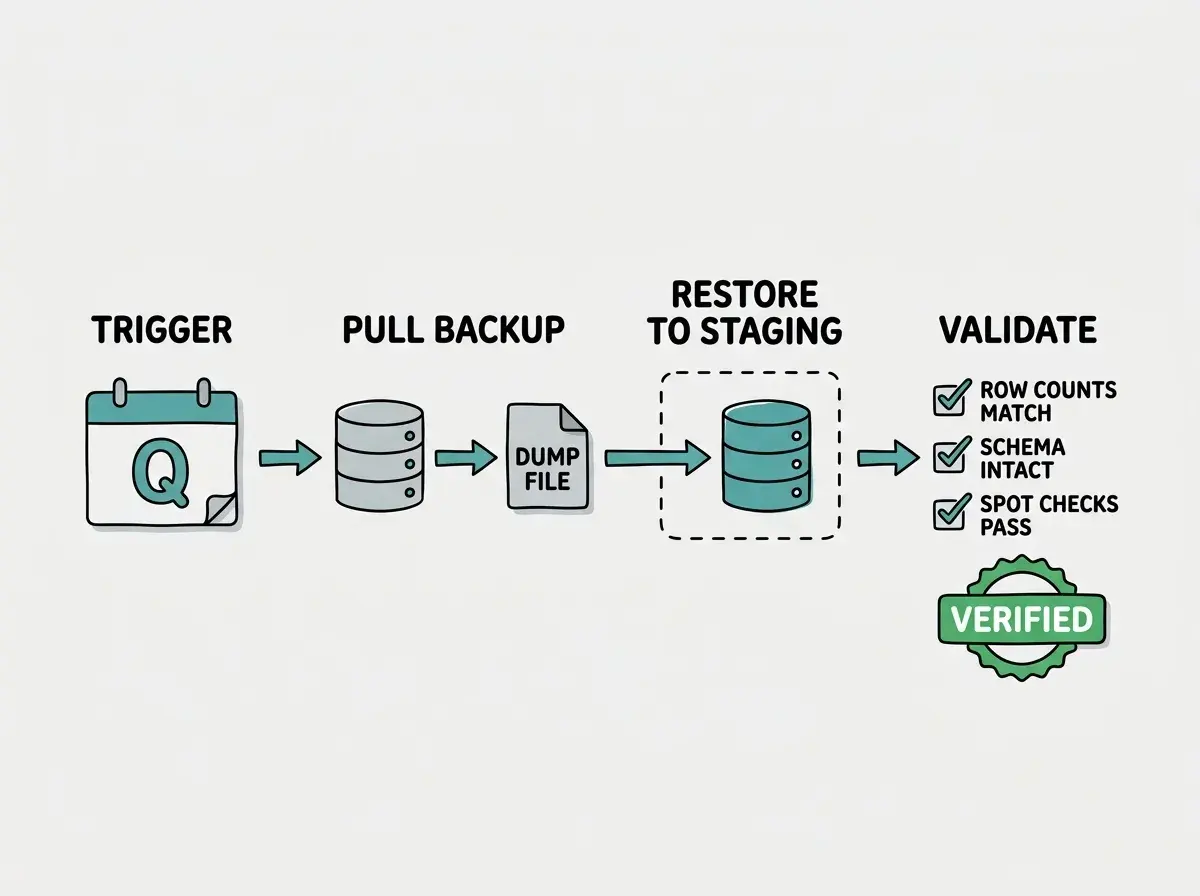
Layer 3: Full restore drill. Spin up a clean database, restore the backup, and run a validation suite that confirms the row counts, schema shape, and critical data are what you expect. This is the only layer that catches the failure modes that layers 1 and 2 miss. Schema conflicts, ordering problems, and missing environment configuration only surface when you actually run the restore.
The third layer is the one almost nobody does. It is also the only layer that actually verifies your recovery ability.
Setting Up a Restore Drill for Supabase
Supabase makes point-in-time recovery available on Pro plans. The backup files are managed by Supabase infrastructure, which means you cannot directly access the raw dump. But you can test your recovery ability using the backup restore feature in the dashboard, or by using the Supabase Management API to trigger a restore to a separate project.
The practical approach for a quarterly drill is to use a separate Supabase project as a restore target. This costs the price of a second project for a few hours per quarter, which is negligible compared to the cost of an unverifiable backup.
# Pull a logical dump from your production Supabase database
# Use the connection string from your project settings > database
pg_dump \
  --no-acl \
  --no-owner \
  -Fc \
  "postgresql://postgres.[project-ref]:[password]@aws-0-us-east-1.pooler.supabase.com:5432/postgres" \
  -f backup-$(date +%Y%m%d).dump

# Restore to a staging Supabase project
pg_restore \
  --no-acl \
  --no-owner \
  -d "postgresql://postgres.[staging-ref]:[password]@aws-0-us-east-1.pooler.supabase.com:5432/postgres" \
  backup-$(date +%Y%m%d).dump
After the restore completes, run your validation queries to confirm the critical tables look right.
-- Validate row counts against your known baseline
SELECT
  schemaname,
  tablename,
  n_live_tup AS estimated_rows
FROM pg_stat_user_tables
ORDER BY n_live_tup DESC;

-- Spot-check critical business records
SELECT COUNT(*) FROM users WHERE created_at > NOW() - INTERVAL '7 days';
SELECT COUNT(*) FROM orders WHERE status = 'completed';
If the row counts match your expected baseline and the spot checks return plausible numbers, the restore is validated. Document the date, the row counts you verified, and how long the restore took. That log becomes the record that your backup works.
Setting Up a Restore Drill for Self-Hosted PostgreSQL
If you are running PostgreSQL on Railway, Render, Fly.io, or a self-hosted instance, the restore drill follows the same pattern but you have more direct control over the backup files.
Set up a cron job that runs pg_dump on a schedule and stores the output somewhere durable. Cloudflare R2, S3, or any object storage service works. The important detail is that the backup must live somewhere independent of the database server. A backup on the same disk as your database does not protect against disk failure or a destructive operation that touches the whole volume.
#!/bin/bash
# backup.sh - run as a daily cron job

DATE=$(date +%Y%m%d-%H%M%S)
BACKUP_FILE="/tmp/backup-${DATE}.dump"
BUCKET="your-backup-bucket"

# Create the dump
pg_dump \
  -Fc \
  -U "$DB_USER" \
  -h "$DB_HOST" \
  "$DB_NAME" \
  -f "$BACKUP_FILE"

# Verify the dump is readable before uploading
pg_restore --list "$BACKUP_FILE" > /dev/null 2>&1
if [ $? -ne 0 ]; then
  echo "BACKUP VERIFICATION FAILED: dump is not readable" >&2
  exit 1
fi

# Upload to object storage
aws s3 cp "$BACKUP_FILE" "s3://${BUCKET}/postgres/${DATE}.dump"
rm "$BACKUP_FILE"

echo "Backup completed and verified: ${DATE}.dump"
The pg_restore --list check is the integrity verification step that catches corrupted dumps before they reach storage. A dump that fails this check triggers an alert rather than silently uploading a broken file.
For the quarterly restore drill, download the most recent backup from object storage, restore it to a clean database instance (a Docker container works well for this locally), and run your validation queries against it.
# Download most recent backup and restore locally
aws s3 cp s3://your-backup-bucket/postgres/$(aws s3 ls s3://your-backup-bucket/postgres/ | sort | tail -1 | awk '{print $4}') ./restore-test.dump

# Spin up a clean Postgres container for the restore test
docker run -d \
  --name restore-test \
  -e POSTGRES_PASSWORD=testpass \
  -p 5433:5432 \
  postgres:16

# Wait for postgres to be ready, then restore
sleep 3
docker exec -i restore-test pg_restore \
  -U postgres \
  -d postgres \
  < ./restore-test.dump

# Connect and validate
psql -h localhost -p 5433 -U postgres -d postgres \
  -c "SELECT relname, n_live_tup FROM pg_stat_user_tables ORDER BY n_live_tup DESC LIMIT 10;"

# Clean up
docker stop restore-test && docker rm restore-test
rm ./restore-test.dump
This runs entirely locally, costs nothing, and gives you a verified restore in under 15 minutes once the process is documented.
Testing backups only in the same environment they came from. A backup restored to the same server that created it does not catch environment-specific failures. Run your restore drill to a completely separate environment, whether a local Docker container, a staging cloud instance, or a secondary database project. Isolation is what makes the drill meaningful.
The full S15 Maintenance Handbook covers monitoring, database health, and recovery planning for AI-built apps.
Browse all articlesThe Quarterly Disaster Recovery Checklist
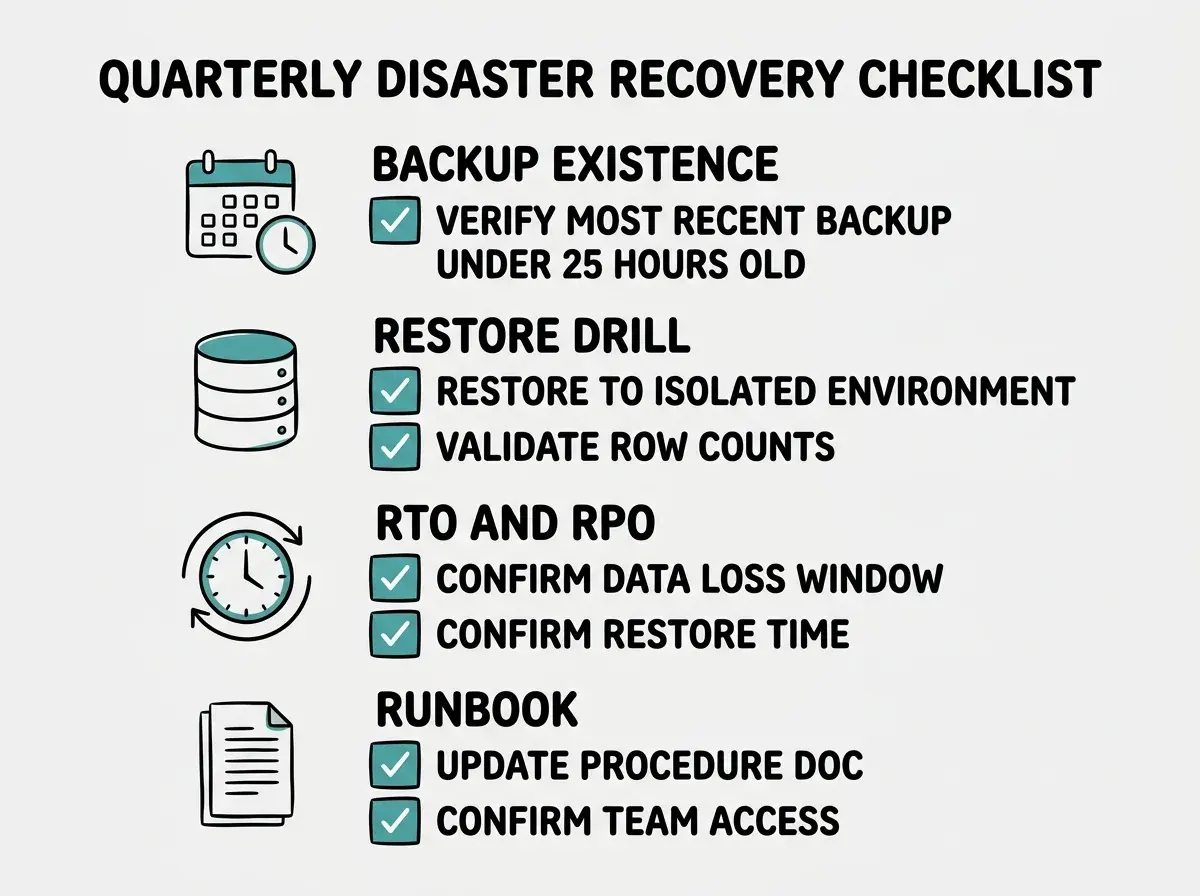
A restore drill is the core, but a complete disaster recovery verification covers a few adjacent areas that catch the failure modes backups alone cannot address.
Confirm your backup schedule is running. Log in to every service where backups should be happening and confirm the most recent backup timestamp. Supabase dashboard, your S3 bucket listing, your Railway project settings. One service having silently disabled backups after a config change is more common than it sounds.
Document your RTO and RPO. Recovery Time Objective is how long it takes to restore service. Recovery Point Objective is how much data you can afford to lose (measured in time). Write these numbers down explicitly. If your daily backup means you can lose up to 24 hours of data in a worst-case scenario, confirm your users and your business can accept that. Many teams discover during an incident that their implicit RPO was far more aggressive than their backup frequency.
Test your connection string update process. When you restore to a new database instance, the connection string changes. Every service that depends on your database needs the updated credential: your app's environment variables, any background worker services, your admin tooling. Walk through that list and time how long the update process takes. Connection string rotation is frequently the slowest part of recovery.
Confirm who does what. A disaster recovery plan that lives in one person's head is not a plan. Write down the three to five steps to restore your database and put them somewhere the whole team can access during an incident. Notion, Linear, a pinned Slack message. The format matters less than the existence of the document and its accessibility when someone is panicking.
What to Do This Week
If you have never run a restore drill, do not wait for the quarterly schedule. Run one this week on a non-critical database first if you have one, then on production.
The immediate goal is to answer one question: if your database disappeared right now, how long would it take to have a working replacement with your most recent backup restored into it?
Time the restore. Write down the number. If the answer is "I don't know" or "more than a few hours," you have work to do before the next incident.
For Supabase users, enable point-in-time recovery in project settings if it is not already on. Download a manual dump using the connection string approach above, restore it to a staging project, and run the validation queries. Log the result.
For self-hosted PostgreSQL users, confirm your backup script is running by checking the most recent file in your object storage bucket. Run the Docker-based restore drill locally. Log the result.
The DataTalks.Club community lost 2.5 years of data from a single misfire of terraform destroy. The Replit SaaStr team had fabricated data masquerading as real data in production. In both cases, what turned a recoverable incident into a lasting loss was the gap between "backups exist" and "backups are verified and recoverable under pressure."
That gap closes in one afternoon. The restore drill is not a big project. It is a script, a staging environment, and a log entry. Run it now so that when you actually need it, the answer to "can we restore this?" is not a hope but a fact.
Backup verification works alongside uptime alerts and anomaly detection for complete incident readiness.
Read the full handbook