92% of US developers use AI tools daily according to the 2025 Stack Overflow survey. Most of them are building apps that write data continuously. Very few of them have a plan for what happens to that data over time.
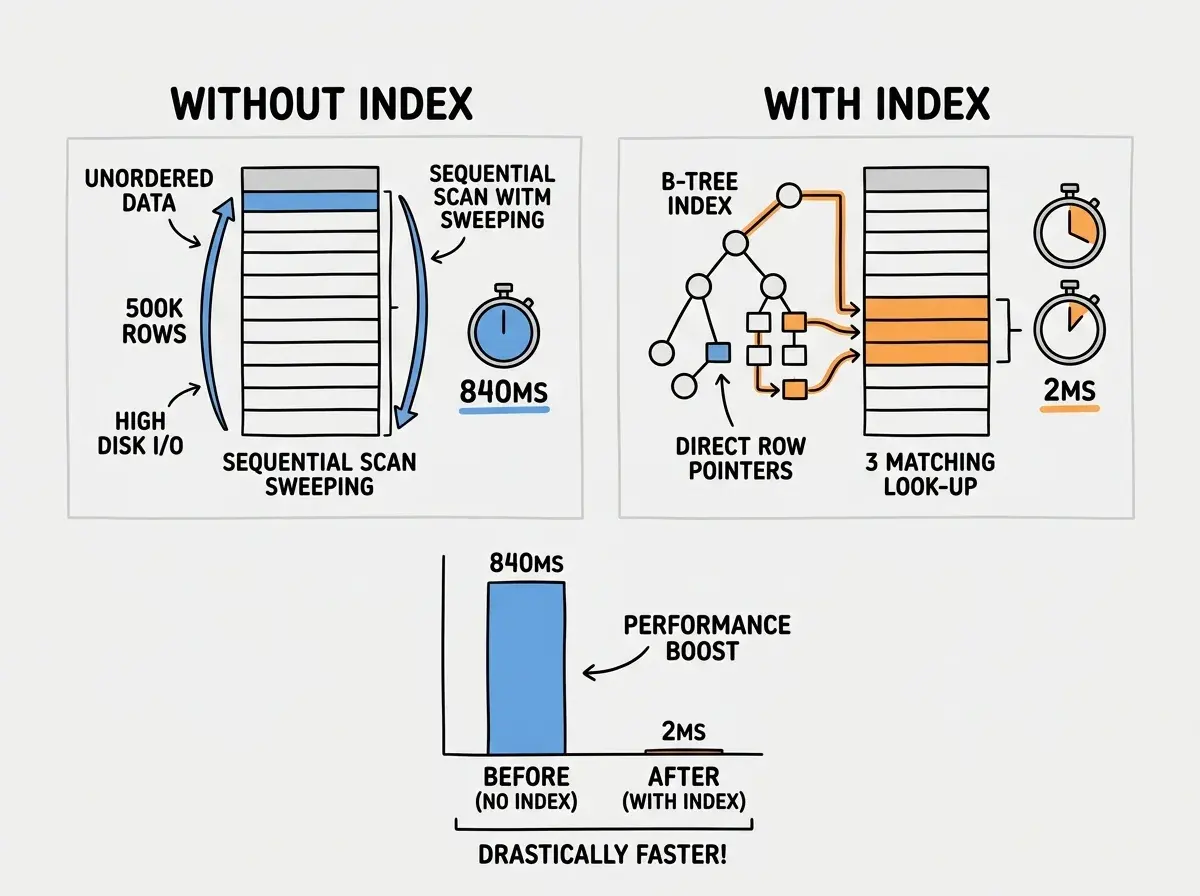
The gap shows up in production. A vibe-coded SaaS that runs fine at 1,000 rows starts returning queries in 800ms at 500,000 rows. The AI never modeled that growth. It generated a schema that works, not one that ages well. And since the database never throws an error when it gets slow, nobody notices until users start complaining or churn metrics start moving. By the time it is visible, the problem has been compounding for months.
The pattern repeats across every tech stack. PostgreSQL, MySQL, SQLite-backed platforms. It is not a PostgreSQL problem. It is a planning problem. AI tools are optimized to make your feature work today. They have no incentive to think about what your data model looks like at 50 million rows eighteen months from now.
Database maintenance is the discipline that closes that gap. This article covers the three core practices: vacuuming dead rows in PostgreSQL, pruning data you no longer need, and archiving data you need to keep but rarely access. Done on a fixed schedule, these three things will keep your database fast for years.
Why AI-Generated Schemas Age Poorly
When you describe a feature to an AI coding tool, the model generates a schema that models the current feature requirements. It does not model deletion, archival, or growth patterns. The result is databases where every table is append-only by default, indexes cover columns that were queried in early prototypes but not current production patterns, and no soft-delete or expiry mechanism exists at the data layer.
The Replit SaaStr incident made the costs of unmanaged databases viscerally clear. A database that accumulated operational records without a pruning strategy eventually became a liability during a migration. The data was not malicious. It was just old, unstructured, and everywhere. The cleanup was not a technical challenge. It was a time and risk challenge.
The 2024 Datadog State of Cloud Costs report found that database storage is the second-fastest-growing cost category for early-stage SaaS companies. Not compute. Storage. Because storage costs compound silently while app teams are focused on features.
PostgreSQL Vacuuming Explained
PostgreSQL uses a multi-version concurrency model (MVCC). Every time you update or delete a row, the old version is not immediately erased. It is marked as dead and left in place until a vacuum pass reclaims the space. This is what allows reads and writes to happen concurrently without locking. The tradeoff is that dead rows accumulate and consume storage while degrading query performance on large sequential scans.
Autovacuum handles this in most setups, but the defaults are tuned for the median workload, not your specific tables. Two situations break autovacuum's default behavior.
High-write tables see autovacuum running too infrequently relative to how fast dead rows accumulate. An events table that receives 10,000 inserts per hour builds up dead tuples faster than the default threshold triggers a vacuum pass. You can check the current dead tuple count with this query:
SELECT relname, n_dead_tup, n_live_tup,
       round(n_dead_tup::numeric / nullif(n_live_tup + n_dead_tup, 0) * 100, 1) AS dead_pct
FROM pg_stat_user_tables
ORDER BY n_dead_tup DESC
LIMIT 20;
Any table showing a dead percentage above 10% warrants tuning. For high-write tables, increase the autovacuum frequency by setting autovacuum_vacuum_scale_factor lower, or run manual vacuums after bulk operations.
Large tables with infrequent writes hit a different problem. Autovacuum runs but does not reclaim bloat efficiently. For tables that have had large batch deletes, run VACUUM FULL manually during a low-traffic window. This rewrites the table entirely and reclaims disk space. Unlike regular vacuum, VACUUM FULL requires an exclusive lock, so schedule it intentionally.
Autovacuum is not set-and-forget. For any table with more than 100,000 rows that receives regular writes or deletes, run the dead tuple query monthly and compare against your last result. A rising dead percentage means your autovacuum settings need tuning before query performance degrades.
Data Pruning Strategies That Actually Work
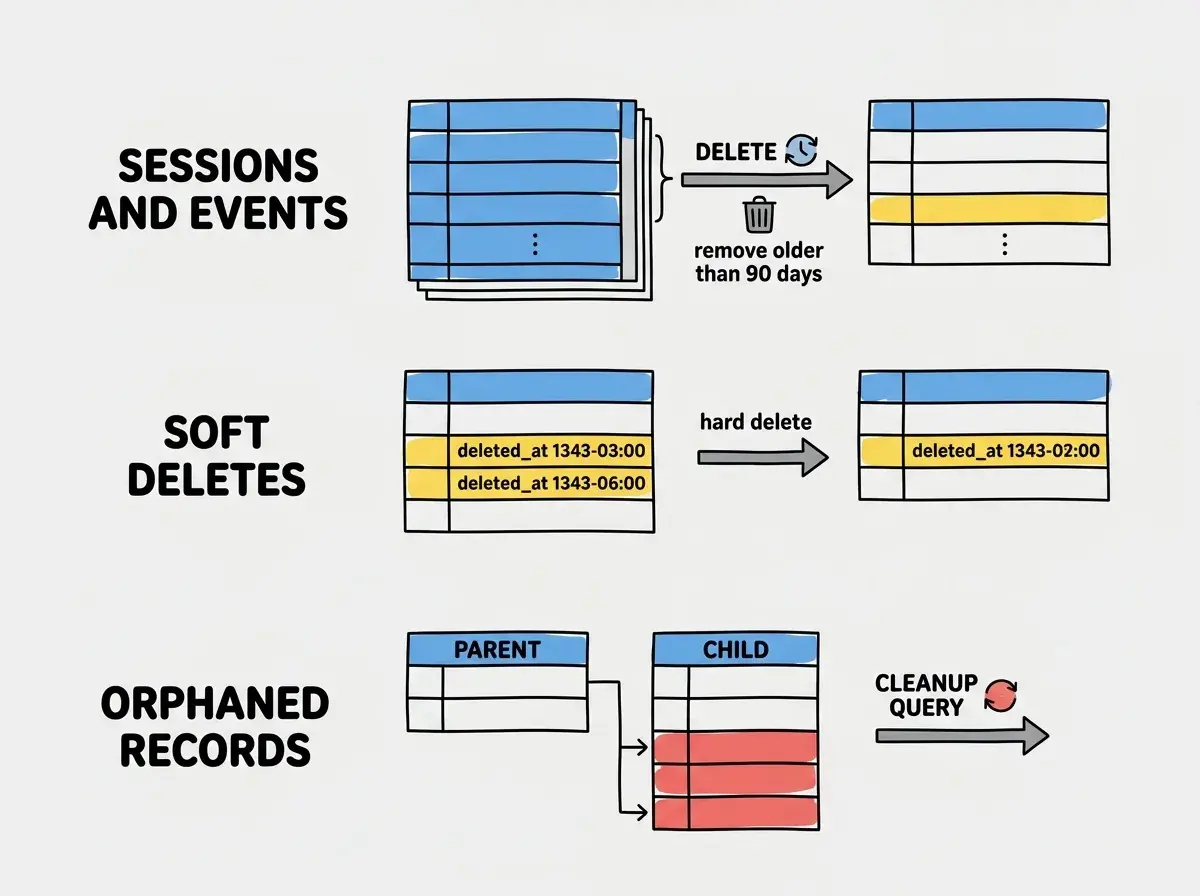
Pruning is the practice of permanently deleting data that no longer has business value. Most AI-generated apps have no pruning logic at all because the model generates schemas for features, not for the lifecycle of the data those features produce.
Three categories of data accumulate silently in almost every app.
Session and event records. Auth sessions, activity logs, and analytics events are high-volume and have a clear expiry window. A session record that is 90 days old has no operational value. A page view record from two years ago is not informing real-time decisions. Set a retention policy and enforce it with a scheduled job:
-- Delete expired sessions older than 90 days
DELETE FROM sessions
WHERE expires_at < NOW() - INTERVAL '90 days';

-- Prune activity log beyond 180-day window
DELETE FROM activity_log
WHERE created_at < NOW() - INTERVAL '180 days';
Run these as scheduled jobs during off-peak hours. On PostgreSQL-compatible services like Neon or Supabase, you can use pg_cron to schedule these directly inside the database. On serverless setups, a weekly cron job in your deployment platform works equally well.
Soft-deleted records. AI-generated code frequently implements soft deletes (a deleted_at column set to a timestamp) because they are safe and easy to explain. The consequence is a table that grows indefinitely even when users "delete" their data. Set a hard-delete policy for records where deleted_at is older than a threshold you are comfortable with, typically 30 to 90 days after the soft delete depending on your recovery needs.
Orphaned records. AI models generate join tables and child records but do not always generate the cleanup logic when parent records are deleted. An audit of your foreign key relationships every quarter frequently reveals orphaned rows that are consuming storage and inflating row counts for no reason. In PostgreSQL, this check finds orphaned records in a child table:
SELECT COUNT(*) FROM child_table c
WHERE NOT EXISTS (
  SELECT 1 FROM parent_table p WHERE p.id = c.parent_id
);
Archiving Data at Scale
Archiving is different from pruning. Pruning removes data permanently. Archiving moves data to cheaper, slower storage where it remains accessible for compliance or analytics purposes but no longer burdens your primary database.
The threshold for archiving versus pruning depends on your business context. For most apps, a reasonable policy is: data accessed in the last 90 days stays in the primary database, data from 90 days to two years goes to an archive table or cold storage, data older than two years gets deleted unless there is a compliance reason to keep it. GDPR adds a legal dimension here as well. Data older than your stated retention period is a liability, not an asset. Archiving is a compliance strategy as much as a performance one.
The simplest archiving pattern at the PostgreSQL level is a separate archive table with identical schema plus an archived_at column:
-- Archive old orders to cold storage table
INSERT INTO orders_archive
SELECT *, NOW() AS archived_at
FROM orders
WHERE created_at < NOW() - INTERVAL '90 days'
  AND status IN ('completed', 'refunded', 'cancelled');

DELETE FROM orders
WHERE created_at < NOW() - INTERVAL '90 days'
  AND status IN ('completed', 'refunded', 'cancelled');
For larger apps, time-based partitioning in PostgreSQL (using PARTITION BY RANGE on a date column) allows you to drop entire old partitions without running expensive DELETE operations. This is significantly faster than row-level deletes at scale and worth implementing once your primary tables exceed a few million rows.
Object storage is the cost-efficient destination for archival data you need to retain but rarely query. Export old records to JSON or Parquet files on Cloudflare R2 or S3 at roughly $0.015 per GB per month, compared to $0.10 to $0.25 per GB on managed database services. The operational cost is adding a query layer when you need the archived data, but for compliance records and historical analytics this tradeoff is usually worth it.
Index Maintenance
Indexes are the most overlooked part of database maintenance in AI-built apps. The model creates indexes on columns it queries during generation. Six months later, your query patterns have changed, new columns are being filtered heavily, and the indexes you have are either unused bloat or missing entirely from the hottest paths.
Find unused indexes with this query on PostgreSQL:
SELECT schemaname, tablename, indexname, idx_scan
FROM pg_stat_user_indexes
WHERE idx_scan = 0
  AND indexname NOT LIKE '%_pkey'
ORDER BY schemaname, tablename;
Indexes with zero scans since the last statistics reset are consuming storage and slowing down writes for no benefit. Drop them.
Find missing indexes by checking which queries are doing sequential scans on large tables. pg_stat_statements combined with EXPLAIN ANALYZE on your slowest queries from the past week identifies the columns that need indexing. The rule of thumb: any column that appears in a WHERE clause on a table over 10,000 rows and is not already indexed deserves an index evaluation. Partial indexes are particularly useful for AI-generated apps that use soft deletes. An index on (user_id) WHERE deleted_at IS NULL is far cheaper to maintain and more effective than an index on user_id alone when a large fraction of rows are soft-deleted and queries always filter on active records.
The Quarterly Database Maintenance Routine
Weekly and monthly routines catch fires. The quarterly routine is strategic. Set aside two to four hours once per quarter and run through these four areas.
Vacuum audit. Run the dead tuple query across all tables. Any table above 10% dead tuples needs autovacuum tuning or a manual vacuum. Any table that has received large batch deletes since last quarter needs a VACUUM FULL scheduled.
Retention policy enforcement. Review your data retention rules against your current table sizes. If sessions or events tables have grown significantly, lower the retention window or confirm the pruning jobs are running correctly. Compare table sizes against the previous quarter using pg_total_relation_size.
Index review. Run the unused index query and drop anything with zero scans. Run EXPLAIN ANALYZE on the five slowest queries from the previous month and confirm indexes cover the hot paths. Add any missing indexes and confirm the query plan improves.
Archive pass. Run your archiving jobs manually if they have not been running automatically. Move records past your archiving threshold to cold storage. If your primary tables are approaching tens of millions of rows, evaluate whether table partitioning is worth implementing before the next quarter.
Running VACUUM FULL during peak traffic hours. VACUUM FULL requires an exclusive lock on the table, which blocks all reads and writes for the duration. On a table with 50 million rows this can take minutes. Always schedule VACUUM FULL during your lowest-traffic window (typically 2 to 5 AM in your primary user timezone) and confirm it completes before traffic resumes.
Putting Numbers to the Problem
The performance degradation from unmaintained PostgreSQL tables follows a predictable curve. A table with 100,000 live rows and no dead tuples returns indexed queries in under 5ms. The same table at 1 million rows with 200,000 dead tuples (a 20% dead ratio) starts adding 40 to 80ms of overhead on sequential scans. At 5 million rows and 30% dead, full table scans that were once fast enough to ignore are now taking seconds.
Storage costs compound at the same rate. A managed PostgreSQL database with 20GB of live data may have 8 to 12GB of dead tuple bloat if autovacuum has been undertuned. At $0.10 to $0.25 per GB per month on Supabase or Neon, that bloat costs $15 to $50 per month for nothing. Over a year that is $180 to $600 in storage costs for dead rows.
The quarterly routine described above takes four hours. That investment recovers far more value than it costs in both query performance and infrastructure savings.
Start Before You Need To
The developers who never face a database performance crisis are not doing anything exotic. They are running dead tuple queries monthly. They are deleting session records older than 90 days on a schedule. They are dropping unused indexes once a quarter.
None of this requires deep database expertise. The queries in this article are copy-paste ready. The scheduling can be done with pg_cron inside your database or a simple cron job in your deployment platform. The discipline is just treating the database as something that needs regular attention rather than something you set up once and ignore.
AI coding tools will ship you a working database on day one. Keeping it working on day 500 is a different task, and it is one the AI did not plan for. That planning is yours to do. The good news is that the planning is not complicated. It is a handful of queries run on a schedule, with someone reading the output and acting on it. Four hours per quarter. Every database that has ever fallen over under load had at least one moment where that investment would have prevented it.
This is part of the S15 Maintenance Handbook series. Get the full operational picture for AI-built apps.
Browse all articlesQuick Reference
The commands and queries above are most useful when they are in front of you at the right moment. Here is the condensed version.
Monthly checks:
- Dead tuples per table:
SELECT relname, n_dead_tup, n_live_tup FROM pg_stat_user_tables ORDER BY n_dead_tup DESC - Unused indexes:
SELECT indexname, idx_scan FROM pg_stat_user_indexes WHERE idx_scan = 0 - Table sizes:
SELECT relname, pg_size_pretty(pg_total_relation_size(relid)) FROM pg_stat_user_tables ORDER BY pg_total_relation_size(relid) DESC
Quarterly actions:
- Prune expired sessions and event logs
- Run
VACUUM FULLon any table with >10% dead tuples (during low-traffic window) - Archive records past your retention threshold
- Drop unused indexes, add missing ones based on slow query analysis
A shared document with these queries and a checkbox for each completed item is enough. Build the routine now, before tables are large enough to make it painful.
From query optimization to connection pooling, the database performance guides cover it all.
Explore the blog