Building artificial intelligence applications requires connecting large language models to external data and actions. Developers face a critical architectural choice when designing these connections. You can write standalone scripts, build custom function tools, package features as platform plugins, or adopt the Model Context Protocol. Each approach carries distinct trade-offs for interoperability, deployment complexity, and system latency.
Retrospective edition for 2026-04-21. Researched and published September 9, 2026. Product details reflect documentation checked at publication unless explicitly identified as historical.
Understanding the boundaries of each integration method is essential for building resilient systems. A script executes deterministic tasks without model intervention. A custom tool relies on a specific model API mechanism to trigger functions. A plugin bundles capabilities for a specific product ecosystem. The Model Context Protocol standardizes client-server capabilities, allowing a host application to expose standardized tools to a model.
According to the official architecture documentation at official documentation, MCP standardizes how clients and servers communicate capabilities. The protocol allows an MCP server to supply tools to a host application, which then exposes those tools to the underlying AI model.
Defining the Integration Methods
Before comparing these approaches, we must define their operational boundaries. The terminology in artificial intelligence development often overlaps, causing architectural confusion. We will separate these concepts based on how they interact with the host application and the language model.
A script is a traditional piece of code. It runs predictably and deterministically. You might use a script to fetch a database record or trigger a webhook. Scripts do not inherently know about language models. They require a wrapper or an orchestrator to become useful in an AI context.
Custom tools utilize function calling features provided by model providers. When you define a custom tool, you provide a JSON schema describing the function signature. The model reads this schema and returns structured arguments when it decides the tool should be used. The host application then executes the underlying code and returns the result to the model.
Plugins represent product-specific packaging. A plugin might contain a custom tool, a user interface component, and authentication logic. Plugins are designed for specific ecosystems. If you build a plugin for one chat interface, it typically will not work in another without significant modification. Interestingly, a plugin can contain an MCP server as its backend mechanism.
The Model Context Protocol acts as a universal translation layer. As noted in the specification at the tools specification, MCP servers provide tools to hosts, but the host retains control over how these are presented to the model. This separation of concerns means the MCP server does not need to know which specific model or function-calling API the host is using.
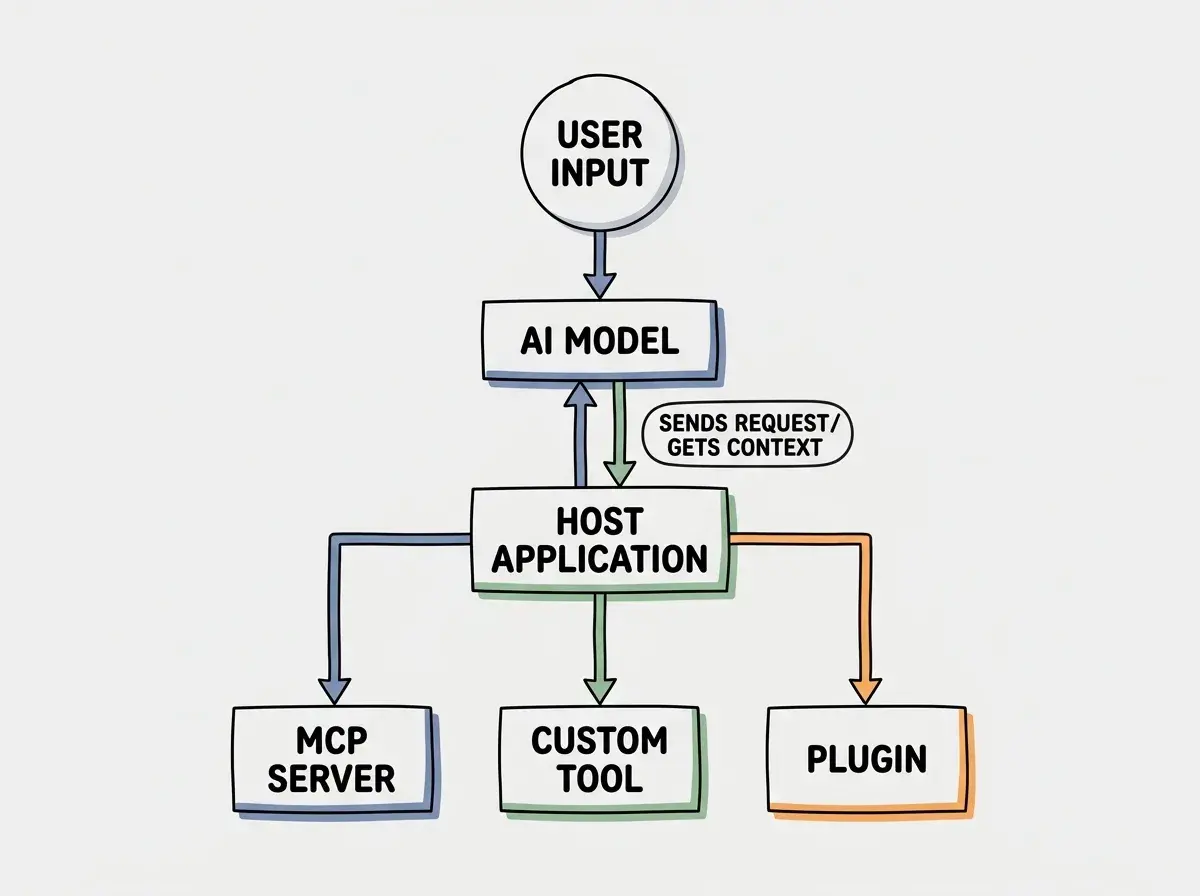
The diagram above illustrates how a host application sits between the language model and the various execution environments. The host manages the translation between the model's proprietary function calling format and the standardized MCP format.
Decision Framework Using Incident Lookup
To make these concepts concrete, let us examine a practical scenario. Imagine you are building an internal AI assistant for a site reliability engineering team. The assistant needs to look up active incidents in your ticketing system, summarize the current status, and suggest remediation steps based on historical data.
We will evaluate how you might implement this incident lookup feature using a script, a custom tool, an MCP server, and a plugin.
Developers often confuse the model function calling API with the tool implementation. The model only generates JSON arguments. The actual execution of the incident lookup must happen in your secure host environment, not within the model itself.
A script can be run by a person, a scheduler, or an assistant with an authorized shell tool. For incident lookup, a command accepting an incident ID and returning structured output may already be sufficient. MCP becomes useful when compatible clients need a discoverable interface, not because scripts are inherently inaccessible to AI.
If you build a custom tool, you write a function that queries the ticketing API. You then define a JSON schema for this function, specifying that it requires an incident ID as a parameter. You pass this schema to the language model API. When the engineer asks about an incident, the model returns the JSON arguments. Your host application intercepts this, calls your custom function, and feeds the ticket details back into the conversation. Keep the business function separate from the provider adapter. That allows reuse even when the model-facing schema changes.
Implementing this as an MCP server changes the architecture. You build a standalone server that exposes the incident lookup tool using the standardized Model Context Protocol. Your host application connects to this MCP server. The host application is responsible for translating the MCP tool definition into the specific schema required by the language model. A model change can leave the server interface unchanged when the new host adapter supports the same capabilities. The host handles the adapter logic.
Finally, if you build a plugin, you are likely targeting a specific internal developer portal or chat application. The plugin would package the incident lookup logic, perhaps wrapping an MCP server, along with specific user interface elements like custom rendering for ticket statuses. This can provide a more integrated experience in that platform. Its portability depends on the packaging and interfaces you choose.
Interoperability vs Latency vs Deployment
When choosing an architecture, you must balance interoperability, latency, and deployment complexity. Ownership of the execution environment also plays a crucial role in enterprise security.
Interoperability refers to how easily your tool can be reused across different AI applications and models. Custom tools need model-facing adapters, while their underlying functions can remain portable. Plugins use a product-specific packaging contract. MCP standardizes a client-server boundary across compatible hosts, but does not make every client support every feature.
Latency is a critical factor in conversational AI. Every network hop adds delay. An in-process function avoids an additional transport boundary. A local stdio server and a remote HTTP service have different overheads, and a plugin can use either. Measure the complete request path; database work, model inference, caching, and network placement may dominate the result.
| Feature | Script | Custom Tool | MCP | Plugin |
|---|---|---|---|---|
| Interoperability | High for code reuse | Portable logic with API adapters | High across compatible hosts | Low tied to platform |
| Deployment Complexity | Very Low | Medium | Medium to High | High requires packaging |
| Execution Boundary | Process or shell | In-process or remote | Local stdio or remote transport | Depends on implementation |
Deployment complexity increases as you move toward standardized protocols and platform plugins. A script is just a file. A custom tool requires integrating with your host application deployment. An MCP server can be a local process or a separately deployed service. A plugin follows the target product's packaging rules; a marketplace review is only relevant when that distribution path requires one.
Explore clear explanations of AI coding tools, project context, and reliable development workflows.
Explore the blogOwnership and security are paramount when dealing with sensitive data like incident reports. Control depends on where you run the implementation and which credentials it receives. Self-hosted custom tools and MCP servers can use your infrastructure controls; hosted services follow their own deployment model. A plugin can also run locally. Review the actual data flow rather than inferring security from the interface label.
Architecture Scenarios and Migration Costs
Let us explore specific architectural scenarios and the costs associated with migrating between these integration methods. Understanding these migration paths helps future-proof your application design.
Scenario A involves a small startup building a prototype AI assistant. They start with custom tools because the deployment is simple. All logic lives in a single Node application. The host application directly calls the database. This can remain maintainable if business logic and provider adapters stay separate. Split it when sharing, ownership, or deployment needs justify the additional boundary.
Scenario B involves an enterprise team with existing internal microservices. They choose the Model Context Protocol. They wrap their existing microservices in MCP servers. The AI host application acts purely as an orchestrator, connecting to these various MCP servers. This requires more upfront infrastructure work to deploy the MCP servers, but it allows different teams to maintain their own tools independently.
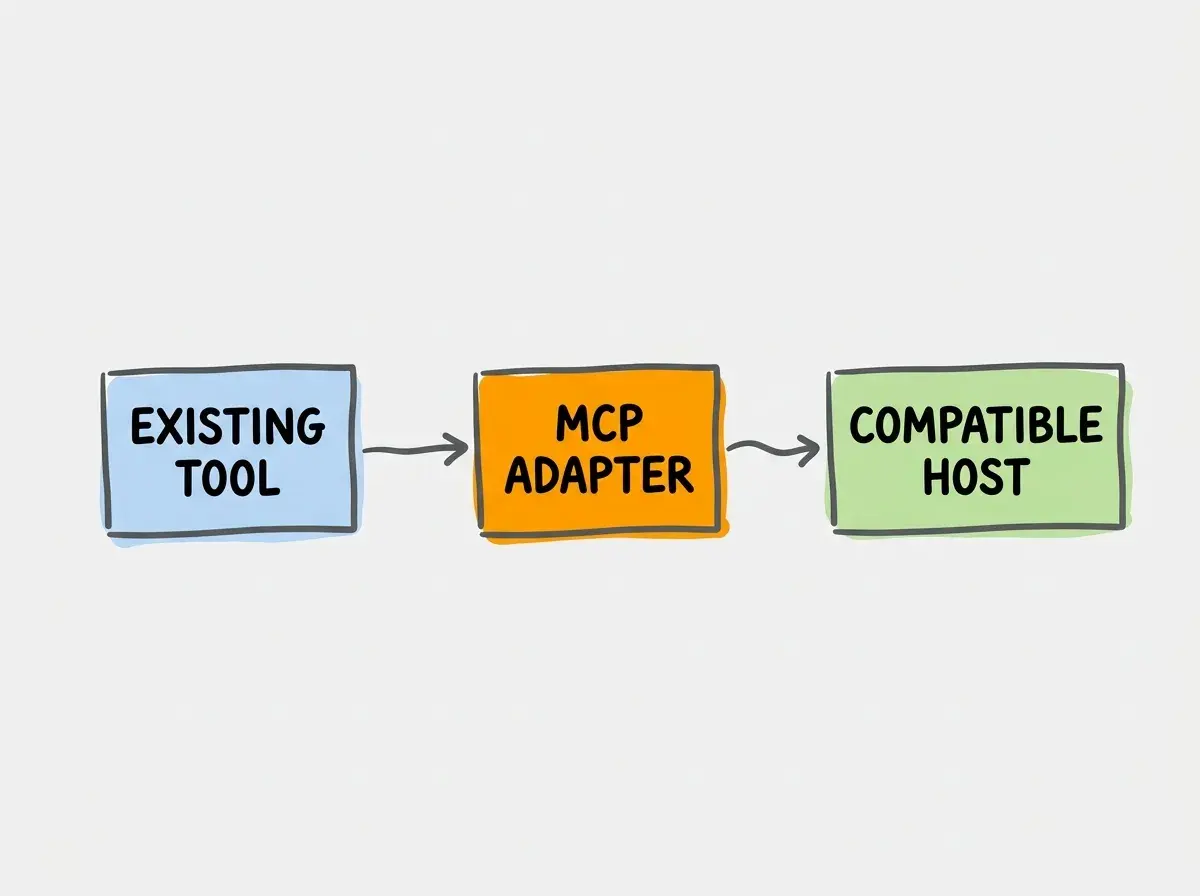
Migrating from Scenario A to Scenario B involves extracting the custom tool logic into a separate service. You must implement the MCP specification, handling initialization, tool listing, and tool execution requests. The migration cost includes setting up new deployment pipelines for the MCP server and updating the host application to use an MCP client instead of direct function calls.
Adopt MCP when you need to share tools across multiple different AI host applications or when you want to decouple tool maintenance from the core AI orchestrator team. Stick to custom tools for simple monolithic applications where latency is the primary concern.
Migrating from an MCP server to a platform plugin is often a matter of packaging. Because the MCP server already exposes a standardized interface, you can build a lightweight plugin wrapper that connects the platform's specific UI hooks to your existing MCP server. This reuse is useful when the target platform supports the required connection and rendering hooks.
When evaluating migration costs, consider the operational overhead. Running ten custom tools inside a single host application requires monitoring one service. Ten independently deployed remote servers plus one host would create eleven services in that hypothetical architecture; a local or consolidated deployment would have different operational needs. The organizational maturity of your operations team should dictate how quickly you adopt a distributed MCP architecture.
Frequently Asked Questions
To effectively evaluate your current system, you should audit your existing AI integrations. Identify which tools are tightly coupled to specific model APIs. Calculate the theoretical engineering time required to switch your application to a competing model provider. Use that estimate alongside the likelihood of switching and the cost of a new abstraction. A long migration is not, by itself, proof that a redesign is worthwhile.
Consider setting up a proof of concept using a single, low-risk tool. Implement it first as a custom function within your host application, measure the latency, and document the deployment process. Then, extract that same logic into an MCP server. Connect your host application to the new server and measure the changes in latency and deployment complexity. This practical exercise will provide concrete data for your specific environment.
What this means for you
The choice between scripts, custom tools, MCP, and plugins is not about finding a single correct answer. It is about matching the architectural pattern to your organizational needs. If you are building a quick prototype or a highly latency-sensitive application, custom tools remain a valid and efficient choice.
However, as the AI ecosystem matures, standardization becomes increasingly valuable. The Model Context Protocol offers a robust way to decouple your valuable internal business logic from the rapidly changing landscape of language models and chat interfaces. A standard interface can preserve useful integration work when new compatible hosts arrive. Keep business logic separately testable so the design remains useful even if the integration layer changes.
Start by evaluating your most complex and frequently used tools. Determine if they would benefit from being decoupled into independent services. Plan your architecture not just for the models available today, but for the diverse ecosystem of AI applications you will need to support tomorrow.
Read more practical articles for choosing tools, reviewing changes, and shipping useful software.
Read more guides