Artificial intelligence applications are incredibly smart, but they often lack access to your specific business data. They need an authorized connection, an upload, or information you provide before they can use your private reports, inventory, or customer feedback. The Model Context Protocol changes this by creating a standard way for AI applications to talk to external systems.
Retrospective edition for April 24, 2026. Researched and published September 9, 2026. Product details reflect documentation checked at publication unless explicitly identified as historical.
Understanding how this protocol works is essential for founders, marketers, and product managers who want to build smarter workflows without compromising their company data. You do not need to be a software engineer to grasp the mechanics of this system. By learning the fundamental concepts, you can make informed decisions about how your team adopts AI tools and what boundaries you need to set.
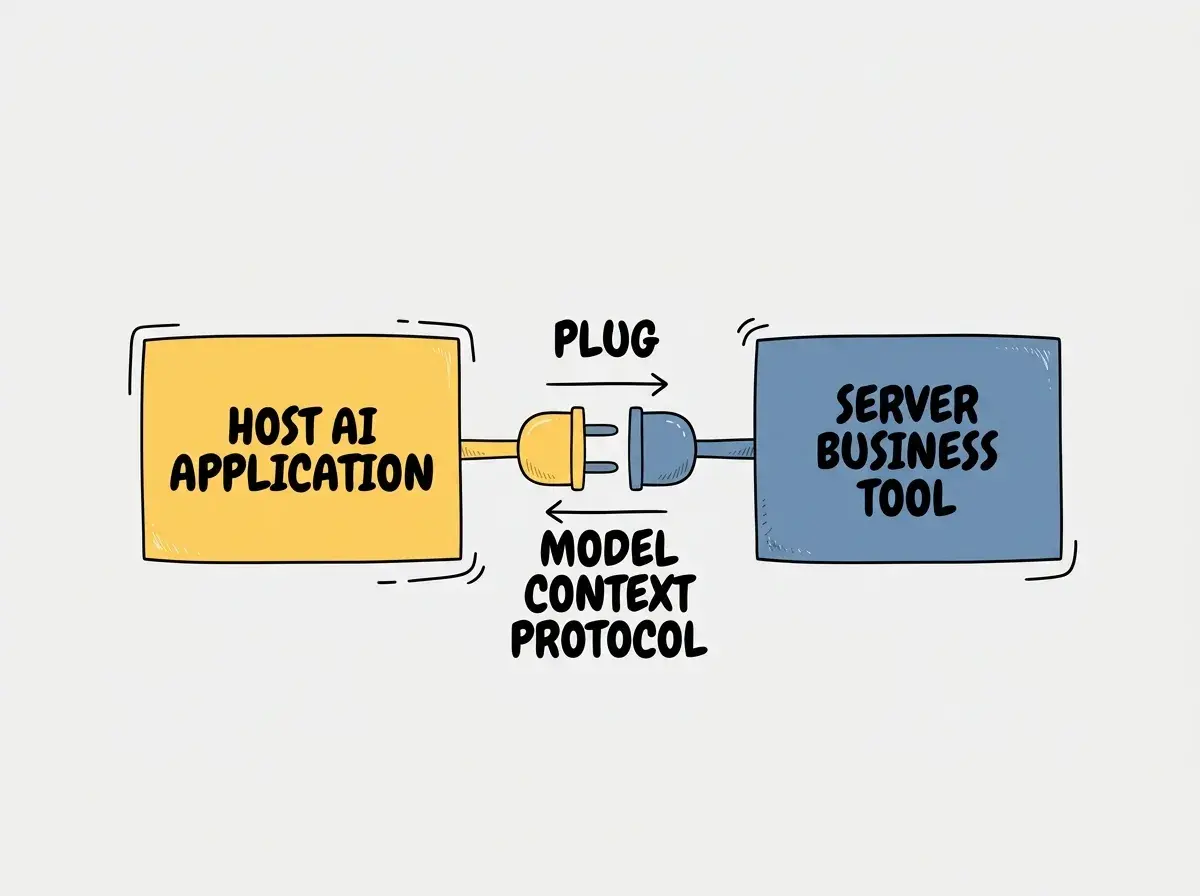
The Universal Plug Analogy
Think of the Model Context Protocol as a universal power plug adapter for artificial intelligence. Before international plug standards existed, traveling with electronics was a nightmare. You had to buy a specific adapter for every single country you visited. In the software world, connecting an AI application to a business tool used to require a custom-built integration for every single pairing.
The protocol acts as a standardized socket. An AI application only needs to know how to plug into this standard socket. Your business tools only need to know how to provide data through this standard socket. Once both sides agree on the shape of the plug, they can communicate through a common interface, subject to supported capabilities and authorization.
However, it is crucial to understand that a universal plug only defines the physical shape of the connection. It is not a safety certification. Just because a plug fits into a wall socket does not mean the appliance is safe to use or that the electrical current is correct. Similarly, just because an AI application can connect to your database using this protocol does not automatically mean the AI should be trusted with all your data. The connection is merely a communication channel. You are still responsible for setting the rules about what data flows through that channel.
Core Concepts Explained Simply
To understand how the system operates, you need to know a few key terms. The architecture of the protocol relies on a clear separation of responsibilities between different software components. According to the official architecture documentation, the Model Context Protocol connects AI applications with external capability providers, where a Host coordinates the interaction and a Server supplies the actual capabilities (source: official documentation).
The Host is the AI application you are interacting with. This could be a chat interface, a writing assistant, or a data analysis tool. The Host is responsible for understanding your requests and deciding when it needs to ask for outside help.
The Server is the software bridge connected to your business tools. It waits for requests from the Host and translates those requests into actions your business tools understand. The server and the underlying business service must enforce the intended data permissions.
When the Host and Server connect, the Server can offer three types of capabilities. First, it can offer Resources. Resources are pieces of contextual data, which may change over time, like a text file, a database record, or a specific marketing report. The official specification describes resources as data that the server supplies to the host (source: official documentation).
Second, the Server can offer Tools. Tools are actions the AI can take, such as calculating a metric, translating a document, or querying a live database. Third, the Server can offer Prompts. Prompts are pre-written instructions that help the AI understand how to handle specific tasks related to your business.
A frequent misunderstanding is assuming that establishing a connection means the AI automatically sees all your data. A connection only allows the AI to see the specific Resources and Tools that the Server explicitly chooses to share.
A Realistic Example Marketing Campaign
Let us look at a practical scenario. Imagine you are a marketing director who wants to analyze the performance of a recent email campaign. You are using an AI chat application as your Host, and your company has set up a Server connected to your marketing analytics platform.
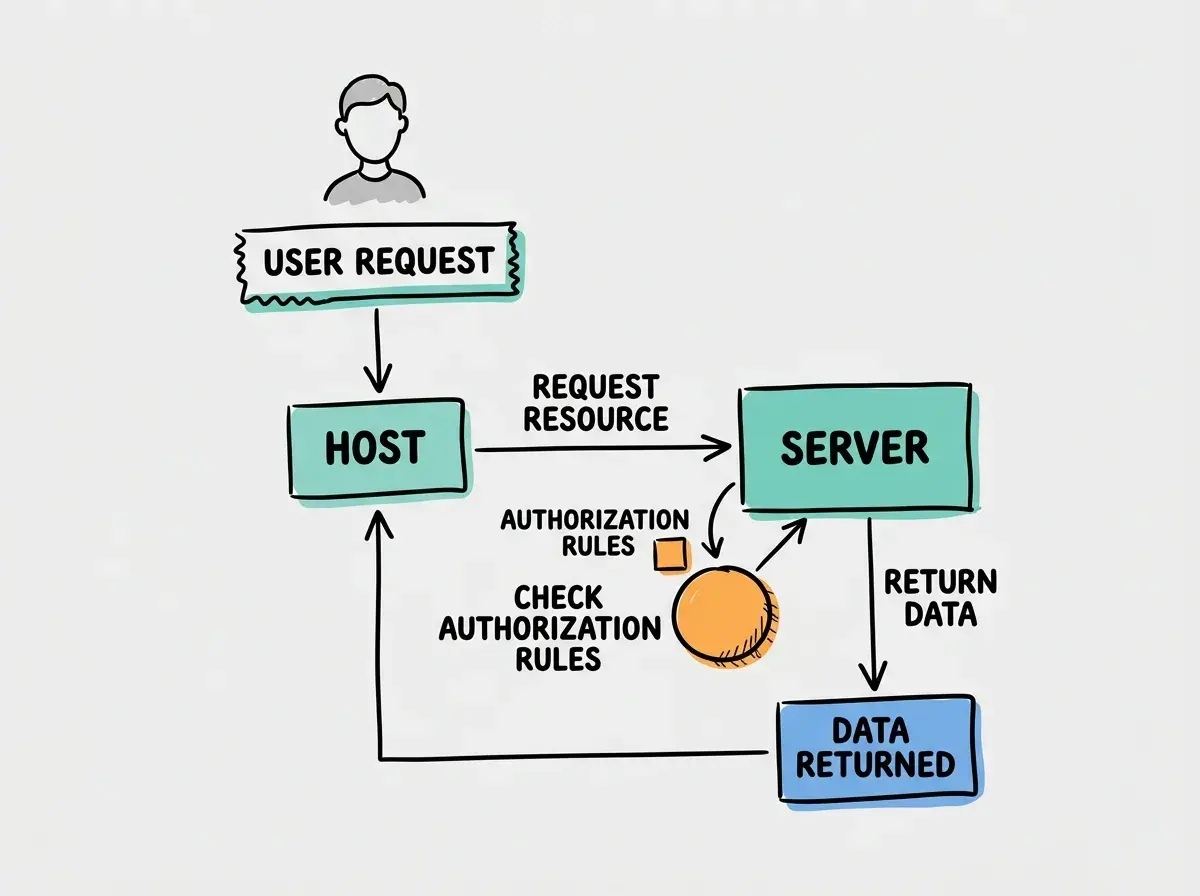
You type a request into the AI chat application asking for a summary of the spring campaign performance. The Host realizes it does not have this information. It sends a request through the standard protocol plug to the Server.
The Server checks its list of allowed capabilities. It sees that it has a Resource available called "Spring Campaign Read-Only Report." The Server fetches this report from the marketing platform and sends the text back through the plug to the Host. The AI application then reads the report and generates a beautifully formatted summary for you.
In this scenario, the AI never logged into your marketing platform. It never saw your customer email addresses. It only received the specific, aggregated report that the Server was authorized to provide. The connection was strictly read-only. The AI cannot send emails, alter campaign settings, or delete data, because the Server did not offer any Tools that permit those actions.
Explore clear explanations of AI coding tools, project context, and reliable development workflows.
Explore the blogSecurity and Control Over Your Data
When you connect AI to your business systems, control is paramount. The protocol itself does not dictate your security policies; it merely provides the framework for you to enforce them. You must actively manage how these connections operate.
Authorization is the first layer of control. Before the Server provides any data to the Host, it must verify that the Host is allowed to ask for it. You can configure your Server to require specific authentication tokens or passwords. If an unauthorized AI application tries to plug in, the Server will simply refuse to communicate.
Approvals form the second layer. Even if an AI application is authorized to connect, you might want a human to approve specific actions. For example, if a Server offers a Tool that updates a project status, the system can be designed to pause and ask for your explicit confirmation before the change is finalized. The protocol supports this kind of human-in-the-loop workflow.
Ownership is about understanding where your data lives. When the Server sends a Resource to the Host, that data temporarily enters the AI application's memory. You must ensure that the AI application you choose has clear policies about data retention and privacy. Transport security must be configured correctly, such as HTTPS for a remote service. The receiving application also needs an acceptable retention and privacy policy.
Disconnecting is just as important as connecting. Because the system uses a standardized plug, unplugging is simple and immediate. If you suspect an issue or simply want to revoke access, you can shut down the Server or revoke its authorization credentials. Confirm that new requests stop succeeding. Revocation behavior can depend on cached credentials and active sessions, and it cannot erase data already returned to the host.
| Decision | MCP connection | Custom integration |
|---|---|---|
| Interface | Shared protocol with negotiated capabilities | Interface chosen by the implementer |
| Portability | Depends on compatible host support | Depends on the design and adapters |
| Data control | Requires explicit permissions and enforcement | Also supports narrowly scoped permissions |
A standard interface can reduce repeated integration work, but it does not guarantee shorter development time or better security.
Questions to Ask Your Developer
If your technical team is proposing an integration using this standard, you should ask specific questions to ensure the implementation aligns with your business goals and risk tolerance.
First, ask exactly which Resources and Tools the Server will expose. Request a plain-English list of every piece of data the AI will be able to read and every action it will be able to take. If a tool sounds too broad, ask them to narrow its scope.
Second, ask how authorization is handled. How does the Server know that the request is coming from our approved AI application and not a malicious actor? Ensure they are using robust authentication methods, not just open connections.
Third, ask about logging and auditing. When the AI requests data, where is that request recorded? You need to be able to review what the AI has been doing to ensure it is behaving as expected.
Use a small, reviewable task to check how this applies in your own project before expanding the workflow.
Your team must configure and verify the data boundary. The protocol provides a standard way to communicate, but your team decides exactly what information is shared and what actions are permitted.
Small Pilot Acceptance Checklist
Before rolling out a new AI connection to your entire company, you should run a small, controlled pilot program. Use this checklist to verify the system works safely.
Start by verifying read-only access. Ask the AI a question that requires it to fetch a specific document. Confirm that it provides the correct information. Then, attempt to ask the AI to modify or delete that document. The system should explicitly reject this request.
Next, test the boundaries of the data. Ask the AI for information that exists in your business tools but was not explicitly shared as a Resource. Check the server logs and permission responses, rather than treating the AI’s verbal refusal as proof of enforcement.
Finally, test the disconnection process. Have your technical team revoke the authorization credentials. Try asking the AI to fetch a document again. Verify that new requests fail within the documented revocation window. Previously returned text may remain in the conversation.
Frequently Asked Questions
What This Means For You
The standardization of AI connections represents a significant shift in how businesses will adopt artificial intelligence. You no longer have to wait for software vendors to build official integrations with your preferred AI tools. By utilizing this standard protocol, your team can build secure, controlled bridges between your proprietary data and the most advanced AI applications available.
This flexibility allows you to experiment with new AI capabilities without committing to a single vendor ecosystem. You can swap out the AI Host while keeping your Server and data controls exactly the same. By understanding the mechanics of Hosts, Servers, Resources, and Tools, you can confidently guide your organization toward smarter workflows while defining explicit limits on the information you share.
Read more practical articles for choosing tools, reviewing changes, and shipping useful software.
Read more guides