MCP servers turn Claude Code from "edits files and runs bash" into "queries your database, reads your PR comments, posts to Slack, screenshots a page." The setup is five minutes for off-the-shelf servers and about an hour for a custom one. This article walks through both, with the literal commands and a complete custom-server example you can copy.
This is written for developers who want to give Claude Code superpowers specific to their stack without forking Claude Code itself. If you already use the Postgres, GitHub, or Slack ecosystem and you've ever thought "I wish Claude could just look this up," this is how.
What an MCP Server Actually Is
MCP (Model Context Protocol) is an open spec from Anthropic. An MCP server exposes two things to any MCP-capable client, including Claude Code: tools (callable functions, like query-database) and resources (readable data, like the schema of that database). The spec is small enough that you can read the whole thing in an afternoon.
The protocol is transport-agnostic. Local servers usually run over stdio, meaning Claude Code spawns a subprocess and talks to it via standard input and output. Remote servers can run over Server-Sent Events or plain HTTP. Once a server is registered, its tools show up in Claude Code's tool list alongside the built-in ones, and the model can call them the same way it calls Read or Bash.
The reason this matters is that Claude Code, by design, keeps its built-in tool list small. The team has talked about holding the top-level toolset at roughly twenty tools because every tool you add costs context window space and decision overhead for the model. MCP is the escape hatch. You don't bloat Claude Code with everyone's integrations; you let each team plug in exactly what they need.
I think the biggest revolution for me was when we started to give the model tools, they just started using tools, and it was just this insane moment.
MCP is how you do that yourself for your stack. The off-the-shelf servers cover the common cases, and the SDK is small enough that you can wrap any internal API in an afternoon.
MCP servers are plugins. Install one for Postgres and Claude Code can query your database directly. Install one for GitHub and it can read PR comments. Build a custom one for your internal API and Claude Code becomes your senior engineer who knows the codebase, the database, and the bug tracker.
Let's start with the easiest possible win, a Postgres server you can register in one command.
Install Postgres MCP in 5 Minutes
The Anthropic-maintained Postgres MCP server is published on npm. There's no global install required because npx will fetch the latest version on first run. You point it at a connection string and that's it. Register it once and every future Claude Code session in this directory will have it available.
# Install the server (npx works for local Postgres MCP server)
claude mcp add postgres \
  --transport stdio \
  --command "npx" \
  --args "@modelcontextprotocol/server-postgres" \
  --args "postgresql://user:pass@localhost:5432/mydb"
Use a read-only Postgres user for the connection string unless you specifically want Claude to mutate data. The server exposes a query tool and a list-schemas resource, so the model can discover your tables before it tries to write SQL against them.
Now in any Claude Code session in this project, you can ask "find all users who signed up last week but never completed onboarding" and Claude writes the SQL, runs it through the MCP, and uses the result in its next reasoning step. The Claude Code team has joked that they haven't written SQL in months. The feedback loop is genuinely that smooth once it's wired up.
Install the GitHub MCP
The GitHub MCP is the second one most teams reach for. It lets Claude Code read pull request comments, post review responses, create issues, browse the commit history, and look at file diffs across branches. You'll need a GitHub personal access token with repo and pull_requests scopes (use fine-grained tokens scoped to specific repos in production).
# Requires a personal access token with repo + pull_requests scope
claude mcp add github \
  --transport stdio \
  --command "npx" \
  --args "@modelcontextprotocol/server-github" \
  --env "GITHUB_PERSONAL_ACCESS_TOKEN=ghp_xxxx"
Once it's registered, you can pair it with a custom slash command like /review-pr and Claude becomes a credible first-pass reviewer. It pulls the diff, reads the existing comments so it doesn't repeat them, checks the linked issue for acceptance criteria, and posts its findings as a single thread. That workflow alone has replaced a meaningful chunk of "can someone glance at this" Slack pings on every team I've shown it to.
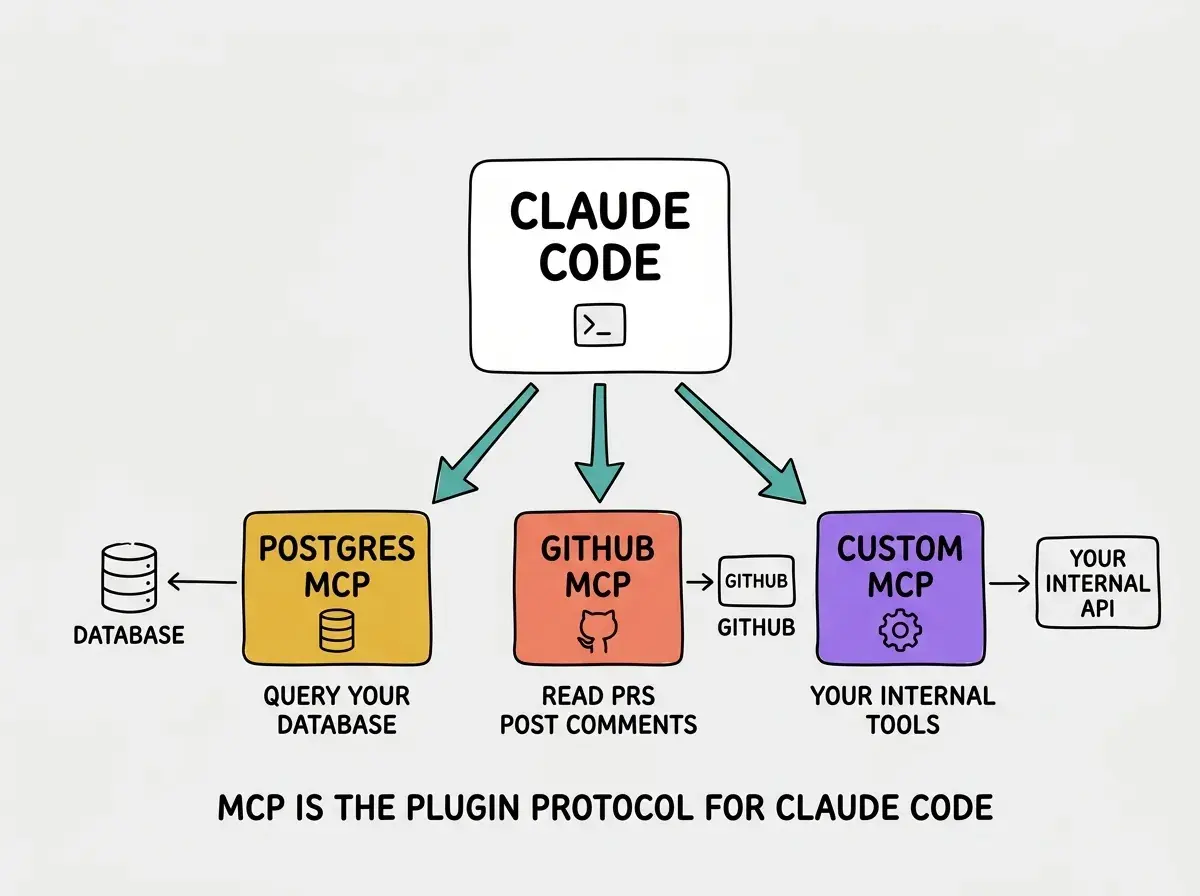
Both of those installs leave traces in your Claude Code config. Before you go any further, it's worth knowing how to see what you have and how to test it.
Inspect What's Registered
Claude Code ships two commands for managing registered servers. claude mcp list shows you every server that's been added, the transport, the command line, and the scope (project or user). claude mcp test does a handshake with a specific server to confirm it's reachable and lists the tools it advertises.
# List all registered MCP servers
claude mcp list

# Test a server is reachable
claude mcp test postgres
Registered servers can be scoped per-project (stored in .claude/settings.json in the repo root) or globally (in ~/.claude/settings.json). Project scope is almost always what you want for production work. The config file lives in git, your whole team gets the same toolset on git pull, and onboarding a new engineer to your stack becomes a npm install && claude mcp test away.
User-scope is for things that only make sense to you personally, a server that talks to your private Linear workspace, or one that connects to your home network. Keep those out of the project file so you don't leak credentials or surprise your teammates with tools they can't use.
Build a Custom MCP Server
The official servers cover a lot, but eventually you'll want to wrap something only your team has, your internal admin API, your billing dashboard, your on-call rotation. A custom MCP server is just a small program that speaks the MCP protocol over stdio. Anthropic publishes SDKs in TypeScript and Python, and the minimum viable server is about forty lines.
Here's a complete TypeScript example that exposes one tool, get-current-on-call, which fetches the current on-call engineer from an internal endpoint. Drop it in scripts/mcp-oncall.ts and run it with tsx.
// scripts/mcp-oncall.ts
import { Server } from "@modelcontextprotocol/sdk/server/index.js";
import { StdioServerTransport } from "@modelcontextprotocol/sdk/server/stdio.js";
import { CallToolRequestSchema, ListToolsRequestSchema } from "@modelcontextprotocol/sdk/types.js";

const server = new Server(
  { name: "oncall", version: "0.1.0" },
  { capabilities: { tools: {} } }
);

server.setRequestHandler(ListToolsRequestSchema, async () => ({
  tools: [
    {
      name: "get-current-on-call",
      description: "Get the engineer currently on call for production incidents.",
      inputSchema: { type: "object", properties: {} },
    },
  ],
}));

server.setRequestHandler(CallToolRequestSchema, async (req) => {
  if (req.params.name === "get-current-on-call") {
    const res = await fetch("https://internal.example.com/oncall/now");
    const data = await res.json();
    return {
      content: [{ type: "text", text: `On call: ${data.name} (${data.slack})` }],
    };
  }
  throw new Error(`Unknown tool: ${req.params.name}`);
});

await server.connect(new StdioServerTransport());
Register it with claude mcp add oncall --transport stdio --command "npx" --args "tsx" --args "scripts/mcp-oncall.ts" and you're done. Now any Claude Code session in this repo can ask "who's on call?" and route the answer through your internal system. Add a second tool that posts to the on-call's Slack and you have an incident-routing capability nobody else has.
Designing an agent is more of an art than a science.
The art is mostly in deciding which tools to expose. Don't add tools you won't use; each one costs context window and adds a path the model has to consider on every turn. The team's guidance is to keep your custom servers focused, three to five well-named tools beats fifteen redundant ones every time.
We're publishing a deep-dive series on how Anthropic engineers actually use Claude Code.
Browse our Claude Code coverageOnce you've built one custom server, the temptation is to build a server for everything. Resist that urge until you've thought about which primitive actually fits the work.
When to Use an MCP Server vs a Skill vs a Subagent
Claude Code has three main extension points and they look similar from a distance, which is why people mix them up. MCP servers expose external systems. Skills encapsulate repeatable workflows. Subagents add parallelism and context isolation. Pick the wrong one and you'll fight the tool forever.
Use an MCP server when the capability lives outside Claude Code and needs an API call to access. Postgres, GitHub, Slack, Linear, your internal billing API, your Cloudflare account, all of those are MCP-shaped. The server is the bridge to the system; the model decides when to use it.
Use a skill when the capability is a workflow Claude already knows how to do but you keep repeating the prompt. "Deploy this to staging then check the logs for the next two minutes" is a skill, not an MCP server. Use a subagent when you need parallel work (run three independent investigations at once) or when you want a clean context window (a code reviewer that doesn't know about the rest of the session).
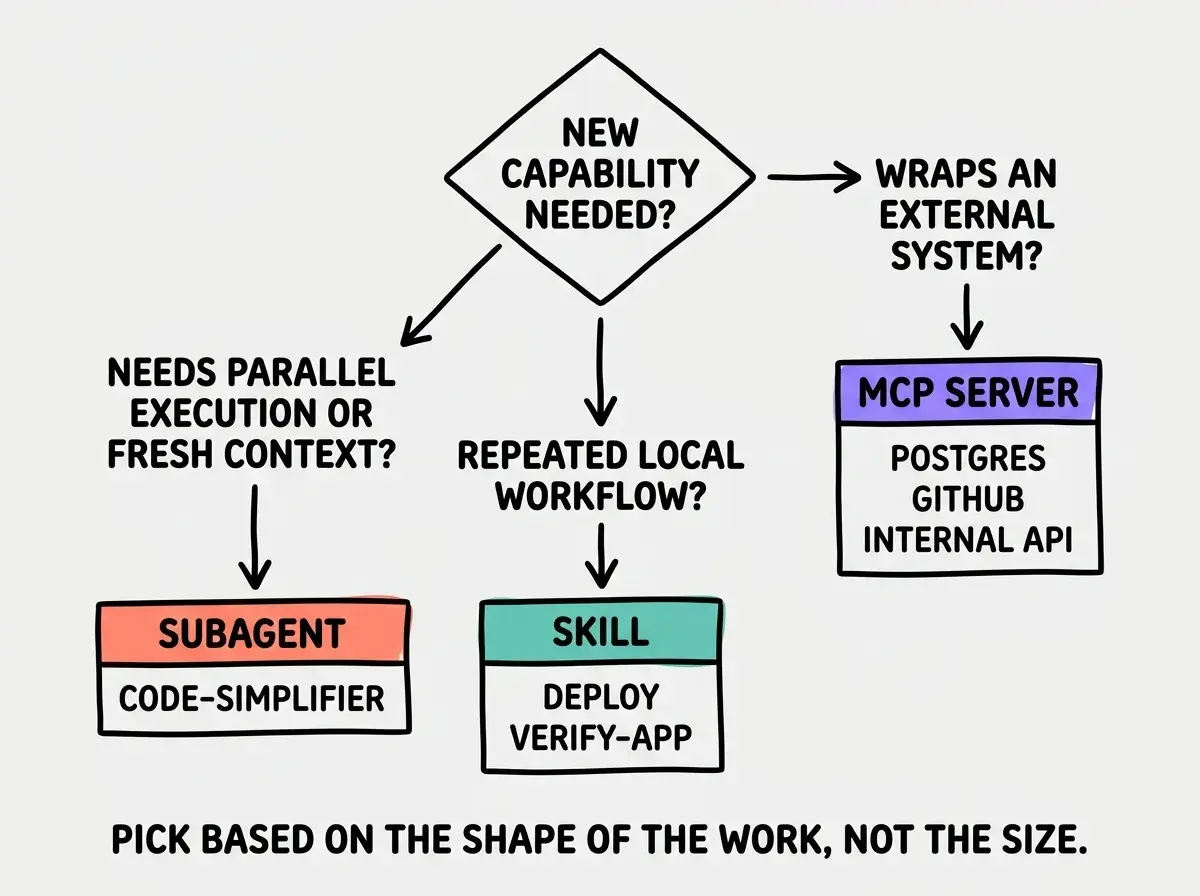
The mistake the team's tips threads warn about most is using a subagent or an MCP server when a skill would do, because it sounds more impressive. Start with the lightest primitive that solves the problem and only escalate when you actually hit its limits.
Building a custom MCP server when an existing one already covers your case. Check the public registry first, there are official servers for Postgres, GitHub, Slack, Linear, Sentry, and many more. Only build custom when no one has shipped what you need.
Even when you stick to off-the-shelf servers, you're handing Claude a credentialed connection to real production systems. That deserves a security pass before you ship the config to your team.
Security Considerations
MCP servers can read and write to external systems on Claude Code's behalf. Treat them like any other production credential surface. The defaults are reasonable, but the failure modes are exactly the failure modes of giving any other process those credentials, multiplied by the fact that an LLM is deciding when to call them.
A few habits that have held up across the teams I've watched deploy this. Use scoped tokens. A read-only Postgres role is almost always enough; the times you genuinely need write access are rare enough to warrant a separate, explicitly-scoped server. Use fine-grained GitHub PATs scoped to the repos that actually need it, not classic tokens that touch every repo in your org.
Don't register MCP servers globally if they expose write operations across multiple repositories or environments. Project scope keeps the blast radius small. For internal servers, run them locally over stdio rather than exposing an HTTP endpoint, the stdio transport means the server only exists for the lifetime of your Claude Code session and never accepts a network connection.
Finally, audit what tools each server advertises before you install it. claude mcp test will list them. Reject MCP servers from authors you don't trust the same way you'd reject a random npm package with one star, which is to say almost always.
What This Means For You
- If you're a founder: The first MCP server pays for itself the first time Claude queries your database without you writing the SQL. Start with Postgres if you have one; the time-to-value is under ten minutes and the productivity bump is immediate.
- If you're changing careers: Start with the Postgres MCP if you use Postgres; the "ask in plain English, get the data" feedback loop is genuinely magical and teaches you SQL by reading what Claude writes. Open the query and read it before you accept the answer, that's where the learning happens.
- If you're a student: Build your own MCP server for an API you already use, your school's class schedule API, the GitHub API for a side project, whatever. The protocol is small and the SDK is friendly. It's the best way to internalize how agents and tools fit together at the byte level.
Two off-the-shelf servers and one custom server gets you the team's setup.
See the team's playbook