Authentication is the system that verifies who your users are, and it is the single highest-value target in any application. When AI coding tools build your login system, they default to patterns that leave passwords recoverable, sessions stealable, and tokens exploitable. Veracode's 2025 research found that 45% of AI-generated code contains OWASP vulnerabilities, and broken authentication is consistently near the top of the list.
CodeRabbit's analysis showed AI-generated code has a 2.74x higher vulnerability rate compared to human-written code. When you ask an AI tool to "add user authentication," the code it produces will likely work on the first try. It will also likely store passwords incorrectly, put session tokens in the wrong place, or generate JWTs with no expiration. Working and secure are not the same thing.
Think of authentication like a hotel key card system. The front desk verifies your identity (password hashing), issues you a card with specific access rights (session or token), and that card expires at checkout (session management). A well-run hotel does not hand out master keys that never expire to anyone who walks through the lobby. But that is effectively what AI tools build when left to their defaults.
Why AI Gets Password Storage Wrong
Password hashing is the foundation of authentication security. When a user creates an account, you should never store their actual password. You store a hash, a one-way mathematical transformation that cannot be reversed. When they log in, you hash what they typed and compare it to the stored hash. If they match, the password was correct. If someone steals your database, they get hashes, not passwords.
AI tools know this in principle. But the specific hashing algorithms they choose matter enormously, and this is where AI defaults go wrong.
The gold standard in 2026 is Argon2id (winner of the Password Hashing Competition) or bcrypt with a cost factor of at least 12. These algorithms are intentionally slow. Hashing a single password takes 200-500 milliseconds on purpose, because that slowness makes brute-force attacks computationally infeasible. An attacker trying to crack properly hashed passwords would need thousands of years of compute time.
What AI tools actually generate is a different story. I have seen AI produce login systems that store passwords in plain text, use MD5 (broken since 2004), use SHA-256 without salting, or use bcrypt with a cost factor of 4 (fast enough to brute-force on consumer hardware). The AI is not choosing these algorithms randomly. It is reproducing the most common patterns from its training data, which includes decades of tutorials and Stack Overflow answers that used whatever was convenient.
If your AI-generated authentication code uses anything other than bcrypt (cost 12+) or Argon2id for password hashing, it is vulnerable. Plain text, MD5, SHA-1, SHA-256 without salting, and low-cost bcrypt are all breakable with modern hardware. Search your codebase for your hashing implementation and verify the algorithm and parameters before you ship.
The fix is straightforward. In Node.js, use the bcrypt or argon2 npm package. In Python, use passlib with Argon2. In Go, use golang.org/x/crypto/bcrypt. The correct implementation is three to five lines of code. But you need to verify that the AI chose the right algorithm and the right parameters, because the difference between a 200-millisecond hash and a 1-microsecond hash is the difference between "uncrackable" and "cracked overnight."
Sessions vs Tokens and Where to Store Them
Once a user proves their identity with a correct password, your application needs to remember them. This is where sessions and tokens come in, and where the hotel key card analogy becomes useful.
A session is like a key card that the hotel keeps a record of. The card itself is just a random number (the session ID). The hotel's front desk (your server) keeps a log of which card belongs to which guest and what rooms they can access. If a card is lost, the hotel can deactivate it instantly. The card is meaningless without the hotel's records.
A token (specifically a JWT, or JSON Web Token) is like a key card that contains all the information directly on the card itself. The guest's name, room number, checkout date, and access permissions are all encoded on the card. The hotel does not need to look anything up. But if the card is stolen, the hotel cannot deactivate it because there is no central record to update. The card works until it expires.
AI tools overwhelmingly default to JWTs because they are stateless and simpler to implement. No database table, no session store, no Redis instance. But this simplicity comes with serious security tradeoffs that AI tools almost never address.
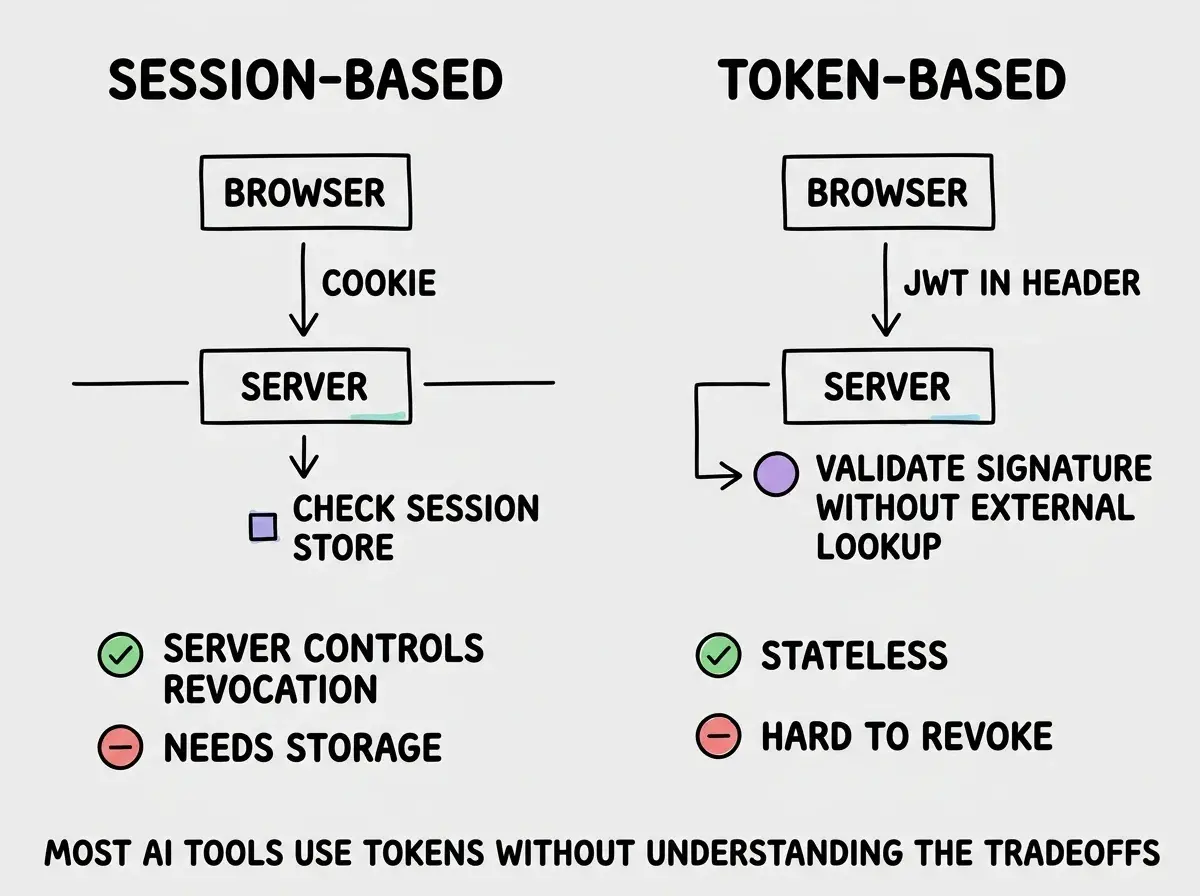
The storage question is just as critical as the mechanism. Where your application stores the session ID or token determines whether an attacker can steal it through a cross-site scripting (XSS) vulnerability. AI tools frequently store tokens in localStorage, which is accessible to any JavaScript running on the page. If your application has a single XSS vulnerability (and remember, AI code is 2.74x more likely to have one), an attacker can read the token from localStorage and impersonate the user.
The secure approach is to store the session ID or token in an httpOnly cookie. An httpOnly cookie is invisible to JavaScript. Even if an attacker finds an XSS vulnerability, they cannot read the cookie. Combined with the Secure flag (HTTPS only) and SameSite=Strict or SameSite=Lax, the cookie is protected against the most common theft vectors.
AI tools default to localStorage because it is easier to work with in client-side JavaScript. You can read it, write it, and include it in API requests with a few lines of code. The httpOnly cookie approach requires the server to set the cookie and the browser to send it automatically, which is a different architectural pattern that AI tools do not default to.
The JWT Pitfalls AI Tools Never Mention
If your application uses JWTs (and it probably does if AI built it), there are three specific pitfalls that AI tools introduce consistently.
No expiration or excessively long expiration. I have reviewed AI-generated code that creates JWTs with no exp claim at all, meaning the token is valid forever. Others set expiration to 30 days or even a year. Going back to the hotel analogy, this is a key card that works for a year after checkout. If it is stolen, the attacker has access for that entire duration with no way to revoke it.
Access tokens should expire in 15 to 60 minutes. Refresh tokens can last longer (7-30 days) but should be stored in httpOnly cookies and rotated on each use. This short-lived access token plus refresh token pattern is the industry standard, and AI tools almost never implement it unprompted.
Weak or hardcoded signing secrets. JWTs are signed with a secret key that proves they were issued by your server. AI tools frequently use placeholder secrets like "secret", "jwt_secret", or "your-secret-here" that never get changed before deployment. An attacker who knows your signing secret can forge tokens for any user, including admin accounts. Your JWT secret should be at least 256 bits of randomness, stored in an environment variable, never in source code.
This is part of Security from Scratch, covering every vulnerability AI tools introduce.
Start from the beginningNo algorithm verification. JWTs include a header that specifies which algorithm was used to sign them. A well-known attack called the "alg: none" attack works by changing the algorithm header to "none," which tells the server to skip signature verification entirely. Some JWT libraries accept this by default. AI-generated code rarely specifies the expected algorithm when verifying tokens, leaving the door open for this attack.
When verifying JWTs, always explicitly specify the expected algorithm. In the jsonwebtoken Node.js library, pass { algorithms: ['HS256'] } as an option. Never let the token itself dictate which algorithm to use for verification.
How to Audit Your Authentication System
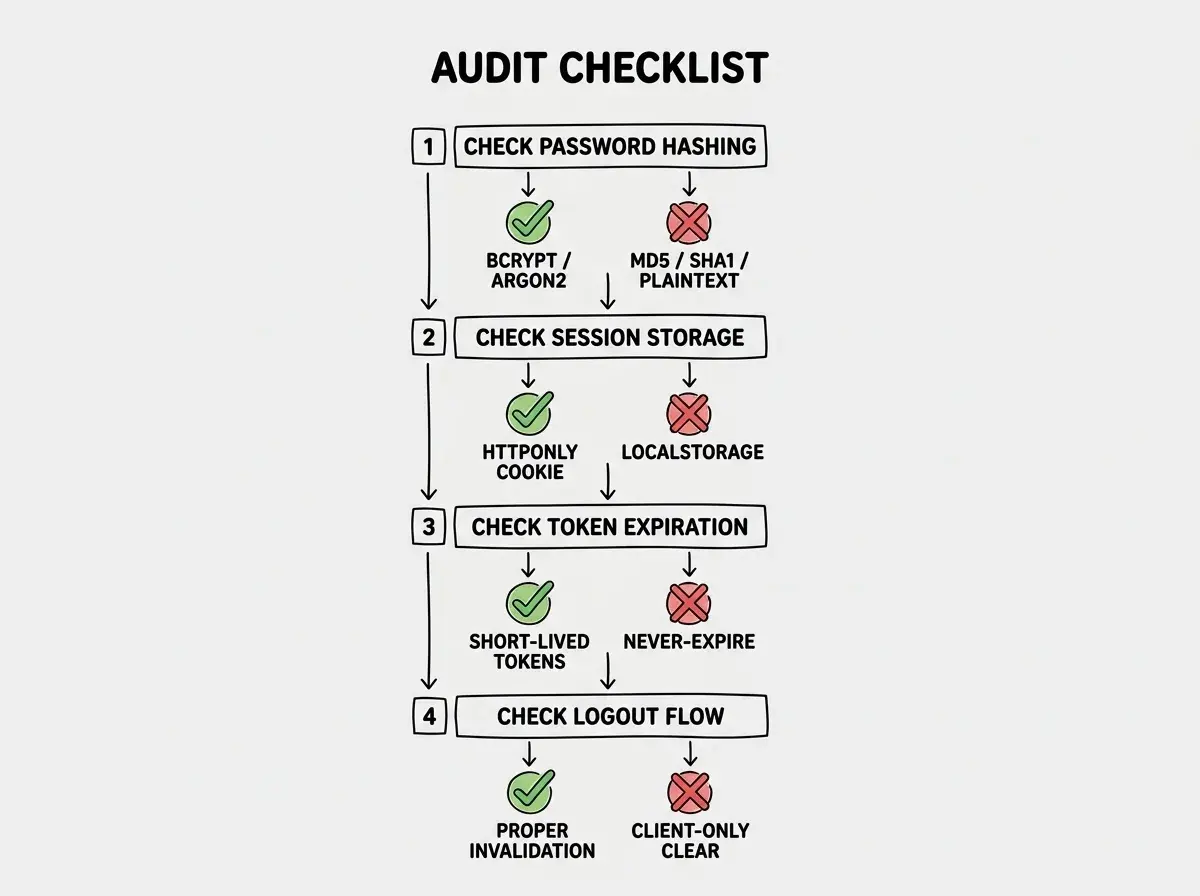
If AI tools built your login system, here is a concrete audit you can run in under an hour.
Step 1: Check your password hashing. Find the code that runs when a user creates an account. Look for the function that processes the password before storing it. If you see md5(), sha256(), sha1(), crypto.createHash(), or the password being stored directly in the database, that is a critical vulnerability. You should see bcrypt.hash() with a cost factor of 12 or higher, or argon2.hash() with default parameters.
Step 2: Find where tokens or session IDs are stored. Search your frontend code for localStorage.setItem or sessionStorage.setItem combined with terms like "token," "jwt," or "auth." If tokens are stored in browser storage, they are accessible to XSS attacks. They should be in httpOnly cookies set by your server.
Step 3: Check JWT configuration. If your app uses JWTs, find the code that creates and verifies them. Check the expiration time (should be under 60 minutes for access tokens), the signing secret (should be a long random string from an environment variable), and the verification options (should specify the expected algorithm explicitly).
Step 4: Test session invalidation. Log in, copy your session token, log out, then try using the copied token. If it still works after logout, your application is not invalidating sessions. This is especially common with JWTs because there is no server-side state to clear.
The Refresh Token Pattern AI Tools Skip
The most secure token-based authentication uses a two-token system. A short-lived access token (15 minutes) handles everyday requests. A long-lived refresh token (stored in an httpOnly cookie) silently obtains new access tokens when the old ones expire. The user stays logged in seamlessly, but any stolen access token becomes useless within minutes.
AI tools almost never implement this pattern. They generate a single token with a long expiration because it is simpler, giving an attacker a massive window if that token is compromised.
The refresh token approach requires your server to have an endpoint that accepts a refresh token, returns a new access token, and rotates the refresh token on each use. You also need a way to revoke refresh tokens, which means storing them in a database. This is why many experienced developers choose server-side sessions over JWTs for user-facing authentication. Sessions give you instant revocation and centralized control, with sub-millisecond lookup times when backed by Redis.
Using JWTs for everything because the AI tool defaulted to them. JWTs are appropriate for stateless, service-to-service communication where revocation is not critical. For user-facing authentication where you need logout to actually work, session invalidation after password changes, and protection against token theft, server-side sessions with httpOnly cookies are more secure and easier to get right. Do not let the AI's default choice become your architecture decision.
If you do use JWTs, at minimum implement short-lived access tokens, store refresh tokens in httpOnly cookies, rotate them on each use, and maintain a server-side blocklist for revoked tokens.
What This Means For You
Authentication is the system that protects every piece of user data in your application. AI tools will generate auth code that works, but "works" and "secure" are different requirements. The patterns above are not advanced techniques. They are baseline security that every production application needs.
- If you are a senior developer reviewing AI-generated auth code: Check password hashing algorithms and parameters first. Then verify token storage (must be
httpOnlycookies, notlocalStorage). Finally, audit JWT expiration and signing secrets. These three checks take ten minutes and catch the most common AI-introduced authentication vulnerabilities. Push for the refresh token pattern or server-side sessions on any application handling sensitive data. - If you are an indie hacker shipping fast: Your authentication system is the first thing attackers probe. A leaked user database with properly hashed passwords is an inconvenience. A leaked database with MD5 or plain text passwords is a lawsuit. Use a battle-tested auth library like NextAuth.js, Lucia, or Auth.js instead of letting the AI build authentication from scratch. These libraries handle password hashing, session management, and token rotation correctly by default. The thirty minutes you spend integrating a proper auth library saves you from the breach that kills your product.
Start the Security from Scratch series from the beginning and cover every vulnerability category.
Start the series