SQL injection has been around since 1998. It is one of the oldest, most well-documented, most preventable vulnerabilities in web development. It should be extinct by now. Instead, AI coding tools are bringing it back at scale.
Think of it this way. SQL injection is leaving your front door wide open with a sign on the lawn that reads "come in." Not a broken lock, not a hidden vulnerability that requires sophisticated tools to exploit. An open door. A welcome mat. And AI coding tools are building thousands of apps with the front door open because that is the pattern they learned from their training data.
Veracode's 2025 research found that 45% of AI-generated code contains OWASP vulnerabilities, with injection flaws ranking consistently among the top findings. CodeRabbit's analysis put it more starkly: AI-generated code has 2.74 times higher security vulnerability rates compared to human-written code. When Escape.tech scanned 5,600 vibe-coded applications, they found over 2,000 vulnerabilities. SQL injection appeared in app after app, the same preventable flaw reproduced at machine speed.
I have spent weeks reviewing the patterns AI tools produce when they write database queries. The vulnerable patterns are consistent, predictable, and trivially exploitable. Here is exactly what is happening and how to check whether it is happening in your codebase.
Why AI Defaults to Dangerous Query Patterns
To understand why AI tools keep writing injectable SQL, you need to understand what they are doing when they generate code. They are pattern-matching against their training data. And their training data is the internet, which includes millions of tutorials, Stack Overflow answers, blog posts, and open-source projects written over the past two decades.
Here is the problem. The simplest, most intuitive way to build a database query is also the most dangerous. If you want to find a user by their email address, the obvious approach is to construct a string that includes the email value directly in the query text. This is called string interpolation or string concatenation, and it reads like natural language. "Select from users where email equals this value." It makes sense. It works in testing. It is catastrophically insecure.
The safe approach is parameterized queries (also called prepared statements), where the query structure and the data values are sent to the database separately. The database treats the parameters as data, never as executable code. But parameterized queries are slightly less intuitive. They require an extra conceptual step. And in the ocean of code that AI tools trained on, the intuitive-but-dangerous pattern appears far more often than the safe one.
This is not a bug in any specific AI model. It is a reflection of the training data. Beginner tutorials use string concatenation because it is easier to explain. Stack Overflow answers use it because it is fewer lines of code. Legacy codebases use it because they were written before parameterized queries became standard practice. The AI reproduces the most common pattern, which happens to be the vulnerable one.
AI tools default to string concatenation for database queries because it is the most common pattern in their training data. It is also the most dangerous. Every database query in your codebase that builds SQL strings using variable interpolation is a potential SQL injection vector. The fix is always the same: parameterized queries or a well-configured ORM. No exceptions.
What Vulnerable Code Actually Looks Like
I am not going to walk through elaborate attack scenarios. Instead, I want you to understand the two patterns so you can spot them instantly when reviewing AI-generated code.
The vulnerable pattern takes user input and drops it directly into a SQL string. Imagine a login function where the username and password from a form get placed directly into a query like "select from users where username equals" followed by the username variable and "and password equals" followed by the password variable. The query string is built by combining fixed SQL text with dynamic values. This is the open front door.
An attacker does not need to guess passwords. They type a specially crafted string into the username field that changes the meaning of the query itself. Instead of asking "find a user with this name," the query becomes "find a user with this name, or just return true for everything." The database executes whatever the attacker tells it to.
The safe pattern sends the query structure and the values separately. The query says "select from users where username equals parameter one and password equals parameter two," and then the actual values are passed alongside as a separate list. The database knows that the parameters are data, not instructions. If an attacker types a malicious string, the database treats it as a literal username search (which will find nothing) instead of executing it as code.
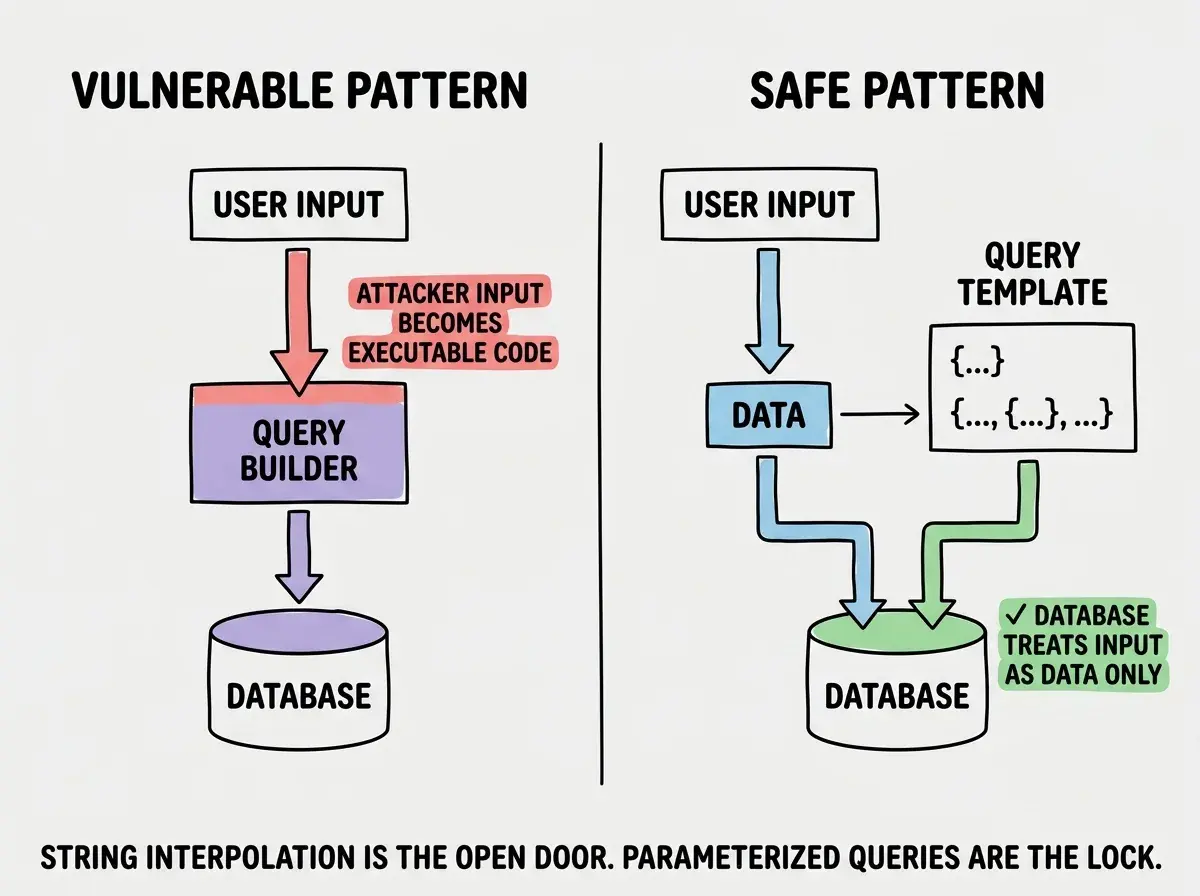
The thing that makes this so insidious is that both patterns produce identical results during normal use. When a legitimate user types their real email address into a login form, the vulnerable version and the safe version return the same result. The vulnerability only reveals itself under attack, which means testing with normal inputs will never catch it.
ORMs vs Raw SQL and How AI Handles Each
Object-Relational Mappers like Prisma, Drizzle, SQLAlchemy, and ActiveRecord are supposed to solve this problem. They generate parameterized queries automatically. When you use an ORM's built-in methods to query the database, the ORM handles parameterization for you. In theory, using an ORM should make SQL injection impossible.
In practice, AI tools find ways around the safety net.
The most common failure mode is the "escape hatch." Every ORM provides a way to write raw SQL when the built-in query methods are not flexible enough. AI tools reach for raw SQL surprisingly often, especially for complex queries involving joins, aggregations, or full-text search. When the AI drops into raw SQL mode, it frequently reverts to string concatenation, defeating the entire purpose of using an ORM.
The second failure mode is misconfiguration. Prisma, for example, has a $queryRaw method that supports tagged template literals for safe parameterization, and a $queryRawUnsafe method that does not. AI tools reach for the unsafe variant because it is simpler to construct dynamically.
The third failure mode is partial ORM usage. The AI uses the ORM for simple CRUD operations but writes raw SQL for search, filtering, or reporting. This creates a false sense of security. The developer sees an ORM in the codebase and assumes all queries are safe, while the complex queries (often the ones handling the most user input) are built with string concatenation.
Assuming that because your project uses an ORM, all database queries are automatically safe from injection. AI tools routinely bypass ORM protections by using raw SQL escape hatches, unsafe query methods, or string concatenation for complex queries. Search your codebase for raw SQL calls, especially any method with "raw" or "unsafe" in the name, and verify that each one uses parameterized inputs.
How to Audit Your Codebase Right Now
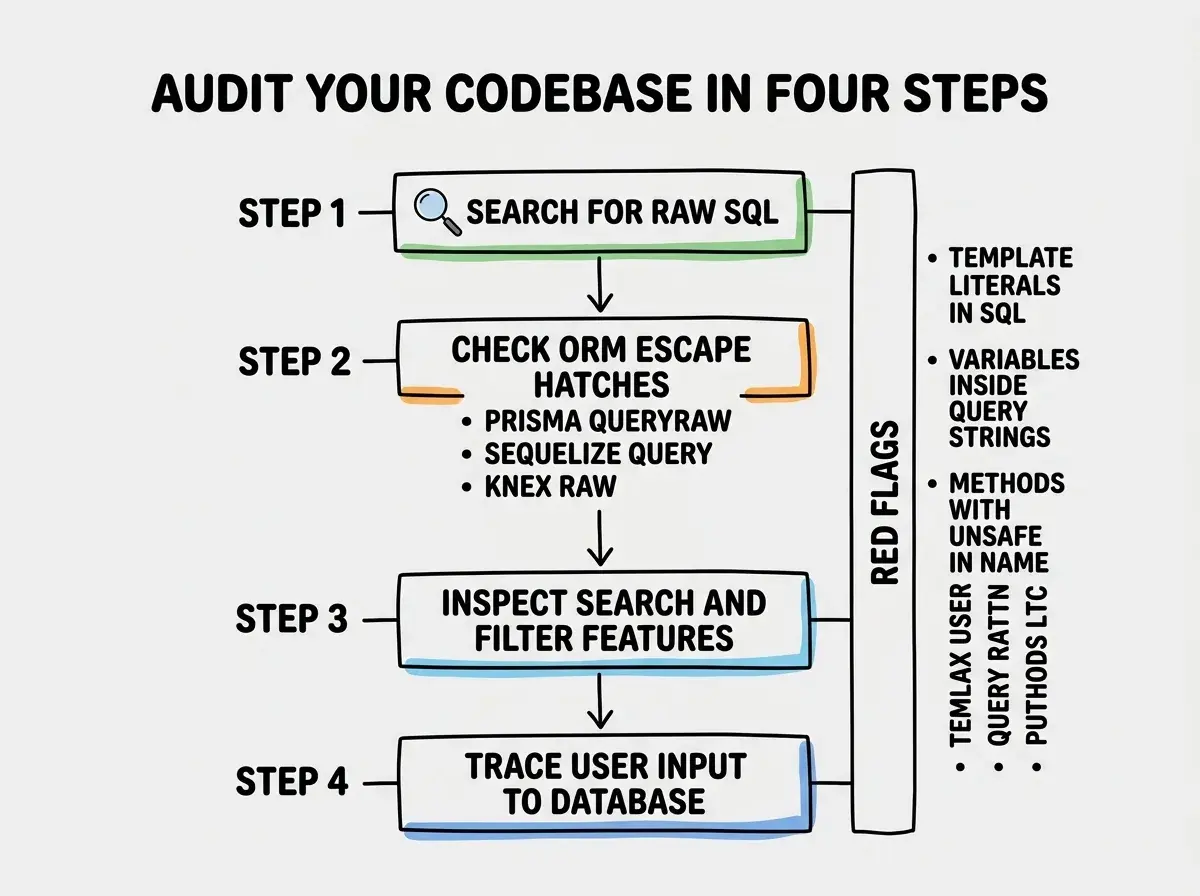
If you are using an AI coding tool and your app talks to a database, you should check for this today. Here is the approach I use.
Start by searching your codebase for raw SQL. Look for any string that starts with SELECT, INSERT, UPDATE, DELETE, or DROP in your server-side code. If you find SQL strings that include variable references or template literal expressions, those are candidates for injection vulnerabilities.
Next, search for your ORM's raw query methods. In Prisma, look for $queryRaw and especially $queryRawUnsafe. In Sequelize, look for sequelize.query(). In Knex, look for knex.raw(). In SQLAlchemy, look for text() and execute(). Each of these can be used safely or unsafely. Check whether the values are passed as parameters or interpolated into the string.
Then check your search and filter features specifically. These are where AI tools most often drop into raw SQL. If your app has a search bar, a filter panel, or a reporting feature that queries the database, examine the code behind those features with extra scrutiny. Anywhere the user controls what data the query returns is a potential injection point.
Finally, look at your API routes that accept user input and pass it to the database. Trace the path from the request body or URL parameter to the database query. If the user's input passes through any string concatenation step before hitting the database, that route is vulnerable.
The Fix Is Always the Same
Every SQL injection vulnerability has the same fix: separate the query structure from the data. Use parameterized queries if you are writing raw SQL. Use your ORM's built-in methods instead of raw SQL escape hatches. If you must use raw SQL, use your ORM's safe raw query method with parameter placeholders.
This is not a nuanced problem. There are not edge cases where string concatenation is acceptable for database queries that include user input. The answer is always parameterized queries. Always.
If you find vulnerable code in your codebase, you can ask your AI tool to fix it. Describe the specific function, tell it the query is vulnerable to SQL injection, and ask it to rewrite the query using parameterized inputs. AI tools are actually good at this when you tell them explicitly what you want. The problem is that they do not default to the safe pattern on their own.
Start with the full survival guide that covers every critical security check.
Read the security survival guideWhy This Will Keep Happening
The uncomfortable truth is that AI tools will keep generating injectable queries until the models are specifically fine-tuned to avoid it. The training data problem is structural. There are more examples of insecure code on the internet than secure code. Every introductory SQL tutorial that uses string concatenation for clarity, every quick-and-dirty Stack Overflow answer, every legacy codebase on GitHub reinforces the pattern.
Some AI tool vendors are working on guardrails. GitHub Copilot has started flagging certain insecure patterns. Claude and GPT-4 will sometimes warn about injection risks when asked to write database queries. But these safeguards are inconsistent. They depend on context, prompt phrasing, and model temperature. You cannot rely on the AI to catch its own mistakes.
The responsibility falls on you. Not to become a security expert, but to build the habit of checking database queries for injection vulnerabilities. It is one check. It takes minutes. And it closes the most common door that AI tools leave open.
What This Means For You
SQL injection in AI-generated code is not a theoretical risk. It is the default output. If your AI tool wrote database queries and you did not specifically ask for parameterized queries, the odds are high that at least some of those queries are vulnerable. The good news is that the fix is mechanical and consistent. Find the vulnerable queries, replace string interpolation with parameterized inputs, and move on.
- If you are a founder: Every customer record in your database is a liability if your queries are injectable. A single SQL injection exploit can dump your entire user table. The Escape.tech scan of 5,600 vibe-coded apps found over 2,000 vulnerabilities. Your app may be one of them. Spend thirty minutes running the four-step audit above. It is the highest-leverage security investment you can make this week.
- If you are a career changer: SQL injection and parameterized queries come up constantly in technical interviews. Being able to explain why string concatenation is dangerous and how parameterized queries prevent it shows security awareness that most junior developers lack. When you catch an injection vulnerability before it ships, that is exactly the kind of judgment that earns trust from senior engineers.
- If you are a student: Build a small project with an intentionally vulnerable query, then exploit it yourself. Nothing teaches SQL injection faster than watching a crafted input dump an entire database table. OWASP Juice Shop and similar practice environments let you do this safely. Once you have seen it work from the attacker's side, you will never forget to check for it in your own code.
This is part of Security from Scratch, covering every vulnerability AI tools introduce.
Start from the beginning