AI wrote the code. Now someone has to review it. The problem is that most code review processes were designed for human-written code, and AI-generated code fails in entirely different ways. Here is the checklist that catches the failures your existing review process misses.
Why AI Code Needs a Different Review
Human developers make mistakes because they misunderstand requirements, have bad days, or rush under deadline pressure. AI models make mistakes because they hallucinate APIs, ignore context outside the current prompt, and optimize for code that looks correct rather than code that is correct.
The gap matters. A human developer who writes an insecure authentication check was probably tired or cutting corners. An AI that writes one was following a training pattern that looked similar to your request but was not the same thing. The surface appearance is identical. The failure mode is different.
Standard review checklists ask whether code is readable, follows style guides, and is tested. Good questions for human code. For AI-generated code, you need to ask harder: "Does this code actually do what it claims, and what assumptions did the model make that are wrong for our situation?"
Veracode's 2025 research found 45% of AI-generated code contains at least one security vulnerability. That drops to under 10% when teams apply a structured review process. The difference is a checklist that targets the right failure modes.
AI-generated code fails in predictable patterns: security holes from borrowed training examples, logic bugs from hallucinated APIs, performance problems from unnecessary dependencies, and dead code from incomplete generation. All four categories need to be checked on every significant AI-generated contribution.
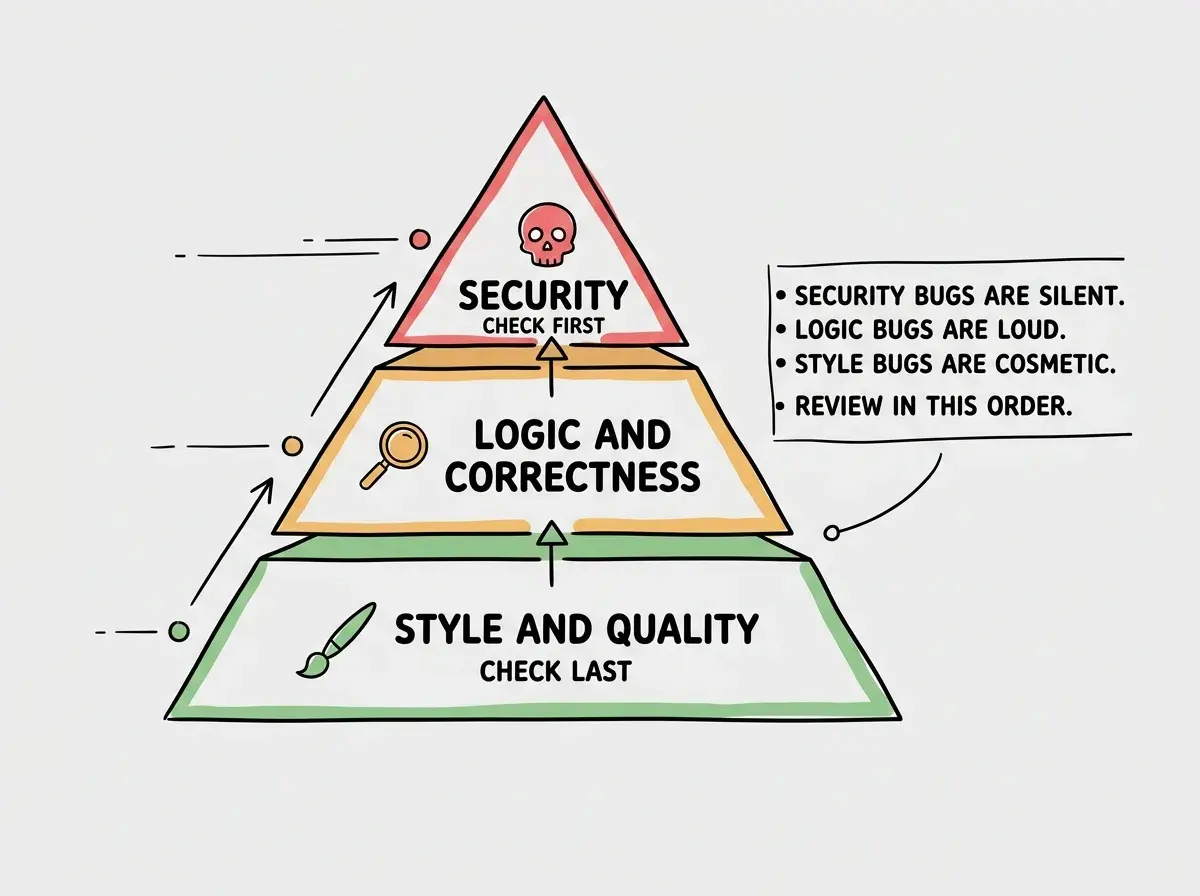
Work through the categories below in order. Security first because a deployed vulnerability is worse than a delayed feature. Logic next because correctness gates everything else. Performance and quality last, because they improve the codebase but rarely cause immediate failures.
Security Review
AI models are trained on millions of code repositories. Many of those repositories contain insecure code. When you ask for authentication logic, database queries, or input handling, the model produces patterns it has seen before, and some of those patterns are insecure. These checks are not optional.
Scan for hardcoded secrets and credentials. Search the entire diff for API keys, tokens, passwords, and connection strings embedded directly in code. AI models love to put example credentials in config files, seed data, and test setup functions. Run grep -r "password\|secret\|api_key\|token" --include="*.ts" --include="*.js" on the changed files. Every hit needs manual inspection.
Check every database query for injection vulnerabilities. Look at any code that builds SQL, NoSQL, or ORM queries using user-supplied input. AI-generated queries frequently interpolate user data directly into query strings. The model knows parameterized queries exist but does not always use them. For each query, ask: "If someone passes a single quote in this field, what happens?"
Review all input rendering for XSS. Anywhere the code takes user input and renders it to the DOM or a template, check for proper escaping. In React, dangerouslySetInnerHTML is the obvious flag, but template literal rendering in vanilla JS is equally dangerous. AI models sometimes use innerHTML for convenience when textContent would be safe.
Verify authentication on every new endpoint. For each new API route or server function in the diff, confirm that authentication is checked before any business logic runs. AI models generate working routes quickly, but they generate the happy path first. The "what if someone calls this unauthenticated" question comes later, and in AI code, it often never comes at all.
Check authorization, not just authentication. Authentication verifies who you are. Authorization verifies what you can do. AI-generated code regularly authenticates users and then forgets to check whether that user has permission to access the specific resource they are requesting. User A accessing User B's data is a common AI-generated bug.
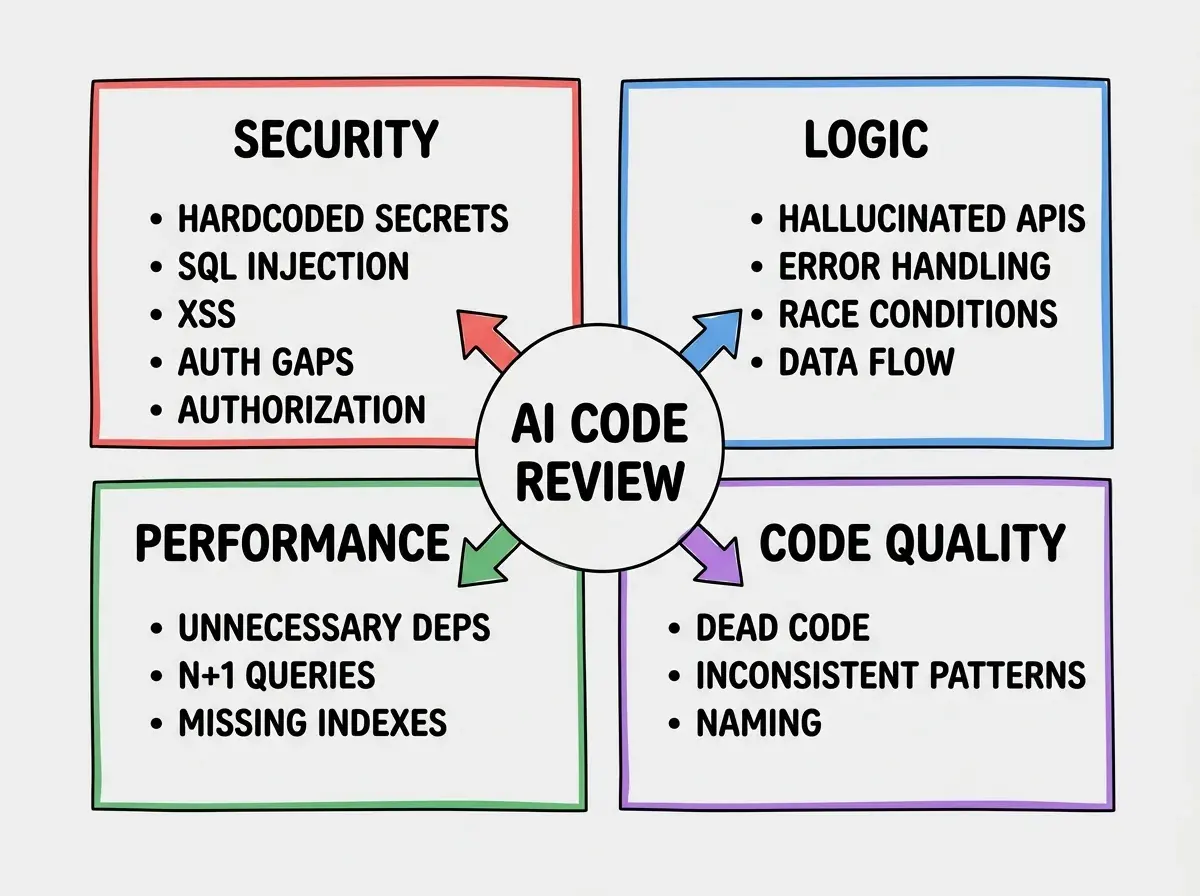
Run these five security checks before anything else. A security hole in production is worse than a delayed feature, and AI-generated security code has a higher defect rate than any other category.
Start with the deployment fundamentals that keep AI-built apps safe and stable in production.
See the deployment checklistLogic Review
Logic bugs in AI-generated code are harder to catch than security issues because they look correct. The code runs, it does not throw errors, and it handles the obvious cases. The failure happens in edge cases the model did not consider, or in integrations with APIs the model described incorrectly.
Verify every external API call against current documentation. AI models have training cutoffs. They describe APIs as they existed at training time, and APIs change. For every external API call in the diff, open the current documentation and verify the call matches reality. This is the single most common source of AI-generated logic bugs.
Check error handling for completeness. AI models generate try-catch blocks that handle expected error types and silently swallow everything else. Look at every error handler and ask what happens when an unexpected error type arrives. Silent failures in background jobs are a specific risk, where caught-and-ignored errors mean jobs stop running with no warning.
Look for race conditions in async code. AI-generated async code frequently assumes operations complete in order when they do not have to. Multiple concurrent requests updating the same resource, optimistic UI updates without conflict resolution, and database writes without transactions are the patterns to look for. Ask: "What happens if two users do this at the same time?"
Validate data flow from input to output. Trace the path that user input takes through the new code. Does each transformation handle null and undefined correctly? Does the type at each step match what the next step expects? TypeScript types are not enough here because AI models sometimes cast types to avoid compiler errors without ensuring the underlying data actually matches.
Check that business logic matches the actual requirement. AI models implement what the prompt described, not necessarily what was intended. For business-critical logic like pricing calculations, permission rules, and state transitions, read the code against the original requirement word by word. The model's interpretation and your intention diverge more often than you expect.
Performance Review
Performance problems in AI-generated code are usually invisible during development and obvious under production load. The model generates code that works, not code that scales. These checks surface the issues before they become production incidents.
Audit new dependencies for necessity and size. For every package added to package.json, ask whether it was necessary. AI models frequently import full utility libraries when a built-in method would work, adding heavy packages because the library appeared in their training data. Check bundlephobia.com for the size impact of any non-trivial new dependency.
Check for N+1 query patterns. Look at any code that iterates over a collection and makes database calls inside the loop. AI models generate N+1 queries consistently because the loop-then-fetch pattern is easy to write. For each loop in the diff, ask whether the data could be fetched in a single batched query.
Look for missing indexes on new queries. AI models rarely add indexes when they introduce new queries that filter or sort on a column. Unindexed queries work with small datasets and degrade exponentially under load. Review new queries against your schema and add indexes for columns used in WHERE, ORDER BY, and JOIN conditions.
Check for unnecessary re-computation. AI models generate code that recomputes values on every call when those values could be cached or memoized. Look for expensive operations (database lookups, API calls, complex calculations) inside loops or inside frequently-called functions that always receive the same inputs. The fix is usually a single line of caching, but it requires spotting the pattern first.
Code Quality Review
Quality issues do not cause immediate failures, but they compound over time. AI-generated code accumulates dead code, inconsistent patterns, and naming problems that make the codebase harder to understand and modify. Catching them during review prevents the debt from compounding.
Remove dead code from incomplete generations. AI models sometimes generate utility functions and type definitions that are imported but never called, scaffolded for code that was never included. Search for unused imports and unexported functions in the diff. Dead code is a maintenance burden and a source of confusion during future review.
Check for consistency with existing patterns. AI models default to their training patterns when they lack context about your codebase conventions. A codebase that uses custom error classes should not have new code throwing plain Error objects. Read the diff against the surrounding code for consistency, not just correctness.
Review naming for accuracy. AI models choose names that sound reasonable generically. A function named validateUser that actually checks payment status is a naming bug that will confuse every reader for years. Check function names, variable names, and type names against what the code actually does.
Verify comment accuracy. AI models generate comments confidently regardless of accuracy. A comment that says "returns the user's full name" on a function that returns an ID is worse than no comment. Read every JSDoc annotation and inline explanation against what the code actually does.
Treating AI code review as faster than human code review. The review is different, not shorter. Security and logic checks require the same time per line as careful review of any code, because AI failure modes are less obvious and more varied. Teams that rush because "the AI checked itself" are the ones who ship the vulnerabilities. Budget the same time for AI code review as any other review.
Dig deeper
A few hand-picked sources if you want to go further.
What This Means For You
If you are a developer using AI tools: Add the four categories as checkboxes to your pull request template. Reviewers confirm each section before approving. This does not slow down AI-assisted development. It ensures that speed gains from AI generation do not come at the cost of security and correctness.
If you are a product manager: The checklist is not optional overhead. It is the minimum responsible process for shipping AI-generated code. If your team skips code review to move faster, security debt accumulates and surfaces at the worst possible time. Insist on the process.
The practical approach: Run security and logic every time. Add performance and quality checks for AI-generated code that touches data storage, external APIs, or high-traffic paths. A ten-minute structured review catches the majority of problems that reach production in unchecked AI-generated codebases.
The four categories exist because AI models fail in them predictably: security from borrowed patterns, logic from hallucinated APIs, performance from unoptimized generation, and quality from incomplete context. The review process built for human code does not catch these. Build the one that does.
Get the full checklist for shipping AI-assisted projects with confidence.
Start reviewing better