Claude Code is Anthropic's terminal-based AI coding tool, and it works fundamentally differently from every AI code editor on the market. Instead of adding AI to an editor, Claude Code adds coding ability to an AI. You interact with it in your terminal, it reads your codebase, runs commands, edits files, and executes multi-step plans autonomously. If you are a developer who lives in the terminal and wants an AI that acts more like a capable junior engineer than an autocomplete engine, Claude Code is the most powerful option available.
I want to be upfront about something. This blog runs on Claude Code. The content pipeline, the deployment workflow, and much of the codebase were built with it. That gives me deep familiarity with its strengths and weaknesses, and I am going to be honest about both.
100% of my code is written by Claude Code. I haven't touched a line by hand since November.
What Claude Code Is (and Isn't)
Claude Code is a CLI tool that you install globally via npm and run from your terminal. It is not an editor. It does not have syntax highlighting, file tabs, or a project sidebar. You keep using whatever editor you already like (VS Code, Neovim, Emacs, whatever) and you run Claude Code alongside it in a terminal pane.
What makes Claude Code different is the agentic workflow. You describe what you want, and Claude Code figures out the steps. It reads relevant files, proposes changes, runs terminal commands, checks the output, and iterates. Instead of you manually orchestrating each step, you describe the goal and let the agent plan the path.
You might think a terminal tool without a visual interface would be harder to use. But actually, the lack of UI is the point. Claude Code does not need you to select files or highlight code or click buttons. It explores your codebase on its own, finds the relevant code, and makes changes across as many files as needed. The interface gets out of the way so the AI can operate with maximum autonomy.
That autonomy is also the risk. Claude Code will make changes you did not expect if your instructions are vague. It will run shell commands, install packages, and modify config files. You need to review everything it does, which is why it asks for confirmation before potentially destructive actions. The developers who thrive with Claude Code are the ones who give clear direction and review the diffs carefully.
Getting Started with Claude Code
Install Claude Code globally with npm install -g @anthropic-ai/claude-code. You need an Anthropic API key, which you set as an environment variable. Navigate to your project directory in the terminal and type claude to start an interactive session.
The first thing Claude Code does is scan your project structure. It looks for configuration files, understands your tech stack, and builds a mental model of your codebase. The quality of this initial context matters, which is where CLAUDE.md files become essential.
Create a CLAUDE.md file in your project root. This is a markdown file that describes your project to Claude Code. Include your tech stack, coding conventions, important constraints, file structure patterns, and any rules that the AI should follow. Claude Code reads this file automatically at the start of every session, which means you describe your project once and every interaction benefits from that context.
The CLAUDE.md file is the single highest-leverage thing you can do to improve Claude Code's output. A good CLAUDE.md turns generic AI suggestions into project-specific, convention-following code. Spend thirty minutes writing a thorough one before you write your first prompt.
Here is what a useful CLAUDE.md includes: your framework and version, your database and ORM, your deployment target and its constraints, your directory structure conventions, your preferred libraries for common tasks, and any hard rules (like "never use fs at runtime" or "always use server components by default"). The more specific you are, the better every interaction becomes.
Invest in your CLAUDE.md. After every correction, end with: Update your CLAUDE.md so you don't make that mistake again. Claude is eerily good at writing rules for itself.
The Agentic Workflow in Practice
Here is exactly what I did when I needed to add a newsletter system to this blog. I opened a terminal, navigated to the project, and started Claude Code with the prompt: "Add a newsletter subscription system. Use Resend for email sending and subscriber management. Create an API route at /api/newsletter/subscribe that accepts POST requests with an email field. Add a subscription form component. Include double-send protection using a newsletterSentAt frontmatter field."
Claude Code read my existing codebase. It found my API route patterns, my component conventions, my environment variable structure, and my CLAUDE.md constraints (including the Cloudflare Workers limitation that prohibits fs at runtime). Then it executed a plan: created the API route, built the form component, added the environment variable types, updated the frontmatter schema, and added the protection logic. It ran the TypeScript compiler to check for errors and fixed two type issues it found.
The entire interaction took about four minutes. I reviewed the diffs, made one adjustment to the form styling, and committed. That is the agentic workflow. You describe the outcome, the AI plans and executes, you review and adjust.
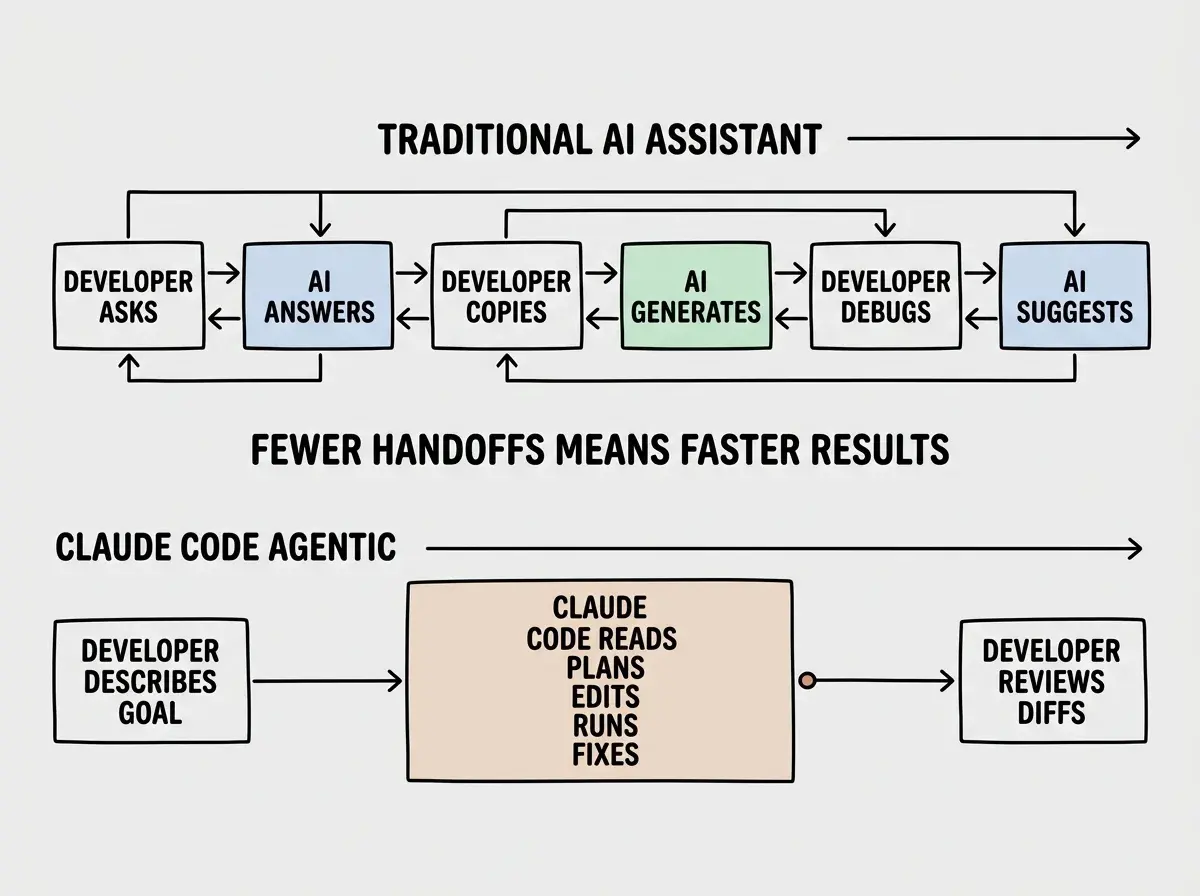
The difference between Claude Code and a chat-based AI assistant is the number of handoffs. With ChatGPT or a basic copilot, you are constantly going back and forth: ask a question, copy the answer, paste it in, run it, get an error, go back and ask again. With Claude Code, you describe the goal once and the agent handles the full cycle. This is more efficient, but it requires you to be more careful in your initial description.
Power User Features
Extended thinking. Claude Code can use extended thinking mode for complex problems, spending more time reasoning before acting. This is valuable for architectural decisions, complex refactoring, and debugging tricky issues. You do not need to enable it manually; the agent decides when deeper reasoning is needed.
Git integration. Claude Code understands git. It can read your commit history, understand what changed recently, create commits with meaningful messages, and even help with rebases and merges. When you ask it to make a change, it knows what the codebase looked like before recent modifications, which prevents it from reverting your work.
Shell command execution. Claude Code can run terminal commands and use the output to inform its next steps. It will run your test suite, read the failures, and fix them iteratively. It will run your linter, see the warnings, and address them. This feedback loop is something no editor-based AI tool can replicate because they do not have direct terminal access.
Multi-session memory. You can create project-level and user-level memory files that persist across sessions. This means Claude Code remembers your preferences, past decisions, and recurring patterns. Over time, it gets better at your specific project because it accumulates context.
Pricing Breakdown
Claude Code uses a pay-per-use model through the Anthropic API. There is no flat subscription. You pay for the tokens Claude processes, which includes both your prompts and the code it generates. Typical usage for an active developer runs between $50 and $200 per month, depending on how heavily you use it and how large your codebase is.
The pricing structure means small, focused requests are cheap and large, exploratory sessions are expensive. A quick "fix this TypeScript error" might cost a few cents. A "build me a complete authentication system" session with extended thinking could cost several dollars. The costs are transparent on your Anthropic dashboard, so there are no surprises, but there is also no cap.
For teams, Anthropic offers the Max plan with a flat monthly fee that includes a usage allowance. This makes budgeting more predictable, but the per-seat cost is higher than editor-based alternatives. If cost predictability matters more than usage flexibility, the Max plan is worth evaluating.
Running Claude Code on large codebases without a CLAUDE.md file and then wondering why the output is generic and off-target. Without project context, Claude Code treats your codebase like any random project. It will use default patterns that do not match your conventions, suggest libraries you do not use, and miss constraints that matter. Always set up your CLAUDE.md first.
There is also a hidden cost in time. Because Claude Code is agentic, each session processes significantly more tokens than a simple chat exchange. The AI reads multiple files, reasons about them, generates code, runs commands, reads output, and iterates. A single session can easily process 50,000 to 100,000 tokens. Be aware of this when budgeting, especially during the first few days when you are still learning what kinds of prompts are cost-effective.
Limitations and Gotchas
The biggest limitation is the learning curve. Claude Code is powerful but opinionated about how you interact with it. Developers who are used to visual editors will find the terminal-only experience disorienting at first. There is no "accept this change" button with syntax-highlighted diffs in a sidebar. You review changes in your terminal or switch to your editor to see what changed.
Large files can be challenging. If your project has files with thousands of lines, Claude Code sometimes struggles to make precise edits in the right location. It works best with well-structured codebases where files are reasonably sized and responsibilities are clearly separated.

Rate limiting can interrupt your flow. During peak usage times, you might hit API rate limits that slow down the agent. This is frustrating when you are in the middle of a complex task and the AI pauses for thirty seconds between steps. The Max plan alleviates this with higher rate limits, but it is still something to be aware of.
Probably the most important thing to get great results out of Claude Code, give Claude a way to verify its work. If Claude has that feedback loop, it will 2-3x the quality of the final result.
Who Should Use Claude Code (and Who Shouldn't)
Claude Code is the right choice if you are comfortable in the terminal, you work on complex multi-file changes regularly, and you want an AI that can execute autonomously rather than just suggest. It is exceptional for senior developers who know what they want built and can articulate it clearly.
Claude Code is not the right choice if you are new to coding and need visual guidance, if you prefer a lightweight autocomplete experience, or if you need strict cost predictability. Beginners benefit more from editor-based tools where they can see suggestions inline and accept them one at a time. If your primary use case is tab completion while typing, an editor-based tool like Cursor or Copilot will serve you better at a lower cost.
Learn the core concepts before diving into advanced tools.
Start hereWhat This Means For You
Claude Code represents a different philosophy of AI-assisted development. Instead of AI that helps you write code faster, it is AI that writes code for you while you direct and review. That distinction matters because it changes your role from typist to architect.
- If you are a founder building a product: Claude Code lets you describe features in natural language and get full implementations, not snippets. The pay-per-use pricing means you only pay when you are actively building, which is ideal for early-stage projects where some weeks are all coding and other weeks are all customer conversations. Pair it with a CLAUDE.md that captures your product's technical decisions.
- If you are a career changer: Start with an editor-based tool like Cursor first. Once you are comfortable reading and understanding code, move to Claude Code for larger tasks. The agentic workflow assumes you can review diffs and understand what changed, which requires baseline code literacy. Think of Claude Code as a graduation, not a starting point.
- If you are a student: Claude Code is an excellent learning tool once you understand the fundamentals. Ask it to explain its reasoning as it works. Watch how it explores a codebase, identifies the relevant files, and plans its changes. The agentic workflow teaches software architecture in a way that tutorials cannot, but you need enough foundation to follow along.
Compare Claude Code with other AI coding tools to find your ideal workflow.
See the options