A Claude Code skill is a folder you drop into .claude/skills/. It teaches Claude how to do a specific workflow by giving it instructions, supporting scripts, and reference material that all live together. When the workflow matches what you are asking Claude to do, the skill loads itself into the conversation automatically.
The trouble is that authoring a skill that activates reliably and runs cleanly is harder than it looks. Most badly-built skills do not fail in their bodies. They fail because the description is too vague to trigger, the folder is structured like a single file, or the author tries to railroad Claude through a workflow that should have stayed a prompt. This guide is about avoiding all three.
What a Claude Code skill actually is
A skill is a directory with a SKILL.md file at its root and any supporting files alongside. The full path looks like .claude/skills/<skill-name>/SKILL.md for project-level skills, or ~/.claude/skills/<skill-name>/SKILL.md for personal skills available across every repo you work in.
The SKILL.md opens with YAML frontmatter and then contains the actual instructions for Claude. Frontmatter declares what the skill is called, when it should activate, what arguments it accepts, what tools it is allowed to use, and a handful of other knobs. The body is the prompt Claude reads when the skill loads.
The reason skills are folders rather than single files is the most important structural point about them. Real workflows need more than a prompt. They need scripts that run as part of the workflow, reference documents Claude consults, example files that show the expected output shape, and "gotchas" notes that capture failure modes you have already debugged. Putting all of that in one folder is what makes a skill a reliable workflow rather than a longer prompt.
The official documentation at code.claude.com/docs/en/skills is the source of truth for the full frontmatter spec and is worth bookmarking. This guide is about the patterns that actually matter when you are writing skills that other people on your team will rely on.
How Claude loads a skill (progressive disclosure)
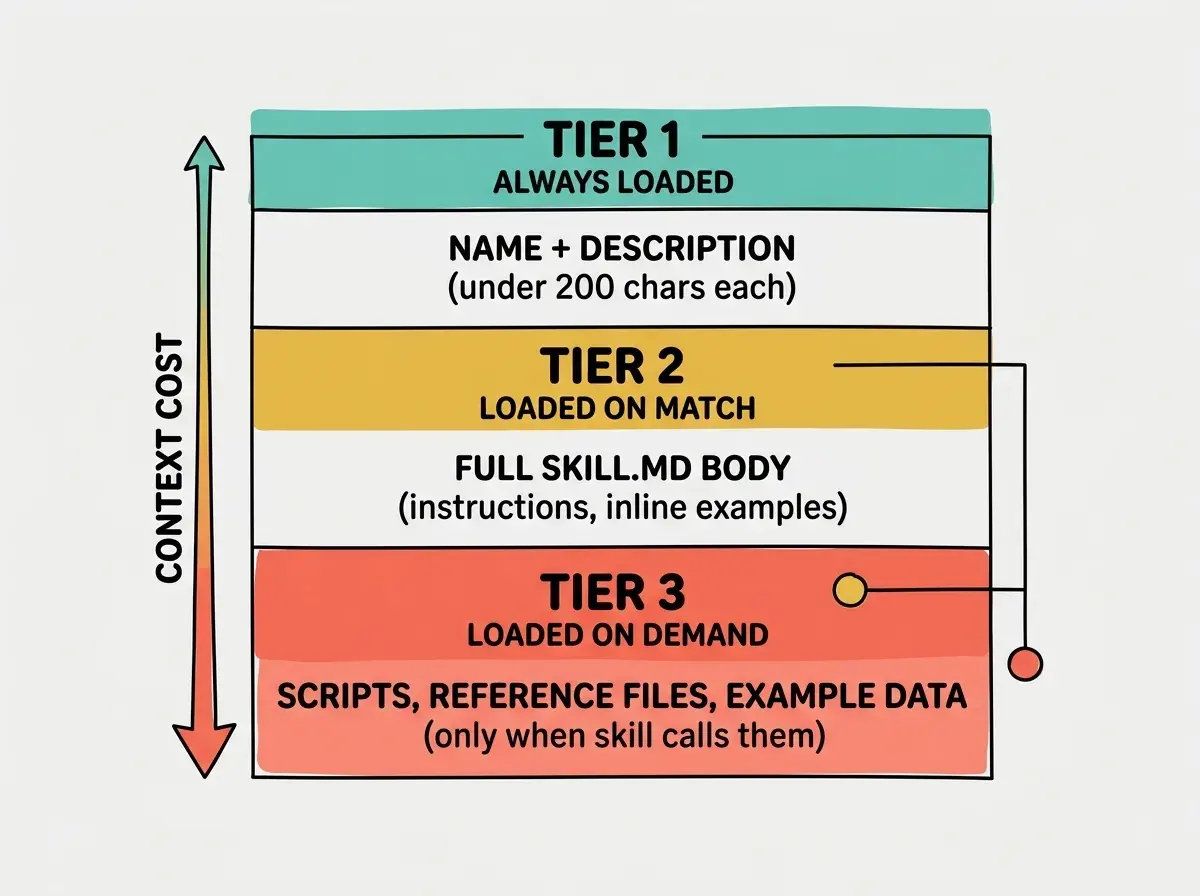
Claude does not load every skill into context for every prompt. If it did, the context window would fill with hundreds of skills you do not need, and the model would lose track of the one you actually want. Instead, skills load in three tiers.
First, every skill's name and description are always loaded into context as metadata. This costs almost nothing because each entry is short. The model uses this metadata to decide which skill is relevant to your current request.
Second, when the model decides a skill matches, the full SKILL.md body loads into the conversation. This is where your detailed instructions, examples, and inline guidance live. The body stays in context for the rest of the session.
Third, any supporting files (scripts, reference docs, examples) are loaded only when the skill explicitly tells Claude to consult them or run them. They do not consume context until Claude actually needs them.
The description is the single most important field in your skill. It is always loaded into context, even when your skill is not active, and it is the only signal Claude uses to decide whether to load the rest. A vague description means a skill that never activates, no matter how good the body is.
This three-tier loading is called progressive disclosure, and it is the architectural reason skills scale better than stuffing everything into CLAUDE.md or a single mega-prompt. Each tier reveals more detail only when needed. Authoring a skill properly means designing for each tier: writing a description Claude can route on, a body Claude can act on, and supporting files Claude can pull in on demand.
What the description field actually controls
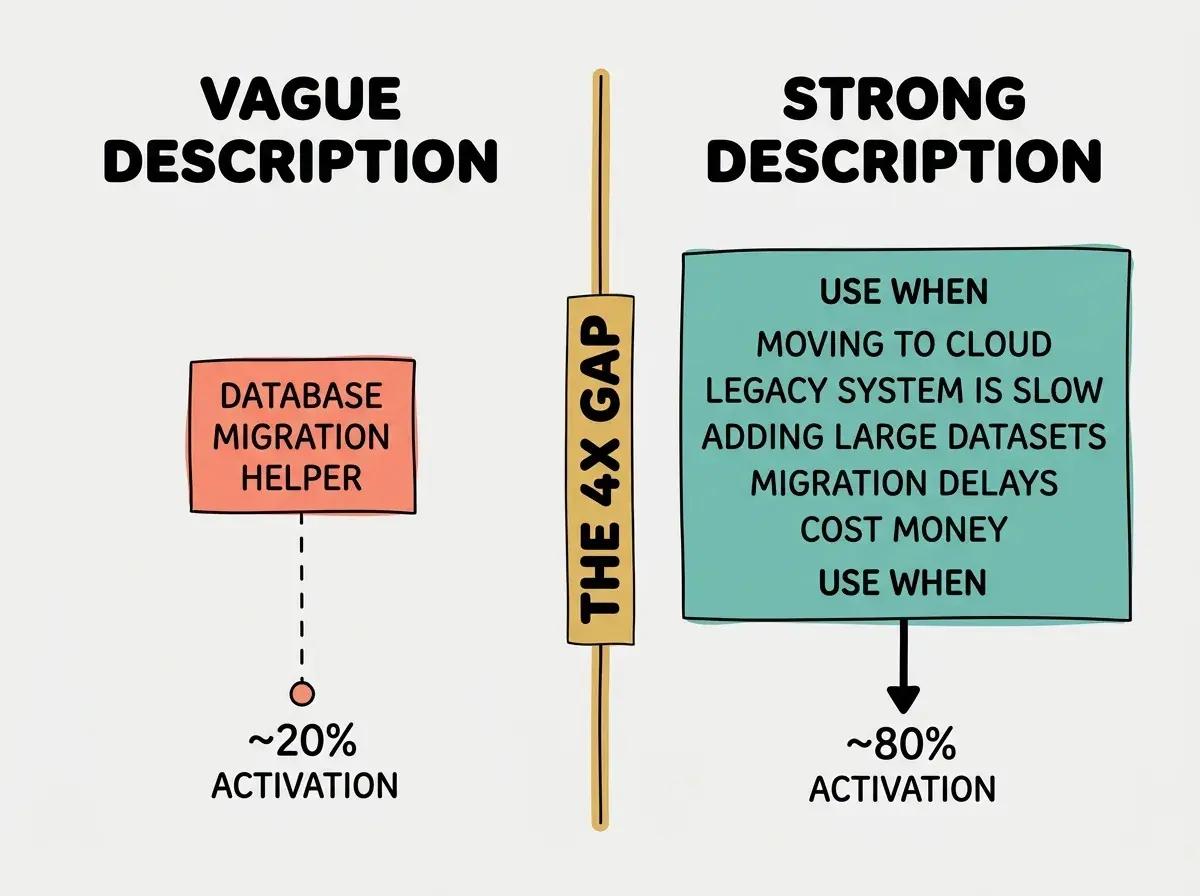
The description field is doing more work than any other line in your skill. Claude routes between dozens of available skills using only the descriptions, so a description that does not include the trigger language Claude expects will silently never activate. Community testing has put the gap between an unoptimised description and a well-tuned one at roughly four times higher activation rate.
What separates a good description from a bad one is whether it answers the question "when should I be loaded" rather than "what am I". A description that says "Refactors React components" is a label. A description that says "Use when the user asks to refactor a React component, rename props, or convert a class component to hooks" is a trigger. The second one tells Claude exactly when to fire.
The pattern that works is the "USE WHEN" frame, written in the third person. Start the description with a one-line capability statement, then explicitly list the situations that should trigger the skill. Include several keywords a user might naturally say, and end with a concrete example phrase if you have room. The 1,536 character cap is generous; use it.
Here is a vague-to-strong rewrite:
- Vague: "Database migration helper."
- Better: "Generate database migration files for the project's PostgreSQL schema."
- Strong: "Generate database migration files for the project's PostgreSQL schema. Use when the user asks to add a column, rename a table, change a constraint, write a migration, or modify the database schema. Examples: 'add a status column to orders', 'rename users.name to users.full_name', 'create a migration for the new posts table'."
The strong version triggers across the natural ways users phrase the request. It also tells Claude what the skill expects to see (PostgreSQL, schema changes) so the skill does not fire on unrelated database questions. That specificity is the difference between a skill you actually rely on and one that lives in the folder but never runs.
The folder structure for skills that scale
Once a skill goes beyond a single prompt, structure starts to pay for itself. The folder structure most experienced authors converge on looks like this.
.claude/skills/deploy-service/
├── SKILL.md
├── scripts/
│   ├── pre-deploy-check.sh
│   ├── deploy.sh
│   └── rollback.sh
├── examples/
│   ├── successful-output.txt
│   └── rollback-output.txt
├── reference/
│   └── runbook.md
└── gotchas.md
SKILL.md stays under roughly 500 lines and reads like a runbook table of contents. It points to the scripts when Claude needs to execute something, points to the reference docs when Claude needs deeper background, and points to the gotchas when Claude is debugging a failure.
scripts/ holds anything Claude should execute rather than reproduce. If your skill repeats a deploy procedure, the right place for the deploy command is a checked-in script that the skill invokes, not a multi-line shell block inside the prompt. Scripts are versioned, reviewable, and testable in a way that prompt-embedded commands are not.
examples/ shows Claude the shape of expected output. When you want a skill to produce structured results (a status report, a JSON object, a markdown table), giving it a real example of the right shape is more reliable than describing the shape in words. Anthropic's own best-practices doc calls this the example-driven pattern.
reference/ holds the long-form context that Claude only needs sometimes. The runbook for what to do if a deploy fails, the spec for the API you are integrating, the architecture diagram for the system being modified. Keep these out of SKILL.md so the body stays small, and reference them with file paths so Claude knows to read them when relevant.
gotchas.md is the most underrated file in this layout. It captures every failure mode you have already debugged. When Claude hits a similar failure, it consults this file and skips the dead end. Treat this file as a living artifact and add to it every time you fix something the skill got wrong.
The colocation matters. When Claude is running a workflow, it should not have to hunt around your repo for the right script or the right runbook. The folder is the workflow's home, and everything the workflow needs lives there.
A worked example of structuring a verify-app skill with the folder, SKILL.md, and scripts that Anthropic engineers use.
Read the walkthroughDegrees of freedom, the underrated decision
The Anthropic best-practices documentation calls out a spectrum that most authors miss: how much freedom does the skill give Claude. The three positions on this spectrum are high, medium, and low, and picking the wrong one is one of the most common ways skills fail.
A high-freedom skill gives Claude goals and constraints, then lets the model figure out the path. A skill for "review this PR for security issues" might list categories to check, examples of what counts as a problem, and a few hard rules, then leave the actual review to Claude's judgment. This works well when the situations the skill encounters vary widely and you cannot enumerate them upfront.
A medium-freedom skill provides a structured workflow with decision points. A deploy skill might define five phases (pre-check, build, deploy, verify, rollback), but within each phase let Claude decide which sub-steps to run based on the current state. This is the sweet spot for most production workflows.
A low-freedom skill gives Claude an exact script to follow. A "weekly metrics report" skill might specify the exact queries to run, the exact format for the output, and the exact recipients. This is right when the workflow is mechanical and any deviation is a bug.
The trap is treating every skill as high-freedom. Authors who write skills like longer system prompts ("be helpful, be careful, think about edge cases") get vague behaviour because they have not constrained Claude enough. Conversely, authors who railroad every skill to a script ("step 1: do X. step 2: do Y. step 3: do Z. do not deviate.") get brittle workflows that break the first time reality does not match the script.
The right move is to ask which kind of work the skill is doing. Open-ended judgment work wants high freedom. Repeatable but situation-dependent work wants medium freedom. Mechanical work wants low freedom.
When to use a skill versus prompt versus CLAUDE.md versus subagent
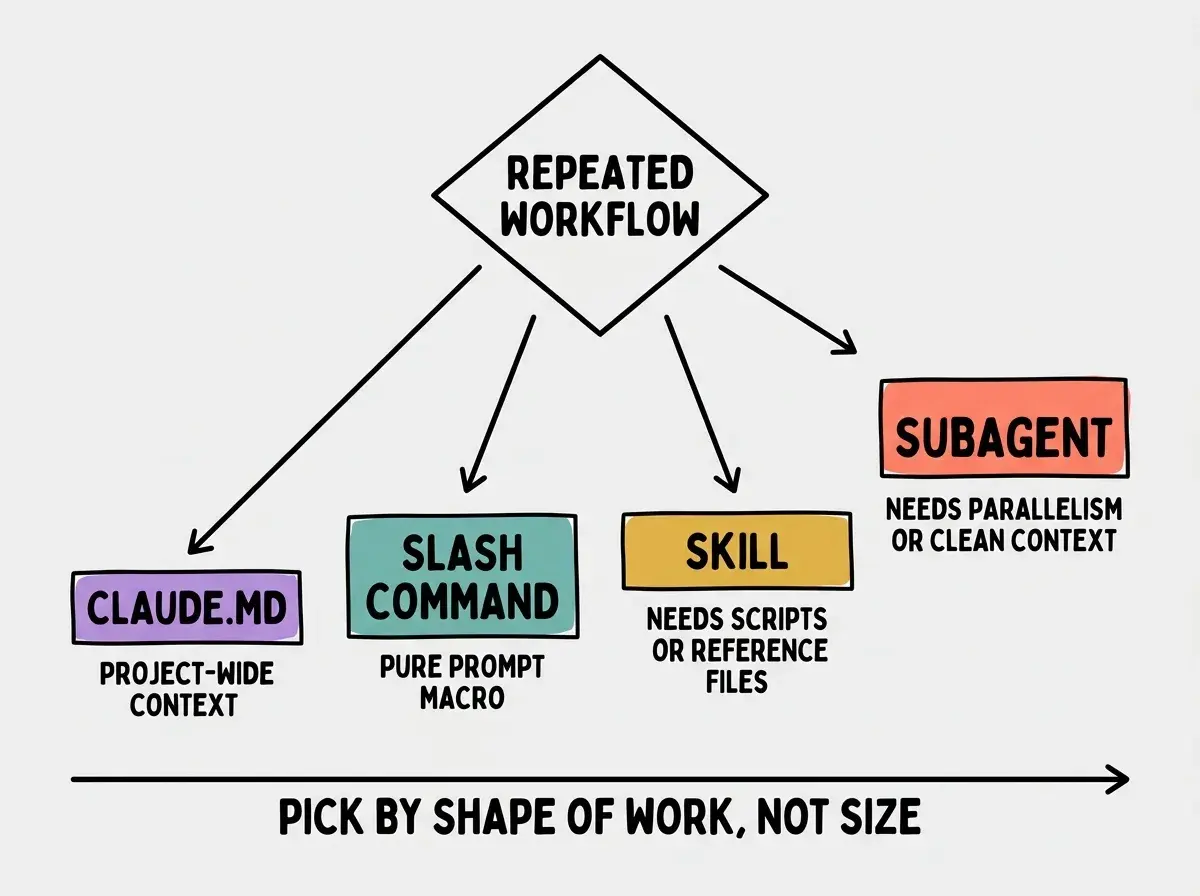
Skills are one of several places workflow knowledge can live. The decision tree below is the most useful filter when you are choosing where to put something.
If you are running a workflow fewer than three times a week and it fits in a single prompt, just type the prompt. Skills, slash commands, and CLAUDE.md are all worse choices than a well-written one-off prompt.
If you are running it several times a week but it is still essentially one prompt with no scripts or supporting files, write it as a slash command in .claude/commands/. Slash commands are single Markdown files that act as prompt macros.
If the workflow needs scripts, examples, or reference material to succeed, write it as a skill in .claude/skills/. The folder structure is what justifies the upgrade from a slash command.
If the information is about the project itself (the stack, the conventions, the things Claude should always remember when working in this repo), put it in CLAUDE.md. CLAUDE.md is for context that should apply to every prompt, not workflows that fire on specific triggers.
If the workflow needs to run in parallel with the main session or in a clean context (no contamination from the active conversation), turn it into a subagent. Subagents are isolated processes; they cost more than skills to invoke but give you parallelism and context independence.
Anti-patterns to avoid
Six mistakes recur often enough to call out by name.
The kitchen-sink SKILL.md is the most common. Authors who write skills like a manifesto end up with 800-line files that mix process steps, reference material, and example output. The fix is to push everything that is not direct workflow instructions into separate files (reference/, examples/, gotchas.md) and keep SKILL.md to the runbook.
The vague description is the second. Skills with descriptions like "Helper for database stuff" or "Workflow for deploys" never activate because Claude cannot route on them. The fix is the "USE WHEN" pattern from above.
The railroad is the third. Step-by-step skills that prescribe every action work the day you write them and break the first time reality differs. The fix is to drop down a notch on the degrees-of-freedom spectrum: define the goal and the constraints, then let Claude pick the path.
Treating skills as longer prompts. A skill is not a prompt with more words; it is a workflow with supporting files. If your skill is one big block of text and nothing else, you have built a slash command in the wrong folder. Either split out scripts and references into supporting files, or move the content back into .claude/commands/.
The dependency tangle is the fourth. Skills that depend on environment state Claude cannot see (specific versions of CLI tools, specific files existing, specific env vars set) fail mysteriously when run in a fresh context. The fix is to add a precondition check at the top of SKILL.md and make Claude verify the assumptions before acting.
The orphan supporting file is the fifth. Authors create scripts/ and examples/ folders but never reference them from SKILL.md. Claude does not auto-discover supporting files; if they are not pointed to from the body, they might as well not exist. Always reference your supporting files with a path Claude can read.
The first-person voice is the sixth and subtlest. Writing the skill body as "I will deploy the service by running..." invites Claude to treat the skill as instructions from the user. Writing in the third person ("Deploy the service by running...") frames the skill as a runbook the assistant follows. The third-person frame is more robust against prompt injection and more reliable in practice.
What to do this week
Pick one workflow you run more than three times a week and turn it into a skill. Write the description first, in third person, with explicit "USE WHEN" trigger language. Put scripts in scripts/, examples in examples/, and any failure modes you have already debugged in gotchas.md. Keep SKILL.md under 500 lines.
When you test it, watch whether the skill activates from the natural way you would ask for the workflow. If it does not, the description is wrong. Iterate on the description until it triggers reliably, then iterate on the body until the workflow runs cleanly. The order matters: a perfect body with a vague description is worthless.
See how the Claude Code team uses skills, slash commands, and subagents together for daily workflows.
Read the primitives overviewThe questions below cover the points readers ask most often when authoring their first few skills.