If you want to know how the Claude Code team uses Claude Code, the answer is both more boring and more useful than you would expect. The engineers who built the tool at Anthropic ship close to 90% of their own code through it, and they keep landing on the same handful of habits. Boris Cherny, who leads the team, is blunt that there is no single right way to use it. But the doctrine underneath is surprisingly consistent.
This post pulls together the quotes, podcast transcripts, and team threads from the people who actually shipped Claude Code. The pattern that emerges is a short list of high-leverage moves you can adopt today.
Vanilla First, Customize Later
The first surprise is that the team running this tool does not recommend you spend your first weekend tweaking it. Boris Cherny put it directly in a January 2026 thread.
There is no one correct way to use Claude Code: we intentionally build it in a way that you can use it, customize it, and hack it however you like. Each person on the Claude Code team uses it very differently.
In the same thread he admits his own setup is anything but elaborate.
My setup might be surprisingly vanilla. Claude Code works great out of the box, so I personally don't customize it much.
That from the person who runs the team. And yet his output rate speaks for itself.
100% of my code is written by Claude Code. I haven't touched a line by hand since November.
So vanilla, in his world, still means shipping production code at the rate of a senior staff engineer. The trick is not configuration. The trick is workflow.
The team's bias toward defaults is intentional. They watch new users build elaborate hook systems and custom MCP servers in week one, then quietly abandon them by week three because the underlying habits never formed. When the team itself starts a new project, the first thing they reach for is plan mode and a short CLAUDE.md, not a forked harness.
Anthropic's Claude Code team ships roughly 90% Claude-written code with mostly vanilla setups. The leverage is not in the harness you build around the tool; it is in three workflow habits the entire team uses consistently.
Those three habits are plan mode, CLAUDE.md, and verification loops. Every single member of the team I could find on the record names at least two of these as their top recommendations. We will take them one at a time.
Plan Mode Is Non-Negotiable
If there is one piece of advice every Claude Code team member repeats, it is to use plan mode. Boris made the case in plain numbers on the Every / AI & I podcast.
Not using plan mode enough is super important... plan mode can 2-3x success rates pretty easily.
Two to three times. For a feature that costs you nothing and adds maybe ten seconds to a prompt.
Cat Wu, a PM on the team, walked through the mechanic in a November 2025 thread.
Hit
shift + tabtwice to enter Plan Mode and verify Claude Code's execution plan before it makes code changes.
That double tap is the entire UI. You type your prompt, Claude responds with a structured plan of what it intends to do, you read it, and you either approve or push back before any file is touched.
Sid Bidasaria, also on the team, put the case even stronger that same day.
Plan Mode is the most slept-on feature in Claude Code... It dramatically improves your one-shot success rate. Fewer iterations, less hand-holding, better final results.
Notice the words "one-shot success rate." That is the real reason plan mode matters. It is not about safety. It is about the fact that catching a misunderstanding in a plan is roughly ten times cheaper than catching it in a half-written diff.
Thariq Shihipar takes the planning step even further. He described his preferred approach for large features in a December 2025 post.
My favorite way to use Claude Code to build large features is spec based. Start with a minimal spec or prompt and ask Claude to interview you using the AskUserQuestionTool.
Instead of one big prompt, you let Claude ask you the questions it actually needs answered. The output is a tighter spec, which feeds a tighter plan, which produces a tighter first attempt.
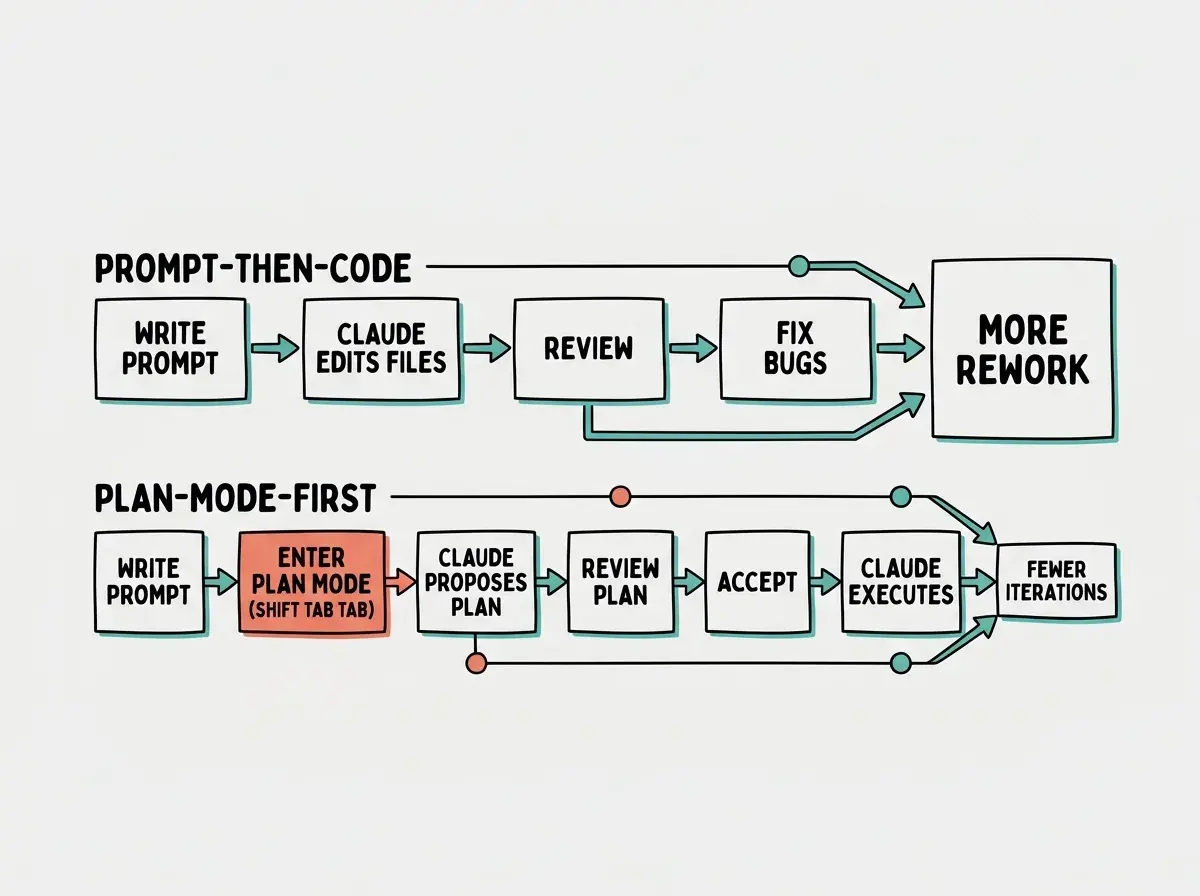
The objection people raise is that plan mode feels slow. It is not. Reading a 200-word plan takes thirty seconds. Reviewing 600 lines of code that went the wrong direction takes twenty minutes. The math is not close.
CLAUDE.md Is the Team's Institutional Memory
The second universal habit is treating CLAUDE.md as a living document, not a one-time setup task. Cat Wu captured the stakes in a Creator Economy interview.
Your Claude.md file is so important.
Boris gave the operational rule for how to keep it growing in a January 2026 post.
Invest in your CLAUDE.md. After every correction, end with: 'Update your CLAUDE.md so you don't make that mistake again.' Claude is eerily good at writing rules for itself.
The team's recommended way to grow your CLAUDE.md is to let Claude write it, one correction at a time. You do not sit down and brainstorm rules from scratch. You catch the model doing something dumb, you correct it, and then you ask it to update its own instruction file so it does not repeat the mistake. Over a few weeks this produces a CLAUDE.md that is sharp, specific, and weirdly tailored to your codebase.
Anthropic's own CLAUDE.md for the Claude Code repo is around 2,500 tokens. Not 25,000. Not 250. About the length of a long blog post intro. It contains the kind of stuff you would expect: which commands to run, which patterns to avoid, where things live. The discipline is keeping it short enough that the model actually reads and respects it, while still capturing every painful lesson.
We're publishing a deep-dive series on how Anthropic actually uses the tools they built.
Browse our Claude Code coverageThe thread that connects CLAUDE.md to the next section is feedback. CLAUDE.md is essentially a static feedback loop, encoded ahead of time. Verification is the dynamic one, running in real time as Claude works. The team uses both, and they reinforce each other.
Verification Beats Prompting Every Time
Boris's number one tip, when forced to pick just one, is not about prompting. It is about verification. He spelled out the multiplier in the same January 2026 thread.
Probably the most important thing to get great results out of Claude Code, give Claude a way to verify its work. If Claude has that feedback loop, it will 2-3x the quality of the final result.
Note the same 2-3x multiplier as plan mode. Stack them and the compounding gets real.
Cat reinforces the practical implementation in a 2026 post.
Tell the model how to verify its changes. Put your testing workflow in your claude.md, or add a /verify-app skill.
The phrasing matters. You are not asking Claude to verify its work in some general sense. You are giving it specific, runnable steps that prove the change works. A unit test. A typecheck. A screenshot. Something concrete that returns a green or red signal Claude can read and act on.
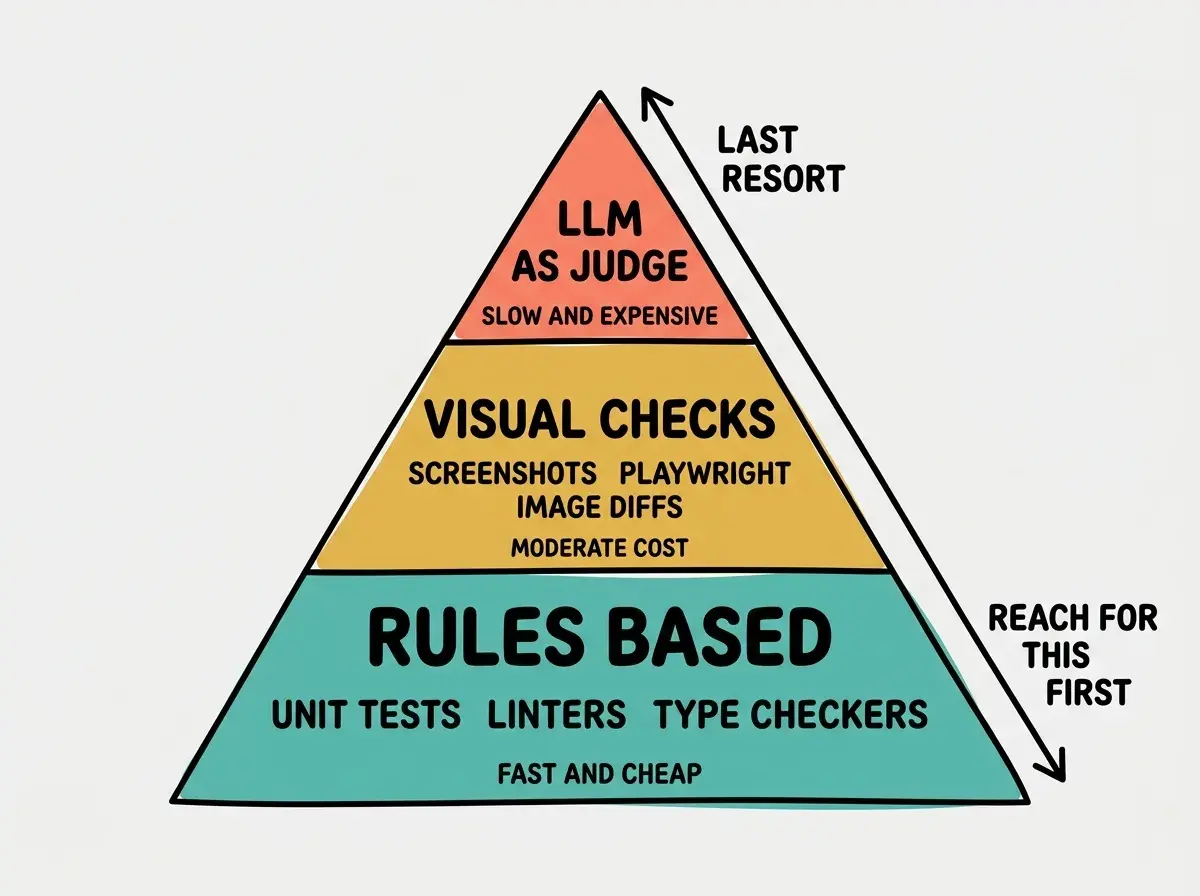
Thariq has been explicit about ranking verification methods by efficiency. The cheapest, fastest, and most reliable verification is rules-based: linters, type checkers, unit tests. Anything that a deterministic tool can answer in milliseconds. Above that sits visual verification, where Claude runs the app, takes a screenshot, and inspects it. At the top, used sparingly, sits LLM-as-judge, where you ask another model to grade the output. The team reaches for the cheapest tool that can actually answer the question.
The model is not the bottleneck. Claude Sonnet 4.6 is more than capable of writing the function you need. The bottleneck is the gap between "Claude thinks it is done" and "the change actually works." Verification closes that gap. Everything else is decoration.
The biggest mistake new users make is spending hours tuning prompts when the real wins are plan mode, CLAUDE.md, and a verify-app skill. Boris's setup is "surprisingly vanilla" and he ships 100% Claude-written code. If you are not getting good results, it is almost never a prompt problem; it is a feedback-loop problem.
Once you internalize that, the next step is to make these workflows muscle memory. That is where slash commands and skills come in.
Once a Day, Turn It Into a Skill
Boris shared a concrete rule of thumb in his January 2026 team tips thread.
If you do something more than once a day, turn it into a slash command or skill.
Anthropic ships its developers with internal skills for everything from running specific test suites to deploying microservices. Once a workflow is captured as a skill, you stop typing the same prompt and you stop forgetting the same flags.
Sid has a related principle the team talks about: let the model cook. Once you have given Claude a good plan, a verification loop, and a clear spec, get out of its way. Do not micromanage every file edit. The team has watched users undermine perfectly good runs by interrupting after every diff to ask for tiny adjustments that the model would have made anyway during the next step.
This blog runs on that doctrine. The skills directory has commands for writing posts, generating images, running SEO checks, publishing, and deploying. None of them are clever. They are just the same prompts I used to type by hand, captured as markdown files so I never have to type them again. The compounding from this is real, and you can build it in an evening.
Dig deeper
A few hand-picked sources if you want to go further.
What This Means For You
- If you're a founder: Enable plan mode by default and write a 200-line CLAUDE.md this week. Those two changes alone close most of the gap between "Claude Code is interesting" and "Claude Code is shipping my product."
- If you're changing careers: The team's top advice is to keep your setup vanilla. Do not try to learn 50 customizations. Learn three habits (plan, memory, verify) and use them on every single task for a month.
- If you're a student: Go read the primary sources linked in this post directly. Twenty minutes with Boris on Lenny's Podcast and Cat's tweet thread will teach you more about how the tool is meant to be used than any third-party course.
Plan mode, CLAUDE.md, and a verify-app skill. Three changes, two-to-three-x quality.
See our complete Claude Code guide