Boris Cherny has a rule that quietly defines how the Claude Code team uses their own tool. That is the entire customization philosophy in one line.
If you do something more than once a day, turn it into a slash command or skill.
The Anthropic team treats customization as a craft, not a feature dump, and they lean on three primitives that each do a very specific job: slash commands, skills, and subagents.
What makes their setup interesting is the discipline. Each primitive has a clear shape of work it is built for, and the team rarely mixes them up. That discipline is what keeps the system maintainable when you have dozens of repeating workflows piling up across a year of daily use.
Slash Commands and the Once-a-Day Rule
Boris's once-a-day rule is the most leveraged piece of advice the team has shared publicly, and it sounds almost too simple to be useful. The reason it works is that the friction of typing the same five-sentence prompt twice is wasted, but the friction of building a slash command is paid once and amortized forever. Within a week, the math is overwhelmingly on the side of building the command.
The mechanics are deliberately boring. Boris wrote in the team tips thread:
Slash commands live in
.claude/commands/. I use/commit-push-prdozens of times every day.
Each command is a single markdown file. The file holds the prompt template Claude Code expands when you invoke it, plus whatever inline instructions and arguments you want to thread through. That is the entire surface area. You write the prompt once, you give it a name, and now your workflow has a verb.
His other favorite example is a session-ending hygiene command:
Build a /techdebt slash command and run it at the end of every session to find and kill duplicated code.
The pattern is the same shape as commit-push-pr: a clear, repeating, single-purpose prompt that you would otherwise type by hand. Both commands are macros. They compress a multi-step prompt into one keystroke and let the underlying model do all the actual thinking.
Boris's "if you do it more than once a day, turn it into a slash command" rule is the single most leveraged piece of advice the team has shared. The friction of typing the same prompt twice is wasted; the friction of building the command pays off within a week.
The trap most people fall into is reaching for a heavier primitive when a slash command would do. A slash command is the right answer for any repeating prompt that is essentially one shot. The moment your workflow needs supporting files, scripts, or a runbook to succeed, you have moved into skill territory, which is where the team's next primitive lives.
Skills Are Folders, Not Files
Thariq Shihipar wrote the canonical post on this. When he published Lessons from Building Claude Code: How We Use Skills, he opened with this:
Using Skills well is a skill issue. I didn't quite realize how much until I wrote this, the best can completely transform how your team works.
The single most important sentence in that post is the structural one: skills are folders, not files.
That distinction is what makes skills different from slash commands. A slash command is a single markdown file with a prompt template. A skill is a directory that holds everything the workflow needs to succeed: a SKILL.md with instructions, supporting scripts, asset files, notes on the gotchas you have hit before, and any reference material Claude Code should consult inline. The whole workflow lives in one place, colocated by purpose.
That colocation matters more than it looks on paper. When you teach Claude Code to deploy a service, the model needs the deploy script, the rollback runbook, the list of things that have broken in the past, and the rules about what counts as a healthy deploy. If you scatter those across your repo, Claude Code has to go find them, and it might not find the right ones. If they all live inside the skill folder, the workflow becomes self-contained and reliable.
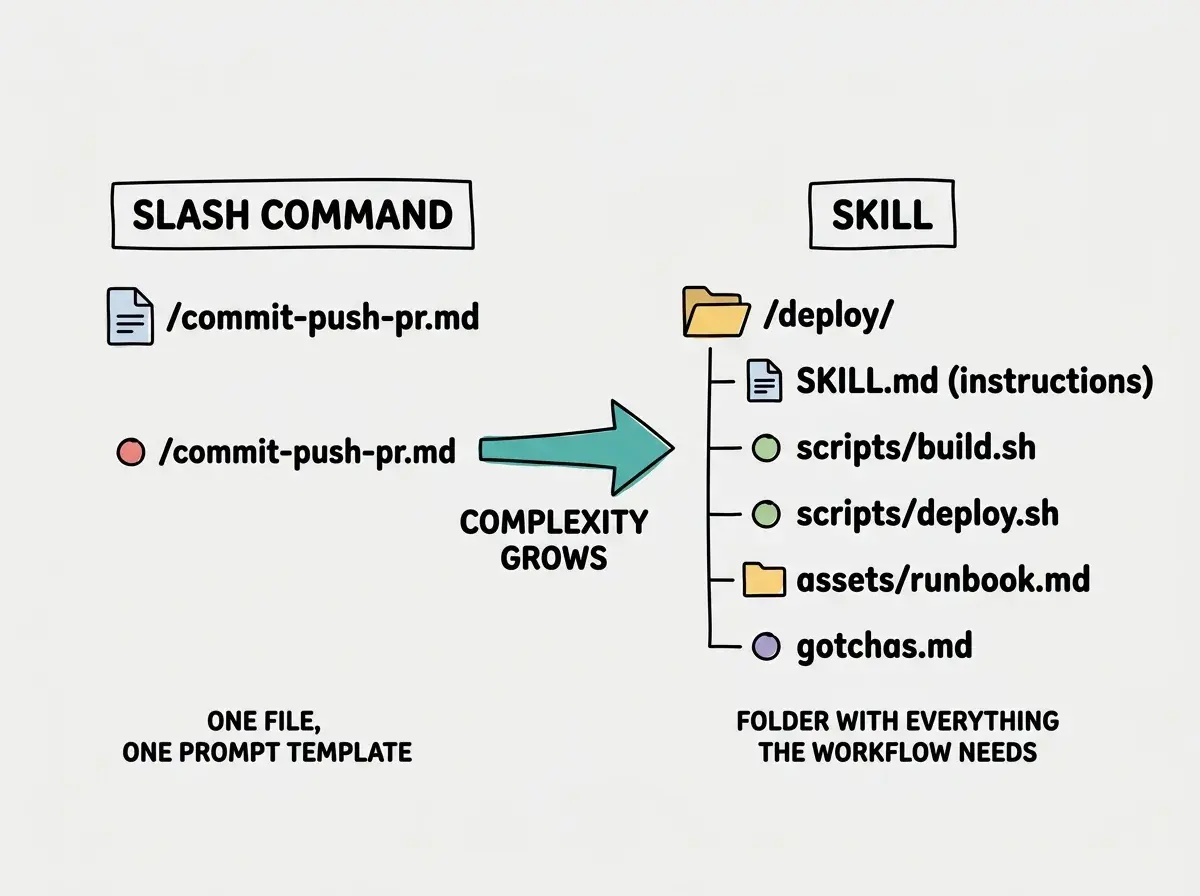
The "skill issue" line in Thariq's post is a deliberate pun, and it lands. The teams that get leverage from skills are the ones that treat the SKILL.md as a living document, refine it after every failure, and check the supporting scripts in alongside it. The teams that struggle treat skills as a fancier slash command and skip the supporting files. The folder structure is the feature; ignoring it gives you all the overhead of a skill with none of the upside.
Subagents Exist for Parallelism and Context Isolation
The third primitive is the one people most often misuse. Thariq's framing in the same skills writeup is the rule the team operates by: subagents exist for parallelization and context isolation, nothing more. If your workflow does not need either, you do not want a subagent. You want a slash command or a skill.
The launch context backs this up. Sid Bidasaria wrote when subagents shipped:
Type /agents to get started. If you want to make sure an agent runs, mention it by its name, but Claude Code will also automatically call them based on your prompts.
Cat Wu later confirmed that subagents support @-mentions and per-agent model selection, which lets you pick a cheaper model for routine subagent work and reserve the heavier model for the main session. Those features make subagents practical, but they do not change what subagents are for.
Boris's personal lineup makes the doctrine concrete:
I use a few subagents regularly:
code-simplifiersimplifies the code after Claude is done working,verify-apphas detailed instructions for testing Claude Code end to end. I think of subagents as automating the most common workflows I do.
Each one earns its place by needing a clean context or by running in parallel with the main thread. code-simplifier runs after the main agent finishes so it sees the final state without the noise of the conversation that produced it. verify-app runs end-to-end testing in its own context so the main session is not derailed by test output.
We're publishing a deep-dive series on the doctrine Anthropic engineers actually use.
Browse our Claude Code coverageThe mistake people make is the inverse of the skills mistake. They build a subagent for every workflow, because subagents feel more powerful. They are not more powerful, just more isolated, and isolation has a cost. Every subagent invocation pays for setup, context loading, and the round trip back to the main agent. If your workflow does not need a fresh context or a parallel lane, you are paying that cost for nothing.
Pick the Primitive That Matches the Shape of the Work
The decision rule the team uses is shape-based, not size-based. A repeating single prompt becomes a slash command. A multi-step workflow that needs assets, scripts, or a runbook becomes a skill. A workflow that needs to run in parallel with the main session or in a clean context becomes a subagent. The size of the prompt does not decide; the shape of the work does.
Thariq has a related observation that explains why this matters. Claude Code holds at roughly twenty top-level tools before the model starts losing its grip on which tool to reach for. You do not extend Claude Code by adding tools. You extend it by adding skills and subagents, both of which keep the top-level tool count flat while massively expanding what the agent can do. That constraint is why the team is so careful about primitive choice. Add the wrong primitive and you have not just made a mess, you have eaten into the model's tool budget.
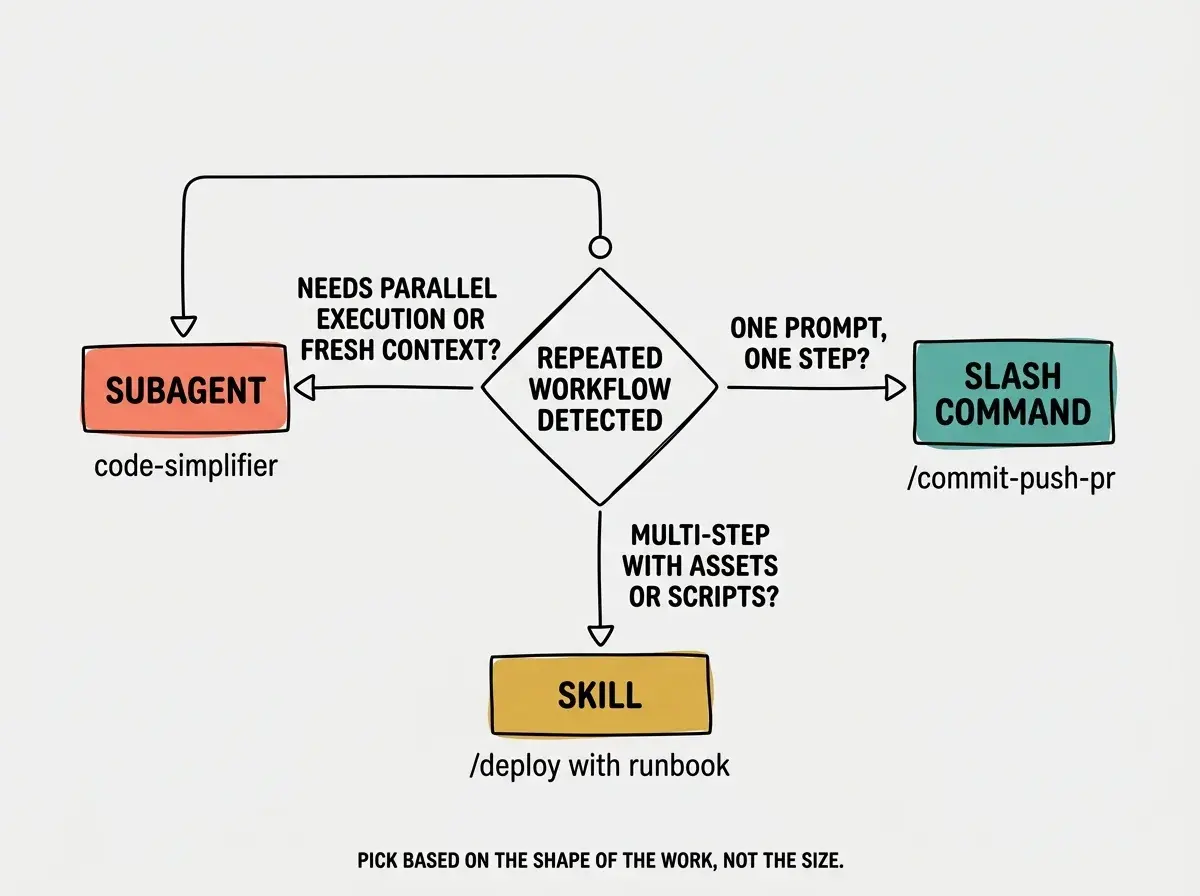
A useful gut check before adding any primitive is to ask which of the three failure modes you are trying to avoid. If you are tired of typing the same prompt, you want a slash command. If your workflow keeps failing because Claude Code does not have the right script or runbook, you want a skill. If your main session keeps getting polluted by a noisy subtask, you want a subagent. Those three failure modes map cleanly onto the three primitives.
Creating a subagent for every workflow. Subagents have setup cost and context overhead. The team's rule is: only use a subagent when you actually need parallelism or context isolation. For everything else, a skill or slash command is simpler and faster.
The other failure mode worth naming is the opposite. People will sometimes try to cram a workflow that genuinely needs scripts and assets into a single slash command file, with the prompt growing longer and more brittle every week. When you find yourself adding inline bash blocks and pasting in runbooks, the workflow has outgrown the slash command primitive and wants to be a skill.
Check Customization Into Git
The last piece of the team's doctrine is that customization is a team artifact. Boris put it directly:
Customize all the things, but check
settings.jsoninto git so your team can benefit, too.
The same logic that makes CLAUDE.md a shared file applies to .claude/commands/, .claude/skills/, and your subagent definitions. If you keep your customization local, only you benefit and the team has to rediscover every workflow from scratch.
The trick for getting started is one Cat Wu shared in the same week:
My favorite shortcut is to ask the claude code guide agent to set up the customization for me. I use this to create all of my slash commands and hooks.
Claude Code can build its own customization. You describe the workflow you want to automate, the guide agent scaffolds the slash command or skill, and you commit the result. That removes the last excuse anyone has for not starting; you do not have to learn the file format before you build your first command.
Committing customization into git also makes the team's tooling reviewable. A new skill goes through pull request like any other code. A change to a slash command shows up in the diff so anyone can question it. That review pressure is what keeps the system from sliding into a junk drawer of half-broken automations. The same culture that produced strong CLAUDE.md files now produces strong skill folders and slash commands, because they all sit in the same review pipeline.
What This Means For You
- If you're a founder: Start with one slash command this week. Pick the prompt you have typed three times today and put it in
.claude/commands/. The compounding is real, and the only thing that gets in the way of it is not starting. - If you're changing careers: Copy a skill from the team's public examples rather than building one from scratch. The folder structure is the part that is hard to get right, and seeing a working example shortcuts most of the learning curve.
- If you're a student: Read Thariq's How We Use Skills post end to end. It is the most concentrated explanation of the team's doctrine that exists in public, and the template he describes is the one that works.
Slash commands, skills, and subagents, organized the way the Claude Code team does it.
See the team's playbook