Cat Wu's tip is to "add a /verify-app skill" but the team rarely shows the literal contents. This article does. Folder, SKILL.md, scripts, and the exact prompt template, all copy-paste ready. If you have read the verification doctrine piece and wondered what the operational form looks like, this is it.
This is for anyone with a working app who wants Claude to run end-to-end verification with one slash command instead of long ad-hoc prompts every session. By the end you will have a folder you can drop into any repo and a Claude Code session that knows how to check itself before declaring victory.
Why a Skill Beats a Long Prompt
Skills are folders, not files. They colocate the instructions, the scripts, the asset templates, and the gotchas in one place. Claude Code reads the front matter of every available skill at session start to know what is available, then loads the body on demand when the description matches the work in progress. The folder pattern means the skill can grow to hold reference screenshots, sample data, or a dozen helper scripts without bloating your main context.
The alternative is what most people start with, a long ad-hoc prompt that says "run the tests, check the dev server, take a screenshot, compare to the reference, look for layout regressions, then tell me what broke." That works once. The second session you have to retype it. The fifth time you forget a step. The tenth time you give up and let Claude declare done without checking. A skill is one keystroke, every time, in every session, with no drift.
The economy of attention matters as much as the economy of typing. When verification lives in a skill, the surface area of every session shrinks. You ask for the change, Claude does the change, the skill checks the change. You are no longer the runtime for the workflow.
Probably the most important thing to get great results out of Claude Code, give Claude a way to verify its work. If Claude has that feedback loop, it will 2-3x the quality of the final result.
Verification is the lever. A skill is how you operationalize the lever so it pulls itself. Boris talks about 2-3x quality because the feedback loop catches the regressions that an unverified model would happily ship past. The skill is the smallest unit of "feedback loop you do not have to babysit."
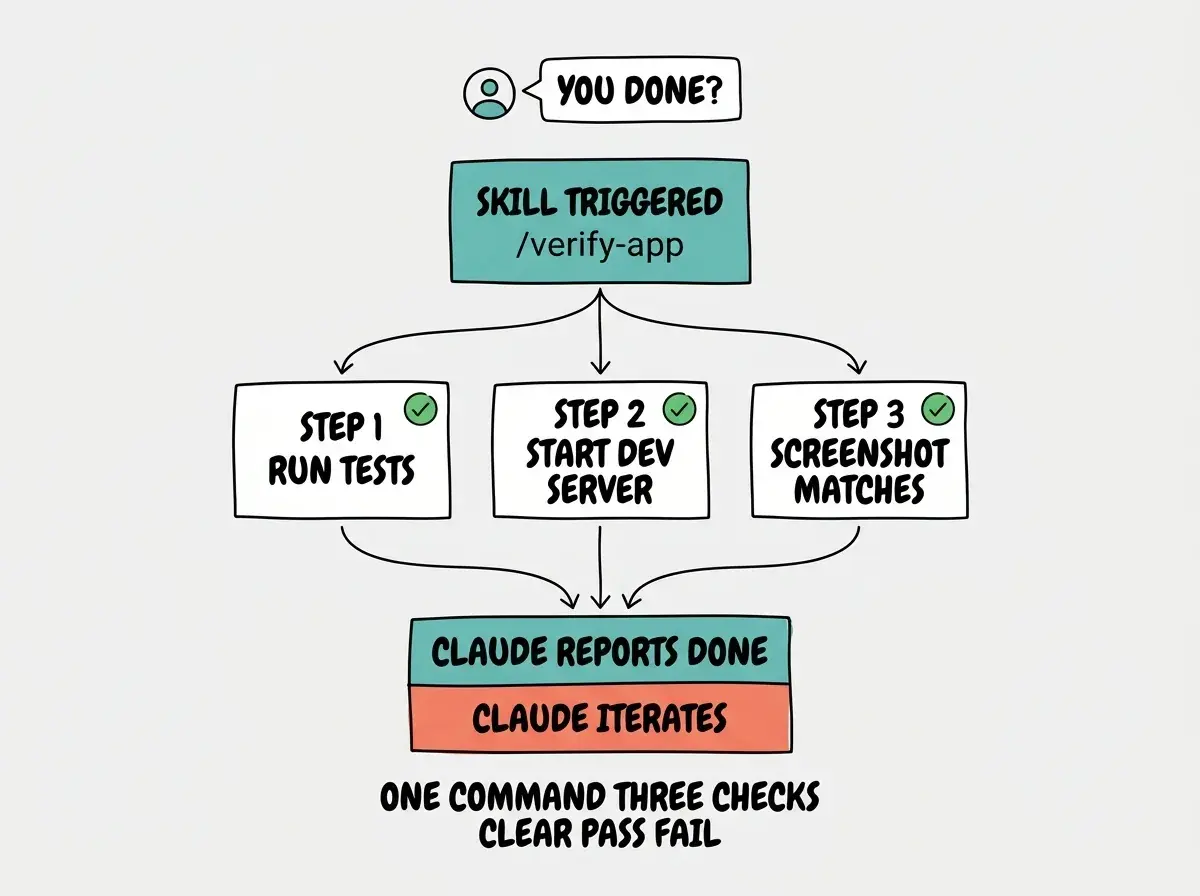
A /verify-app skill turns the team's verification doctrine into a one-keystroke operation. The setup is a folder with three files. Once it exists, every Claude session in your repo can verify the full app stack without you re-explaining the workflow.
The rest of this piece is the build. Folder layout first, then the SKILL.md, then each script, then the hook that ties it all together.
The Folder Layout
Everything for the skill lives under .claude/skills/verify-app/ at the root of your repo. The name of the folder is the name of the skill; Claude Code discovers it automatically when you start a session in this directory. Nothing to register, no config file to update.
Here is the structure we are going to build, including a gotchas.md for the things that have broken in the past and a reference/ directory for the baseline screenshot.
.claude/skills/verify-app/
├── SKILL.md           # instructions Claude reads
├── scripts/
│   ├── run-tests.sh   # the test suite
│   ├── start-dev.sh   # start the dev server
│   └── screenshot.sh  # visual check via Playwright or similar
├── reference/
│   └── main-page.png  # baseline for visual diff
└── gotchas.md         # things that have broken in the past
This is Thariq's "skills are folders" pattern in its simplest form. Everything the workflow needs lives in one place. Claude reads SKILL.md to understand the contract, then invokes the scripts as separate processes. The scripts can grow in complexity without polluting the model's context window, because Claude only reads their output, not their source.
The SKILL.md File
The SKILL.md file is the only file Claude reads in full. The front matter at the top tells Claude when to use the skill; the body tells Claude how. Keep it short, keep it explicit, and keep the trigger conditions concrete.
Here is the complete file. Copy it verbatim into .claude/skills/verify-app/SKILL.md and adjust the paths if your repo layout differs.
---
name: verify-app
description: Run the full app verification suite. Use after any change that could affect functionality, before declaring the task done.
---

# verify-app

Verify the app works end-to-end. Run this skill after every meaningful code change.

## When to use this skill

- After editing any file in `src/`
- Before saying "done" on a multi-file change
- When asked to "verify" or "check" the app

## Steps

1. Run unit tests:
   ```bash
   ./.claude/skills/verify-app/scripts/run-tests.sh
   ```
   Tests must exit 0. If they fail, read the output and fix the failing test before continuing.

2. Start the dev server in the background:
   ```bash
   ./.claude/skills/verify-app/scripts/start-dev.sh
   ```
   Wait for "Ready" in the output.

3. Take a screenshot of the main page:
   ```bash
   ./.claude/skills/verify-app/scripts/screenshot.sh /tmp/current.png
   ```
   Compare against `.claude/skills/verify-app/reference/main-page.png` for visual regressions.

## Pass criteria

- Tests pass (exit 0)
- Dev server starts within 10 seconds
- Screenshot matches reference (within tolerance)

## Failure response

Report which step failed with the exact output, then iterate. Do not declare the task done until all three pass.

## Known gotchas

See `gotchas.md` in this skill folder.
The front matter at the top, the name and description, is what Claude Code uses to decide when to invoke the skill. Be specific about triggers. A description that says "verify the app" is too vague to fire reliably; "run the full app verification suite, use after any change that could affect functionality" includes the use case the model needs to pattern-match against.
Tell the model how to verify its changes. Put your testing workflow in your claude.md, or add a /verify-app skill.
Cat's two options are not equivalent. CLAUDE.md lives in your context budget every session. A skill loads on demand. For anything beyond a one-line verification step, the skill is the right home. The doctrine is the same in both cases; the operational form is what the skill makes durable.
With the contract in place, the next layer is the scripts the contract refers to. The contract does not care how the scripts work, only that they exit cleanly or noisily.
The Scripts
Each script is a small, single-purpose shell file that exits 0 on success and non-zero on failure. The point of the three-script split is that Claude can run them independently, debug them independently, and skip the steps that are not relevant to a given change. Make the scripts executable with chmod +x once and forget about them.
These are deliberately minimal. Yours will be longer, with retries, with environment guards, with custom reporters. The skeleton below is the contract; treat it as the smallest thing that proves the workflow.
run-tests.sh
#!/usr/bin/env bash
set -uo pipefail
npm test -- --run --reporter=verbose
start-dev.sh
#!/usr/bin/env bash
set -uo pipefail
# Start dev server in the background, write logs to file
npm run dev > /tmp/dev.log 2>&1 &
DEV_PID=$!
echo "Dev server pid: $DEV_PID"
# Wait up to 10s for "Ready"
for i in {1..10}; do
  if grep -q "Ready" /tmp/dev.log 2>/dev/null; then
    echo "Ready"
    exit 0
  fi
  sleep 1
done
echo "Dev server did not start in 10s"
exit 1
screenshot.sh
#!/usr/bin/env bash
set -uo pipefail
TARGET=${1:-/tmp/current.png}
# Use Playwright CLI or a small node script
npx playwright screenshot http://localhost:3000 "$TARGET"
Yours will differ. Vitest instead of npm test, Next.js or Vite or Astro instead of a generic dev server, Puppeteer instead of Playwright, a Python or Go stack instead of Node. The point is the contract. Exit 0 on success, non-zero on failure, structured output on stderr. Claude reads exit codes; you do not need to teach the model to parse free-form prose. Make the machine readable thing machine readable and the prose for humans.
How Claude Code Invokes the Skill
Once the skill exists, there are two ways it fires. You can trigger it manually by typing /verify-app in the Claude Code prompt. Or you can let Claude auto-invoke it based on the description in the front matter. The team prefers auto-invocation because it removes one more step from the loop and one more thing for you to remember.
Auto-invocation depends on the description matching the work in progress. The skill description here says "use after any change that could affect functionality, before declaring the task done." When Claude is about to wrap up a task that touched code, that description matches the situation and the skill fires. If the description were vague, the skill would never fire on its own.
Using Skills well is a skill issue. I didn't quite realize how much until I wrote this, the best can completely transform how your team works.
Thariq's point lands hardest after you have built three or four skills. The first one feels mechanical; you copy a template, you replace some paths. By the third one you start to notice which descriptions trigger reliably, which scripts compose, which gotchas belong in a gotchas.md and which belong inline. Making skills good is its own craft, and the verify-app skill is the right starting point because the contract is unambiguous and the failure modes are easy to test.
The verification doctrine and the workflow that makes it real.
Browse our Claude Code coverageThe skill is the recipe. To make the recipe run without you asking, you need one more layer.
Pair It With a Stop Hook
A skill is what to do. A stop hook is when to do it. Wire your stop hook to invoke the skill so Claude cannot claim "done" until verify-app passes. This is how Boris's "Claude runs for hours" pattern actually works in production, with the autonomous loop closed at the bottom by a hook that refuses to let the agent stop short.
The hook lives in .claude/settings.json under the hooks.Stop array. It runs a tiny script that asks Claude to evaluate whether the verify-app skill ran in this session and whether it passed. If the answer is no, the hook blocks the stop event and feeds the model a one-line nudge: "run verify-app before stopping." The model picks the skill back up, runs it, fixes anything that broke, and tries to stop again.
The result is an agent that polices its own completion criteria. You ask for a feature, you walk away, and when you come back the work is either done with a passing verify-app run or stuck mid-iteration with the failures spelled out. Either way you have signal that does not depend on the model's optimism.
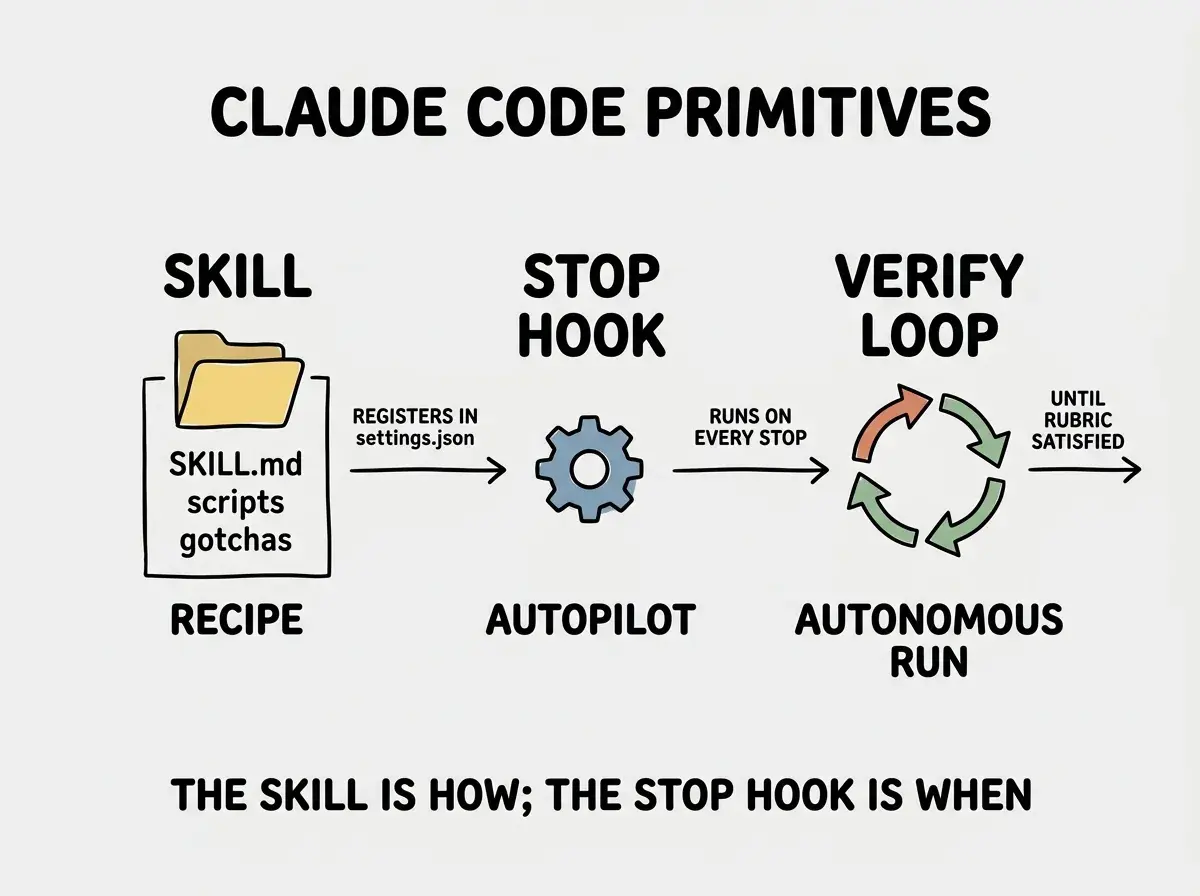
The skill and the hook together are the smallest unit of self-correcting Claude Code. Everything else, subagents, plan mode, custom slash commands, layers on top of this base.
Trying to put the whole workflow into a single shell script. The skill folder pattern wins because Claude can read the SKILL.md to understand the contract, then invoke specific scripts as needed. Everything in one file means Claude has to load 200 lines of bash to understand 20 lines of contract.
Keep the contract and the implementation separate. The SKILL.md is the contract. The scripts are the implementation. The hook is the enforcement. Three layers, three jobs, each one swappable without breaking the others.
What This Means For You
- If you're a founder: Spend the 30 minutes. One verify-app skill saves hours of supervision across the rest of the year. The compounding starts the first time you walk away from a Claude session and find it iterated to green instead of stopping at the first failure.
- If you're changing careers: Reading a real SKILL.md teaches you more about Claude Code than ten doctrine posts. Copy this one, adapt it to your stack, and use it as the model for every other skill you build. The pattern is the asset.
- If you're a student: Start with the run-tests script alone. Add the dev server and screenshot steps later as your verification stack grows. The skill becomes more powerful as you add reference assets and known-gotcha entries; do not try to ship the final form on day one.
One folder, three scripts, one stop hook. Claude verifies your app every time before claiming done.
See the team's playbook