Your app has a login page. Users create accounts, enter passwords, get session tokens. Authentication is working. You tell your AI tool "only logged-in users should see the dashboard," and it adds a check. Done, right?
Not even close. Authentication answers "who are you?" Authorization answers "what are you allowed to do?" These are fundamentally different questions, and AI coding tools almost exclusively answer the first one while ignoring the second.
Think of an apartment building. Authentication is the front door. You have a key fob, you tap it, you get inside. Authorization is the lock on each individual unit. Your key opens apartment 4B, not 4C, 4D, or the building manager's office. If the building only had a front door and no locks on individual apartments, every resident could walk into every other unit. That is what most AI-built applications look like.
The Lovable CVE-2025-48757 proved this is not hypothetical. Over 170 production applications were exposed because the AI generated working authentication but zero authorization. The front door of the building had a lock. The apartments did not.
Authentication vs Authorization
Authentication verifies identity. When a user logs in with an email and password, or signs in with Google, they are authenticating. After authentication succeeds, you know who they are.
Authorization determines permissions. After you know who the user is, you still need to check whether they can view this page, edit this record, or delete this resource.
Here is where AI tools fail. When you prompt an AI to "make this page require login," it adds an authentication check. It verifies that a valid session exists. But it almost never asks: which logged-in users should see this? A junior employee and the CEO both have valid sessions. Should they see the same data?
AI tools default to a binary model. Logged in means full access. Logged out means no access. Real applications need granular control beyond "is there a session?"
Authentication and authorization must be implemented separately. AI tools consistently generate authentication checks while skipping authorization. If your app checks whether a user is logged in but never checks what that user is allowed to do, every logged-in user can access everything.
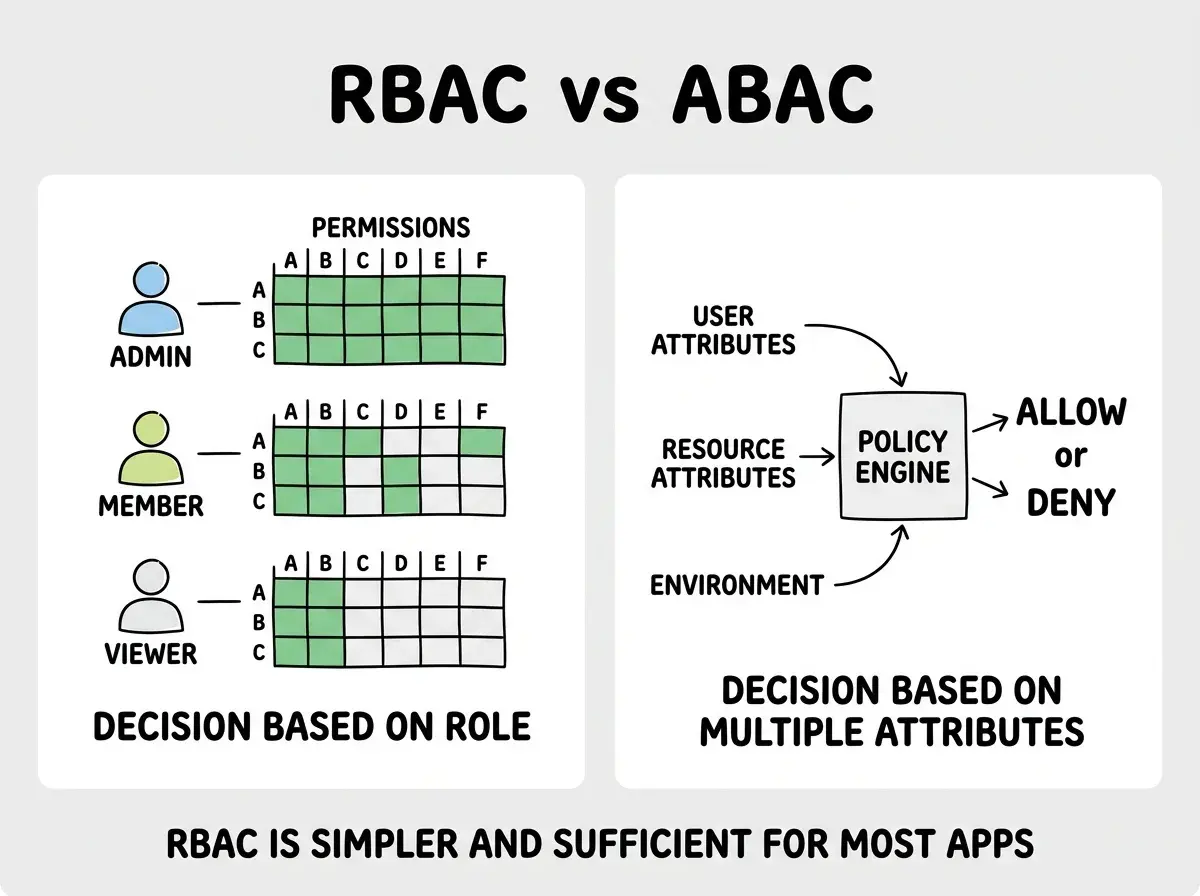
Role-Based Access Control (RBAC)
RBAC is the most common authorization pattern and the one you should implement first. Every user is assigned one or more roles, and every role has a defined set of permissions.
A typical SaaS application has three roles: admin, member, and viewer. An admin can create, read, update, and delete anything. A member can create and read, plus update their own content. A viewer can only read.
// Middleware that checks role before allowing access
function requireRole(allowedRoles: string[]) {
  return (req, res, next) => {
    const user = req.session.user;

    if (!user) {
      return res.status(401).json({ error: 'Not authenticated' });
    }

    if (!allowedRoles.includes(user.role)) {
      return res.status(403).json({ error: 'Not authorized' });
    }

    next();
  };
}

// Usage on routes
app.delete('/api/users/:id', requireRole(['admin']), deleteUser);
app.post('/api/posts', requireRole(['admin', 'member']), createPost);
app.get('/api/posts', requireRole(['admin', 'member', 'viewer']), listPosts);
Notice the two different error codes. A 401 means "you are not authenticated, go log in." A 403 means "you are authenticated, but you do not have permission." AI tools almost always return 401 for both cases, which makes debugging access issues confusing.
RBAC works well when your permission model maps cleanly to roles. It breaks down when you need more nuanced rules, like "managers can only edit posts created by people on their team." That is where attribute-based access control comes in.
Authorization is one piece of the security puzzle. Start with the fundamentals.
Explore the blogAttribute-Based Access Control (ABAC)
ABAC makes authorization decisions based on attributes of the user, the resource, and the environment. Instead of checking a single role, the question becomes "does this user's department match the resource's department, and is the account in good standing?"
// ABAC policy evaluation
function canEditDocument(user, document) {
  if (user.organizationId !== document.organizationId) return false;
  if (document.ownerId === user.id) return true;
  if (user.role === 'manager' && user.departmentId === document.departmentId) {
    return true;
  }
  if (user.role === 'admin') return true;
  return false;
}
ABAC is more flexible than RBAC but more complex to implement and audit. For most vibe-coded applications, RBAC is sufficient. If you find yourself writing lots of special-case rules on top of RBAC, that is the signal to consider ABAC.
Row-Level Security Policies
RLS moves authorization from your application code into the database itself. Instead of checking permissions in your API route, the database enforces the rules on every query automatically.
Application-level authorization has a fatal weakness: it is easy to miss a route. If you have forty API endpoints and thirty-nine check permissions correctly, the one you missed is all an attacker needs. RLS eliminates this class of bug because the database applies the policy regardless of how the query arrives.
In Supabase (built on PostgreSQL), RLS looks like this:
-- Enable RLS on the table
ALTER TABLE documents ENABLE ROW LEVEL SECURITY;

-- Users can only read documents in their organization
CREATE POLICY "org_read_access" ON documents
  FOR SELECT
  USING (organization_id = auth.jwt() ->> 'org_id');

-- Users can only update their own documents
CREATE POLICY "owner_update_access" ON documents
  FOR UPDATE
  USING (owner_id = auth.uid());

-- Only admins can delete documents
CREATE POLICY "admin_delete_access" ON documents
  FOR DELETE
  USING (
    auth.uid() IN (
      SELECT id FROM users WHERE role = 'admin'
        AND organization_id = documents.organization_id
    )
  );
With these policies active, a user querying SELECT * FROM documents only gets rows their policies allow. Even if your application code has a bug that forgets to filter by organization, the database prevents data leakage.
This is exactly what was missing in the Lovable CVE. The 170+ exposed applications had no RLS policies. Any authenticated user (and in some cases, unauthenticated requests using the public API key) could read and modify every row in every table.
Why AI Tools Skip Authorization
The pattern is consistent across every major AI coding tool. You ask for a todo app, and every logged-in user sees every todo. You ask for an admin panel, and it is accessible to anyone with a valid session.
This happens for two reasons. First, AI tools optimize for demos, not production. In a demo, there is one user who needs to see all the data to verify the app works. The AI takes the path of least resistance: showing everything to everyone.
Second, authorization requires business logic the AI cannot infer. "Members can edit their own posts but not others'" is a rule specific to your application. Current tools are not designed to ask you about these rules.
The result is applications that feel complete during testing but have wide-open authorization in production.
Adding authorization checks only to the frontend. Hiding a button in the UI does not prevent someone from calling the API endpoint directly. If your "Delete User" button is hidden for non-admins but the /api/users/:id DELETE endpoint has no role check, anyone with basic API knowledge can delete users. Authorization must be enforced on the server. Frontend visibility is a UX concern, not a security control.
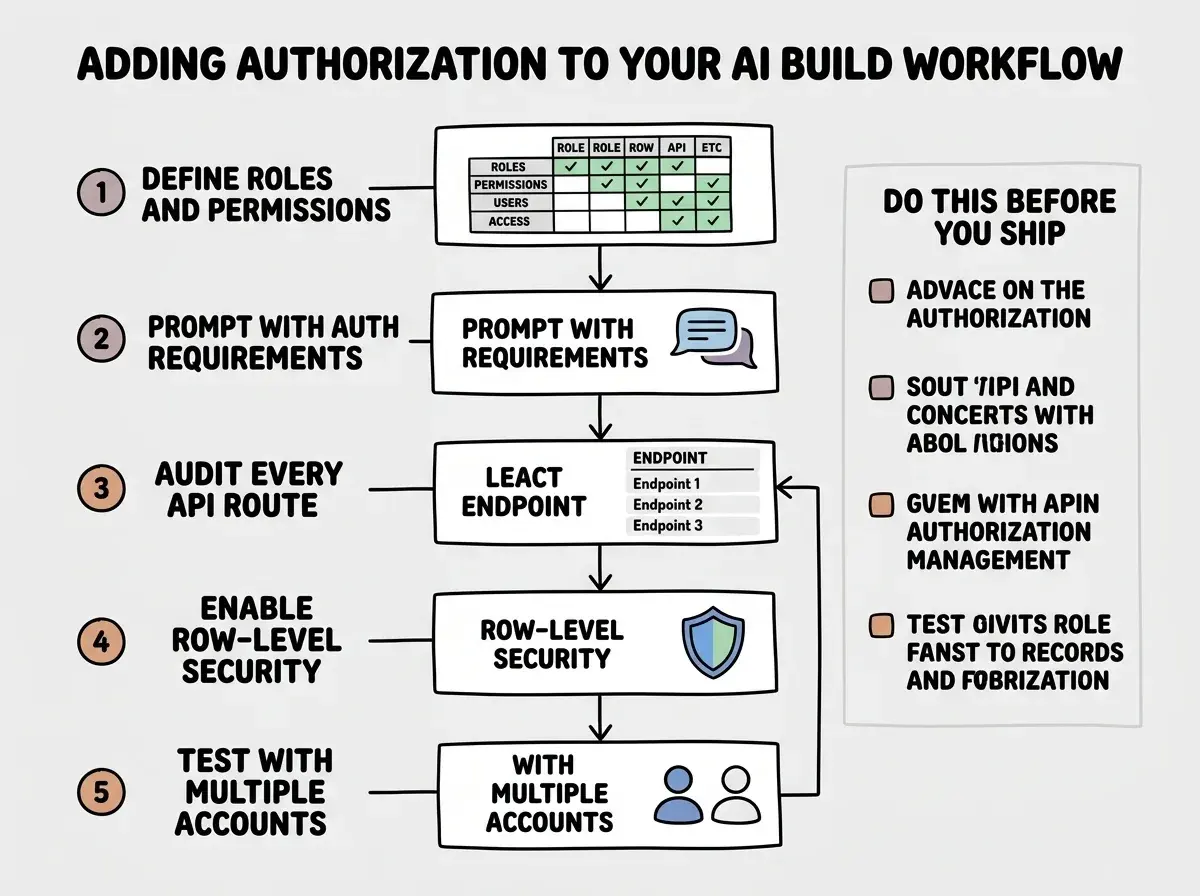
Building Authorization Into Your Workflow
If you are using AI tools, you need to add authorization as an explicit step.
Define your roles and permissions before generating code. Write down who uses your app and what each type of user should be able to do. A simple table with roles across the top and actions down the side gives the AI something concrete to implement.
Prompt for authorization explicitly. Include authorization requirements in every feature prompt. "Build a document editing page where users can only edit documents they own and admins can edit any document." The more specific you are, the more likely the AI generates proper checks.
Audit every API route. Go through every route and ask: "Who should be allowed to call this?" If the answer is "only admins" or "only the resource owner," verify that the code enforces it.
Use RLS if your database supports it. Enable RLS and define policies for every table that contains user data. This gives you a safety net that catches authorization bugs in your application code.
Test with multiple user accounts. Create at least two test users with different roles. Log in as the lower-privilege user and try to access everything the higher-privilege user can see. If you succeed, your authorization is broken.
What This Means For You
Authorization is the difference between an application that verifies identity and one that actually controls access. AI tools consistently build the front door and skip the apartment locks, because the application works the same way during testing regardless of whether authorization exists.
-
If you are a founder: The Lovable CVE exposed 170+ apps because authorization was missing entirely. Before your first real user touches the product, define your roles, enable RLS if you are on Supabase, and audit every API route. A data breach from missing authorization is not a technical accident. It is a foreseeable failure that investors, regulators, and users will hold you accountable for.
-
If you are a senior developer: Treat authorization as a first-class architectural concern. Every AI-generated endpoint should be assumed to have no authorization until verified. Push for RLS at the database layer, because application-level checks require perfection across every route. When reviewing AI-generated code, the question is not "does this route check for a session?" It is "does this route verify this user can perform this action on this resource?"
Authorization is one piece of securing your AI-built application. Get the full picture.
Read the security survival guide