Authentication is the hardest system to test because bugs surface as security vulnerabilities, not UI glitches. A broken button is obvious. A session that stays valid after logout, a token that never expires, or a role check that passes for the wrong user can go unnoticed for months until someone exploits it.
This tutorial covers testing authentication flows at every layer: unit tests for token validation and role logic, integration tests for signup and login endpoints, and E2E tests that drive a real browser through the full auth cycle. Each layer catches different classes of failure.
Why Auth Is the Hardest Thing to Test
Most features break visibly. Auth fails silently. A user submits a form and either gets in or does not. If the logic is wrong, you might not notice for a long time. The consequences are also asymmetric: a failed payment is recoverable, but a leaked session or a privilege escalation is not.
There are three reasons auth is uniquely difficult to test. First, it spans the entire stack. Token generation happens on the server. Token storage happens in the browser. Token validation happens on every protected route. A bug in any layer compromises the whole system. A unit test on the token validator tells you nothing about whether the cookie is set correctly in the browser, and a passing login E2E test tells you nothing about what happens when that token expires mid-session.
Second, auth is stateful. Whether a user can access a resource depends on external state (is the token expired? has the password changed? is the session revoked?), not just the inputs to a function. Mocking that state correctly requires care. Tests that do not set up realistic state give you false confidence: they pass in isolation but the real system behaves differently.
Third, AI-generated auth code tends to get the happy path right and miss the edge cases. The login endpoint works. The token validation works. But the token that was issued before a password reset, the concurrent session from a different device, the rate limiter that should block brute force attempts: these get skipped because the prompt never mentioned them. Your job as a senior dev is to write the tests that cover the cases the prompt left out, then fix whatever those tests reveal.
Unit Testing Auth Logic
Unit tests are the right tool for pure logic: functions that take inputs and return outputs with no side effects. Token validation, session expiry checks, and role permission lookups all fit this pattern.
Here is a token validation function and a comprehensive test suite using Vitest (Jest works identically):
// lib/auth/token.ts
import jwt from 'jsonwebtoken';

export interface TokenPayload {
  userId: string;
  role: 'user' | 'admin';
  iat: number;
  exp: number;
}

export function validateToken(token: string, secret: string): TokenPayload {
  try {
    return jwt.verify(token, secret) as TokenPayload;
  } catch (err) {
    if (err instanceof jwt.TokenExpiredError) {
      throw new Error('TOKEN_EXPIRED');
    }
    throw new Error('TOKEN_INVALID');
  }
}

export function hasPermission(role: TokenPayload['role'], action: string): boolean {
  const permissions: Record<string, string[]> = {
    admin: ['read', 'write', 'delete', 'manage_users'],
    user: ['read', 'write'],
  };
  return permissions[role]?.includes(action) ?? false;
}
// lib/auth/token.test.ts
import { describe, test, expect } from 'vitest';
import jwt from 'jsonwebtoken';
import { validateToken, hasPermission } from './token';

const SECRET = 'test-secret';

describe('validateToken', () => {
  test('returns payload for a valid token', () => {
    const token = jwt.sign({ userId: 'u1', role: 'user' }, SECRET, { expiresIn: '1h' });
    const payload = validateToken(token, SECRET);
    expect(payload.userId).toBe('u1');
    expect(payload.role).toBe('user');
  });

  test('throws TOKEN_EXPIRED for an expired token', () => {
    const token = jwt.sign({ userId: 'u1', role: 'user' }, SECRET, { expiresIn: '-1s' });
    expect(() => validateToken(token, SECRET)).toThrow('TOKEN_EXPIRED');
  });

  test('throws TOKEN_INVALID for a tampered token', () => {
    const token = jwt.sign({ userId: 'u1', role: 'user' }, 'wrong-secret', { expiresIn: '1h' });
    expect(() => validateToken(token, 'correct-secret')).toThrow('TOKEN_INVALID');
  });

  test('throws TOKEN_INVALID for a malformed string', () => {
    expect(() => validateToken('not.a.token', SECRET)).toThrow('TOKEN_INVALID');
  });
});

describe('hasPermission', () => {
  test('admin can delete', () => {
    expect(hasPermission('admin', 'delete')).toBe(true);
  });

  test('user cannot delete', () => {
    expect(hasPermission('user', 'delete')).toBe(false);
  });

  test('user can read', () => {
    expect(hasPermission('user', 'read')).toBe(true);
  });
});
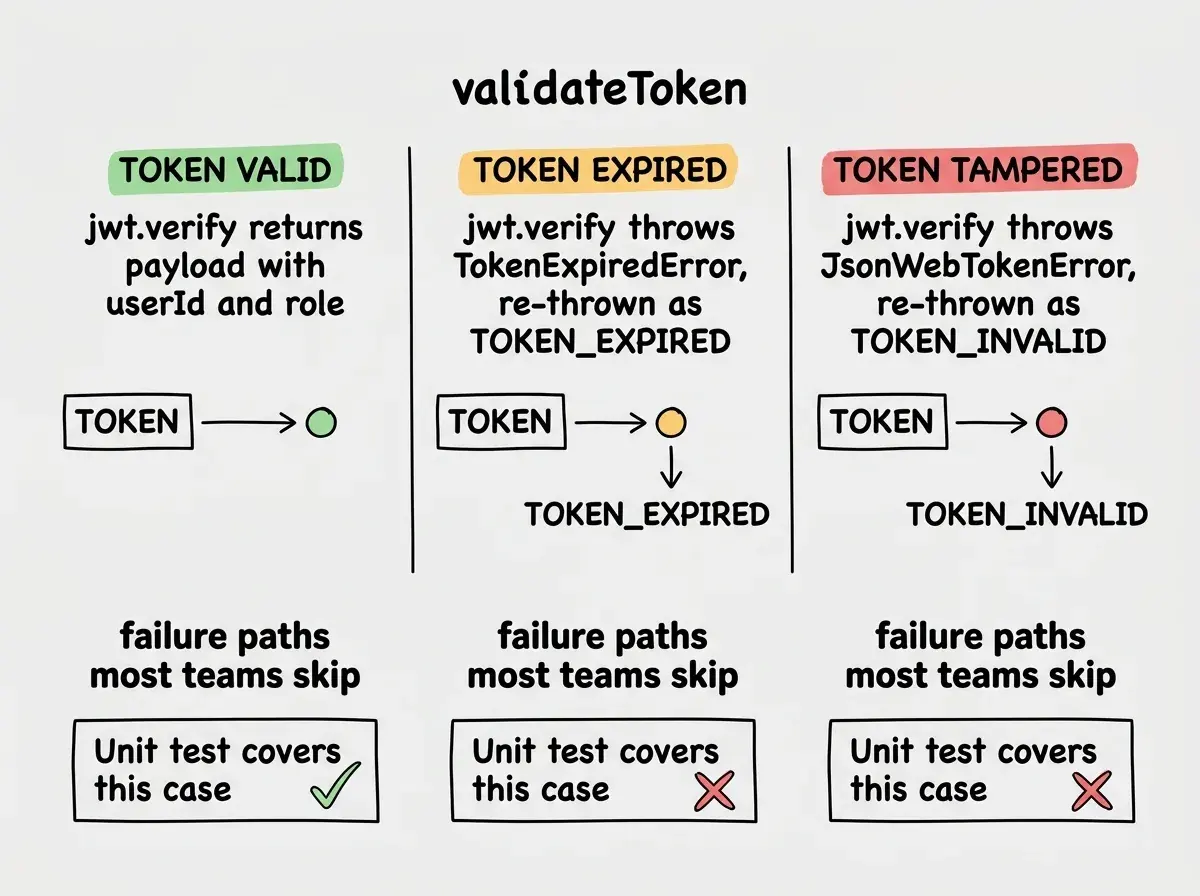
The expired token test is the one that most codebases skip. Notice the trick: expiresIn: '-1s' creates a token that was already expired one second ago when it was signed. This lets you test expiry without mocking the clock.
Integration Testing Auth Flows
Integration tests verify that your API endpoints do the right thing end to end, including database reads and writes, without a browser. Use a test database (separate from production), seed it with known users, and make real HTTP requests.
Here is a pattern using Vitest with supertest against a Next.js API route handler:
// tests/integration/auth.test.ts
import { describe, test, expect, beforeAll, afterAll } from 'vitest';
import request from 'supertest';
import { createTestServer } from '../helpers/server';
import { seedTestUser, clearTestUsers } from '../helpers/db';

let app: ReturnType<typeof createTestServer>;

beforeAll(async () => {
  app = await createTestServer();
  await seedTestUser({
    email: 'test@example.com',
    password: 'correct-password',
    role: 'user',
  });
});

afterAll(async () => {
  await clearTestUsers();
});

describe('POST /api/auth/login', () => {
  test('returns a token for valid credentials', async () => {
    const res = await request(app)
      .post('/api/auth/login')
      .send({ email: 'test@example.com', password: 'correct-password' });

    expect(res.status).toBe(200);
    expect(res.body.token).toBeDefined();
    expect(res.body.token.split('.')).toHaveLength(3); // valid JWT structure
  });

  test('returns 401 for wrong password', async () => {
    const res = await request(app)
      .post('/api/auth/login')
      .send({ email: 'test@example.com', password: 'wrong-password' });

    expect(res.status).toBe(401);
    expect(res.body.token).toBeUndefined();
  });

  test('returns 400 for missing email', async () => {
    const res = await request(app)
      .post('/api/auth/login')
      .send({ password: 'correct-password' });

    expect(res.status).toBe(400);
  });

  test('returns 429 after too many failed attempts', async () => {
    for (let i = 0; i < 5; i++) {
      await request(app)
        .post('/api/auth/login')
        .send({ email: 'test@example.com', password: 'wrong' });
    }

    const res = await request(app)
      .post('/api/auth/login')
      .send({ email: 'test@example.com', password: 'wrong' });

    expect(res.status).toBe(429);
  });
});
The rate limit test is critical. Most AI-generated login endpoints do not include rate limiting at all. This test will fail by default, which is the point: a failing test is a security finding you now have to fix.
For password reset flows, test the full sequence as one integration test. Generate a reset token, use it to change the password, then verify the old password no longer works and the reset token cannot be used a second time.
test('password reset token is single-use', async () => {
  // Request a reset
  const requestRes = await request(app)
    .post('/api/auth/reset-request')
    .send({ email: 'test@example.com' });
  expect(requestRes.status).toBe(200);

  // Get the token from the database (test-only helper)
  const { token } = await getLatestResetToken('test@example.com');

  // Use it once (should succeed)
  const firstUse = await request(app)
    .post('/api/auth/reset-confirm')
    .send({ token, newPassword: 'new-password-123' });
  expect(firstUse.status).toBe(200);

  // Try to use it again (should fail)
  const secondUse = await request(app)
    .post('/api/auth/reset-confirm')
    .send({ token, newPassword: 'another-password' });
  expect(secondUse.status).toBe(400);
});
Your integration tests should use a separate, seeded test database, never your development or production database. Run beforeAll to seed known users and afterAll to clean up. This makes tests deterministic: the same seed produces the same results every run, regardless of what data exists elsewhere.
E2E Testing Auth with Playwright
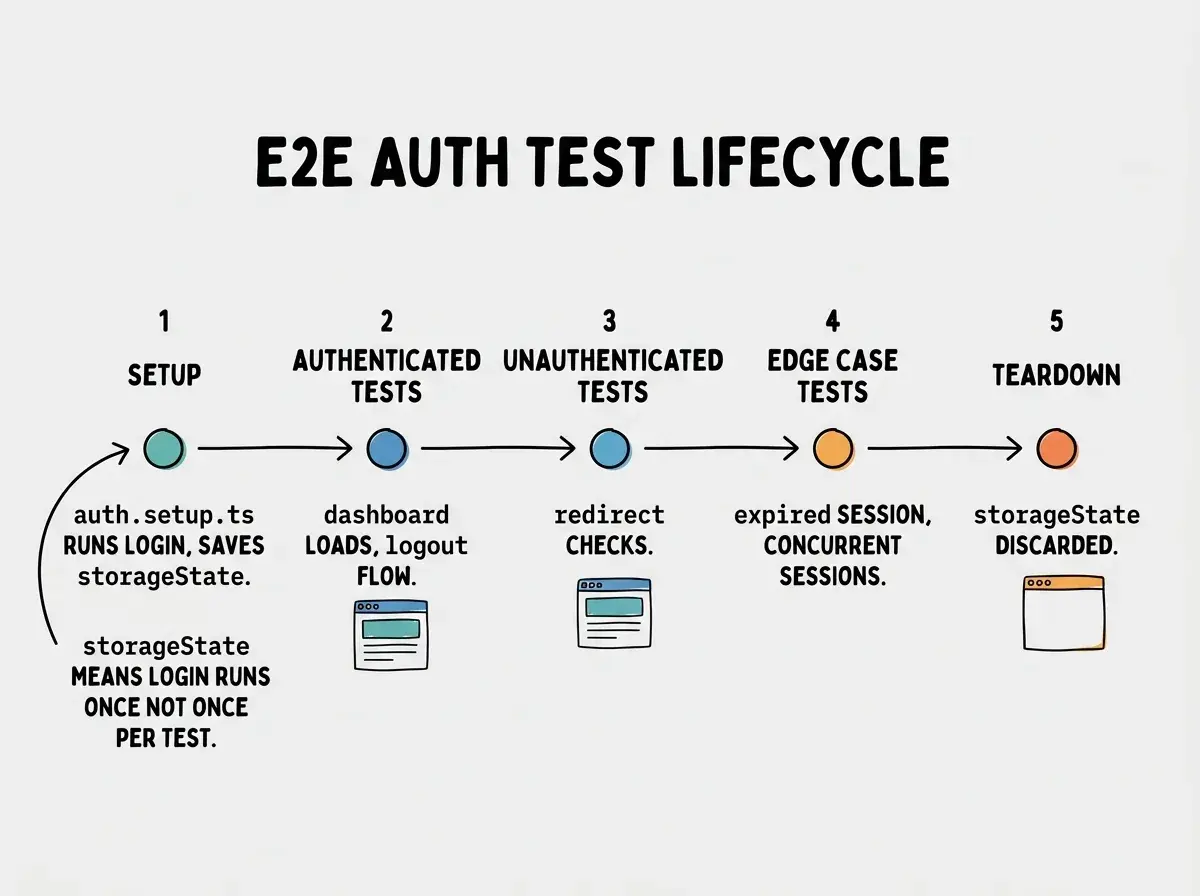
E2E tests drive a real browser through your auth flows. They catch problems that neither unit nor integration tests see: the redirect that does not happen, the cookie that is not set, the session that persists after logout because the client-side state was not cleared.
Set up a storageState project so tests that need to be logged in do not repeat the login flow on every test:
// tests/e2e/auth.setup.ts
import { test as setup } from '@playwright/test';
import path from 'path';

const authFile = path.join(__dirname, '../.playwright/auth.json');

setup('log in as test user', async ({ page }) => {
  await page.goto('/login');
  await page.getByLabel('Email').fill(process.env.TEST_USER_EMAIL!);
  await page.getByLabel('Password').fill(process.env.TEST_USER_PASSWORD!);
  await page.getByRole('button', { name: 'Sign in' }).click();
  await page.waitForURL('/dashboard');
  await page.context().storageState({ path: authFile });
});
// playwright.config.ts (relevant section)
projects: [
  { name: 'setup', testMatch: /auth\.setup\.ts/ },
  {
    name: 'chromium',
    use: { storageState: '.playwright/auth.json' },
    dependencies: ['setup'],
  },
  {
    name: 'chromium-unauthenticated',
    use: { storageState: undefined },
  },
],
Now write tests for protected and public routes separately. The unauthenticated project handles redirect tests; the authenticated project handles everything behind the login wall.
// tests/e2e/protected-routes.spec.ts
import { test, expect } from '@playwright/test';

// These run in the 'chromium-unauthenticated' project
test('visiting /dashboard while logged out redirects to /login', async ({ page }) => {
  await page.goto('/dashboard');
  await expect(page).toHaveURL('/login');
});

// These run in the 'chromium' project (authenticated)
test('logout clears session and redirects to login', async ({ page }) => {
  await page.goto('/dashboard');
  await page.getByRole('button', { name: 'Log out' }).click();
  await expect(page).toHaveURL('/login');

  // Verify the session is actually gone, not just redirected
  await page.goto('/dashboard');
  await expect(page).toHaveURL('/login');
});
The logout test is the one most teams skip. It is not enough to confirm the redirect. You need to verify that navigating back to a protected route after logout does not let you in, because some implementations clear the cookie on the server but leave a stale client-side session that still passes checks.
For Cypress users, the equivalent is cy.session. You define a session with a name and a setup callback; Cypress caches it and restores it across tests automatically. The structural principle is the same: authenticate once per run, reuse the session state across every test that needs it.
Edge Cases AI Auth Code Always Misses
This is the section that matters most for senior developers auditing AI-generated auth implementations. The happy path usually works. These do not.
Expired tokens that look valid on the client. If your token expires but the client does not refresh it, the user gets confusing 401 errors deep in the app rather than being redirected to login. Write an integration test that issues a request with an expired token and asserts a 401 with a specific error code your client can handle.
Tokens issued before a password change. When a user changes their password, all previously issued tokens should be invalidated. The common implementation (JWTs with no revocation list) cannot do this. Test it: issue a token, change the password, use the old token, and assert it is rejected. If it is not, you have a security gap to fix.
Concurrent sessions. Can a user be logged in on two devices simultaneously? Should they? If concurrent sessions are not allowed, test that logging in on a new device invalidates the previous session. If they are allowed, test that logout on one device does not affect the other.
Rate limiting under concurrency. Single-threaded rate limit tests can miss bugs in implementations that use in-memory counters without proper locking. Write a test that fires multiple requests simultaneously using Promise.all and verifies that no more than the allowed number succeed.
test('rate limiter blocks concurrent brute force attempts', async () => {
  const attempts = Array.from({ length: 10 }, () =>
    request(app)
      .post('/api/auth/login')
      .send({ email: 'test@example.com', password: 'wrong' })
  );

  const results = await Promise.all(attempts);
  const blocked = results.filter(r => r.status === 429);
  expect(blocked.length).toBeGreaterThan(0);
});
Testing only the final state of an auth flow instead of the intermediate states. For password reset, most tests check that the new password works. Fewer check that the reset token cannot be reused, that it expires after 15 minutes, and that requesting a second reset invalidates the first token. Each of those is a separate security property that requires a separate test.
What This Means For You
Testing authentication flows is the kind of work that distinguishes a senior engineer from someone who ships and hopes. Here is how this applies depending on where you are:
If you are a senior dev reviewing AI-generated code: Treat every auth flow as untested until you have coverage at all three layers. The unit tests will catch logic bugs. The integration tests will catch missing rate limiting and insecure token handling. The E2E tests will catch redirect failures and client-side session leaks. Run the full suite before any auth-related change ships.
If you are a founder building with AI tools: You do not need perfect test coverage on your landing page. You do need it on auth. One leaked session or one account takeover is a reputational and legal problem that grows proportionally with your user base. A half-day investment in auth testing is your most cost-effective security measure.
If you are a career changer or student: Building a portfolio project with a comprehensive auth test suite is a strong differentiator. Most junior candidates ship features. Showing that you can write unit tests for token validation, integration tests for login endpoints, and E2E tests for logout flows communicates engineering maturity that most interviewers are not expecting.
The test suite does not have to be exhaustive to be valuable. Start with the four most critical tests: valid login succeeds, invalid login returns 401, protected routes redirect when logged out, and logout actually clears the session. Those four tests catch the bugs that reach production most often. Add the edge cases over time as you build confidence in the system.
The deeper benefit is organizational. A comprehensive auth test suite is documentation of what the system is supposed to do, written in code that runs on every push. When a new developer joins, they do not need to ask "what happens if someone tries a reset token twice?" The test answers that question. When an AI rewrites the auth middleware, the tests tell you immediately whether the new version preserved all the security properties the old version had.
Read how to structure the full auth layer from tokens to protected routes.
Explore the full guideAuth testing is investment that pays compound interest. Each test you write reduces the cognitive load on every future change to the auth system. Instead of clicking through login flows manually after every deploy, you run the suite and get a definitive answer. The suite grows with the system, and eventually you stop worrying about auth regressions entirely because the tests have that covered.
Unit, integration, and E2E coverage for the parts of your app that cannot afford to break.
See the full testing workflow