You write a prompt. The AI generates something. It is close but not quite right. The sidebar is too wide, the error messages are missing, the button style does not match your design system. So you do what feels natural. You clear the conversation, rewrite the entire prompt from scratch, and try again.
This is the most expensive habit in vibe coding. Every time you start over, you throw away all the context the AI has built up about what you are building. You lose the progress, the partial correctness, and the shared understanding that took your first prompt to establish. It is like crumpling up a clay sculpture because the nose is slightly off instead of just reshaping the nose.
Follow-up prompts are the alternative, and once you learn to use them, you will wonder how you ever built anything without them.
Why Starting Over Wastes More Than Time
When you send a prompt and get a response, the AI has done more than generate code. It has built an internal model of what you are trying to accomplish. It understands your tech stack, your component structure, and the relationships between the pieces it just created. That mental model lives in the conversation context, and it is valuable.
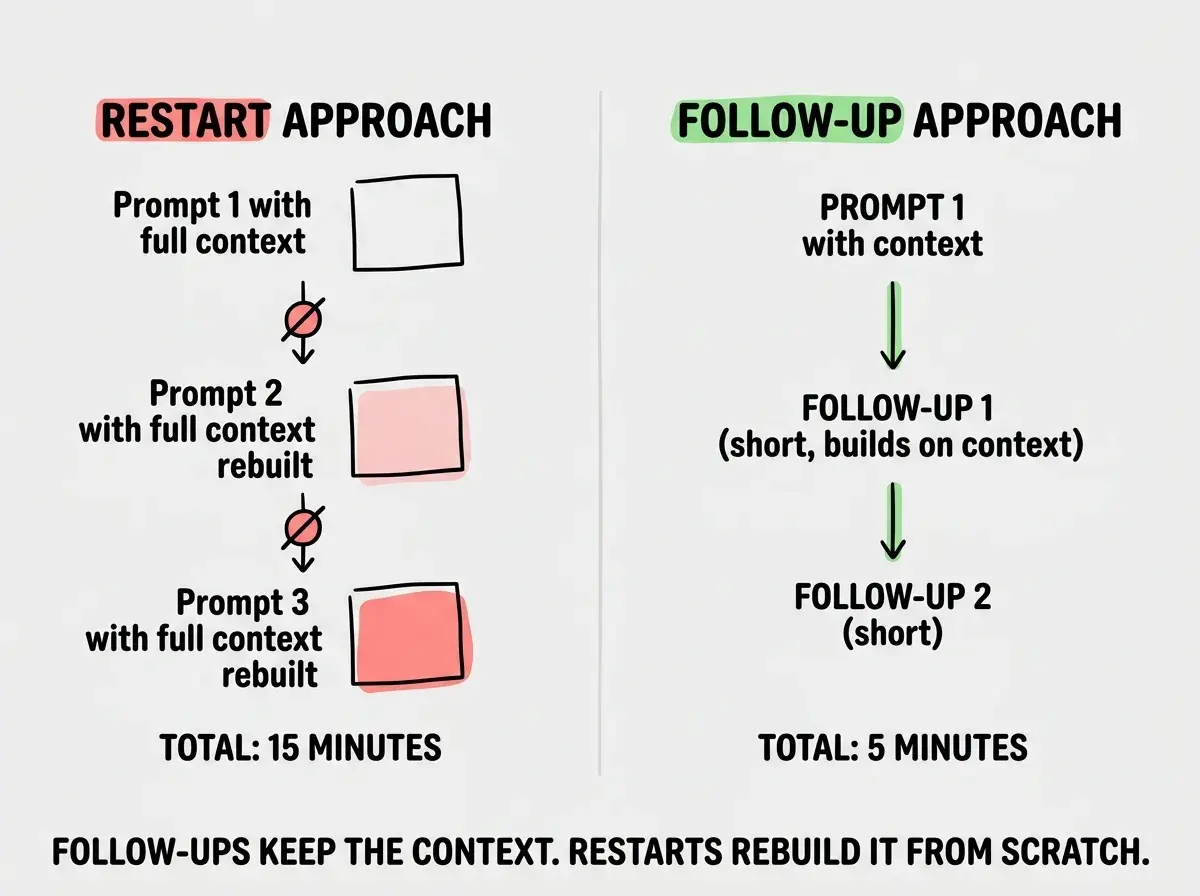
Starting over destroys that model. Your second attempt begins from zero, and the AI has to reconstruct everything from your new prompt alone. Even if your rewritten prompt is better, you are paying the full cost of context-building again. Worse, there is no guarantee the second attempt will be closer to what you want. You might fix the sidebar issue but introduce a new problem with the layout because the AI made different guesses this time.
Follow-up prompts preserve the context. Instead of starting from nothing, you start from "almost right" and steer toward "exactly right." The AI already knows what you are building. You just need to tell it what to adjust.
Think about how a sculptor works with clay. When the shape is not quite right, a sculptor does not ball up the clay and start over. They push here, smooth there, add a bit of material in one spot and remove it from another. The clay retains its overall form while the details get refined. Each adjustment builds on the last, and the sculptor converges on the final shape through a series of small, deliberate changes.
That is exactly how follow-up prompts work. Your first prompt creates the rough shape. Each follow-up refines a specific aspect until the whole thing matches your vision.
Your first prompt is a rough draft, not a final submission. The real skill in AI coding is not writing one perfect prompt. It is knowing how to guide the AI from a rough draft to a finished result through focused follow-up prompts. This refinement loop is faster, more reliable, and produces better code than starting over ever will.
The Refinement Loop
The core pattern is simple. You prompt, you review, you follow up. But each step has a specific purpose that makes the whole loop work.
Prompt. Send your initial request with as much structure, context, and constraints as you can. This does not need to be perfect. It needs to be good enough to give the AI a reasonable starting point.
Review. Read the output carefully. Do not just glance at whether it "looks right." Check specific things. Does the data flow make sense? Are the styles consistent with your project? Does the component handle the edge cases you care about? Identify what is correct and what needs to change.
Follow up. Write a targeted prompt that addresses only what needs to change. Be specific about what to keep and what to modify. The more focused your follow-up, the less likely the AI is to accidentally break the parts that were already working.
This is a loop, not a one-time process. After the AI responds to your follow-up, you review again. Maybe the sidebar width is fixed but now you notice the padding needs adjustment. Another focused follow-up. The loop continues until you are satisfied with the result.
The key insight is that each iteration gets cheaper. Your first prompt might be five or six sentences. Your follow-ups are usually one or two sentences each. And because the AI retains context from the entire conversation, each follow-up benefits from everything that came before.
Four Types of Follow-Up Prompts
Not all follow-ups are the same. There are four distinct types, and knowing which one to use makes your iterations faster and more precise.
Narrowing follow-ups reduce the scope of a change. The AI made a modification that affected too many things, and you want to limit it. "Make this only affect the sidebar, not the main content area." Or "Apply that hover effect to the navigation links only, not all anchor tags." Narrowing is the most common follow-up because AI tools tend to over-apply changes, modifying global styles when you wanted local ones, or refactoring three components when you only asked about one.
Expanding follow-ups add something the AI left out. The first output is good but incomplete. "Also add error handling for when the API returns a 404." Or "Include a loading skeleton while the data fetches." Or "Add an aria-label to the icon button for accessibility." Expanding works best when the existing code is solid and just needs additional coverage.
Correcting follow-ups redirect the AI when it misunderstood your intent. This is not about scope. It is about direction. "That is not what I meant. I want the modal to appear on button click, not on page load." Or "I need a dropdown select, not a group of radio buttons." Correcting follow-ups work best when you explicitly name both what the AI did and what you actually want. Saying "change the radio buttons to a dropdown select" is clearer than "that is wrong, use a different input type."
Styling follow-ups adjust the visual presentation without changing functionality. "Make the button match our design system: bg-indigo-600, text-white, rounded-lg, px-6 py-2." Or "The card spacing is too tight. Increase the gap from gap-4 to gap-6 and add p-8 padding instead of p-4." Styling follow-ups are the safest type because they rarely affect logic or data flow.
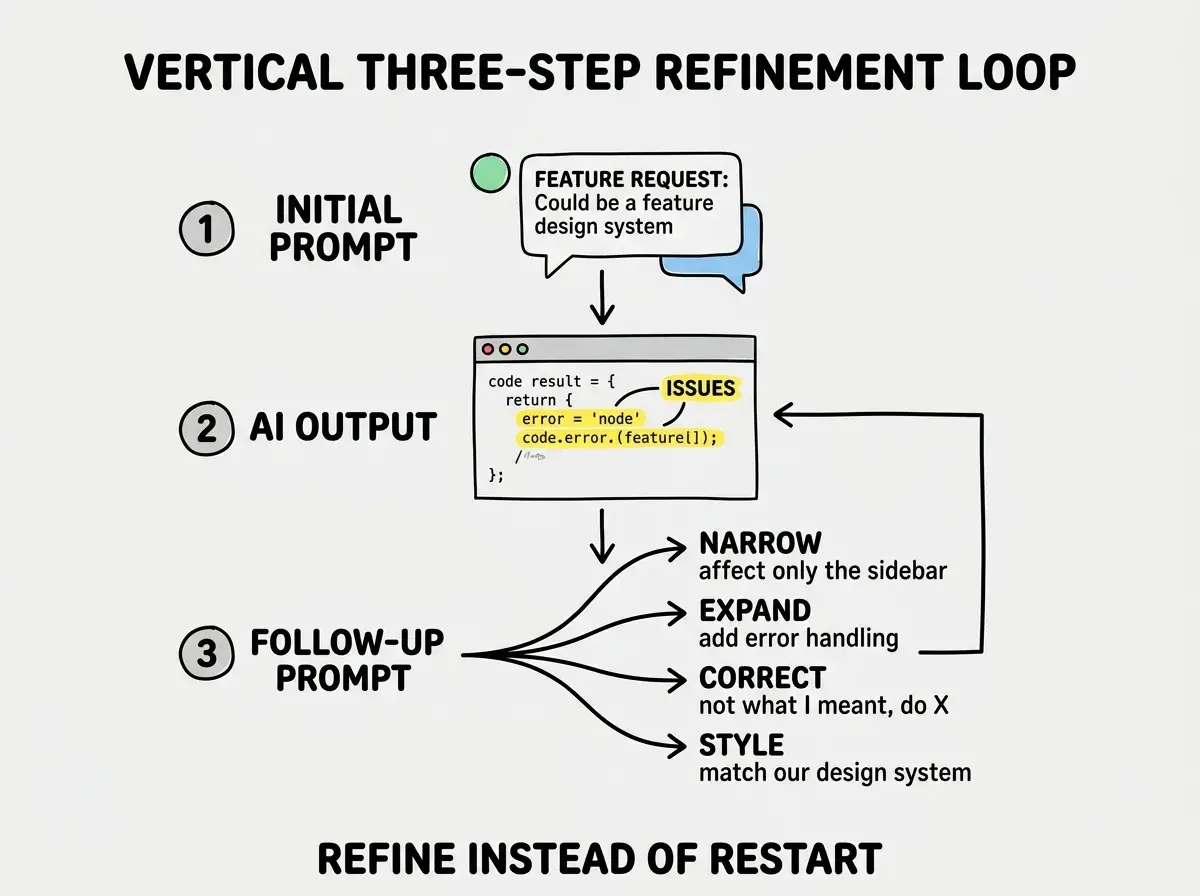
In practice, you will often combine types in a single follow-up. "Make the error handling only apply to the form submission (narrowing), add a retry button (expanding), and style it with our red-100 background and red-600 text (styling)." That is fine. The categories are a thinking tool, not a rigid structure.
A Refinement Loop in Action
Let me walk through a realistic example so you can see how follow-up prompts work in practice.
You want a notification dropdown for your SaaS application. Your first prompt is solid but not exhaustive.
Initial prompt: "Create a notification bell dropdown component for a SaaS dashboard header. When the bell icon is clicked, a dropdown appears showing the 5 most recent notifications. Each notification has a title, message, timestamp, and read/unread status. Use React and Tailwind CSS."
The AI produces a reasonable component. The dropdown works, the notification items render correctly, and the styling is clean. But as you review it, you spot three things that need adjusting.
Follow-up 1 (Narrowing): "The dropdown is rendering full-width on the page. Constrain it to 380px wide and anchor it to the right side of the bell icon, not the left."
The AI fixes the positioning without touching anything else. Good.
Follow-up 2 (Expanding): "Add a red badge on the bell icon showing the count of unread notifications. When the count is zero, hide the badge entirely."
The AI adds the badge. The existing dropdown and notification items stay intact because the AI understands the full component from context.
Follow-up 3 (Styling): "The notification items look flat. Add a left border of 3px in indigo-500 for unread items, use font-medium for unread titles and font-normal for read ones, and add a subtle bg-gray-50 hover state to each item."
Three follow-ups, each one or two sentences, and you have a polished component that would have been very difficult to specify completely in a single initial prompt. The total effort was less than rewriting the whole prompt from scratch, and the result was better because each follow-up built on tested, working code.
Writing vague follow-ups like "make it better" or "fix the styling." These give the AI no direction and often result in changes you did not want. Be specific about what to change, what the current problem is, and what the desired result looks like. "Make the button bigger" is vague. "Increase the button padding from px-4 py-2 to px-6 py-3 and the font size from text-sm to text-base" is actionable.
When to Actually Start Over
Follow-up prompts are not always the right move. Sometimes starting over genuinely is the better choice, and knowing when to start over is just as important as knowing how to iterate.
Start over when the AI chose a fundamentally wrong approach. If you asked for a component using React state and the AI built it with Redux, or you wanted server-side rendering and got a client-side SPA, the foundation is wrong and refinements will not fix it. Architectural mismatches are expensive to correct through follow-ups because every layer of the code reflects the wrong choice.
Start over when the conversation context has become polluted. If you have sent ten follow-ups that pulled the code in contradictory directions, the AI is now working with a confused mental model. Occasionally, a clean slate with a better initial prompt (informed by everything you learned from the first attempt) is genuinely faster.
For everything else, follow up. Wrong colors, missing features, incorrect scope, layout issues, accessibility gaps, performance improvements. All of these respond well to targeted follow-ups and get worse with full restarts.
Building the Follow-Up Habit
The hardest part of follow-up prompts is not the technique. It is overcoming the instinct to start over. When something is wrong, the emotional pull is to wipe the slate clean and try again. It feels decisive. It feels like progress.
But it is not. It is the equivalent of restarting a video game level from the beginning every time you take damage instead of just healing and continuing. You replay the easy parts you already passed and face the same hard parts again without any new advantage.
Building the follow-up habit starts with pausing before you clear a conversation. When the output is not right, take ten seconds to identify what specifically is wrong. Can you describe the problem in one or two sentences? If yes, that is your follow-up prompt. If you cannot articulate the problem clearly, that is a signal to think more carefully about what you actually want, not a signal to start over.
Learn the prompt patterns that turn AI tools into reliable building partners.
Explore the Prompt PlaybookWhat This Means For You
Follow-up prompts transform AI coding from a slot machine (pull the lever and hope for a good result) into a collaborative conversation where you steadily converge on exactly what you want. The technique is simple, but the mindset shift is significant.
- If you are a founder building your product: Your next AI coding session, commit to not starting over for the first three things that go wrong. Instead, write a targeted follow-up for each one. You will be surprised how quickly the AI corrects course when you give it specific feedback instead of a blank slate. After a week of this habit, you will build features in half the iterations you used to need.
- If you are a career changer learning to build: Follow-up prompts are one of the fastest ways to develop your eye for code quality. Each time you review AI output and identify what needs to change, you are training yourself to spot issues that experienced developers catch automatically. The review step is where the real learning happens, so do not skip it by starting over.
Start with the fundamentals that make every prompt and follow-up more effective.
Start learning