The single most underused feature in Claude Code is also the one with the biggest payoff. Boris Cherny, who leads the Claude Code team at Anthropic, said it plainly on the Every / AI & I podcast.
Not using plan mode enough is super important... plan mode can 2-3x success rates pretty easily.
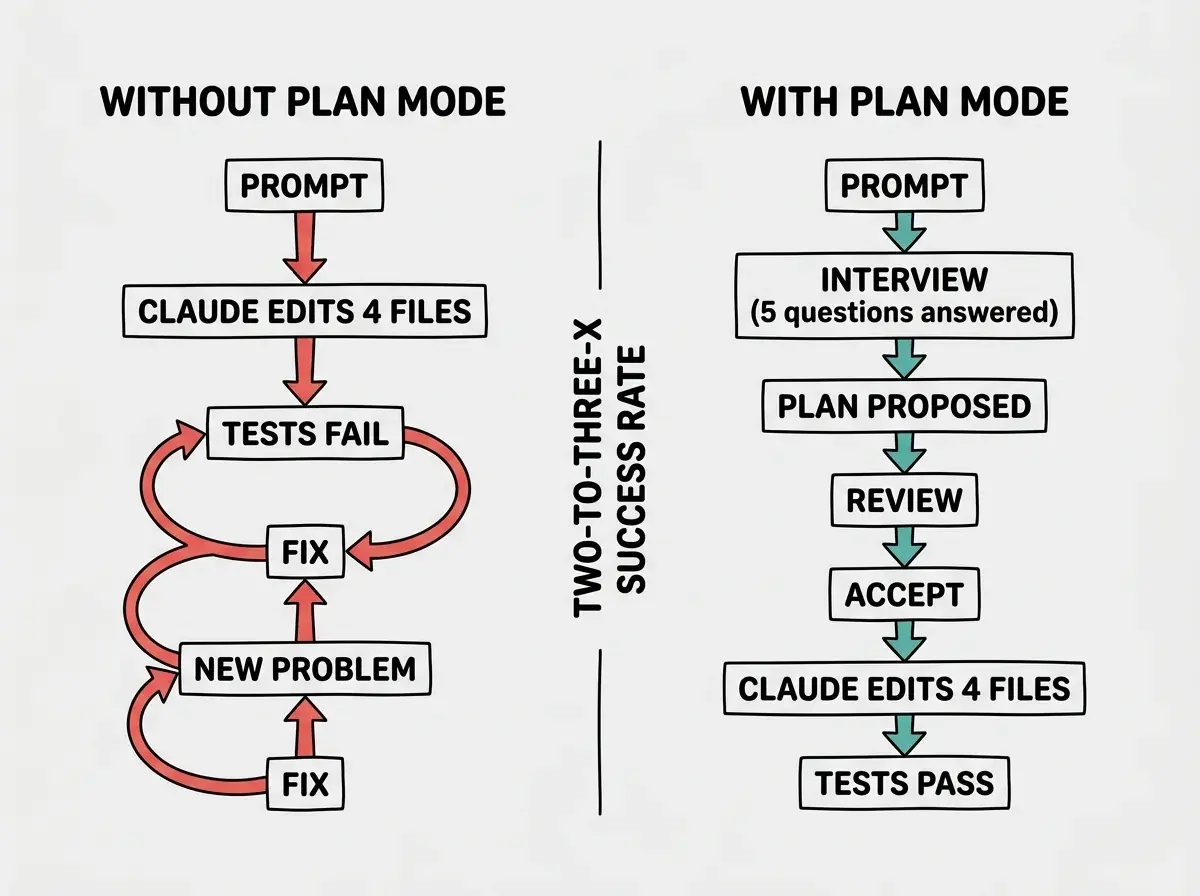
Two to three times. That is not a marketing number. That is the team that ships roughly 90% of Anthropic's internal code telling you that one keyboard shortcut, used a few seconds before a task starts, will roughly double or triple your odds of getting a usable result on the first attempt. Most users skip it. That is the single biggest mistake.
What Plan Mode Actually Does
Plan mode is a state, not a command. You toggle into it with shift + tab (hit it twice, since the first press cycles through the auto-accept toggles). Once you are in plan mode, Claude Code does not touch your filesystem. It reads, thinks, and proposes a structured plan: which files it intends to change, what each change does, what it will not touch. You read the plan. You edit the plan. Then you accept, and Claude executes against the version you approved.
Boris described his own workflow on the same podcast.
I'll shift tabs into plan mode and then align on the plan first before it even writes any code.
That alignment step is the whole game. The model is much better at planning than at recovering from a half-finished wrong direction, so the cheapest place to catch a mistake is before any code exists.
Recent updates pushed plan mode further. Sid Bidasaria announced the plan-file feature in November.
Claude now writes plan files to your filesystem, and you can edit them by running
/plan open. Any changes you make are automatically synced back to Claude's context.
That means the plan is no longer a thing you scroll through in the terminal and squint at. It is a real file you can open in your editor, mark up, and hand back. Boris also shared in January that auto-clearing context on plan acceptance matters.
Helps keep Claude on track longer, significantly improves plan adherence.
Together, these two updates turn the plan from a read-only terminal artifact into an editable, context-aware draft.
Plan mode adds about 30 seconds of friction to the start of a task and removes most of the rework at the end. The Claude Code team's consensus is that this trade is a 2-3x success-rate improvement, which is the biggest single lever they've found.
The mechanics are simple. The discipline is not. Most users hit shift + tab once or twice, see a plan, skim it, and accept. They are leaving most of the value on the table. The real unlock is treating the plan as a draft you negotiate with, not a contract you sign on autopilot.
The Magic Word, "Interview Me"
Thariq Shihipar, an engineer on the Claude Code team, has the cleanest pattern I have seen for getting the most out of plan mode.
My favorite way to use Claude Code to build large features is spec based. Start with a minimal spec or prompt and ask Claude to interview you using the AskUserQuestionTool. Then make a new session to execute the spec.
His exact interview prompt is worth memorizing and copying directly into your workflow: read this @SPEC.md and interview me in detail using the AskUserQuestionTool about literally anything: technical implementation, UI & UX, concerns, tradeoffs, etc. but make sure the questions are not obvious. be very in-depth and continue.
Notice what that prompt does. It does not ask Claude to build. It does not even ask Claude to plan. It asks Claude to interrogate you until the ambiguity in your own head has been forced out into the open. Half of bad AI output is downstream of bad human input, and the interview pattern is the most efficient way to fix the input side. By the time the interview is done, you have answered the questions you did not know you had not answered, and the resulting plan is rooted in a spec that actually reflects what you want.
Thariq also noted in October that clarifying questions are not locked to plan mode.
Claude will ask these questions most during plan mode, but it can ask them anywhere. To get Claude to ask more questions in general, add that guidance to your Claude.MD or when prompting.
A single line in your CLAUDE.md that says "ask clarifying questions liberally before writing code" is one of the highest-leverage edits you can make.
The interview pattern is also a teaching tool. The questions Claude asks you reveal which parts of your idea are vague, which assumptions are load-bearing, and which tradeoffs you have not actually made yet. Even when I end up not using the resulting plan, the interview itself often clarifies my thinking enough that I rewrite the spec before I touch any code.
Make Plan Mode Your Default
The single biggest barrier to using plan mode more is that it requires you to remember to use it. The fix is to make it the default. Sid Bidasaria shared the one-command trick.
You can set Plan Mode as your default with
/config.
One command, and every new session opens in plan mode. You can always toggle out with shift + tab for the tiny edits where planning is overkill, but the defaults flip from "plan when I remember" to "plan unless I opt out." That alone changes behavior more than any number of blog posts.
Cat Wu, also from the Claude Code team, emphasized the model pairing that makes plan mode even more effective.
Hit
shift + tabtwice to enter Plan Mode and verify Claude Code's execution plan before it makes code changes. Paired with Opus 4.5, Plan Mode just got even more powerful.
Opus is the model the team reaches for when planning matters most. The reasoning headroom shows up exactly where you want it, which is in the gap between "what did the user ask for" and "what files actually need to change."
Boris's auto-clear flag is the third leg of the setup. Turn it on, and the moment you accept a plan, Claude clears the context that was used to build the plan, keeping only the plan itself plus your CLAUDE.md and any files explicitly referenced. The result is a much cleaner execution context, with no lingering exploration noise to confuse the model on long tasks. If you have ever watched Claude rediscover something it already knew earlier in a session, this fixes that.
We're publishing a deep-dive series on the doctrine Anthropic engineers actually follow.
Browse our Claude Code coverageThe setup takes five minutes. The payoff compounds across every task for the rest of the time you use Claude Code. It is, by a wide margin, the highest-ROI configuration change in the tool.
When Plan Mode Doesn't Earn Its Keep
Plan mode is not free. It adds a few seconds and a review step to every task, and for the smallest tasks that overhead is worse than the alternative. Renaming a single variable. Fixing a typo in a comment. Adding a missing import. For anything where you can predict the exact diff in your head before you hit enter, plan mode is friction without payoff.
The decision rule the team implicitly uses is this: if you can confidently picture every file Claude will touch and every line it will change, skip plan mode. If you cannot, use it. The honest version of that rule is that most tasks fall into the second bucket. We tend to wildly underestimate how many files a "small" change touches, especially in a codebase we did not write ourselves. The first time plan mode tells you a one-sentence prompt will modify eight files, you will recalibrate fast.
The other place plan mode shines is unfamiliar territory. Working in a codebase you did not write, touching a framework you do not know well, or integrating with an API you have only skimmed. In those situations the cost of being wrong is high and your ability to predict the diff is low. That is exactly the asymmetry plan mode is built for.
Accepting Claude's first plan without editing it. Cat and Boris both edit the plan in place before accepting, and Sid's /plan open flow exists specifically to make that easier. The plan is a draft, not a contract.
The plan is not the answer. It is the first viable candidate for an answer. Treat it that way, push back on the parts that feel off, and add the constraints Claude missed. The edited plan almost always beats the proposed plan, and the difference shows up in the final output.
Plan Mode Plus Subagents, the Next Level
Plan mode gets a second wind when you combine it with subagents. Thariq's full workflow, after the interview-driven spec is written, is to "spin up a subagent to read the spec file and verify if work has been completed." The pattern is plan with the main agent, execute with the main agent, then verify with a fresh subagent that has no memory of the planning conversation and therefore no bias toward declaring success. The verification subagent reads only the spec and the actual code, and tells you whether they match.
Boris has talked about using a dedicated planner subagent in much the same way. The planner only ever runs in plan mode, has a tight system prompt focused on producing reviewable plans, and never executes code. The executor is a separate agent that takes the accepted plan as input and runs it. The separation of concerns is the same idea engineers have used for decades, applied to AI agents.
The throughline across every team member's workflow is the same. Plan first. Edit the plan. Accept. Execute. Verify against the original spec with a fresh perspective. Plan mode is the keystone in that loop, the single feature that makes the rest of the doctrine possible. Skip it and the rest of the playbook collapses.
What This Means For You
- If you're a founder: Plan mode is the cheapest workflow upgrade you can make. Set it as your default with
/config, turn on auto-clear context on accept, and you have just bought yourself a 2-3x improvement in shipping velocity for the price of five minutes of setup. - If you're changing careers: Practice the interview pattern. Forcing Claude to interrogate you teaches you to think in specs, which is the most important skill in shipping software with AI tools. The questions you cannot answer are the parts of your idea you have not actually designed yet.
- If you're a student: Read Thariq's tweets and copy his exact interview prompt as a starting template. The fastest way to learn how senior engineers reason about complex changes is to watch the questions they ask before they write any code. Plan mode makes that visible.
Plan mode, an interview prompt, and a CLAUDE.md update after every correction. Three habits, big quality jump.
See the team's playbook