You hit a bug. Something broke, an error is staring at you, or the page looks nothing like it should. So you copy the problem into your AI tool and type "fix this." The AI responds with a confident, detailed answer that changes absolutely nothing about the actual problem.
This is the most common debugging failure in AI-assisted development, and it is not the AI's fault. It is a prompting problem. Describing bugs to an AI is a specific skill, and the difference between a vague bug report and a precise one is the difference between five minutes of debugging and an hour of going in circles.
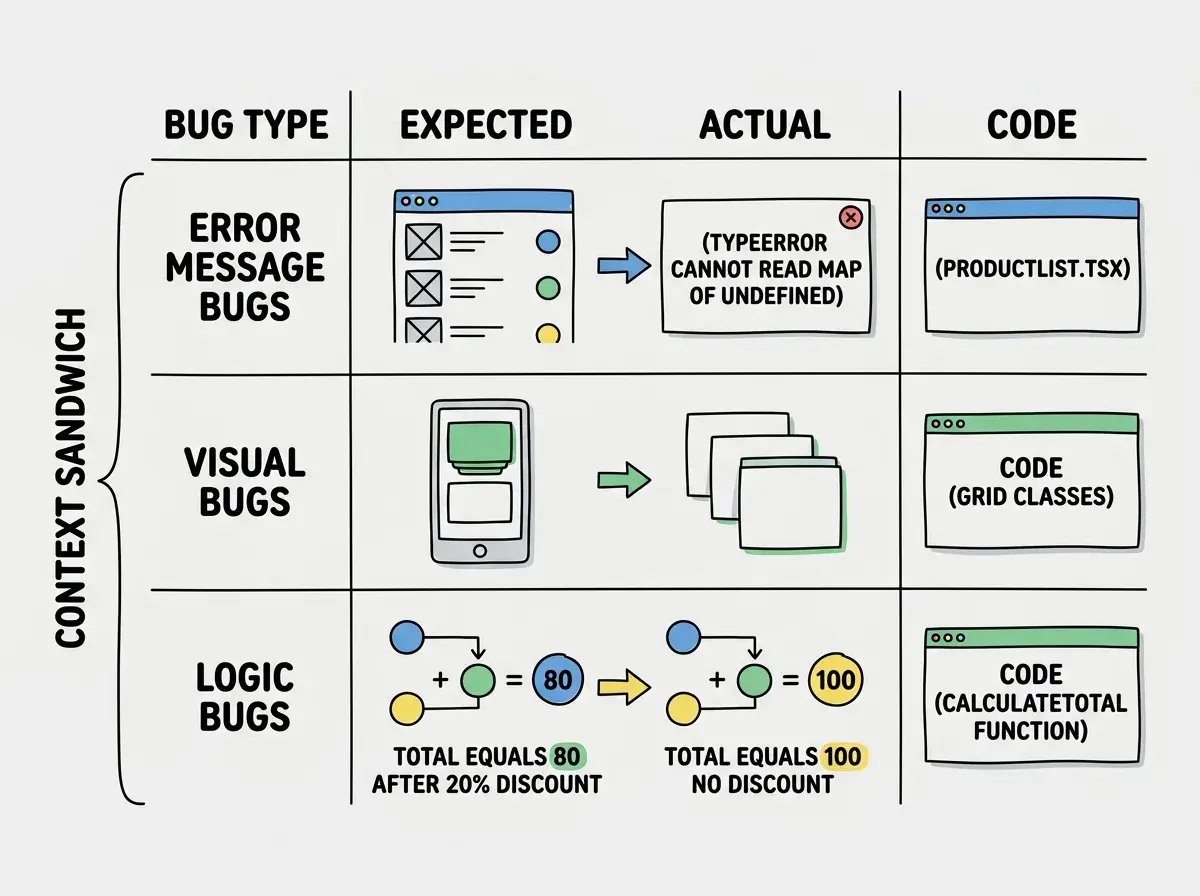
Every bug falls into one of three categories, and each category has a prompt pattern that works reliably. Once you learn the three patterns, your AI tool stops guessing and starts diagnosing.
The Doctor Analogy
Think about what happens when you visit the doctor. If you walk in and say "I don't feel good," the doctor has to ask twenty clarifying questions before they can begin. But if you say "I have a sharp pain in my lower right abdomen that started two days ago, gets worse after eating, and is not helped by antacids," the doctor can immediately narrow down the possibilities.
Your AI tool works the same way. Specific symptoms lead to fast diagnoses. Vague complaints lead to generic guesses. The specificity of your bug description directly determines how quickly the AI identifies the root cause.
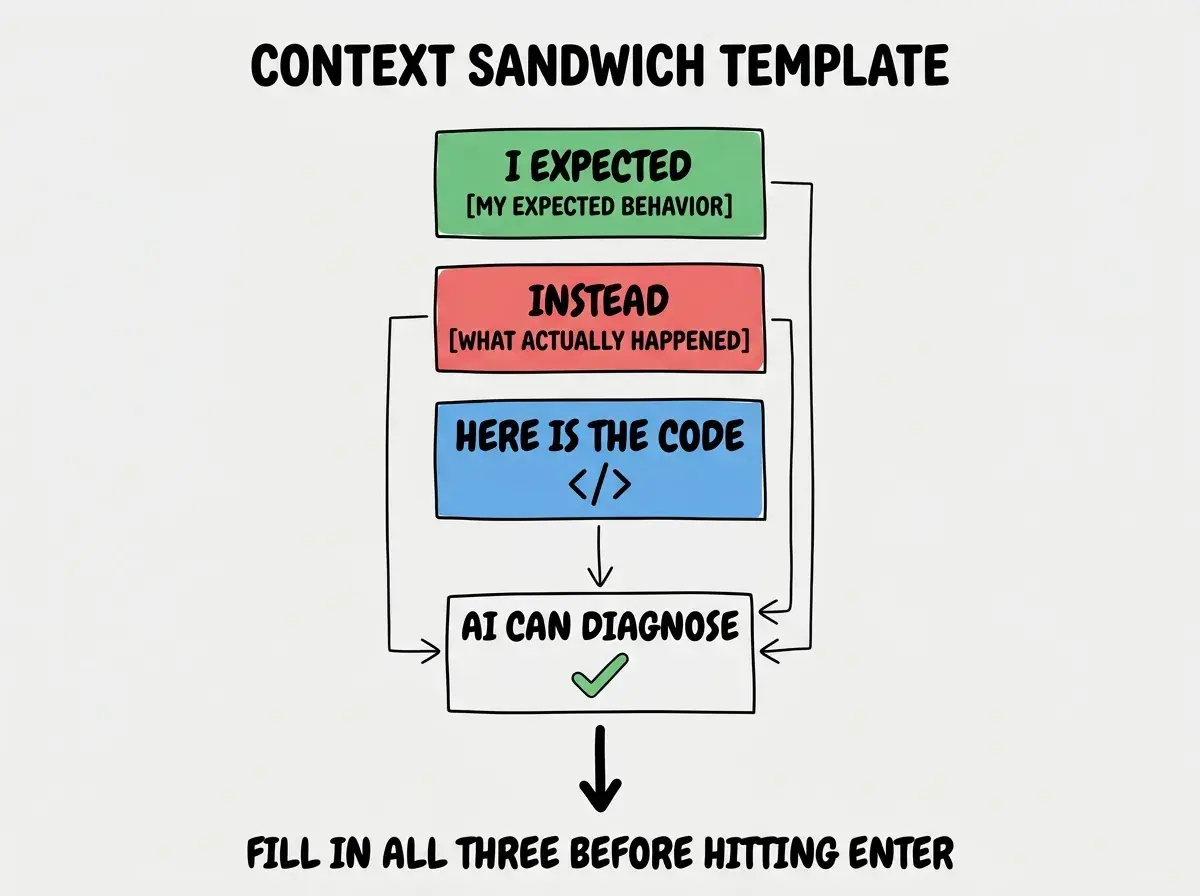
Every effective bug description follows what I call the context sandwich: three layers of information that give the AI everything it needs.
Layer 1: What you expected to happen. This tells the AI what "correct" looks like. Without this, the AI does not know what success means.
Layer 2: What actually happened instead. This is the symptom. The more specific, the faster the diagnosis.
Layer 3: The relevant code. This is the patient's chart. It gives the AI something concrete to examine rather than guessing at what your codebase looks like.
The context sandwich works for all three bug types, but each type emphasizes different layers. Let me show you how.
Error Message Bugs
Error message bugs are the most straightforward to fix with AI because they come with built-in symptoms. The problem is that most people only share part of the error, and that partial information leads to generic fixes.
What most people do:
"I'm getting a TypeError in my React component. How do I fix it?"
The AI has almost nothing to work with. There are hundreds of possible TypeErrors in React. The response will be a generic checklist of common causes.
What actually works:
"My Next.js page crashes on load with this error:
TypeError: Cannot read properties of undefined (reading 'map') at ProductList (src/components/ProductList.tsx:14:22) at Dashboard (src/app/dashboard/page.tsx:31:9)
I expected the ProductList component to render an array of products from the API. Instead, the products variable is undefined when the component first renders. Here is the component code: [paste the ProductList component]"
Now the AI knows the exact error, the exact file and line, what the expected behavior was, and can see the actual code. It will immediately identify that products is undefined before the API response arrives and suggest proper loading state handling.
The pattern for error message bugs: include the full error message with the stack trace, describe what you expected, and paste the relevant code. The stack trace tells the AI exactly where in your code the failure occurs and what the call chain looks like. Trimming the stack trace to save space is like telling the doctor where it hurts but refusing to let them examine you.
Never paraphrase an error message. Copy and paste the entire error including the stack trace. The exact wording, file paths, and line numbers contain diagnostic information that the AI uses to pinpoint the problem. A paraphrased error forces the AI to guess which specific variant of the problem you have.
Visual Bugs
Visual bugs are the hardest to describe to AI because appearance is difficult to communicate in text. "The button looks wrong" could mean a hundred different things. The key is extreme specificity about what you see versus what you should see.
What most people do:
"My layout is broken on mobile. Can you fix the CSS?"
The AI does not know what "broken" means. Overlapping elements? Wrong spacing? Wrong order? It will generate a generic responsive fix that may not address your actual issue.
What actually works:
"On screens below 768px, my three-column pricing grid should stack into a single column with each card taking full width. Instead, the cards are overlapping each other horizontally, with the text from the second card sitting on top of the first card. The cards are still trying to render in three columns but being cut off by the viewport.
Here is my current Tailwind grid setup: [paste the grid container and card component code]
I am using Tailwind CSS v4 with a custom breakpoint at md:768px."
Now the AI knows the expected layout, the exact visual symptom, the viewport size, and can see the CSS. It will identify the missing responsive class or conflicting width causing the overlap.
The pattern for visual bugs: describe the expected appearance in concrete terms (positions, sizes, behaviors at specific breakpoints), describe the actual appearance with equal specificity (what is overlapping, misaligned, hidden, or wrong-colored), and paste the relevant styling code. If your description could apply to fifty different visual problems, it needs more detail.
Logic Bugs
Logic bugs are the most frustrating because nothing crashes and nothing looks wrong. The app runs, the page renders, but the result is incorrect. The only way to communicate a logic bug is through specific inputs and outputs.
What most people do:
"My discount calculation is wrong. It's not applying the discount correctly."
The AI will rewrite the discount function based on its best guess of what "correctly" means, with a decent chance of introducing a different bug entirely.
What actually works:
"My calculateTotal function should apply a percentage discount to the subtotal before adding tax. When I pass in a subtotal of $100 and a discount of 20%, I expect a pre-tax total of $80. Instead, the function returns $100 with no discount applied. When I pass in a subtotal of $50 and a discount of 10%, I expect $45, but I get $50. The discount parameter is definitely being passed correctly because I logged it.
Here is the function: [paste the calculateTotal function and any helper functions it calls]"
Now the AI has concrete test cases. It can trace through the logic with those specific values and identify exactly where the calculation diverges. Maybe the discount is applied after tax instead of before. Maybe the percentage is not divided by 100. The specific numbers make the diagnosis possible.
The pattern for logic bugs: provide specific inputs and the expected output for those inputs, then the actual output you got. Include at least two examples because a single case might not reveal the pattern. Paste the relevant function and anything it calls.
The Context Sandwich in Action
Let me put it all together with one more example that shows how dramatically the context sandwich changes the AI's response.
Without the context sandwich: "My API route is returning the wrong data."
The AI will ask clarifying questions or suggest rewriting the entire route based on assumptions about your stack and data model.
With the context sandwich: "My GET /api/users endpoint should return only active users (where status equals 'active'). When I call it, I get all 847 users including deactivated ones. I tested this by checking the response length (847 instead of expected 312) and confirmed deactivated users are in the response by finding a user with status 'deactivated' in the results.
Here is my route handler and the Prisma query it uses: [paste code]"
One prompt. The AI reads the Prisma query, spots that the where clause is missing the status filter, and gives you the exact fix. No back and forth. No generic suggestions.
The context sandwich mirrors how any good diagnostician thinks. The three layers give the AI everything it needs to reproduce the problem mentally and trace it to the root cause.
This is one technique in a complete system for working effectively with AI coding tools.
Explore the seriesMaking Bug Descriptions a Habit
The biggest obstacle to writing good bug descriptions is not skill. It is impatience. When something breaks, you want it fixed now, and taking sixty seconds to write a proper description feels like wasting time. But that sixty seconds saves you ten minutes of back-and-forth with vague fixes that do not work.
Build the habit with a simple template you keep in your head:
"I expected [specific expected behavior]. Instead, [specific actual behavior]. Here is the code: [relevant code]."
Three sentences before you paste your code. Force yourself to fill in all three parts before hitting enter, and your debugging hit rate will improve dramatically. Your job is not to diagnose the problem yourself, but to describe the symptoms precisely enough that the AI can diagnose it for you.
Describing what you think the cause is instead of what you observe. Saying "I think the API is caching stale data" sends the AI down a caching rabbit hole when the real problem might be a missing database filter. Describe symptoms, not your diagnosis. Let the AI do the diagnosing.
The difference between a frustrating debugging session and a productive one comes down to those sixty seconds of description quality.
Learn the prompt patterns that turn every AI interaction into productive output.
Start learningWhat This Means For You
Describing bugs well is one of the highest-leverage prompt skills you can develop. It directly reduces time spent stuck and frustrated, and it compounds as you build the habit.
- If you are a founder building your product: Every bug is a potential time sink that pulls you away from shipping features. The context sandwich turns debugging from an unpredictable slog into a predictable process. Start with error message bugs since they are the easiest pattern to adopt. Copy the full error, write one sentence about what you expected, paste the code, and watch the AI nail the fix on the first try.
- If you are a senior developer using AI tools: You already have the diagnostic instincts that make the context sandwich natural. "Expected versus actual plus relevant code" is essentially a bug report, something you have written hundreds of times. Apply that same rigor to your AI prompts and AI debugging becomes nearly as effective as a second pair of experienced eyes.
- If you are an indie hacker shipping fast: When you are solo, every minute stuck on a bug is a minute not shipping. The three patterns in this guide cover the vast majority of bugs you will encounter. Use the template every time something breaks. Within a week, writing good bug descriptions will be automatic, and your debugging sessions will shrink from hours to minutes.