Plain English vs technical prompts is the first real choice every vibe coder faces. Should you describe what you want in everyday language, or should you use the specific terminology that developers use? The answer is not one or the other. It depends on what you are building, what stage you are in, and what kind of result you need. This guide gives you a clear framework for knowing which approach to use and when.
Most people start vibe coding by typing what feels natural. "Make me a landing page with a signup form." That is plain English, and it works surprisingly well. But at some point you hit a wall where the AI keeps misunderstanding you, and you wonder if you need to learn to "speak code" to get past it. You do not need to become a developer. You just need to understand when to shift gears.
What Is the Most Efficient Language for AI Prompts
The most efficient language for AI prompts is the one that removes ambiguity for the specific task at hand. That sounds like a non-answer, but it is the most important insight in prompt engineering. Plain English is efficient when you are describing outcomes, user experiences, and business logic. Technical language is efficient when you are describing structure, configuration, and precise behavior. The best vibe coders learn to blend both, often in the same prompt.
Research backs this up. A 2025 GitHub survey found that 92% of developers now use AI coding tools daily, and a separate YC-backed study showed that 63% of people building with vibe coding tools have no traditional development background. That second group, the non-developers, consistently report that plain English prompts get them 80% of the way to a working product. The last 20% is where targeted technical language makes the difference.
There is no single "best" prompting language. Plain English excels at communicating what you want and why. Technical language excels at communicating how and where. The most effective prompts combine both, using everyday words for the big picture and precise terms for the details that matter.
Think of it like ordering food at a restaurant. You do not need to know the French culinary term for every cooking technique to get a great meal. "Grilled salmon, medium, with roasted vegetables" works perfectly. But if you have a specific allergy or want your steak at exactly 130 degrees internal temperature, everyday language is not precise enough. You need the specific term.
The Translation Layer Between You and AI
This restaurant analogy is worth extending because it maps perfectly to how AI coding tools work. When you sit down at a restaurant, there is a translation layer between you and the kitchen. You speak in customer language ("something light and fresh"), the waiter translates that into kitchen language ("house salad, dressing on the side, 86 the croutons"), and the kitchen produces the result.
AI coding tools are both the waiter and the kitchen. When you write a plain English prompt, the AI is doing translation work, converting your intent into technical decisions. It picks the framework, the layout, the color scheme, the component structure. Sometimes it translates brilliantly. Sometimes it translates your "something light and fresh" into a Caesar salad when you wanted a poke bowl.
The more specific you are, the less translation the AI has to do. And less translation means fewer surprises. This is not about learning to code. It is about learning a handful of precise words that eliminate the guesswork from that translation layer.
Here is the key insight. You do not need to know hundreds of technical terms. You need maybe twenty to thirty, and you only need to know what they mean, not how to implement them. Words like "responsive," "modal," "grid layout," "authentication," and "database schema" are not code. They are vocabulary, and vocabulary is something every founder and marketer already knows how to learn.
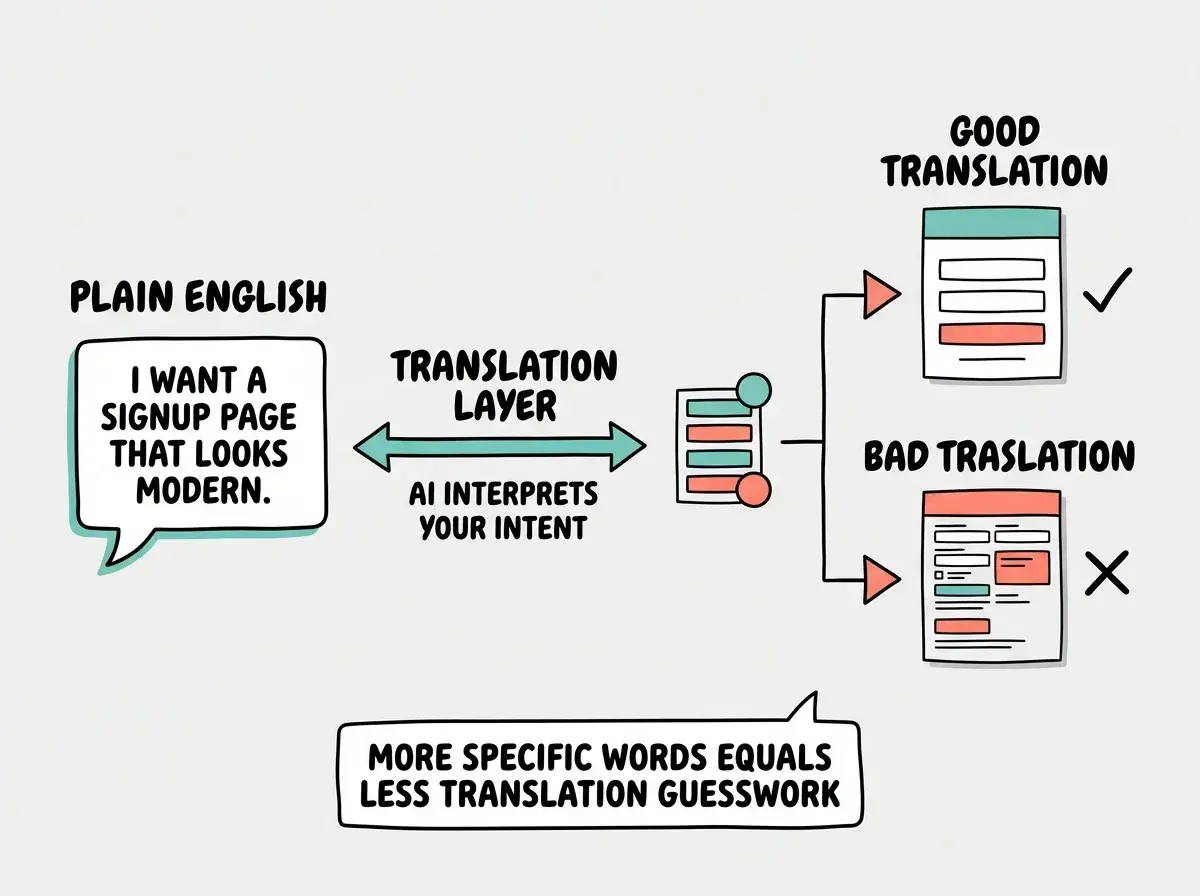
This is why the plain English vs technical prompts debate is a false binary. The real skill is knowing which words to be precise about and which to leave open for the AI to interpret.
When Plain English Wins
Plain English prompts are your best friend in three specific situations. First, when you are starting a new project and want the AI to make broad creative decisions. Second, when you are describing user experience and business logic. Third, when you are iterating on something that already exists and want to describe the problem rather than the solution.
Here is a real example. Say you are building a landing page for your startup.
Plain English prompt: "Create a landing page for a productivity app aimed at freelancers. It should feel clean and professional, not corporate. Include a hero section with a headline and signup form, three key features with icons, some social proof with testimonials, and a final call to action. Use calming colors, maybe blues and greens."
That prompt will produce a solid landing page in Lovable, Bolt, or Replit. The AI makes dozens of decisions for you (font choices, spacing, layout, icon selection, responsive behavior) and because you described the vibe and the audience, those decisions will be surprisingly coherent.
Now here is where plain English falls short. "Make the testimonials section look better." Better how? More colorful? Different layout? Larger photos? The AI will guess, and you will play a frustrating game of "no, not like that" for five rounds. A slightly more targeted version works much better: "Change the testimonials from a vertical stack to a horizontal carousel that shows one testimonial at a time with navigation arrows. Keep the same card style but add a subtle shadow."
You did not need to write code. You just used a few precise terms (carousel, navigation arrows, card, shadow) to eliminate ambiguity. That is the sweet spot.
The pattern is consistent. Plain English works beautifully for the "what" and the "why." It struggles with the "how" and the "exactly like this." Your job as a vibe coder is to recognize which mode you are in.
When Technical Language Gets Better Results
Technical language earns its keep when you need precision that plain English cannot deliver. This happens most often in four areas: layout and positioning, data handling, integrations, and error fixing.
Let me show you the difference with a layout example. Say you want a pricing page with three plan options side by side.
Plain English: "Show three pricing plans next to each other, with the middle one highlighted."
With targeted technical terms: "Display three pricing cards in a responsive grid. Three columns on desktop, stacking to single column on mobile. The middle card should be slightly larger with a colored border and a 'Most Popular' badge. Each card has the plan name, price, a list of features with checkmarks, and a CTA button at the bottom aligned to the card's bottom edge."
The second prompt is still readable by anyone. You did not write CSS or JavaScript. But words like "responsive grid," "three columns on desktop," "stacking to single column," and "aligned to the bottom edge" tell the AI exactly what to do instead of leaving it to guess. The result will be right on the first try instead of the third.
Database and API prompts show an even bigger gap. "Save the user's information" is dangerously vague. Save where? Which information? For how long? "Store the user's name, email, and selected plan in a Supabase users table. Include a created_at timestamp and a subscription_status field that defaults to 'trial'" gives the AI everything it needs.
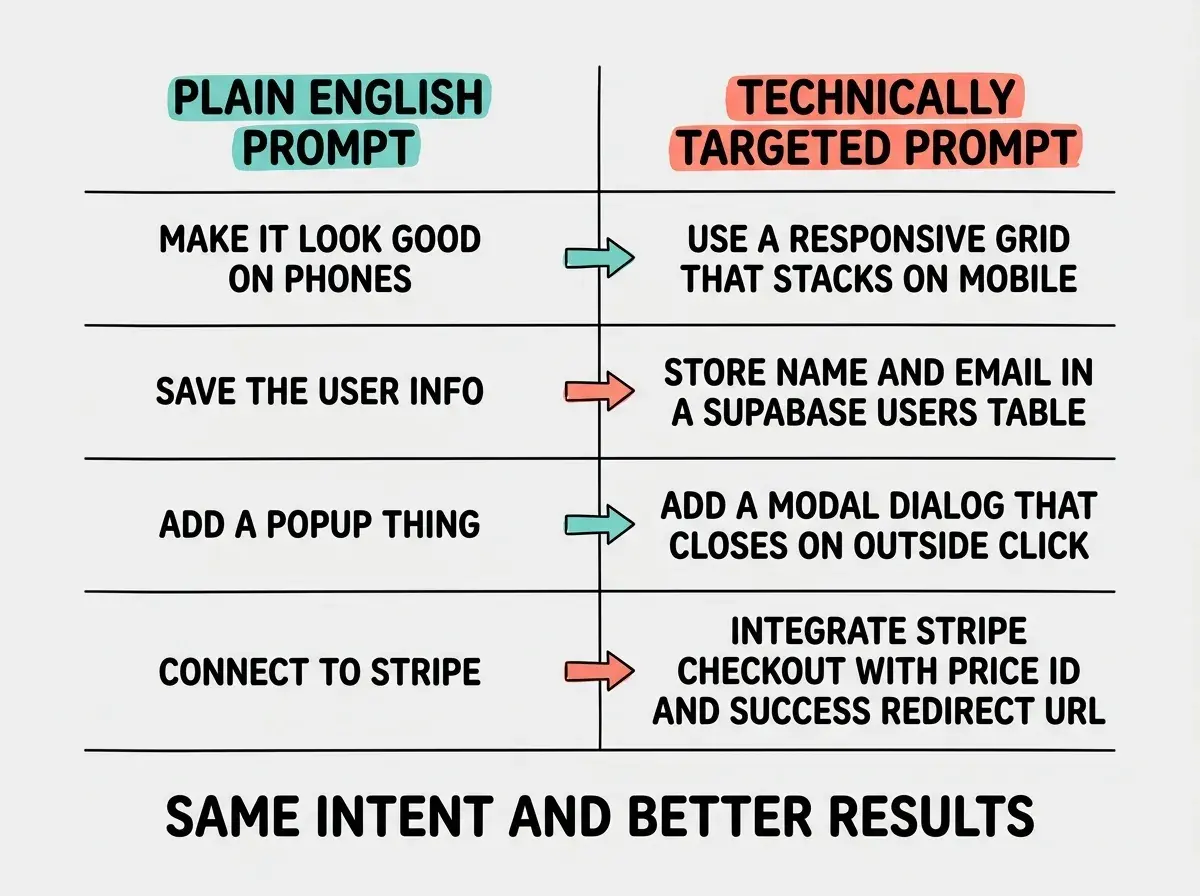
Notice that the right column is not code. It is still English. It just uses a few precise terms that map directly to what the AI needs to build. You can learn these terms in an afternoon, and they will save you hours of back-and-forth revision.
Many beginners think they need to choose one prompting style and stick with it. They either write everything in casual English (and get frustrated by imprecise results) or try to sound as technical as possible (and confuse both themselves and the AI with misused jargon). The best approach is to start conversational and add technical specificity only where it matters. Do not use a technical term unless you are confident you know what it means.
Misused jargon is actually worse than plain English. If you ask for a "RESTful microservices architecture" when you just need a simple form that saves data, the AI will build something wildly over-engineered. Plain English would have gotten you a better result because the AI would have matched the simplicity of your language with a simple solution.
What Are the Best Prompts to Use When Using AI
The best AI coding prompts follow a simple pattern: describe the outcome in plain English, then add technical specifics only where precision matters. Start broad, refine with vocabulary. Here is what this means for different audiences.
What This Means For You
-
If you are a founder building an MVP, start with plain English to describe your product vision and user flows. Add technical terms when you hit the integration layer, things like payment processing, authentication, and database structure. You do not need to learn everything at once. Learn the five to ten terms relevant to your specific product.
-
If you are a career changer exploring tech, think of technical vocabulary as professional development rather than coding education. You are not learning to program. You are learning to communicate with a new kind of tool. Twenty terms will cover 90% of what you need.
-
If you are a student or experimenter, use this as a learning accelerator. Write your prompt in plain English first, then look at what the AI built and learn the technical names for the pieces. Next time, use those names in your prompt and watch the results improve. This feedback loop is the fastest way to build your vocabulary naturally.
The 63% of vibe coders who are non-developers are not at a disadvantage. They bring something developers often lack, the ability to describe problems from the user's perspective. That plain English description of what a customer needs is often more valuable than a technically precise spec. Your job is to combine both skills, gradually and at your own pace.