Xcode 26.6, released June 25, adds Google Gemini as an officially supported coding assistant in the IDE's Intelligence panel alongside Claude Agent and Codex. iOS and macOS developers can now switch between all three models from Xcode settings using either a free Google AI Studio key or an existing Gemini Enterprise account.
What exactly changed in Xcode 26.6 for coding assistants
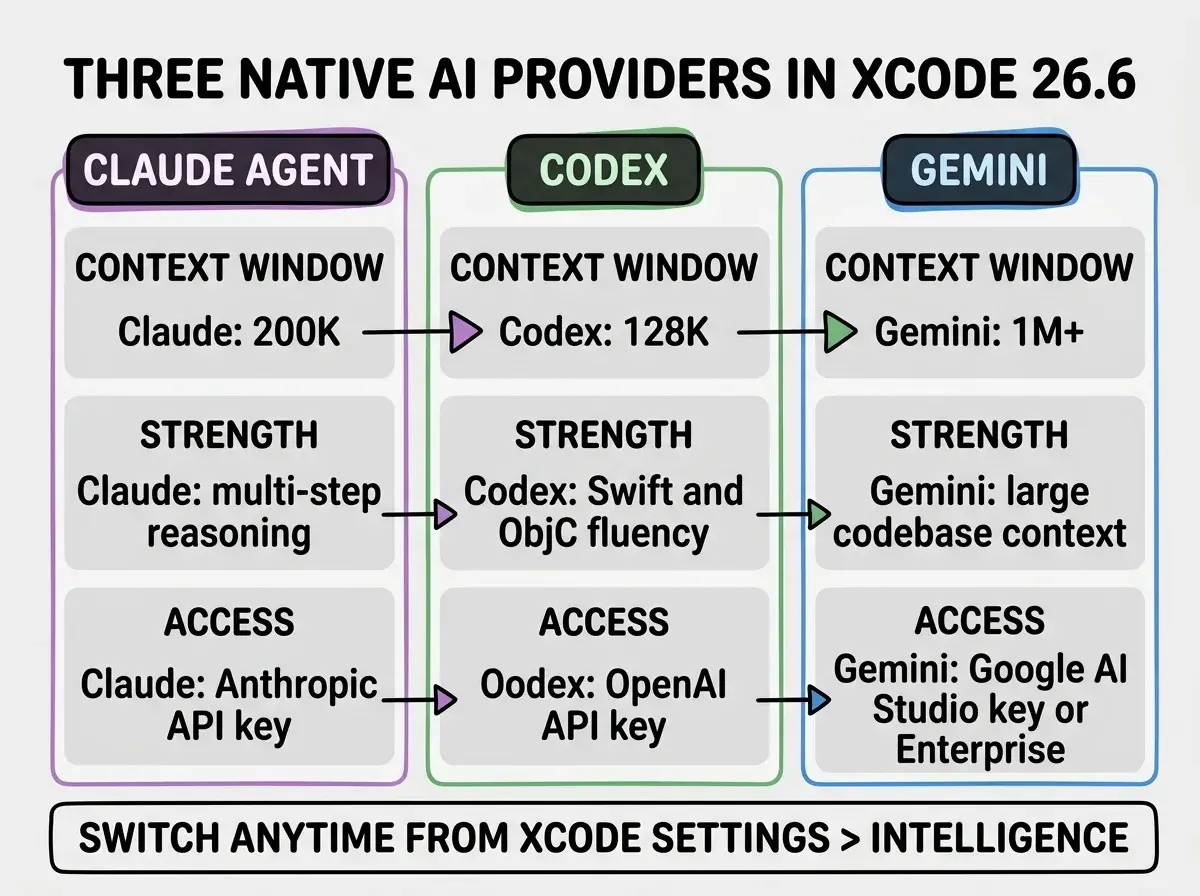
The Intelligence panel in Xcode now shows three first-party AI providers: Anthropic Claude Agent, OpenAI Codex, and Google Gemini. Each connects via a direct API key dropped into Xcode settings, and each offers the same agentic coding interface: read and edit files, run build commands, navigate symbols, and reason about the full project.
Xcode 26.3 launched in February 2026 with Claude Agent and Codex as the initial two providers, establishing the agentic coding panel as a stable feature. Gemini was available in the Xcode 27 developer beta as of June 10, but until June 25 it required running a pre-release IDE. The 26.6 update brings the Gemini option to every developer running the production Xcode channel with no beta flags required.
The 26.6 release also ships Swift 6.3.3 alongside SDKs for iOS 26.5, iPadOS 26.5, tvOS 26.5, watchOS 26.5, visionOS 26.5, and macOS 26.5. For most iOS developers the Gemini addition will be the headline change.
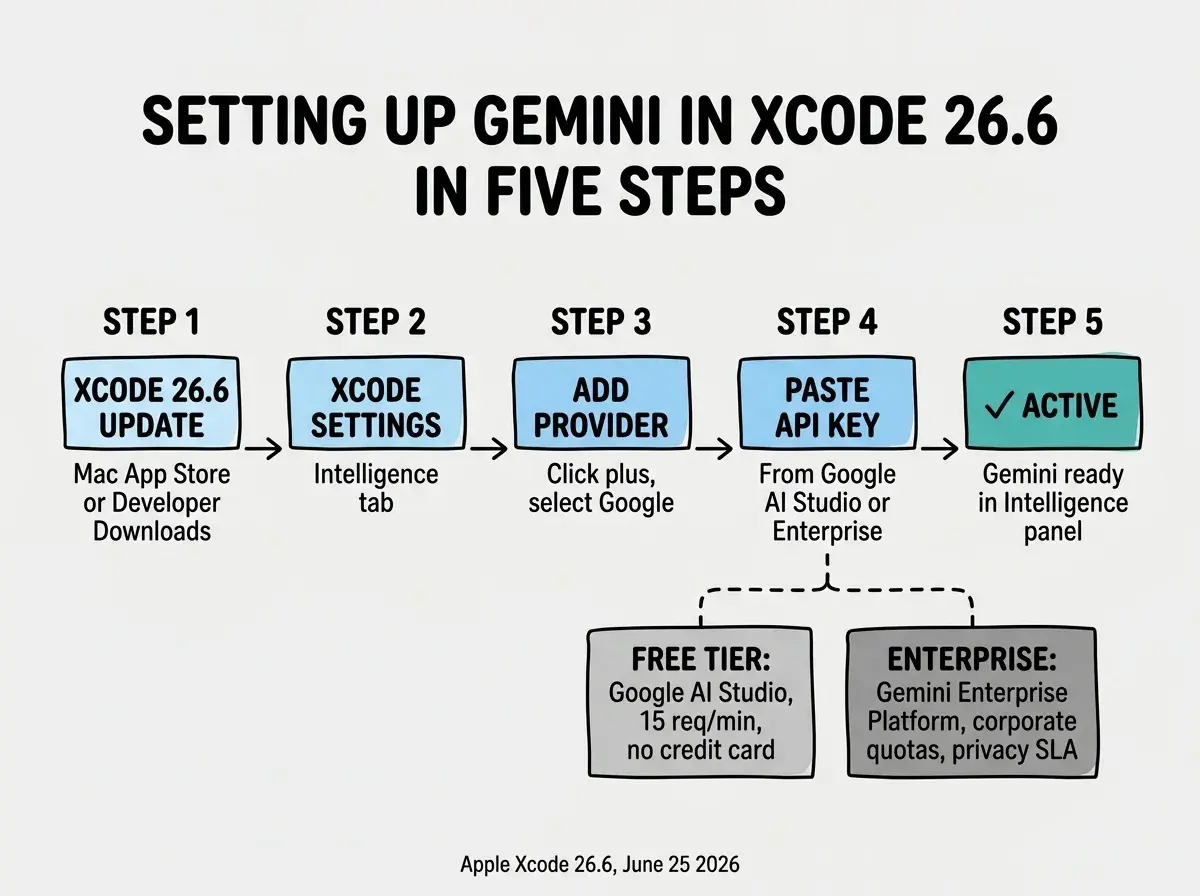
Xcode 26.6 is available now via the Mac App Store or the Apple Developer downloads page. After updating, go to Xcode Settings, open the Intelligence tab, and select Google under Providers. You can use a free API key from Google AI Studio (15 requests per minute, no credit card required) or a Gemini Enterprise key if your team already has an enterprise plan.
The setup is consistent with how Claude Agent and Codex work in Xcode. There is no separate plugin to install. The provider shows up in the Intelligence settings once you are on 26.6, and a valid API key is all that is needed to activate it.
Why does Gemini matter specifically in Xcode
Gemini's distinguishing characteristic for iOS development is its context window. Gemini 1.5 Pro supports up to one million tokens, which is meaningfully larger than Claude Agent's 200K or Codex's 128K. For iOS developers working across large codebases with multiple frameworks, SwiftUI views, UIKit layers, and shared libraries, that window changes what a single agentic session can hold in view.
In practice, this means Gemini can read a larger slice of your codebase before generating a response. A task like "find every place this delegate pattern is implemented and refactor them to use Combine" requires cross-file reasoning at scale. The larger window makes it more likely the model can pull in all the relevant files rather than truncating and missing context in deeper parts of a project.
Gemini has also become relevant to iOS developers specifically because Google has positioned it across Apple's developer stack. Teams already using Gemini for other parts of their infrastructure, or those with Google Workspace Enterprise accounts that include Gemini capacity, can now extend that access into the IDE without adding a new vendor relationship.
For teams that are cost-sensitive, the free tier through Google AI Studio is genuinely usable for individual developers. Fifteen requests per minute is not fast enough for a fully automated coding loop, but it is enough for interactive agentic sessions where a developer is reviewing and approving each step.
How do you set up Gemini in Xcode 26.6
The setup takes under two minutes. After updating to 26.6, navigate to Xcode Settings and open the Intelligence tab. Click the plus button or select Google from the Providers dropdown. Xcode prompts for an API key.
For a personal key, go to Google AI Studio and create a new API key. This is free and does not require a credit card or Google Cloud project. The free tier limits you to 15 requests per minute and 1,500 requests per day on Gemini 1.5 Flash. For heavier use or access to Gemini 1.5 Pro, you need to enable billing on a Google Cloud project.
Enterprise teams with a Gemini Enterprise plan use the Gemini Enterprise Agent Platform to generate a key with their organization's dedicated quotas and data handling terms. This is the path for teams where data residency and privacy compliance matter.
One configuration note: each Xcode project maintains its own Intelligence provider setting. If you switch from Claude Agent to Gemini in one project, other projects continue using whichever provider they were configured with. This is intentional. Different projects may warrant different models, and the per-project setting prevents a change in one context from silently affecting others.
What does the Agent Client Protocol unlock beyond the three built-in providers
Alongside the Gemini addition, Xcode 26.6 formalizes support for the Agent Client Protocol (ACP). This is an open standard that lets any compatible AI agent plug into Xcode's coding assistant panel, not just the three providers Apple has integrated natively.
In practice, this means tools that already implement ACP can connect to Xcode without Apple having to maintain a dedicated integration. Any agent running a conforming server can appear in the Intelligence panel and access the same Xcode tools that Claude Agent and Codex use: symbol navigation, build output, file editing, and project search.
The initial three providers cover most common cases. But the ACP path matters for two groups: teams using specialized or on-premises models who cannot send code to a commercial API, and developers who want to use Cursor, Claude Code, or Gemini CLI as their primary coding agent while keeping Xcode's project tools accessible to that agent.
Do not check your API key into your project's version control. Xcode stores Intelligence provider keys in your local user settings, not in the project file, so they are not committed to git by default. The risk comes from developers who manually add a .env or config file with their key and include it in the project without a proper .gitignore entry. Generate a restricted key from Google AI Studio, scope it to your IP if possible, and rotate it if it ever appears in a commit.
The ACP does not solve the question of whether using an external agent with Xcode's MCP server gives the same experience as using a native provider. As of 26.3, full agentic capabilities were confirmed only with the directly integrated providers. The ACP extension point is real and functional, but the quality of the experience will depend on how well a given agent implements the protocol.
Which Xcode coding assistant should iOS developers use
The answer depends on the kind of work in front of you. No single model wins across every task, and the fact that switching takes seconds means the calculus can shift during a session.
Claude Agent is the most established choice for complex, multi-step tasks. If you are asking the agent to design and implement a feature that spans several files, involves architectural decisions, and requires holding long chains of reasoning together, Claude's training for extended reasoning tasks makes it effective. Teams that were already using Claude Agent since 26.3 have several months of practice with it and built-up prompt patterns that work.
Codex remains the deepest specialist in Swift and Objective-C. If you are working in Objective-C interop, debugging Swift compiler errors, or need the model to understand idiomatic Apple API patterns at a fine-grained level, Codex often produces more idiomatic output because of its concentrated training on Apple platform code.
Gemini fits two scenarios particularly well. First, large codebase reasoning where the million-token context window changes what fits in a single session. Second, teams already using Gemini elsewhere who want to reduce the number of different API relationships they manage. A Google Workspace Enterprise or Google Cloud customer can extend existing access rather than adding a new vendor.
The practical recommendation for most iOS vibecoders: keep Claude Agent as your default for feature work, try Gemini when you are navigating a large codebase you do not know well, and use Codex when you are debugging platform-specific issues or working in Objective-C. All three options are now available in 26.6 without changing IDEs.