App builder limitations are the reason 92% of builders who use AI tools daily still cannot ship production apps with them alone. Lovable, Bolt, and Replit are impressive for getting started, but every one of them hits a ceiling that no amount of clever prompting can break through. Understanding where that ceiling is saves you weeks of frustration.
I have built projects on all three platforms to find their breaking points. This guide covers what I found, organized by the types of features that consistently cause problems, so you can plan around the gaps instead of discovering them mid-project.
The 60 to 70 Percent Completion Ceiling
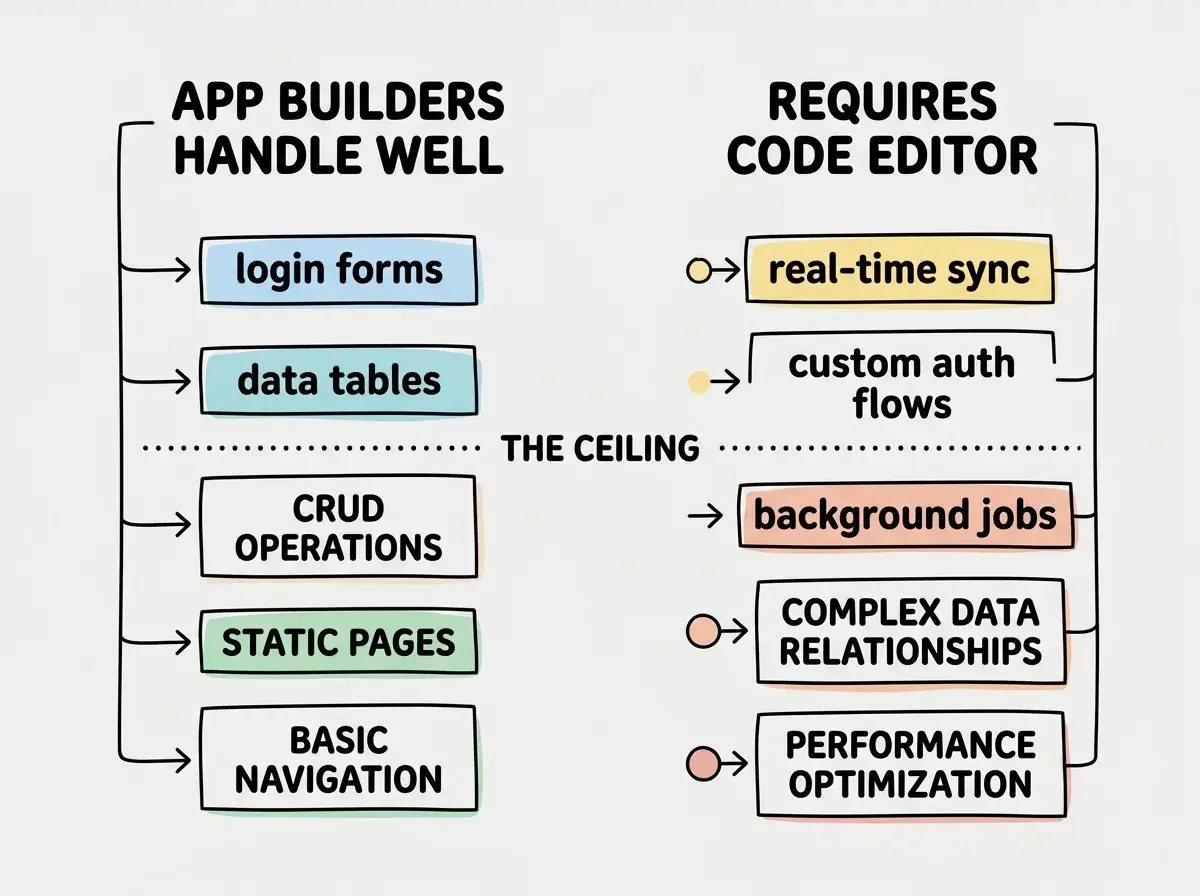
Every app builder shares the same fundamental limitation. They get you roughly 60 to 70 percent of the way to a finished product, then progress slows dramatically. Lovable's own usage data shows this pattern clearly.
This is a structural reality of how AI code generation works. The first 60 to 70 percent of any app consists of common patterns that appear in millions of codebases. Login screens, data tables, forms, navigation, CRUD operations. AI reproduces them well. The remaining 30 to 40 percent is custom logic unique to your product, and that is where every builder starts struggling.
The ceiling shows up differently on each platform. On Lovable, the AI generates code that conflicts with what it built earlier. On Bolt, your token consumption spikes as you spend more generations trying to get a feature right. On Replit, the AI Agent breaks previously working features. The symptom varies, but the cause is identical.
The 60 to 70 percent ceiling is not a bug in any specific app builder. It is a structural limitation of AI code generation. Common patterns work great. Custom business logic unique to your product is where every builder struggles. Plan for this by keeping your MVP as close to common patterns as possible.
Complex State Management
State management is how your app tracks what is happening at any given moment. A to-do app has simple state: a list of items, each marked done or not done. A project management tool has complex state: tasks with subtasks, dependencies, per-project permissions, real-time updates, undo/redo history, and offline capability.
App builders handle simple state just fine. The moment your state becomes interconnected, where changing one thing needs to cascade through multiple parts of your app in a specific order, the AI starts producing buggy code. It manages state correctly in one component but forgets to update a related component. You fix that, and a third component falls out of sync.
These state bugs are invisible until a user hits the exact sequence of actions that triggers them. The app looks fine in the preview. The happy path works. Then a real user clicks things in an unexpected order and everything breaks.
Real-Time Features
If your app needs live updates where one user's actions immediately appear on another user's screen, you are in territory that app builders handle poorly. Chat applications, collaborative editing, live dashboards, multiplayer anything. These require WebSocket connections, conflict resolution, and reconnection logic that AI code generation consistently gets wrong.
Lovable and Bolt can generate the initial WebSocket setup. The code will connect and send messages in a basic demo. But real-time features require handling dozens of edge cases. What happens when a connection drops? What if two users edit the same item simultaneously? These edge cases fall outside the AI's training patterns.
Custom Authentication Flows
Every app builder gives you basic authentication out of the box. Email and password login, maybe social login through Google or GitHub. If standard auth is all you need, builders handle it well.
The problems start when your requirements go beyond the defaults. Multi-tenant apps with organization-level permissions. Role-based access control where admins, editors, and viewers see different things. Single sign-on with a customer's corporate identity provider. Two-factor authentication with hardware security keys.
Each of these is technically possible on the underlying platforms, but the AI does not generate correct security rules consistently. The CVE-2025-48757 vulnerability in Lovable-generated apps was exactly this. The AI built authentication that looked correct in the UI but failed to enforce proper data access rules on the backend.
Background Jobs and Scheduled Tasks
Many real applications need things to happen when no user is actively looking at the screen. Sending reminder emails, processing uploads, generating reports, syncing with external systems. These background jobs require server-side infrastructure that browser-based app builders do not provide.
Bolt runs entirely in your browser. When you close the tab, nothing runs. Lovable uses Supabase Edge Functions, which handle simple triggered tasks, but anything requiring extended processing or complex scheduling needs external infrastructure. Replit offers always-on servers on its paid tier, but the AI Agent does not reliably set up job queues, retry logic, or failure handling.
If your app needs to send a welcome email on signup, that is fine. If it needs to process a 50,000-row CSV upload, generate nightly reports, and retry failed webhooks with exponential backoff, you need a code editor and server infrastructure.
Complex Data Relationships
App builders work beautifully when your data model is simple. Users have posts, posts have comments, comments belong to users. AI generates this correctly every time.
Real applications rarely stay this simple. Consider a marketplace where products have variants with different prices, carts reference specific variants, orders track pricing at the time of purchase (not current pricing), and refunds need to reverse the correct payment while updating inventory. Every table references multiple others, and the order of operations matters.
AI struggles with these interconnected models because a change to one table can break queries across a dozen features. The AI does not maintain a holistic understanding of your data relationships. It sees the immediate table but loses track of downstream effects.
The Context Loss Problem
Bolt starts losing coherence at around 15 to 20 components. This is not a documented limit. It is a practical observation from building projects on the platform. Once your codebase reaches that size, the AI can no longer hold the full picture in its context window. It generates code that conflicts with existing patterns, uses different naming conventions, or creates duplicate functionality because it forgot a feature already exists.
Do not assume that breaking your project into smaller prompts solves the context loss problem. The issue is not prompt size. It is total codebase size. Once your project has enough files, the AI cannot see them all at once regardless of how small your individual requests are.
Lovable and Replit experience the same issue at similar thresholds. Small apps work great. Medium apps work with friction. Large apps become a constant fight against the AI's inability to remember what it already built.
Vendor Lock-In and the Export Question
Every app builder lets you export your code. This is technically true and practically misleading. The exported code is organized in whatever structure the platform chose, with dependencies on whatever libraries it defaults to. Continuing development in a code editor is possible but not seamless.
Lovable exports React code tied to Supabase. Bolt exports with StackBlitz-specific configurations you need to strip out. Replit gives you the most portable codebase, but the AI-generated code still tends to be messier than what a developer would write from scratch.
The real lock-in is not technical. It is knowledge. If you built your app through conversation with an AI, you may not understand how the code works or how to modify it. Exporting gets your files out. It does not give you the ability to maintain them.
Performance Optimization
App builders generate code that works. They do not generate code that performs well at scale. There is no optimization for query efficiency, no code splitting, no caching strategy, no attention to bundle size. The generated code loads every library on every page and makes redundant API calls.
For a prototype with a few hundred users, this does not matter. For an app you want to grow, performance optimization is not optional, and it requires understanding the generated code at a level that contradicts the entire value proposition of using a builder.
The Graduation Path
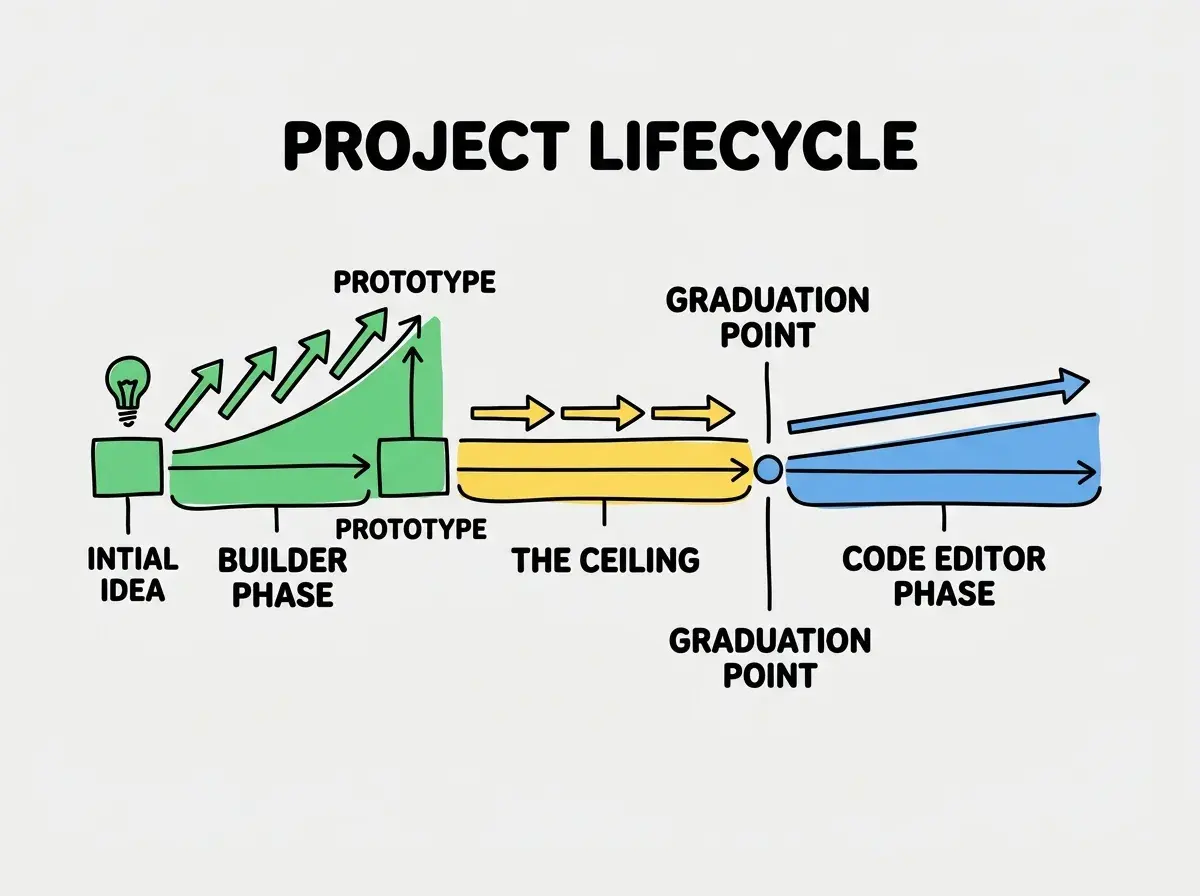
Here is the part app builder marketing will never tell you. The intended lifecycle for a successful app is builder to code editor. You start in Lovable or Bolt to validate your idea quickly. If it works and you want a real product, you graduate to a code editor like Cursor or VS Code with AI assistance.
This is not a failure. It is a rational strategy. Spending weeks building production code for an idea that might not work is a waste. Spending an afternoon prototyping in Lovable to test with real users is smart. The key is knowing the graduation point exists before you start, so you budget for it.
Graduation typically means hiring a developer or learning a code editor yourself. Your prototype becomes a specification document rather than a production codebase. A developer sees what you built and rebuilds it properly. This sounds wasteful, but it is faster than trying to fix AI-generated code that was never designed for production.
The best tool depends on what you are building and where you are in the process.
Explore the guidesWhen to Start With a Builder Anyway
After everything above, you might think app builders are not worth using. That is the wrong takeaway. Builders are genuinely the best option when your goal is validation rather than production.
Use a builder when you need to test whether anyone wants what you are building. Use it for investor demos. Use it for internal tools only your team touches. Many real businesses run on apps that never graduate past the builder stage because they never need to.
The mistake is not using app builders. The mistake is starting without understanding the limitations, hitting the ceiling three weeks in, and feeling stuck because you did not budget for the graduation path.
Read the complete walkthroughs for Lovable, Bolt, and Replit before you pick one.
Read the guidesWhat This Means For You
App builder limitations are real, predictable, and manageable if you plan for them. The 60 to 70 percent ceiling exists on every platform. Complex state, real-time features, custom auth, background jobs, and intricate data models will push you past what builders can handle. Context loss kicks in once your project grows beyond 15 to 20 components. Vendor lock-in is more about knowledge than code.
None of this means app builders are bad tools. It means they are specific tools, excellent for a defined set of use cases and counterproductive for others. Honestly assess which side of the ceiling your requirements fall on. If most of your features are common patterns, a builder will serve you well. If your core value requires custom logic, start with a code editor and save yourself the painful graduation later.