Claude Tag launched June 23 as a research preview that replaces the old Claude Slack app with something categorically different: a shared team agent that any team member can @mention, pick up tasks from, and hand off to the next person, with one Claude identity per channel that builds persistent context over time. It runs on Opus 4.8 and is available now for Claude Team and Enterprise customers.
Anthropic's own announcement on X puts the product in plain terms: "Claude Tag is an evolution of Claude Code, made more proactive and built to work with a full team." The 65% stat they cite alongside it, that 65% of their product team's code now comes from their internal Claude Tag, is not a benchmark. It's the output of Anthropic's actual product team using this in their daily workflow for code, metrics, support tickets, and debugging.
Why does single-player AI coding hit a ceiling for teams
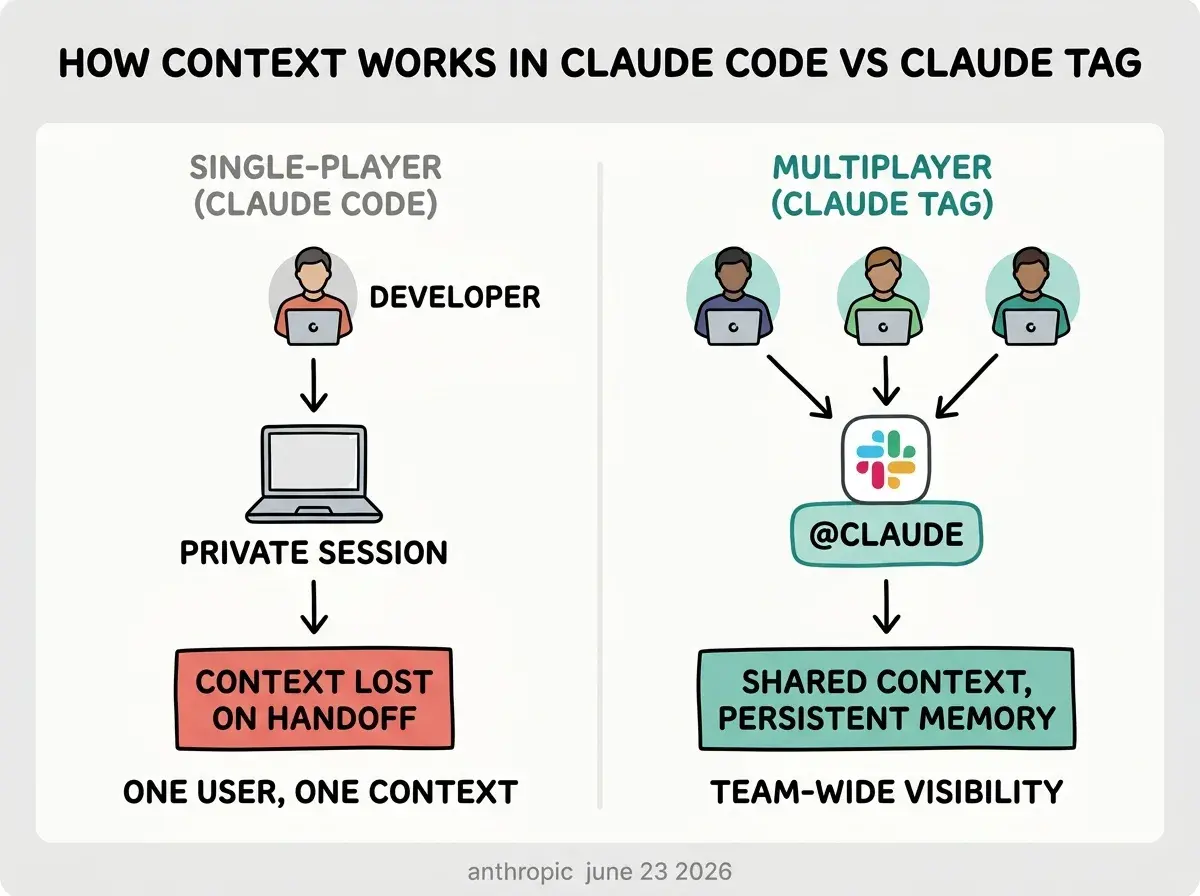
The ceiling is coordination overhead. Claude Code is capable but runs in one terminal session under one user's account. When two engineers need to hand off work, one copies chat history, pastes it for context, and starts over in a new session. That friction compounds with team size. The more people who need to collaborate around an AI agent, the more session management becomes a bottleneck rather than a minor inconvenience.
Claude Tag is built explicitly for this problem. Within a given Slack channel, there is one Claude that every team member can interact with. Anyone can see what Claude is working on, redirect it, or pick up a task from where someone else left off. The context is shared by default, not by copy-paste.
This also changes who participates in AI-assisted work. A product manager can tag @Claude to pull metrics on a feature without asking an engineer to run a query. A designer can hand off a ticket with notes and @Claude carries the context forward. The coordination overhead drops to the same level as any other Slack thread.
Claude Tag is available right now in beta for Claude Team and Claude Enterprise customers. If your team is already on either plan, install Claude Tag from the Slack App Directory to access the research preview today. No waitlist. The model running it is Opus 4.8, which means you get Anthropic's most capable model for long-horizon agentic work at no additional model cost on top of your existing plan.
Claude Tag also replaces the older Claude Slack app entirely. The previous app treated each @mention as a stateless conversation. Claude Tag is stateful: it builds persistent context from channel history session over session, so later requests don't require re-explaining the project from scratch.
What does the shared identity model actually mean for a coding team
The shared identity means one @Claude per channel rather than one per user. Every message Claude posts, including the task breakdowns it works through and the results it returns, is visible to the whole channel.
This creates a dynamic that matters for teams: AI work becomes transparent by default. On a team using individual Claude Code sessions, each developer's AI interactions are private. On a team using Claude Tag in a shared channel, everyone sees which prompts produce useful results, where Claude gets confused, and what clarifications it asks for. Over time that transparency builds shared intuition about how to prompt effectively for your specific codebase.
Admins configure data access and tools per channel, not per user. A channel dedicated to a frontend project can connect to that project's GitHub repository, Linear board, and CI system while being restricted from accessing backend infrastructure. This per-channel granularity matters for teams that need meaningful access controls rather than an all-or-nothing toggle.
The Anthropic internal case points to use cases well beyond pure code generation. According to Fortune, Anthropic teams are tagging Claude to chase product metrics, work through support tickets, and find root causes of bugs, not just to write code. The 65% code stat is the most dramatic number, but the broader pattern is that Claude Tag is handling multi-step information gathering tasks that currently require a human to switch between several tools before they can even start working.
How does ambient mode change team workflows
Ambient mode inverts the usual AI interaction pattern. Instead of waiting to be tagged, Claude follows along with its channels and proactively surfaces information it judges relevant. This includes flagging CI failures it noticed an hour ago, following up on threads that went quiet without resolution, and noting when context from one conversation is relevant to a question somewhere else in the channel.
For coding teams, the practical effect is a reduced monitoring burden. A team that relies on humans to notice when a deploy failed and flag it in Slack now has an automated layer doing the same job, but with full access to the channel history and connected tool context so the flag comes with an explanation rather than just a notification.
Ambient mode is opt-in and off by default. Each channel's admin enables it and decides which tools Claude can monitor. A sensible starting configuration for a coding team is read access to CI and your issue tracker, no write access, for two weeks before expanding. The goal is to learn what Claude surfaces before trusting it to act.
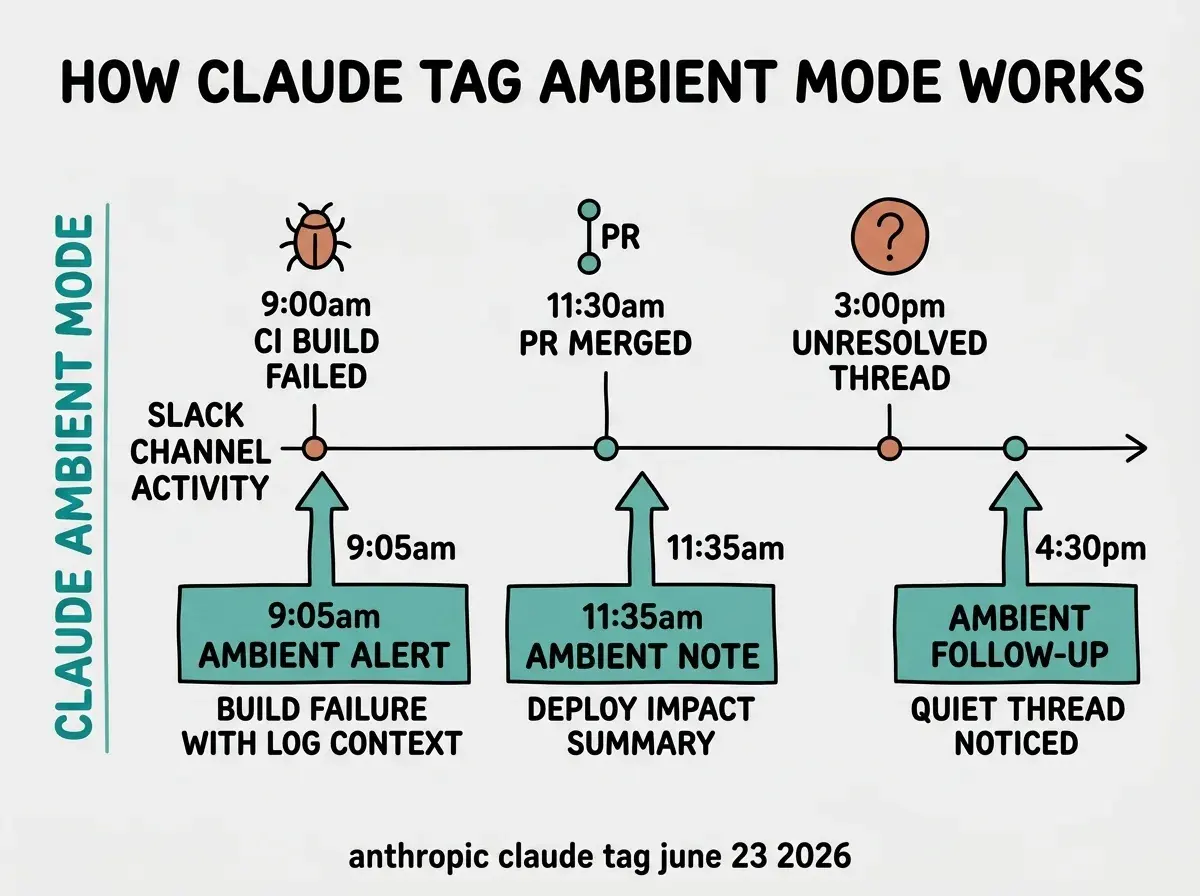
The ambient behavior is also how Claude builds context faster. By following channel conversations even when not tagged, Claude accumulates understanding of the project that makes later @mentions more useful. A team that uses Claude Tag for two months with ambient mode on will get more precise responses than a team that only uses it reactively, because Claude has seen more of the project's history.
The Vibe Coder Blog covers Claude Code, Cursor, and the broader AI coding ecosystem focused on what changes your workflow today.
Browse All PostsWhat can coding teams actually do with Claude Tag right now
The highest-value tasks are those that currently require a human to gather context from three or four sources before they can even delegate the work. Claude Tag handles that context-gathering natively, with the results visible to everyone in the channel.
A product manager can tag @Claude with a bug description from a support channel and get back a probable root cause referencing the relevant Jira ticket and recent deploys. An engineer reviewing a PR can @Claude in a thread asking whether the change is consistent with existing patterns in the connected repository. A team lead can tag @Claude to draft a changelog entry from the last week of merged PRs. These are tasks that currently produce friction not because they are technically hard, but because they require pulling context from multiple places before work begins.
VentureBeat notes that Claude Tag works through tasks asynchronously and reports back to the channel rather than requiring the requester to stay in the thread. This is the practical version of "set it and check back" that most AI coding workflows still require you to manage manually.
Treating Claude Tag like the old Claude Slack app, using it only for stateless questions you could have asked in a new chat window. The old app was a document: you asked a question and got an answer. Claude Tag is an agent: it builds context over sessions, works through multi-step tasks, and can follow up proactively. The mistake is using it only for Q&A when it is designed to take task sequences off your team's plate entirely. Start with one concrete workflow, triaging new bug reports into Jira, for instance, and run it for a week. The context Claude builds during that week makes every subsequent task faster and more accurate.
How should vibecoder teams get started with Claude Tag
Claude Tag requires Claude Team ($30/user/month billed annually) or Claude Enterprise. If you are already on one of these plans, the path is straightforward: install Claude Tag from the Slack App Directory, add it to one focused channel (not your main engineering channel), and connect two or three tools for read access.
The recommended minimum tool set for a coding team is your GitHub organization and your issue tracker. Start with read-only access on both. Once Claude is correctly referencing issues and PRs in its responses after a week of channel history, evaluate whether write access (creating issues, adding PR comments) would reduce enough manual work to be worth enabling.
Admin controls let you configure tool access per channel. Scope tightly at the start. A channel for a specific product area should connect only to that area's repositories and tickets, not your entire organization's infrastructure. The per-channel scope is also how you contain risk if Claude misunderstands a request: a write action scoped to one project can't accidentally touch another.
Anthropic has confirmed plans to expand Claude Tag beyond Slack to other work environments, which likely includes Microsoft Teams and potentially direct IDE integration. The Slack beta is where the product is being validated now.
Claude Tag's launch is a clear directional signal: the AI coding assistant of the near term is not a tool one person uses in a terminal, it is a shared team member that everyone can interact with and redirect. For vibecoder teams already using Claude Code individually, Claude Tag is the natural upgrade path for the parts of your workflow that require more than one person to orchestrate.
The Vibe Coder Blog covers capability shifts in AI-assisted development focused on what teams can act on today.
Read More Posts