Vercel pricing works like a phone plan. You get a generous free tier with specific limits on bandwidth, serverless compute, and build minutes. Go past any single limit and the bill appears, sometimes in places you never expected. This post breaks down every tier, every hidden charge, and the exact moment when the free plan stops being enough.
I have deployed over a dozen projects on Vercel in the last year. Most stayed comfortably on the free tier. Two did not. One hit a $47 bill in a single month because of a misconfigured ISR revalidation that I did not notice until the invoice arrived. That experience taught me to understand exactly what I was being billed for, and this guide is the result.
Why Vercel Pricing Confuses Vibe Coders
Vercel's pricing page lists the plans clearly, but the real costs are buried in usage-based charges that only matter once your app gets traffic. If you have never thought about bandwidth, serverless function execution hours, or image optimization requests, the pricing page reads like a foreign language.
The confusion is not your fault. Traditional hosting was simple: you paid $5 per month for a server, and it was yours. Modern serverless platforms like Vercel charge per unit of work, which means your bill is tied to what your app does, not just that it exists. A static landing page and a Next.js app with heavy API routes can sit on the same plan but generate wildly different bills.
Think of it like a mobile phone plan. You get a certain number of minutes, texts, and data included. Go over on any one of those and you start paying per-unit rates significantly higher than the bundled price. Vercel works the same way, except instead of minutes and texts, you are counting bandwidth gigabytes, function execution hours, and build minutes.
Vercel's free tier is genuinely generous for small projects. You get 100 GB of bandwidth, 100 hours of serverless function execution, and 6,000 build minutes per month. Most MVPs and side projects will never touch these limits. The problems start when you have a successful product and traffic spikes without warning.
The phone plan analogy holds in another important way. Just like you would not sign a phone contract without understanding what happens when you exceed your data limit, you should not deploy a revenue-generating product on Vercel without understanding what happens when you exceed your included usage. The overages are not catastrophic, but they sneak up on builders who never thought to check.
The Three Vercel Tiers in Plain English
Vercel offers three pricing tiers in 2026: Hobby, Pro, and Enterprise. Here is what each one actually gives you, stripped of marketing language.
Hobby is free, forever. You get one team member, 100 GB of bandwidth per month, 100 hours of serverless function execution, 6,000 build minutes, and the ability to deploy unlimited personal projects. You cannot use Hobby for commercial projects (the terms of service prohibit it), but many vibe coders start here while validating an idea before it generates revenue.
The critical limits on Hobby are not just the numbers. Serverless functions time out after 10 seconds on Hobby (60 seconds on Pro). If your app has an API route that calls an external service and occasionally takes 15 seconds to respond, it will fail on Hobby with a timeout error and you will have no way to fix it without upgrading.
Pro costs $20 per team member per month. You get 1 TB of bandwidth (ten times Hobby), 1,000 hours of serverless function execution, and everything in Hobby with higher limits. Functions can run for up to 300 seconds. You also get password protection for preview deployments.
The "per team member" part is important. If you are a solo founder, Pro is $20 per month. Add a co-founder and it is $40. Invite a freelance developer temporarily and it is $60 for that month. This catches people off guard when they add collaborators.
Enterprise is custom pricing. You negotiate directly with Vercel's sales team for SLAs, custom support, advanced security, and significantly higher limits. If you are reading this article, you almost certainly do not need Enterprise yet.
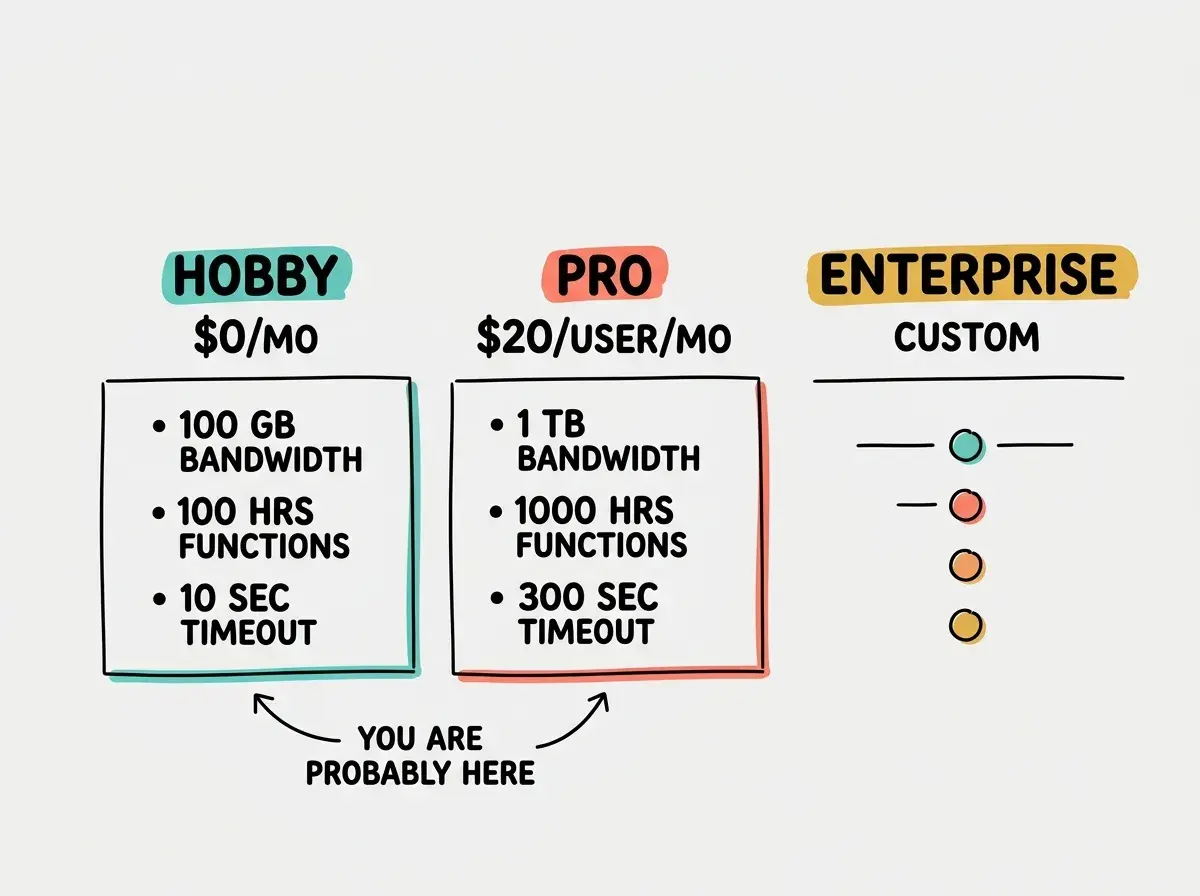
The gap between Hobby and Pro is significant. You jump from free to $20 per month, but also from 100 GB to 1 TB of bandwidth and from 10-second to 300-second function timeouts. For most founders, the timeout increase alone justifies the upgrade once you have an app with any AI integration, because AI API calls regularly exceed 10 seconds.
The Charges That Catch You Off Guard
The tier prices are straightforward. The surprise comes from usage-based overage charges on top of your plan, and this is where the phone plan analogy really clicks.
Bandwidth overages cost $40 per 100 GB on both Hobby and Pro. If you are on Pro with 1 TB included and your app serves 1.2 TB in a month, you pay an extra $80. Bandwidth covers everything your app sends to users: HTML, JavaScript, images served through the CDN, and API responses.
Serverless function execution overages cost $0.18 per GB-hour beyond your included amount. This combines memory usage and time: a function using 1 GB of memory running for one hour equals 1 GB-hour. Most vibe-coded apps have small functions that run for under a second, so you would need thousands of API requests per hour to approach this limit.
Build minutes are rarely a problem because Hobby includes 6,000 per month and Pro includes unlimited. But if you are on Hobby with a large project that takes 5 minutes to build and you push 40 times a day, you will burn through your allocation.
Image optimization is the sneakiest charge. If you use Next.js <Image> components (which most AI-generated code does), Vercel optimizes those images on-the-fly. Hobby includes 1,000 source images per month. Pro includes 5,000. After that, it is $5 per additional 1,000 images. A blog with 50 posts containing 3 images each can hit this limit faster than you expect because the count is based on unique source images optimized, not total page views.
If you have not deployed your first project yet, start with the fundamentals.
Learn deployment basicsISR and on-demand revalidation can silently generate function invocations. If you set revalidate: 60 on a page, Vercel re-renders it every 60 seconds under traffic. A site with 100 ISR pages getting steady traffic generates 144,000 function invocations per day. Each invocation is short, so it will not break the bank immediately, but it adds up and surprises people who thought their static site was truly static.
When the Free Tier Runs Out
Here is a decision framework for when you hit Hobby limits. Ask three questions.
First, is this project generating revenue or on a path to revenue within 90 days? If yes, upgrade to Pro. The $20 per month is a rounding error on any business with paying customers. Trying to squeeze a commercial product into the free tier creates real engineering constraints (like the 10-second function timeout) that cost you more time than the $20 saves.
Second, is the overage coming from bandwidth? If your app is bandwidth-heavy but otherwise simple, consider Cloudflare Pages, which has unlimited bandwidth on its free tier. Moving a Next.js app from Vercel to Cloudflare is not trivial, but it is doable, and the savings can be substantial for media-heavy sites.
Third, is the overage coming from serverless function execution? If so, look at your function code before spending money. Common culprits include API routes that fetch data on every request instead of caching, ISR pages with unnecessarily short revalidation intervals, and middleware that runs complex logic on every page load. I cut my own serverless costs by 60% by changing one revalidation interval from 60 seconds to 3,600 seconds.
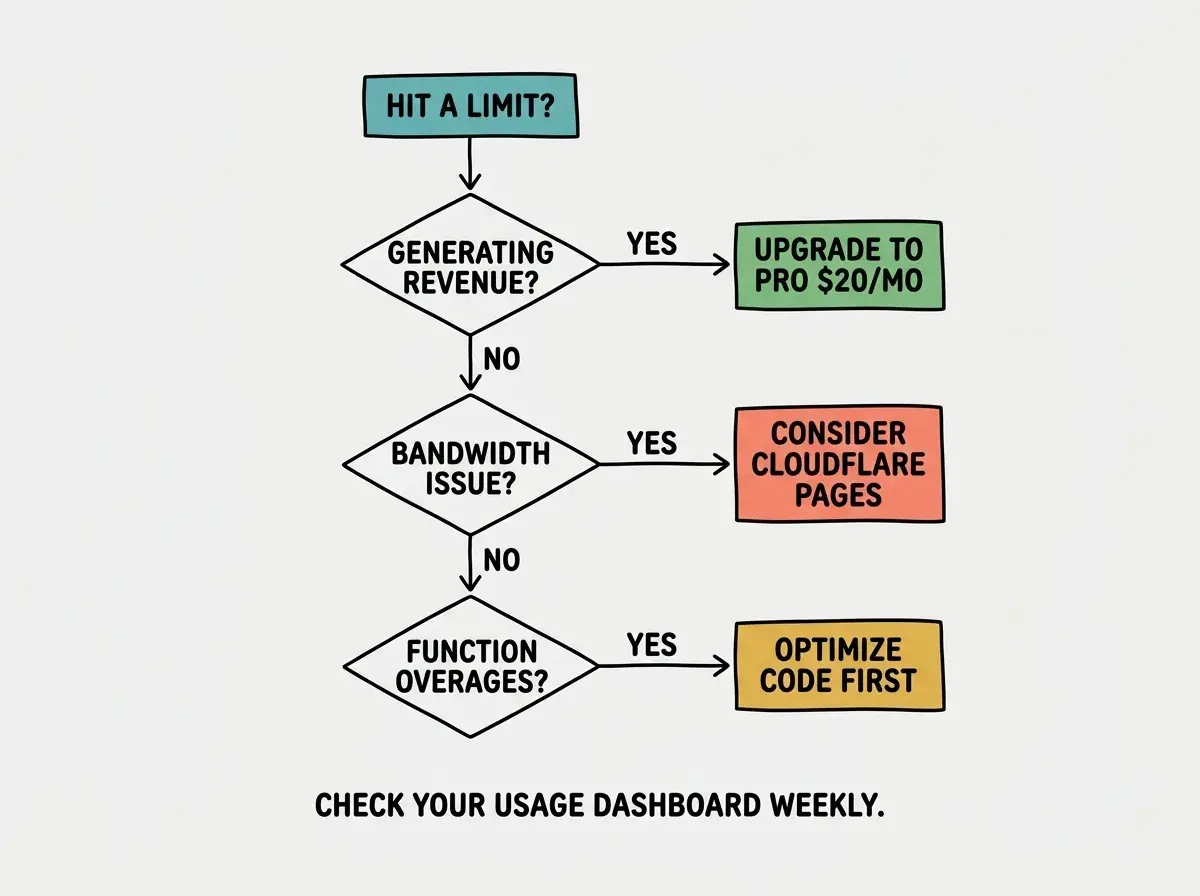
If none of those apply, Vercel's free tier might not be the best fit for your use case. Cloudflare Pages, Netlify, and Railway all have free tiers with different limit profiles. No single platform is cheapest for every workload.
Setting ISR revalidation intervals too low is the number one cause of unexpected Vercel bills for vibe coders. If your AI tool generated revalidate: 60 on your pages, that means Vercel re-renders the page every 60 seconds under traffic. For content that changes daily, revalidate: 3600 (once per hour) or revalidate: 86400 (once per day) is almost always sufficient and dramatically reduces function invocations.
One more factor that does not show up on any pricing page: migration cost. If you build your workflow around Vercel (preview deployments, environment variables, analytics, Speed Insights), moving to another platform means rebuilding all of that. Not a reason to avoid Vercel, but a reason to understand the pricing before you are deeply invested.
How to Monitor Your Usage Before It Becomes a Bill
Vercel provides a usage dashboard under your account settings. Check it weekly if you have a live product. It shows bandwidth consumed, function execution hours used, and build minutes remaining in near real-time.
Set up spending alerts under "Billing" in the dashboard. I set mine at $5, $15, and $30 so I get early warning before anything reaches a painful amount. On Pro, analytics break down bandwidth by route, so you can see exactly which pages or API endpoints are responsible for the bulk of your usage.
The single most effective cost-saving measure: add cache headers to your API responses. Set Cache-Control: public, s-maxage=3600 and let Vercel's CDN serve cached responses instead of invoking your serverless function on every request.
What This Means For You
- If you are a founder: Stay on Hobby until you have paying customers or until the 10-second function timeout blocks a critical feature. When you upgrade to Pro, the $20 per month buys you meaningful engineering flexibility. Budget for it the same way you budget for your domain name, and check your usage dashboard weekly once you have real traffic.
- If you are an indie hacker: The free tier is perfect for validating ideas. Launch on Hobby, get users, measure traffic, and upgrade only when the numbers force you to. If bandwidth is your primary cost driver, evaluate Cloudflare Pages before committing to Pro. The unlimited bandwidth on Cloudflare's free tier can save you hundreds of dollars per year on traffic-heavy projects.
Make sure your deployed app is configured for security before scaling up.
Read the security guide