Everyone talks about the cost of building an app. The $50,000 agency quotes. The $200-per-hour freelance rates. The breathless "I built a SaaS in one weekend with AI" threads. Nobody talks about what happens the month after launch, when the bills start showing up. One developer recently posted a $607 Replit bill they did not expect. Others are spending $2,000 to $5,000 per month on AI agent costs alone, with no clear idea of what they are getting in return. And a growing "cleanup economy" of developers now charges $200 to $400 per hour to fix apps that were vibe-coded without any cost planning.
Building the app is the purchase price. Running it is the insurance, the gas, and the maintenance. Most people budget for the car but forget they need to drive it every day. This article gives you the exact numbers for what it costs to keep a vibe-coded app alive at every scale, from zero users to ten thousand.
The Real Numbers
Here is the monthly cost breakdown by service category for a typical vibe-coded app. These are real prices from real providers as of early 2026.
| Service | Free Tier | Budget | Growth | Scale |
|---|---|---|---|---|
| Hosting (Vercel/Cloudflare) | $0 | $20 | $20 | $50 |
| Database (Supabase/Planetscale) | $0 | $25 | $25 | $25 |
| Auth (Clerk/Supabase Auth) | $0 | $0 | $25 | $25 |
| Email (Resend/Postmark) | $0 | $0 | $20 | $20 |
| AI APIs (Anthropic/OpenAI) | $0 | $10 | $100 | $200+ |
| Monitoring (Sentry/LogSnag) | $0 | $0 | $26 | $30 |
| Monthly Total | $0 | $55 | $216 | $350+ |
These numbers exclude domain registration (about $12 per year) and any image or file storage costs, which typically run $0 to $5 per month on services like Cloudflare R2.
AI API costs are the single largest variable expense for vibe-coded apps. They can range from $0 on free tiers to $200+ per month for apps that rely on AI features, and they scale directly with user activity. Every other cost stays relatively flat until you hit serious traffic numbers.
The numbers in that table tell an important story. Most of the services that make up a modern web app have generous free tiers. You can run a real product with real users for $0 per month if you stay within those limits. The expensive part is not any single service. It is the AI API usage that accumulates quietly in the background.
The Free Tier Hero ($0 per Month)
This is where every vibe-coded app should start. Not because you are cheap, but because free tiers in 2026 are genuinely capable of serving real users.
Vercel gives you 100GB of bandwidth and serverless function invocations on the free plan. For most early-stage apps, you will never touch those limits. Cloudflare Pages is even more generous with unlimited bandwidth on its free tier.
Supabase offers a free tier with 500MB of database storage, 50,000 monthly active users for auth, and 1GB of file storage. For a new app with a handful of users, this is more than enough.
Resend gives you 3,000 emails per month for free. That covers transactional emails (password resets, welcome emails, notifications) for most small apps comfortably.
The catch is AI. If your app does not use AI features at all, you can genuinely run it for $0 indefinitely. But if it calls Claude or GPT for any user-facing feature, you need API credits. Anthropic and OpenAI both offer limited free tiers or trial credits, but these run out fast once real users start hitting your app.
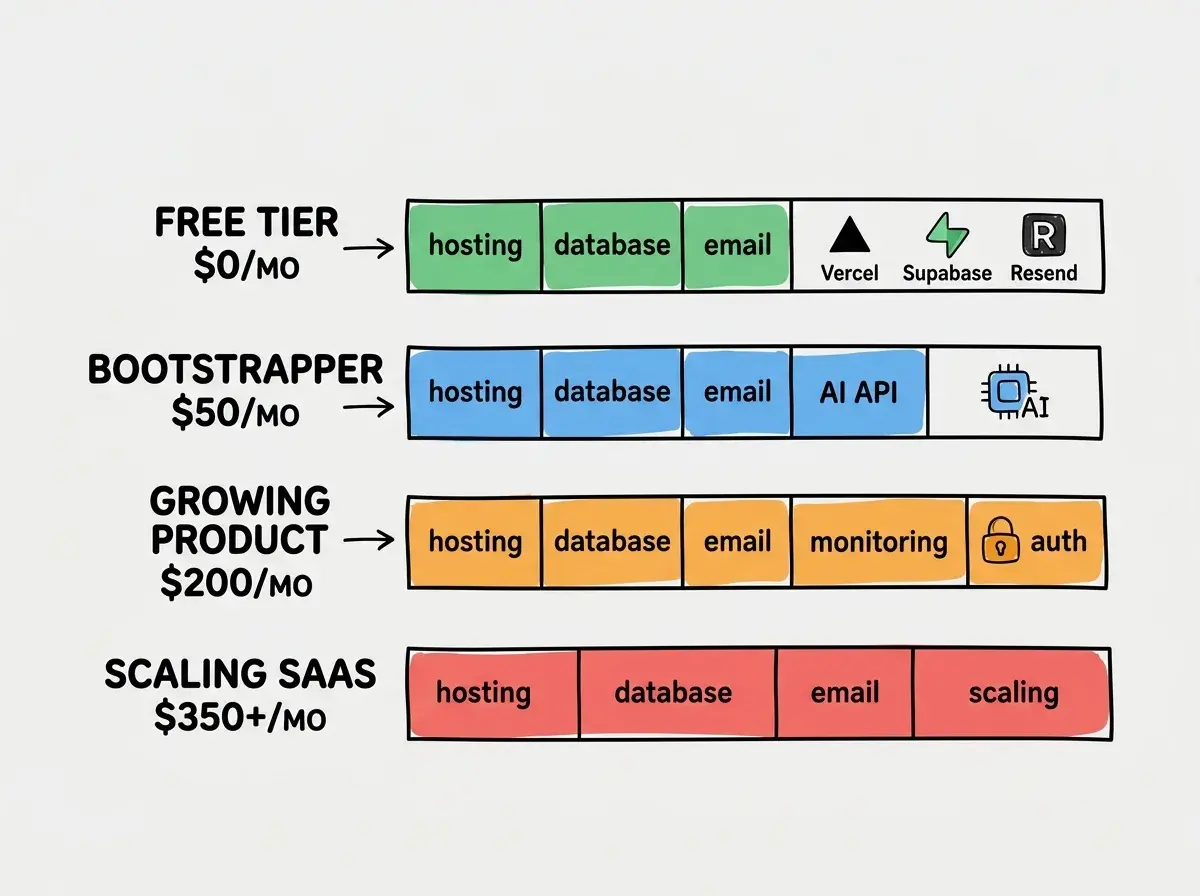
My recommendation for the free tier: deploy on Vercel or Cloudflare, use Supabase for your database and auth, and use Resend for email. Keep any AI features behind a waitlist or usage limit until you are ready to pay for API calls. This is not a limitation. It is a launch strategy.
The Bootstrapper ($50 per Month)
The jump from $0 to $50 is where your app becomes a real product that can serve paying customers without embarrassing outages.
Hosting stays cheap. Vercel Pro at $20 per month gives you higher bandwidth limits, better analytics, and preview deployments. If you are on Cloudflare, the free tier still covers most needs, but the $5 Workers Paid plan removes request limits.
Database stays on free tier. Supabase's free 500MB handles thousands of users' worth of data. You will not need the $25 Pro plan until you have serious data volume or need daily backups.
AI APIs are the real cost. At $10 to $30 per month, you can serve moderate AI usage. A Claude Sonnet call costs roughly $0.003 per 1,000 input tokens. If your app makes one API call per user session and each call is about 1,000 tokens, a thousand monthly active users costs about $3 in API fees. The cost scales linearly, so 10,000 sessions is $30.
The bootstrapper tier is right for apps with fewer than 1,000 monthly active users that include AI features, or apps with up to 5,000 users that do not use AI at runtime.
Start with the free tier and upgrade only when real usage demands it.
See all guidesThe Growing Product ($200 per Month)
This is the tier where you are taking things seriously. You have paying customers, you need reliability, and you cannot afford to debug production issues by guessing.
Hosting ($20). Vercel Pro or Cloudflare Workers Paid. Same as the bootstrapper tier because hosting scales gracefully.
Database ($25). Supabase Pro gives you 8GB storage, daily backups, and a dedicated database server. The jump from free to Pro is worth it once you have data you cannot afford to lose. If you are running a SaaS, this is the point where you need backups.
Auth ($25). Clerk Pro or Supabase Auth Pro. Free tier auth works fine technically, but paid tiers add features like custom domains, advanced session management, and better fraud detection. If you are charging users money, paid auth is not optional.
Email ($20). Resend Pro at $20 per month gives you 50,000 emails and a dedicated IP for better deliverability. If you are sending marketing emails, product updates, or weekly digests, you need this.
AI APIs ($100). This is where it gets real. A hundred dollars of API credits serves roughly 30,000 to 50,000 Claude Sonnet calls per month, depending on prompt length. If your app's core value proposition involves AI, this is the cost of doing business.
Monitoring ($26). Sentry's Team plan at $26 per month gives you error tracking, performance monitoring, and session replay. You need this the moment you have paying customers. Flying blind in production is a luxury only free-tier apps can afford.
The Scaling SaaS ($350+ per Month)
At this tier, you are serving thousands of users and your costs become predictable operating expenses rather than scary surprises.
The hosting and database costs barely change. The big jumps are in AI API costs (which scale linearly with usage) and any premium services you add for reliability. You might add a CDN, an uptime monitoring service, or a more sophisticated logging tool.
The important thing about this tier is not the total number. It is the ratio. If you are serving 10,000 users at $350 per month, your per-user cost is $0.035. If even 2% of those users pay $10 per month, you are generating $2,000 in revenue against $350 in costs. The economics work.
The Monthly Routine That Prevents Surprise Bills
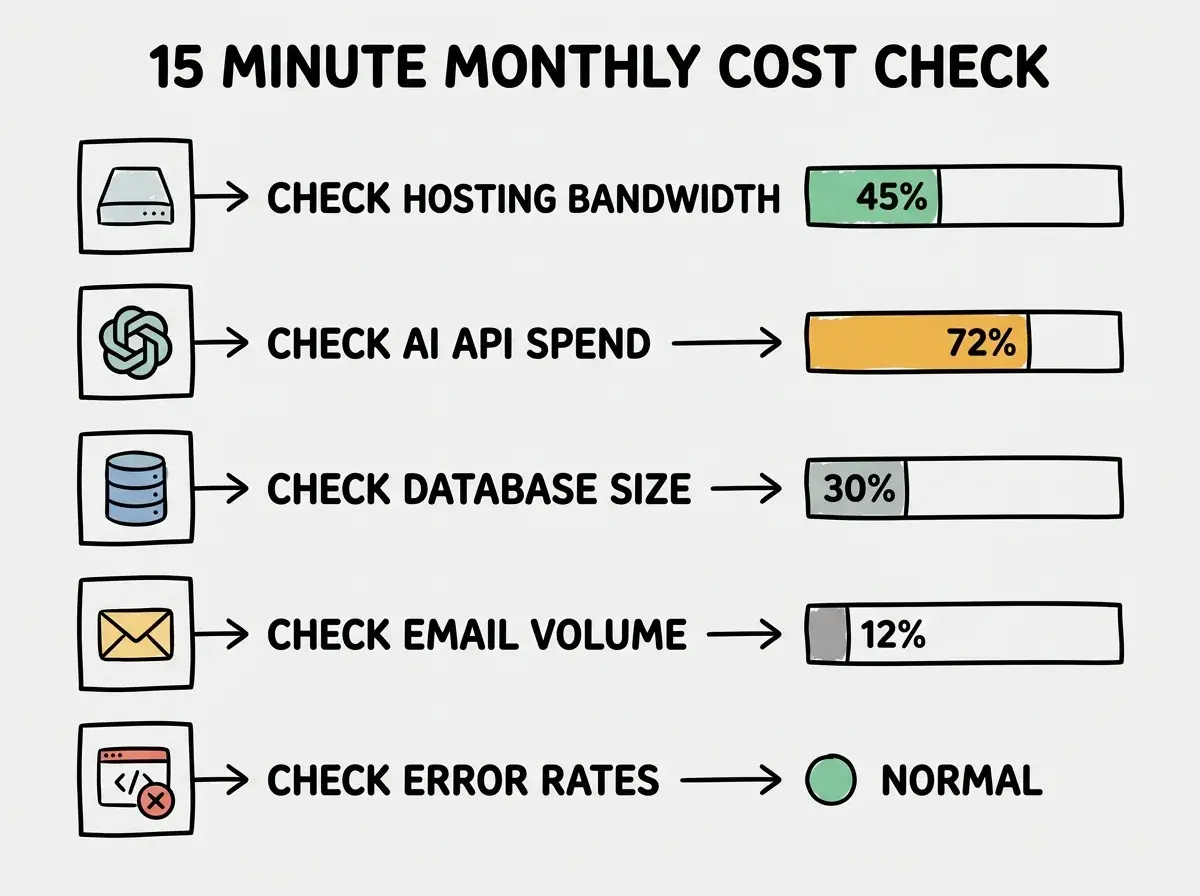
Every month, spend fifteen minutes checking these five numbers.
Check your hosting dashboard. Look at bandwidth usage and serverless function invocations. If either is trending toward the plan limit, you have time to optimize before overage charges hit.
Check your AI API spend. Both Anthropic and OpenAI have usage dashboards. Set a monthly spending limit so you cannot accidentally blow past your budget. This is the single most important thing you can do to prevent surprise bills.
Check your database size. Supabase shows your storage usage on the dashboard. If you are above 80% of your tier limit, either upgrade or clean up old data.
Check your email sending volume. Resend and Postmark both show monthly send counts. Make sure you are not hitting rate limits that cause failed deliveries.
Check your error monitoring. A spike in errors often precedes a spike in costs, because retries and timeout-related duplicate calls burn through API credits faster.
Not setting spending limits on AI API accounts. Anthropic and OpenAI both let you set hard monthly caps. Without one, a single bug that triggers an infinite retry loop can generate hundreds of dollars in charges overnight. Set your limit to 120% of your expected monthly usage on day one.
This fifteen-minute check takes less time than diagnosing one unexpected bill. Build it into your calendar on the first of every month.
When to Upgrade Each Service
Upgrading too early wastes money. Upgrading too late causes outages. Here are the specific triggers for each service.
Hosting. Upgrade when you consistently use more than 80% of your bandwidth or function limits for two consecutive months. A single traffic spike does not mean you need a bigger plan.
Database. Upgrade when your storage exceeds 80% of the free tier or when you need automated daily backups. If you are storing user data that matters, you need backups, full stop.
Auth. Upgrade when you need custom domains, multi-factor authentication enforcement, or when free tier rate limits cause login failures during peak traffic.
Email. Upgrade when your monthly sends consistently exceed 80% of the free tier or when deliverability becomes an issue (emails landing in spam).
AI APIs. There is no "upgrade" here. You pay per call. The control lever is setting spending limits and optimizing your prompts to use fewer tokens. A well-crafted prompt that is half as long costs half as much. Prompt optimization is cost optimization.
Monitoring. Add paid monitoring the moment you have your first paying customer. Before that, browser console errors and Vercel's built-in logs are enough.
What This Means For You
The total cost of running a vibe-coded app is not mysterious. It is predictable, controllable, and much lower than most people assume. The entire stack from hosting to monitoring can run on free tiers while you validate your idea. The jump to paid services happens gradually and maps directly to real usage growth.
- If you are a founder: Budget $50 per month for the first six months. That covers everything you need to serve your first 1,000 users. If your product cannot generate $50 per month in value from 1,000 users, the problem is not your infrastructure costs. It is your product-market fit.
- If you are an indie hacker: Start at $0 and stay there until free tier limits actually constrain you, not when you think they might. Most indie hackers upgrade too early out of anxiety rather than necessity. Let real usage data drive your spending decisions.
The builders who succeed with vibe-coded apps are not the ones who spend the most. They are the ones who know exactly what they are spending and why. That starts with understanding these numbers.
Map out your real costs before you start building.
Explore more guides