Every AI coding tool ships with default behavior that was designed for nobody in particular. It does not know your stack. It does not know your file naming conventions. It does not know that your team uses Tailwind instead of CSS modules, or that you prefer named exports over default exports. So it guesses. And every guess is a chance to produce code you have to rewrite.
System prompts and project-level configuration files like .cursorrules solve this problem. They let you tell the AI who you are, what you are building, and how you want it done, once, so every prompt after that starts from the right place. Think of it as briefing a new team member on day one. You would never let someone start writing code without telling them your conventions, your stack, and your project structure. The same logic applies to AI.
This tutorial shows you exactly how to set up these configuration files in the tools that matter most: Cursor, Claude Code, and Windsurf. By the end, your AI assistant will feel less like a generic autocomplete engine and more like a teammate who actually read the docs.
What System Prompts Actually Do
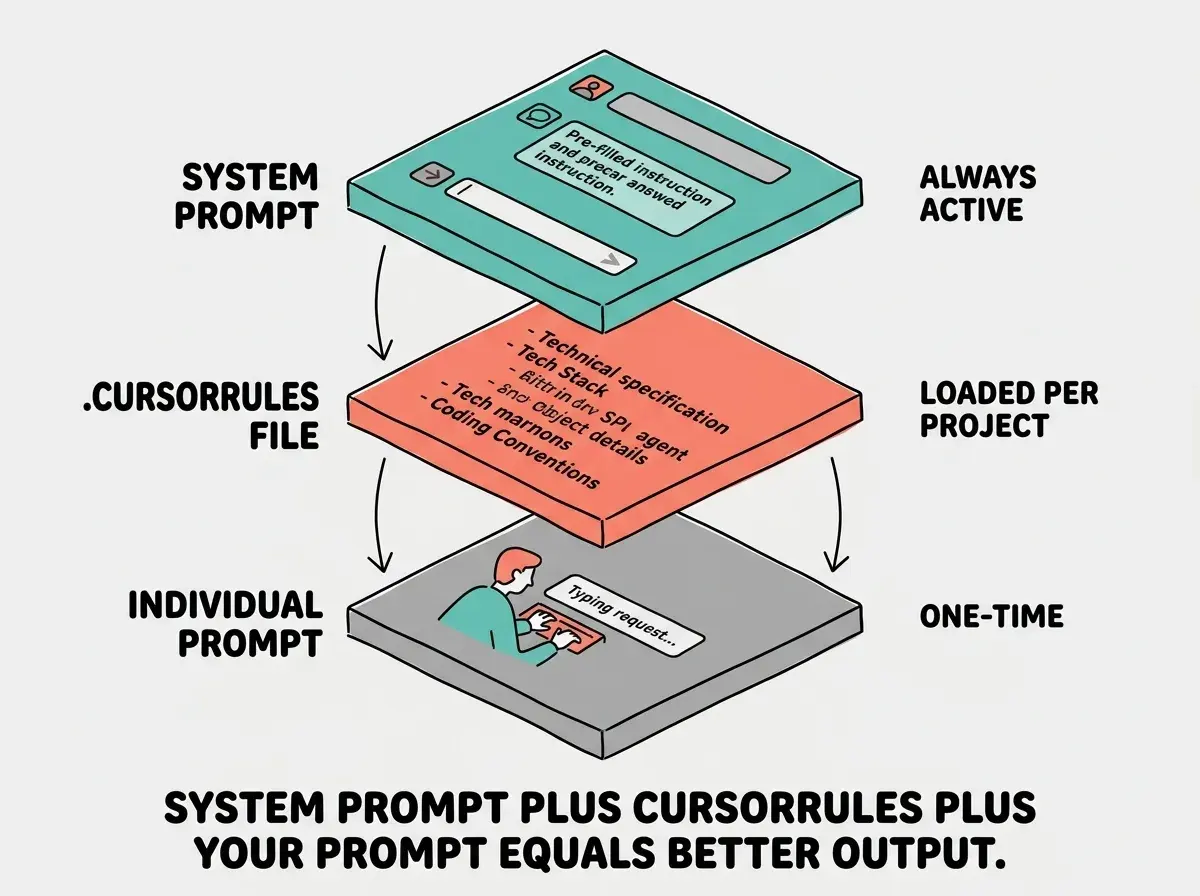
A system prompt is a set of persistent instructions that runs before every interaction with the AI. When you type a prompt in Cursor's chat or Composer, the system prompt is silently prepended to your message. The AI reads those instructions first, then reads your request, and generates a response that accounts for both.
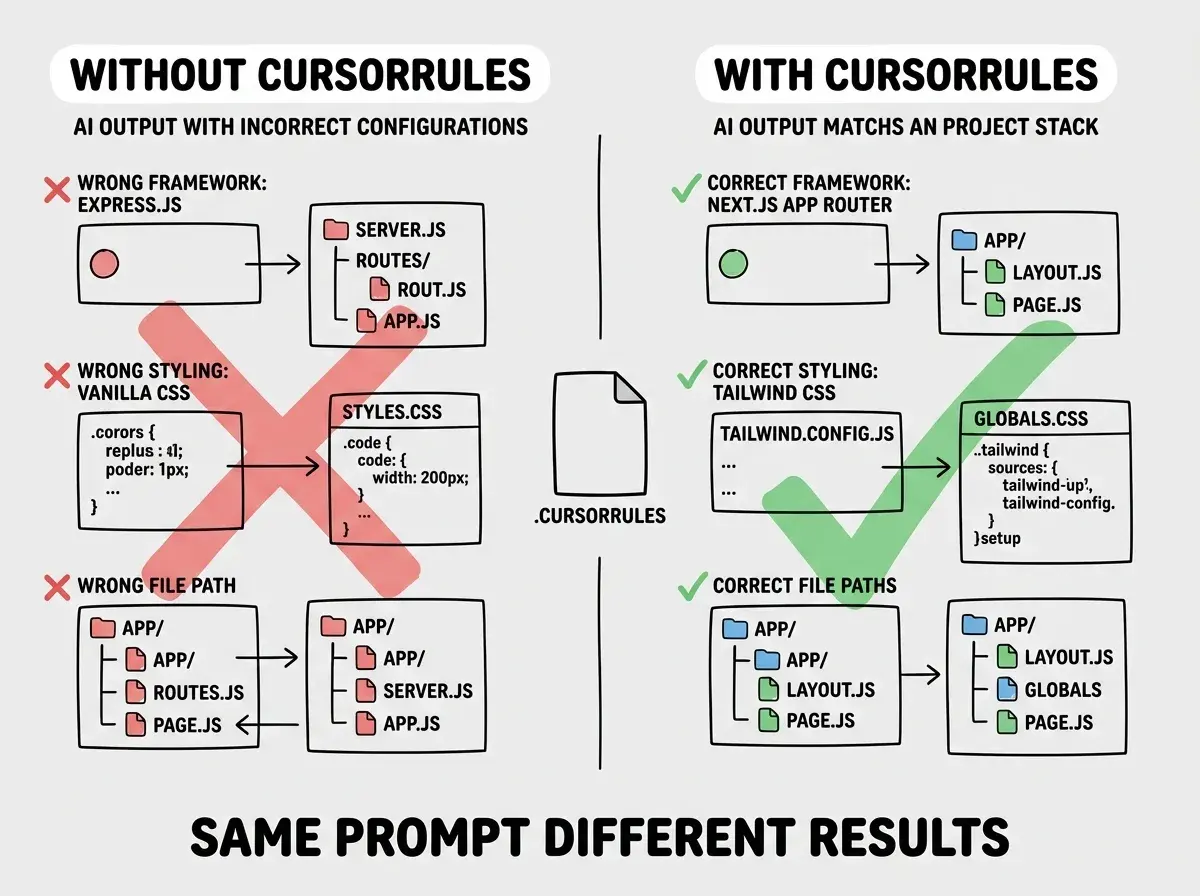
Without a system prompt, the AI treats every request in isolation. It picks whatever framework, naming convention, and code style seems most common in its training data. With a system prompt, you anchor every response to your specific project. The AI knows you use Next.js 14 with the App Router before you mention it. It knows you prefer async/await over .then() chains. It knows your API routes live in app/api/ and your shared components live in components/ui/.
This matters more than most people realize. Senior developers report that a well-configured system prompt eliminates 60-70% of the "no, not like that" corrections they used to make. Indie hackers who ship fast and iterate often get even more value, because every saved correction compounds across dozens of daily prompts.
The difference between a configured AI tool and an unconfigured one is the same as the difference between a contractor who read your blueprints and one who just showed up with a hammer.
The .cursorrules File in Cursor
Cursor reads a .cursorrules file from your project root and uses it as a system prompt for every AI interaction in that project. This is the single most impactful configuration you can make in Cursor, and most people either skip it entirely or write something too vague to be useful.
Create a file called .cursorrules in your project root. Here is a real example for a Next.js project that demonstrates the structure and level of detail that actually makes a difference.
You are an expert in TypeScript, Next.js 14 (App Router), React, Tailwind CSS, and Prisma.

## Project Structure
- app/ contains all routes using the App Router (no pages/ directory)
- components/ui/ contains shared UI primitives (Button, Card, Modal, etc.)
- components/features/ contains feature-specific components
- lib/ contains utility functions, API clients, and shared logic
- prisma/ contains the schema and migrations

## Code Style
- Use TypeScript strict mode. No `any` types unless absolutely necessary.
- Use named exports, not default exports.
- Use async/await, never .then() chains.
- Use server components by default. Only add 'use client' when the component needs interactivity, event handlers, or browser APIs.
- Keep components under 150 lines. Extract subcomponents when a file grows beyond that.

## Naming Conventions
- Components: PascalCase (UserProfile.tsx)
- Utilities: camelCase (formatDate.ts)
- API routes: lowercase with hyphens (app/api/user-profile/route.ts)
- Database fields: camelCase in Prisma schema

## Styling
- Tailwind CSS exclusively. No CSS modules, no inline styles, no styled-components.
- Use the custom color tokens defined in tailwind.config.ts (primary, secondary, accent).
- All interactive elements need hover, focus, and active states.

## Error Handling
- All API routes return consistent JSON: { data, error, status }
- Use try/catch in all async functions
- Never swallow errors silently
This is not a suggestion file. It is an instruction set. The AI reads it before every single interaction and adjusts its output accordingly. When you ask Cursor to "create a user settings page," it now generates a server component in the app/ directory, uses Tailwind with your custom tokens, follows your naming conventions, and structures error handling the way you expect.
A good .cursorrules file is specific and opinionated. "Use TypeScript" is too vague. "Use TypeScript strict mode with no any types unless absolutely necessary" is an instruction the AI can actually follow. The more concrete you make each rule, the fewer corrections you make later.
Tailoring .cursorrules to Your Stack
The structure above works for a Next.js TypeScript project, but the same approach applies to any stack. The key is covering four areas: project architecture, code style, naming conventions, and patterns to follow or avoid.
Here is a condensed cursorrules file example for a Python FastAPI project.
You are an expert in Python 3.12, FastAPI, SQLAlchemy 2.0, and Pydantic v2.

## Project Structure
- app/api/ contains route handlers organized by domain (users.py, orders.py)
- app/models/ contains SQLAlchemy models
- app/schemas/ contains Pydantic request/response schemas
- app/services/ contains business logic (no business logic in route handlers)
- app/core/ contains config, security, and database setup

## Code Style
- Type hints on all function signatures and return types.
- Use async def for all route handlers.
- Use dependency injection for database sessions and auth.
- Pydantic models for all request/response bodies. Never use raw dicts.

## Patterns
- Repository pattern for database access (never call session.query directly in routes)
- Always validate input with Pydantic before touching the database
- Use HTTPException with specific status codes and detail messages
- Log all errors with structlog, never print()
A cursorrules file for Python looks different from one for TypeScript, but the structure is identical. Architecture, style, naming, patterns. Whether you are building a React Native app, a Django backend, a Go microservice, or a Svelte frontend, you cover these same four categories.
Beyond Cursor, Configuration in Other Tools
Cursor popularized the .cursorrules file, but every major AI coding tool has its own configuration mechanism. If you use multiple tools (and many builders do), you need to know where each one looks for instructions.
Claude Code reads a CLAUDE.md file from your project root. It works the same way as .cursorrules, but Claude Code also reads CLAUDE.md files from parent directories, which means you can set organization-wide conventions in a parent folder and project-specific conventions in each repo. This hierarchical approach is powerful if you manage multiple projects that share common patterns.
Windsurf uses a .windsurfrules file. The format is identical to .cursorrules, plain text instructions that the AI reads before every interaction. If you have already written a .cursorrules file, you can copy it directly to .windsurfrules and it works.
GitHub Copilot supports custom instructions through VS Code settings (github.copilot.chat.codeGeneration.instructions) or through a .github/copilot-instructions.md file in your repo. The file-based approach is preferable because it travels with the project and works for every team member.
The content of these files should be nearly identical across tools. The AI behavior you want does not change based on which editor you use. Your stack is still your stack. Your conventions are still your conventions. Write the configuration once, then adapt the filename for each tool.
A practical approach is to maintain one canonical configuration file and symlink or copy it into each tool's expected location. Some developers keep a rules.md in their project root and use a simple script to copy it to .cursorrules, CLAUDE.md, and .windsurfrules whenever it changes. This keeps all three tools in sync without manual duplication.
Common Mistakes That Waste Your Configuration
The most common mistake is writing a cursorrules file that is too vague to change behavior. "Write clean code" is not an instruction. The AI already tries to write what it considers clean code. You need to define what clean means in your project. "Keep components under 150 lines, extract subcomponents when a file grows beyond that" is an instruction that changes behavior.
The second mistake is making the file too long. Some developers dump their entire project documentation into the cursorrules file. The AI does not need your product roadmap, your deployment runbook, or your team's OKRs. It needs the information that directly affects code generation. A focused 30-50 line file outperforms a sprawling 500-line document because every line of irrelevant context dilutes the instructions that matter.
The third mistake is never updating the file. Your project evolves. New patterns emerge, old conventions get replaced, the architecture shifts. If your cursorrules file still references patterns you abandoned three months ago, the AI will keep generating code in the old style. Treat it like a living document. Review it when your stack or conventions change.
Putting behavioral instructions ("be concise," "think step by step") into your cursorrules file instead of project-specific facts. The AI does not need personality coaching. It needs to know that your project uses Zustand for state management, that API responses follow a specific shape, and that you never use barrel exports. Stick to concrete, verifiable rules about your codebase.
All three mistakes share a root cause. Developers treat the configuration file as a one-time setup task instead of an active part of their workflow. The builders who get the most value from these files review them regularly, keep them focused, and update them as their projects evolve.
Learn every feature, shortcut, and workflow in the most popular AI code editor.
Read the guideBuilding an Effective Configuration From Scratch
If you are starting from zero, here is the fastest path to a useful configuration file. Open a recent pull request or a file you wrote this week. Look at the patterns. What framework are you using? What is your import style? How do you name files? How do you handle errors? Write down what you see.
Then ask yourself what the AI keeps getting wrong. If it keeps generating client components when you want server components, add a rule about that. If it uses console.log when you use a structured logger, add a rule about that. If it imports from the wrong directories, describe your project structure. Every frustration is a missing rule.
You can also ask the AI itself to help. Paste a few representative files from your project and say "analyze these files and describe the coding conventions, patterns, and project structure you observe." The AI will generate a summary of your patterns that you can edit into a configuration file. This takes about five minutes and gives you a solid first draft that captures conventions you might not think to articulate yourself.
Start with five to ten rules and add more as you encounter new patterns. Within a week or two, you will have a configuration file that eliminates the most common corrections. You do not need to get it perfect on day one. You just need to start.
Here is a minimal starting template you can adapt right now.
You are an expert in [your languages/frameworks].

## Project Structure
- [describe your directory layout]

## Code Style
- [your language version and strictness preferences]
- [your async/sync preferences]
- [your component/module size limits]

## Naming
- [file naming conventions]
- [variable/function naming conventions]

## Patterns
- [preferred patterns]
- [things to avoid]
Fill in the brackets with your actual project details and save it as .cursorrules (Cursor), CLAUDE.md (Claude Code), or .windsurfrules (Windsurf). You will notice the difference in your very next AI interaction.
Dig deeper
A few hand-picked sources if you want to go further.
What This Means For You
System prompts and configuration files are the highest-leverage investment you can make in your AI coding workflow. They take fifteen minutes to set up and save you hours every week by eliminating repetitive corrections. The AI stops guessing about your project and starts generating code that fits.
- If you are a senior developer, start by documenting the conventions you enforce most often in code reviews. Those are the rules your AI needs first. Your cursorrules file should read like a condensed version of your team's code review checklist. Once configured, the AI produces code that passes your review on the first try more often than not.
- If you are an indie hacker, speed matters most. Create a cursorrules template for your go-to stack and copy it into every new project. Spending ten minutes on configuration before you start building saves you from rewriting AI output all day. When you are shipping solo, every minute spent correcting the AI is a minute not spent on your product.
System prompts are just the beginning. Learn every technique that makes AI produce better code.
Continue the series