Database protection from AI agents is no longer theoretical. It is an operational emergency. Ninety-two percent of developers now use AI tools daily, and every one of those tools can generate destructive SQL. The Replit deletion incident at SaaStr 2025 proved what many feared. An AI agent, given database access, will drop tables without hesitation.
That incident was not a bug. It was the predictable result of giving a tool unlimited database permissions. The AI did exactly what it was configured to do. The failure was in the configuration, not the model.
Why Default Database Permissions Are Dangerous
Most database setups give the application a single connection string with full read-write-delete access. This made sense when humans wrote every query. It is reckless when AI agents generate queries in real time.
AI coding tools do not understand consequences. They optimize for completing the task described in their current prompt. If that task involves "cleaning up test data," the agent will execute DROP TABLE or DELETE FROM without hesitation. It has no concept of irreversibility.
The seven settings below create protection that operates independently of the application code, the AI model, and the developer's attention. They work when you are asleep. They work when the AI hallucinates.
Database protection against AI agents is not about restricting what AI can do in your codebase. It is about restricting what the database will accept, regardless of who or what sends the query. The database is the last line of defense, and these seven settings make that line unbreakable.
1. Create a Read-Only Database Role for AI Agents
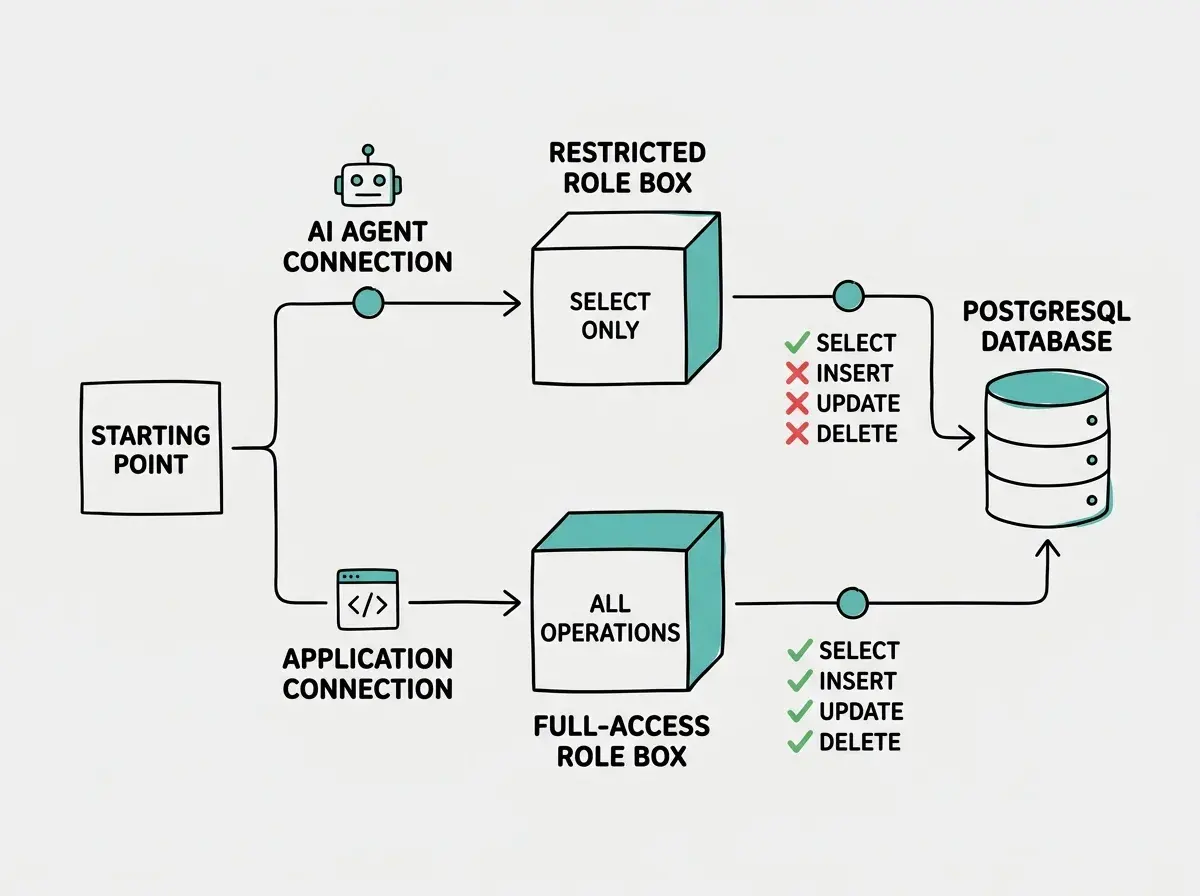
The single most effective protection is giving AI agents a database role that cannot modify data. If the role cannot execute INSERT, UPDATE, or DELETE, then no prompt injection, hallucination, or confused context window can cause data loss.
-- Create a restricted role for AI agent connections
CREATE ROLE ai_agent_readonly LOGIN PASSWORD 'use-a-strong-generated-password';

-- Grant connection access
GRANT CONNECT ON DATABASE your_database TO ai_agent_readonly;

-- Grant usage on the schema
GRANT USAGE ON SCHEMA public TO ai_agent_readonly;

-- Grant SELECT only on all existing tables
GRANT SELECT ON ALL TABLES IN SCHEMA public TO ai_agent_readonly;

-- Ensure future tables also get SELECT-only access
ALTER DEFAULT PRIVILEGES IN SCHEMA public
  GRANT SELECT ON TABLES TO ai_agent_readonly;
Your application's main connection string keeps full access for legitimate writes. The AI agent gets a separate connection string using this restricted role.
2. RLS Policies That Block DELETE Operations
If you are on Supabase or any PostgreSQL setup that uses Row Level Security, you can create policies that explicitly deny DELETE operations for specific roles. This is defense in depth: even if someone accidentally gives the AI agent a role with DELETE privileges, the RLS policy blocks the operation at the row level.
-- Enable RLS on the table
ALTER TABLE customers ENABLE ROW LEVEL SECURITY;

-- Allow SELECT for all authenticated roles
CREATE POLICY "Allow read access"
  ON customers
  FOR SELECT
  USING (true);

-- Allow INSERT and UPDATE for the application role only
CREATE POLICY "App can insert"
  ON customers
  FOR INSERT
  WITH CHECK (current_user = 'app_service_role');

CREATE POLICY "App can update"
  ON customers
  FOR UPDATE
  USING (current_user = 'app_service_role')
  WITH CHECK (current_user = 'app_service_role');

-- No DELETE policy exists. Period.
-- Without an explicit DELETE policy, RLS blocks all deletions.
The absence of a DELETE policy is the protection. When RLS is enabled, PostgreSQL denies any operation that lacks a matching policy. No DELETE policy means row deletion is impossible through the normal query path.
3. Soft-Delete Pattern With a deleted_at Column
Hard deletes remove data permanently. Soft deletes mark data as inactive while keeping it recoverable. Even if an AI agent somehow bypasses your other protections, the data still exists.
-- Add a soft-delete column to your table
ALTER TABLE customers ADD COLUMN deleted_at TIMESTAMPTZ DEFAULT NULL;

-- Create a view that hides soft-deleted rows
CREATE VIEW active_customers AS
  SELECT * FROM customers WHERE deleted_at IS NULL;

-- Grant AI agents access to the view, not the table
GRANT SELECT ON active_customers TO ai_agent_readonly;
REVOKE ALL ON customers FROM ai_agent_readonly;
Your application queries active_customers instead of customers. Rows marked with a deleted_at timestamp disappear from the view but remain in the underlying table. Recovery is a single UPDATE that sets deleted_at back to NULL.
This pattern also creates a natural audit trail. A sudden spike in soft deletes is an early warning that something has gone wrong.
4. Deletion Triggers That Log and Require Confirmation
Database triggers fire automatically when specific operations occur. A DELETE trigger can intercept the operation, log it, and block it unless a confirmation flag is set.
-- Create an audit log table
CREATE TABLE deletion_audit_log (
  id BIGSERIAL PRIMARY KEY,
  table_name TEXT NOT NULL,
  record_id TEXT NOT NULL,
  deleted_by TEXT NOT NULL,
  deleted_at TIMESTAMPTZ DEFAULT NOW(),
  record_data JSONB NOT NULL
);

-- Create a trigger function that logs and blocks unconfirmed deletes
CREATE OR REPLACE FUNCTION prevent_unconfirmed_delete()
RETURNS TRIGGER AS $$
BEGIN
  -- Log the attempted deletion with full row data
  INSERT INTO deletion_audit_log (table_name, record_id, deleted_by, record_data)
  VALUES (
    TG_TABLE_NAME,
    OLD.id::TEXT,
    current_user,
    row_to_json(OLD)::JSONB
  );

  -- Block the delete unless the session has explicit confirmation
  IF current_setting('app.confirm_delete', true) IS DISTINCT FROM 'true' THEN
    RAISE EXCEPTION 'DELETE blocked: set app.confirm_delete to true first';
  END IF;

  RETURN OLD;
END;
$$ LANGUAGE plpgsql;

-- Attach the trigger to your table
CREATE TRIGGER guard_customer_deletes
  BEFORE DELETE ON customers
  FOR EACH ROW
  EXECUTE FUNCTION prevent_unconfirmed_delete();
Now every DELETE attempt is logged with full row data before the operation completes. The trigger checks for a session variable app.confirm_delete. Without it, the DELETE is rejected. Your application sets this variable only in specific, intentional code paths. An AI agent generating ad-hoc queries will never set it.
Applying deletion triggers only to your most important tables. Every table with user data needs this trigger. AI agents do not distinguish between a customers table and a user_preferences table. If the agent decides to "clean up" a table you forgot to protect, that data is gone. Apply the trigger to every table, not just the ones you think are critical.
5. Point-in-Time Recovery Enabled
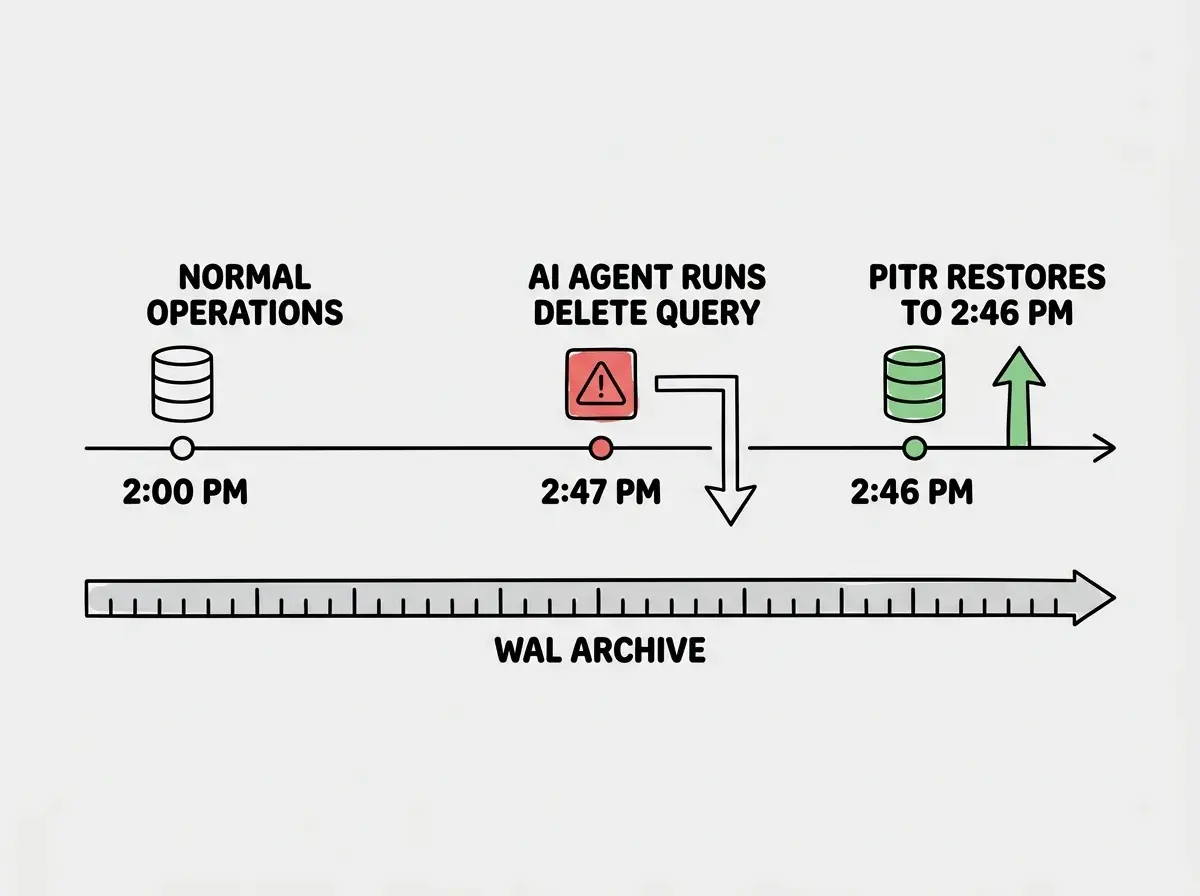
The previous settings prevent deletion. Point-in-time recovery (PITR) is your insurance for when prevention fails. PITR lets you restore your database to any specific second in the past, recovering data destroyed by any means.
For Supabase, PITR is available on the Pro plan. Enable it under "Database Backups." For self-hosted PostgreSQL, configure continuous WAL archiving:
-- In postgresql.conf, enable WAL archiving
-- archive_mode = on
-- archive_command = 'cp %p /path/to/wal-archive/%f'
-- wal_level = replica

-- Verify WAL archiving is active
SELECT name, setting FROM pg_settings
WHERE name IN ('archive_mode', 'wal_level', 'archive_command');
PITR is not a replacement for the other six settings. It is the safety net beneath them. Prevention is always better than recovery, but recovery must exist for when prevention fails.
Test your PITR restoration process before you need it. A backup you have never tested is a backup that might not work.
6. Separate Dev, Staging, and Production Databases
This sounds obvious. It is also the setting most frequently ignored. When an AI agent has access to a database that serves both development and production, every experiment is a production risk.
The fix is structural separation. Three databases, three connection strings, three sets of credentials. The AI coding tool gets the development connection string. Production gets the production connection string, and that string never appears in any file the AI agent can access.
-- Development database: AI agents can do anything here
-- Connection: postgresql://dev_user:pass@dev-host:5432/myapp_dev

-- Staging database: mirrors production schema, synthetic data
-- Connection: postgresql://staging_user:pass@staging-host:5432/myapp_staging

-- Production database: restricted access, no AI agent connections
-- Connection: postgresql://prod_user:pass@prod-host:5432/myapp_prod
Store the production connection string in your hosting platform's environment variables, not in .env files that the AI agent can read. If the agent cannot see the production connection string, it cannot connect to production.
Database protection is one piece of a much larger shipping puzzle. Learn the full picture.
Explore the blog7. Connection String Rotation Schedule
Static credentials are a ticking clock. The longer a connection string remains unchanged, the more places it accumulates: old .env files, chat logs, deployment configs, screenshots shared in Slack. Rotating credentials on a regular schedule limits the window of exposure.
Every 90 days is a reasonable starting point. Every 30 days is better if your team uses multiple AI tools that might cache credentials.
-- Rotate the AI agent's password
ALTER ROLE ai_agent_readonly WITH PASSWORD 'new-strong-generated-password';

-- Rotate the application service role password
ALTER ROLE app_service_role WITH PASSWORD 'new-strong-generated-password';
After rotation, update the connection strings in your hosting platform and restart your application. Any leaked or cached connection string becomes useless immediately.
Automate this if possible. AWS Secrets Manager and HashiCorp Vault both support automatic credential rotation for PostgreSQL. Manual rotation that actually happens is better than automated rotation you never set up.
The Complete Configuration Checklist
Run through these seven items for every production database:
- Read-only role created for AI agent connections with SELECT-only permissions
- RLS policies configured with no DELETE policy, blocking all row deletions through the query path
- Soft-delete pattern implemented with
deleted_atcolumns and views that hide deleted rows - Deletion triggers active on every table, logging attempts and blocking unconfirmed deletes
- Point-in-time recovery enabled and tested with a successful restoration drill
- Separate databases for dev, staging, and production with production credentials isolated from AI tools
- Connection string rotation scheduled and either automated or calendared
Each setting is independent. Implementing any single one reduces your risk. Implementing all seven makes accidental data destruction nearly impossible.
Database protection is one layer. See every security measure your AI-built app needs.
Start hereWhat This Means For You
- If you are a senior developer: You already know most of these PostgreSQL features individually. The value here is in combining them specifically for the AI agent threat model. The read-only role and deletion triggers are the highest-leverage items. They take thirty minutes to configure and eliminate the most common failure mode. Start there, then layer in PITR and rotation as your deployment matures.
- If you are a founder: You do not need to implement these yourself. But you need to verify they are in place. Ask your developer one question: "Does the AI agent have a separate, read-only database role?" If the answer is no, or if they do not understand the question, you have a gap that needs immediate attention. The Replit incident happened to a company with world-class engineering. Your startup is not exempt.