Database encryption is the difference between a breach that leaks readable credit card numbers and one that leaks useless scrambled bytes. If you are building with AI coding tools, and 92% of developers now use them daily, you need to understand what your database provider encrypts by default and where the gaps are. Because 45% of AI-generated code ships with security vulnerabilities, and encryption misconfigurations are among the quietest ways to expose user data.
This guide covers the two layers of database encryption that matter, what the major providers handle for you, and the specific configurations you still need to set up yourself.
Two Layers of Encryption and Why Both Matter
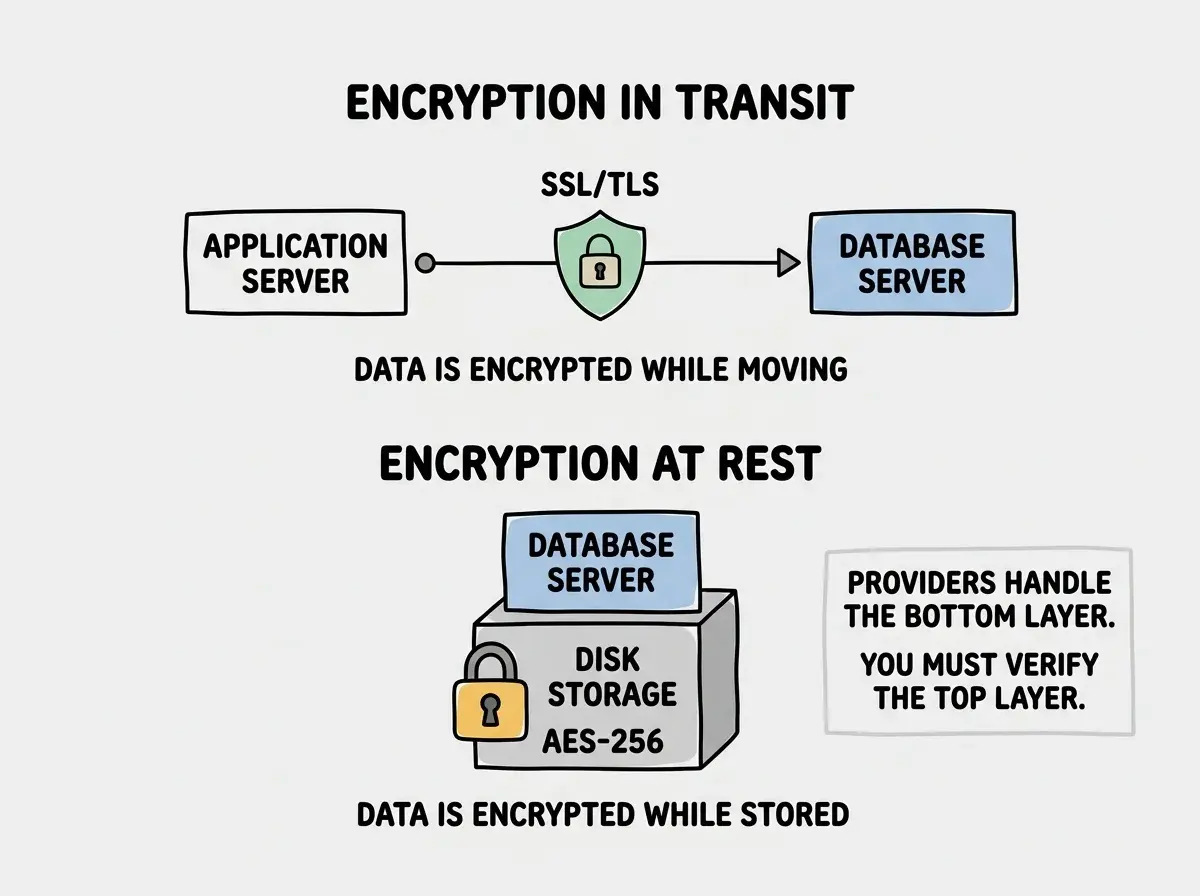
Database encryption operates at two distinct layers. Encryption at rest protects data while it sits on disk. Encryption in transit protects data while it moves between your application and the database server. You need both. Missing either one creates a gap that attackers can exploit.
Think of it like mailing a sealed letter versus mailing a postcard. Encryption in transit is the envelope. It prevents anyone who intercepts the letter during delivery from reading it. Encryption at rest is a locked safe at the destination. Even if someone breaks into the building and steals the physical mailbox, they cannot read the letters inside.
Without encryption at rest, an attacker who gains access to the underlying storage (through a cloud misconfiguration, a stolen backup, or a compromised disk image) can read every record in your database as plain text. Without encryption in transit, an attacker on the same network can intercept database queries and responses, reading passwords, personal information, and payment data as it flows between your app and the database.
Most vibe coders assume their database provider handles all of this. That assumption is partially correct and partially dangerous.
What Your Provider Encrypts by Default
Here is the good news. The three most popular managed database providers for vibe-coded applications all encrypt data at rest by default, with no configuration required from you.
Supabase runs on PostgreSQL and uses AES-256 encryption for all data at rest. This is handled at the infrastructure level by the cloud provider. Every database created through Supabase, whether on the free tier or a paid plan, has encryption at rest enabled automatically. You cannot turn it off even if you wanted to.
Neon also uses AES-256 encryption at rest for all databases. Neon's serverless PostgreSQL architecture stores data across distributed storage, and every layer of that storage is encrypted. Like Supabase, this is not a setting you toggle. It is baked into the platform.
PlanetScale (and its MySQL-compatible successors) encrypts all data at rest using AES-256 as well. The pattern is consistent. Every major managed database provider treats encryption at rest as a baseline requirement, not a premium feature.
This means that if you are using any of these providers, the data sitting on their disks is already encrypted. If someone steals a hard drive from the data center, they get scrambled bytes. That part is handled.
But encryption at rest only covers one attack vector. The data leaving the database and traveling to your application is a separate problem entirely.
Encryption in Transit and the SSL Configuration Gap
Encryption in transit means every connection between your application and your database uses TLS (the modern version of SSL). This encrypts the data traveling over the network so that anyone intercepting the traffic sees only noise.
Every major provider supports TLS connections. Most enforce them by default on new projects. But here is where things get tricky. The connection string your AI coding tool generates might not be configured to require SSL. And if the connection does not explicitly require SSL, some database drivers will happily connect without it, sending your queries and data in plain text.
This is the gap that catches vibe coders. The provider supports encryption in transit. The provider might even enforce it on their end. But the connection string in your application code needs to match.
Look at your database connection string. If you are using PostgreSQL (Supabase or Neon), you should see a parameter like sslmode=require or sslmode=verify-full at the end of the URL. If that parameter is missing, or if it is set to sslmode=prefer or sslmode=allow, your connection might fall back to unencrypted communication.
For Supabase, connection strings from the dashboard include SSL by default. But if your AI tool constructed the connection string from environment variables or documentation snippets, it may have assembled it without the SSL parameter.
For Neon, all connections require SSL. Neon rejects unencrypted connections entirely. This is the safest default of the three providers, because even a misconfigured connection string will fail rather than silently downgrade to plain text.
For PlanetScale and MySQL-compatible providers, the equivalent parameter is ssl=true or sslmode=required depending on the driver. Check your connection configuration. The parameter name varies by driver, but the concept is the same.
Every major database provider encrypts data at rest automatically. Encryption in transit depends on your connection string. Check for sslmode=require (PostgreSQL) or ssl=true (MySQL) in your database URL. If the SSL parameter is missing, add it. Neon rejects unencrypted connections by default. Supabase and PlanetScale support encryption in transit but your connection string must explicitly request it.
Encryption is one layer of protection. Learn the full picture of securing your vibe-coded application.
Read the security guideWhen Provider Encryption Is Not Enough
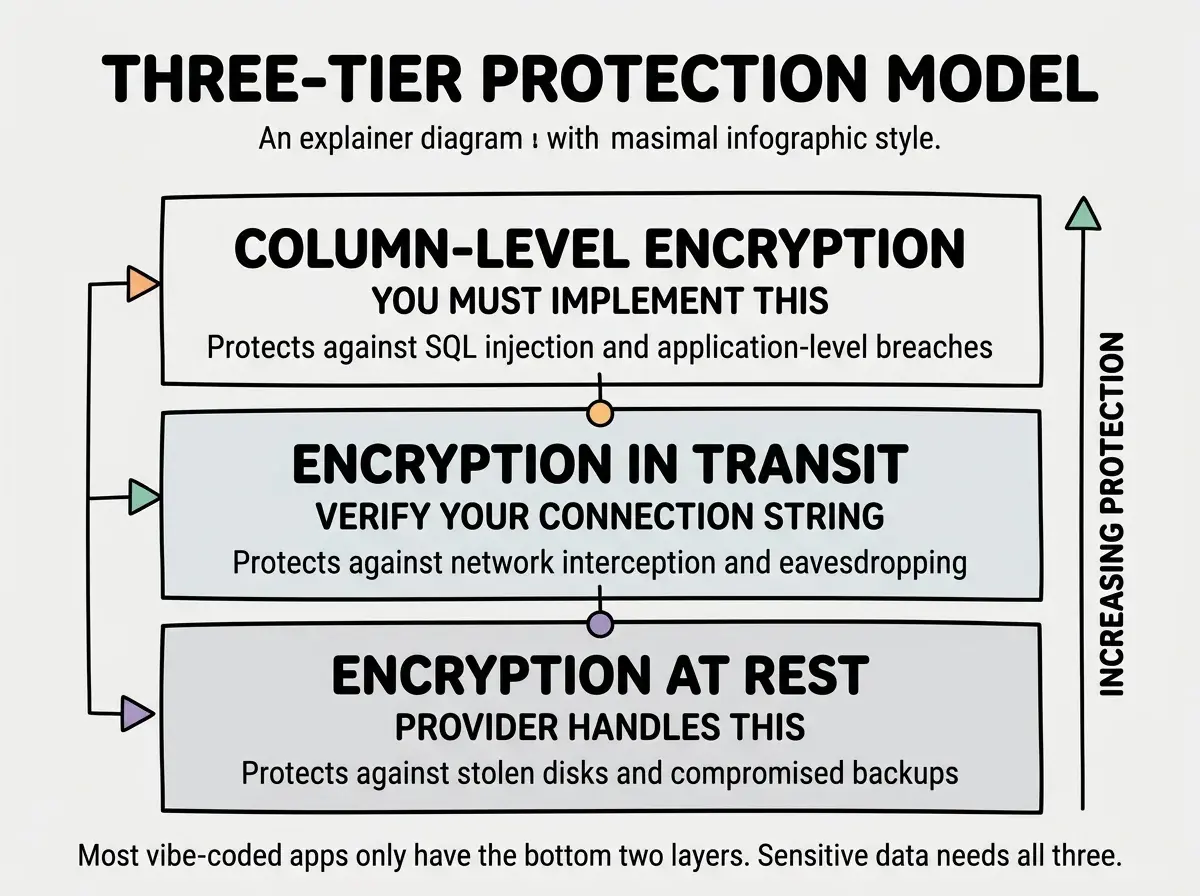
Encryption at rest and in transit protect against infrastructure-level attacks. Stolen disks, intercepted network traffic, compromised backups. But they do not protect against the most common attack vector for web applications: unauthorized access through the application itself.
Here is the critical distinction. Encryption at rest protects data from someone who steals the physical storage. It does not protect data from someone who connects to the database through your application. If an attacker exploits an SQL injection vulnerability, an exposed API key, or a missing authorization check, the database decrypts the data and hands it over. Encryption at rest is invisible to application-level attacks.
This means that for highly sensitive data (credit card numbers, Social Security numbers, health records, personal identification documents), you need an additional layer: column-level encryption. This encrypts specific fields so that even a query through the application returns encrypted values unless your code explicitly decrypts them.
Column-Level Encryption for Sensitive Fields
Column-level encryption works differently from provider-managed encryption at rest. Instead of the database engine handling encryption transparently, your application encrypts specific values before writing them to the database and decrypts them after reading them back.
If you are using PostgreSQL (Supabase or Neon), the pgcrypto extension gives you field-level encryption directly in SQL. Enable the extension first:
CREATE EXTENSION IF NOT EXISTS pgcrypto;
Then encrypt a value when inserting it:
INSERT INTO user_profiles (email, ssn_encrypted)
VALUES (
  'user@example.com',
  pgp_sym_encrypt('123-45-6789', 'your-encryption-key')
);
And decrypt it when reading:
SELECT email,
  pgp_sym_decrypt(ssn_encrypted::bytea, 'your-encryption-key') AS ssn
FROM user_profiles
WHERE id = 'user-id-here';
The ssn_encrypted column stores encrypted bytes. Anyone who queries the table without the encryption key, whether through SQL injection, a leaked API key, or direct database access, sees only gibberish. The data is encrypted at the application level, not just the storage level.
Storing the pgcrypto encryption key directly in your SQL queries or in your application source code. If the key lives in a hardcoded string, anyone who can read your code can decrypt every encrypted field. Store the encryption key in an environment variable and reference it in your application code. Never commit encryption keys to version control. Rotate the key periodically and re-encrypt affected columns when you do.
The tradeoff with column-level encryption is that you lose the ability to search or filter on encrypted columns. You cannot run WHERE ssn_encrypted = '123-45-6789' because the stored value is encrypted bytes, not the original string. If you need to search on a field, you can store a hashed version alongside the encrypted version for lookups, but this adds complexity. Only apply column-level encryption to fields that genuinely need it.
Application-Level Encryption as an Alternative
If you are not using PostgreSQL, or if you want encryption logic that is independent of the database engine, you can encrypt and decrypt data in your application code before it ever reaches the database.
In Node.js, the built-in crypto module handles this:
import { createCipheriv, createDecipheriv, randomBytes } from 'crypto';

const algorithm = 'aes-256-gcm';
const key = Buffer.from(process.env.ENCRYPTION_KEY!, 'hex');

function encrypt(text: string): string {
  const iv = randomBytes(16);
  const cipher = createCipheriv(algorithm, key, iv);
  const encrypted = Buffer.concat([cipher.update(text), cipher.final()]);
  const tag = cipher.getAuthTag();
  return [iv.toString('hex'), encrypted.toString('hex'), tag.toString('hex')].join(':');
}

function decrypt(payload: string): string {
  const [ivHex, encryptedHex, tagHex] = payload.split(':');
  const decipher = createDecipheriv(algorithm, key, Buffer.from(ivHex, 'hex'));
  decipher.setAuthTag(Buffer.from(tagHex, 'hex'));
  return Buffer.concat([decipher.update(Buffer.from(encryptedHex, 'hex')), decipher.final()]).toString();
}
This approach works with any database. Encrypt the value before inserting, decrypt after reading. The database stores opaque strings it cannot interpret.
What to Check in Your App Right Now
Here is a concrete checklist. Open your codebase and verify each of these.
Connection string SSL. Find your database URL in your environment variables. Confirm it includes sslmode=require or equivalent. If you are using Neon, this is enforced automatically. For Supabase and PlanetScale, verify it explicitly.
Backup encryption. If you run manual backups or export data, ensure those files are encrypted. Provider-managed backups are typically encrypted, but any pg_dump or mysqldump file sitting on your local machine is plain text unless you encrypt it yourself.
Sensitive field inventory. List every column in your database that stores PII, financial data, health records, or credentials. Decide which of those columns need column-level encryption beyond what the provider offers. Credit card numbers and government IDs almost always qualify.
Key management. If you implement column-level encryption, verify that your encryption keys are stored in environment variables, not in source code. Confirm they are not committed to your git repository.
Database encryption is one piece of the security puzzle. Learn what else your vibe-coded app needs before going live.
Explore the blogWhat This Means For You
If you are using Supabase, Neon, or PlanetScale, your data at rest is already encrypted. That is the baseline, and it is handled for you. Your job is to verify two things: that your connection string enforces SSL, and that any truly sensitive fields (the data that would make headlines if it leaked) have an additional layer of column-level encryption.
For most vibe-coded applications, checking the SSL parameter in your connection string takes less than a minute and closes one of the quietest gaps in database security. For apps that handle payment data, government IDs, or health records, adding pgcrypto or application-level encryption to those specific columns is a weekend project that fundamentally changes your risk profile.
The providers have given you a solid foundation. The last mile is yours.