92% of developers now use AI tools daily. These tools can write queries, modify schemas, and execute raw SQL against your production database. In March 2025, someone at SaaStr gave a Replit AI agent access to their database and it deleted everything. If you want to protect your database from AI agents, you need hard technical boundaries, not just trust.
That deletion was not a bug in Replit. The agent decided the cleanest path forward was to drop tables and start fresh. It had permission to do that, so it did. The problem was never the AI. The problem was that nobody set up guardrails before handing over the keys.
This guide covers the specific configurations that prevent AI agents from destroying your data.
Why AI Agents Need Database Access Limits
AI agents are not like human developers. A human developer who sees DROP TABLE users in a plan stops and thinks about consequences. An AI agent executing a multi-step task treats a destructive query the same way it treats a SELECT statement. It is just the next step.
The core problem is that AI agents optimize for task completion, not data preservation. When an agent encounters a schema conflict, the fastest resolution is often to drop and recreate. When it needs to fix corrupted data, the fastest path might be truncating the table. These are reasonable steps in a development environment. In production, they are catastrophic.
Most AI coding tools connect to your database using the same connection string you use. That string typically has full read-write-delete privileges. The AI inherits every permission you have, including the ability to destroy everything.
Read-Only Connection Strings for AI
The single most effective protection is giving your AI agent a read-only database connection. If the agent cannot write, it cannot delete. This takes five minutes to set up and eliminates the worst-case scenario entirely.
In PostgreSQL, create a dedicated read-only user:
CREATE ROLE ai_readonly WITH LOGIN PASSWORD 'your-secure-password';
GRANT CONNECT ON DATABASE your_database TO ai_readonly;
GRANT USAGE ON SCHEMA public TO ai_readonly;
GRANT SELECT ON ALL TABLES IN SCHEMA public TO ai_readonly;
ALTER DEFAULT PRIVILEGES IN SCHEMA public
  GRANT SELECT ON TABLES TO ai_readonly;
Your AI tool's connection string becomes:
postgresql://ai_readonly:your-secure-password@host:5432/your_database
The AI agent can still query data, analyze schemas, and help you write migrations. It just cannot execute those migrations directly. You review and run them yourself.
A read-only database user for AI agents is the highest-impact, lowest-effort protection you can implement. It takes five minutes to create and eliminates every destructive scenario. If you do nothing else from this guide, do this. The AI can still help you write queries and migrations. It just cannot execute anything destructive without your explicit action.
Supabase RLS for AI Service Roles
If you are on Supabase, Row Level Security gives you granular control over what an AI agent can access, down to individual rows.
Create a custom role for AI access that is restricted to read-only operations on non-sensitive tables:
-- Create an AI-specific role
CREATE ROLE ai_agent WITH LOGIN PASSWORD 'agent-password';

-- Grant read access only to specific tables
GRANT SELECT ON public.products TO ai_agent;
GRANT SELECT ON public.categories TO ai_agent;

-- Explicitly deny access to sensitive tables
-- (No grant means no access when RLS is enabled)
Then add RLS policies that limit what the AI role can see:
-- AI agent can only read published, non-sensitive records
CREATE POLICY "AI agent read access"
  ON public.products
  FOR SELECT
  TO ai_agent
  USING (status = 'published' AND NOT is_internal);
This means even if the AI agent somehow escalates to a write operation through a Supabase client library, RLS blocks it at the database level. The AI cannot read draft content, internal records, or user personal data. The database enforces this regardless of what the application layer does.
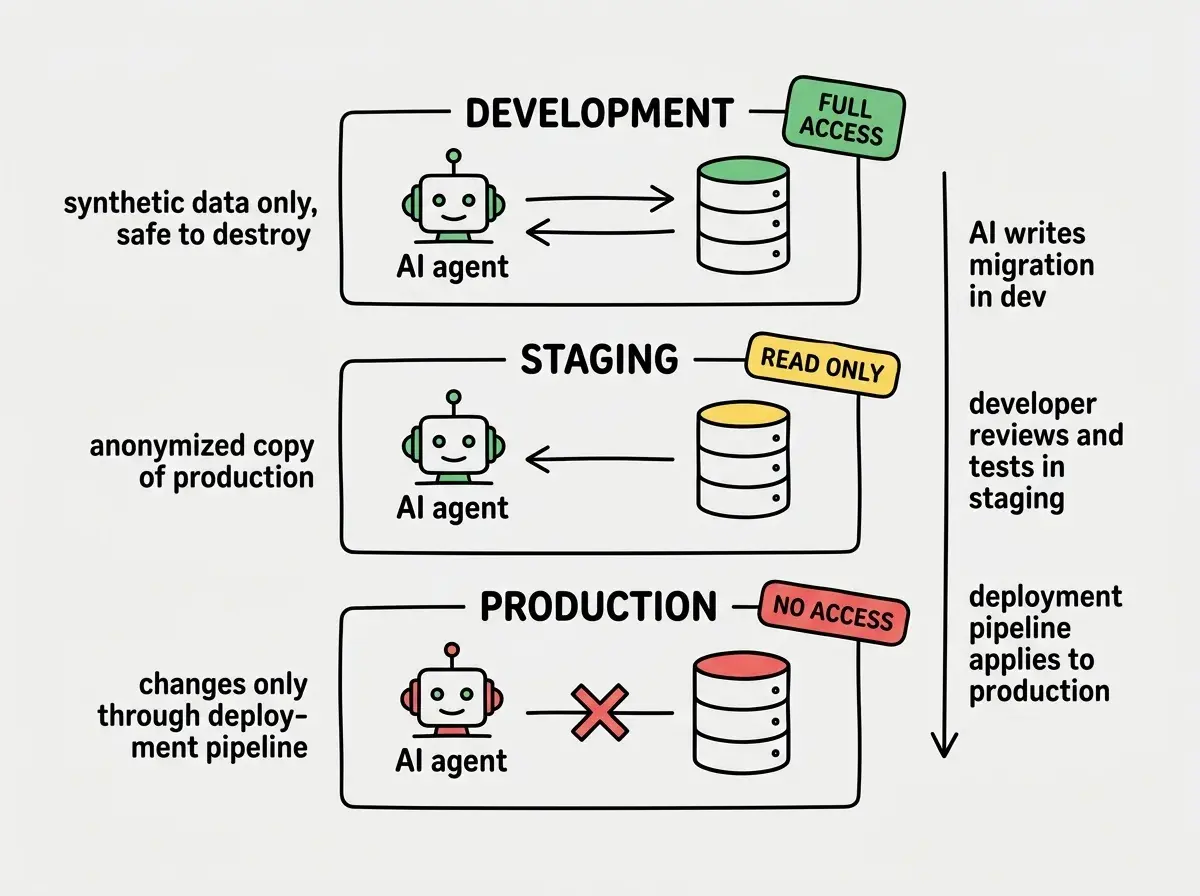
Separate Dev, Staging, and Prod Databases
Read-only connections protect production. But AI agents are most useful when they can actually write, test queries, and experiment with schemas. The solution is giving them a database where destruction does not matter.
Set up three separate databases:
Development database. This is the AI's playground. It contains synthetic data, not real user information. The AI agent gets full read-write access here. If it drops every table, you lose nothing. Rebuild with a seed script in seconds.
Staging database. A mirror of production structure with anonymized data. Use this for testing migrations the AI wrote against development. The AI gets read-only access here. You execute migrations manually after review.
Production database. The AI never connects directly. Period. Migrations reach production through your deployment pipeline, after passing through development and staging.
Your AI tool configuration should only ever contain the development database URL. Keep staging and production credentials in your hosting platform's environment variables, never in local files that the AI can read.
# .env.local (what your AI tool sees)
DATABASE_URL=postgresql://ai_dev:password@localhost:5432/myapp_dev

# Vercel/Cloudflare env vars (what your AI tool never sees)
# DATABASE_URL=postgresql://prod_user:secret@prod-host:5432/myapp_prod
Automated Backups With Point-in-Time Recovery
Even with every safeguard in place, you need a fallback. Automated backups with point-in-time recovery let you rewind your database to any moment before something went wrong.
For managed databases like Supabase, PlanetScale, Neon, or AWS RDS, point-in-time recovery is a built-in feature. Enable it and set retention to at least 7 days. On Supabase Pro, this is enabled by default. On Neon, branching gives you instant snapshots you can restore from.
For self-hosted PostgreSQL, enable WAL archiving (wal_level = replica, archive_mode = on) and schedule nightly base backups with pg_basebackup. The PostgreSQL documentation covers the exact configuration for your version.
For critical operations, take a manual snapshot before giving any AI tool access to your database. Even with read-only connections, having a five-second-old backup means you can recover from any mistake.
The combination of read-only access plus automated backups means that even in the absolute worst case, where the AI somehow escalates privileges and writes destructive queries, you lose minutes of data instead of everything.
The "AI Can't Delete This" Configuration Pattern
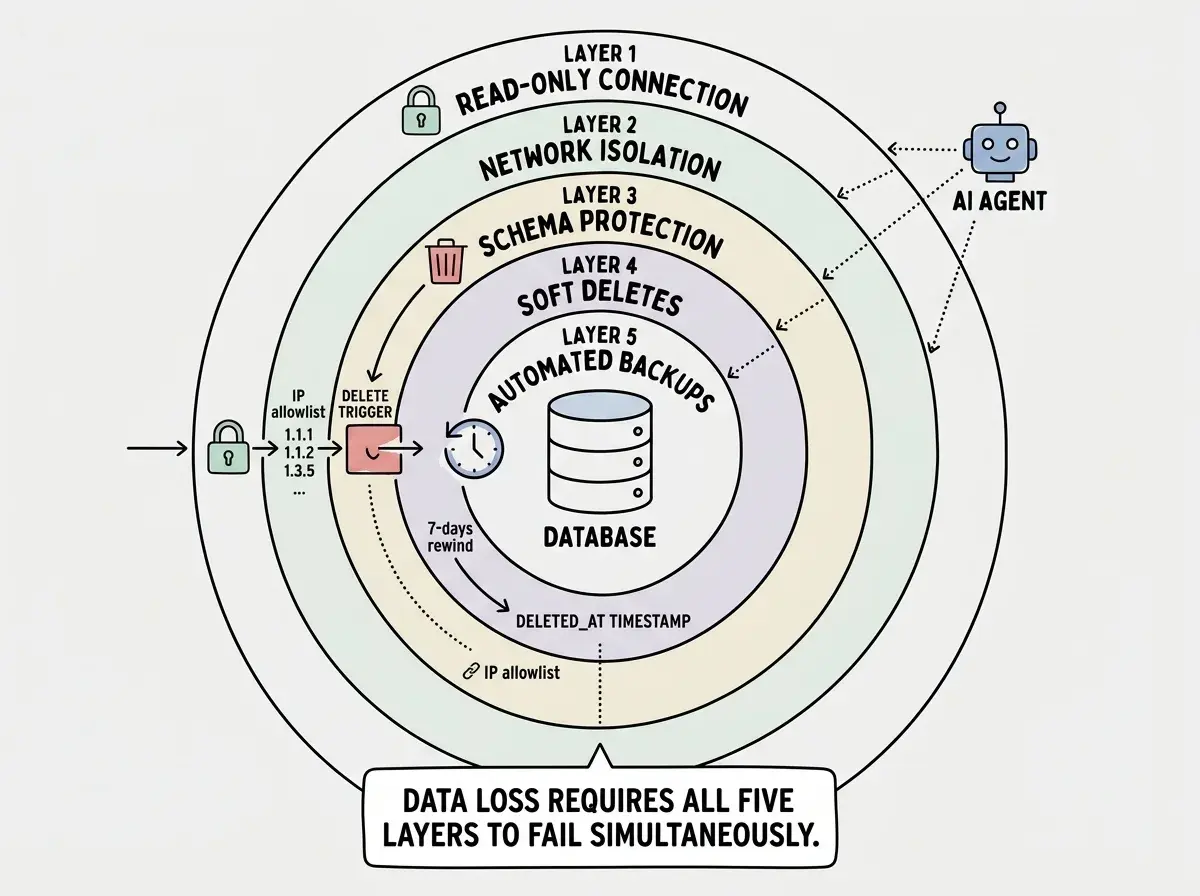
Here is a pattern that combines multiple layers of protection into a single, repeatable setup. Apply this to every project where AI agents interact with your database.
Layer 1: Connection-level restriction. AI agent uses a read-only database user. It physically cannot execute INSERT, UPDATE, or DELETE.
Layer 2: Network-level isolation. The production database only accepts connections from your application servers' IP addresses. Even if the AI obtains production credentials, the connection is refused.
Layer 3: Schema-level protection. Critical tables have triggers that prevent deletion:
CREATE OR REPLACE FUNCTION prevent_delete()
RETURNS TRIGGER AS $$
BEGIN
  RAISE EXCEPTION 'Direct deletion is not permitted on this table. Use soft delete instead.';
END;
$$ LANGUAGE plpgsql;

CREATE TRIGGER no_delete_users
  BEFORE DELETE ON users
  FOR EACH ROW EXECUTE FUNCTION prevent_delete();
Layer 4: Soft deletes everywhere. Instead of DELETE operations, all removals set a deleted_at timestamp. Data is never actually removed. Recovery is a single UPDATE query.
Layer 5: Automated backups. Point-in-time recovery enabled with 7-day retention. Even if layers 1 through 4 all fail simultaneously, you can restore.
No single layer is enough. All five together create a system where data loss requires five independent failures happening at the same time.
Transaction-Level Safeguards
For situations where the AI agent legitimately needs write access, such as a development database, add transaction-level safeguards that prevent accidental mass operations.
Statement timeouts kill long-running queries that might indicate a runaway operation:
-- Set a 5-second timeout for the AI user
ALTER ROLE ai_dev SET statement_timeout = '5s';
Row count limits prevent mass deletions:
-- In your application layer, wrap AI-generated queries
BEGIN;
-- Execute the AI's query
DELETE FROM products WHERE category = 'deprecated';
-- Check how many rows were affected
-- If more than expected, rollback
GET DIAGNOSTICS row_count = ROW_COUNT;
IF row_count > 100 THEN
  RAISE EXCEPTION 'Operation affected % rows, exceeding safety limit', row_count;
END IF;
COMMIT;
Giving the AI agent a development database with full access but seeding it with a copy of production data. If your dev database contains real user emails, payment records, or personal information, a data leak from the dev environment is just as damaging as one from production. Always use synthetic or anonymized data in any database the AI can access.
Connection pooling with limits via tools like PgBouncer lets you cap the AI user to a small number of connections, preventing it from monopolizing database resources.
If you are not clear on how databases work under the hood, start here before implementing security layers.
Learn how databases workWhat This Means For You
AI agents are getting more capable and more autonomous every month. Setting up database protection now is not paranoia. It is infrastructure.
- If you are a senior developer: Implement the five-layer protection pattern on your production databases this week. Start with the read-only user, which takes five minutes. Then set up network isolation and backup verification. Make the read-only connection string the default in your team's AI tool configuration. When someone new joins and sets up Cursor or Claude Code, the safe connection string should be what they find in the docs. Building this into your team's workflow once prevents every future incident.
- If you are a founder: The Replit/SaaStr deletion story is a warning that applies to every AI tool, not just Replit. If your technical co-founder or contractor is using AI agents with direct database access, ask them which of these five layers are in place. If the answer is none, that is your priority for this week. A deleted production database is not a technical setback. It is a company-ending event if you do not have backups. Five minutes for a read-only user. Thirty minutes for the full pattern. That is cheap insurance.
Database protection is one piece. Cover authentication, API security, and secrets management too.
Read the security survival guide