A 2025 Stack Overflow survey found that 92% of developers use AI tools daily. That number keeps climbing. But every time an AI agent connects to your database with full write access, you are handing it the keys to production data. Setting up proper AI guardrails for your database is the difference between a useful assistant and an expensive disaster.
This is not theoretical. In late 2025, a widely shared incident at SaaStr showed what happens when an AI agent with unrestricted database access runs a destructive query in production. Replit's agent, connected with full permissions, dropped tables and corrupted data during a live debugging session. The AI was trying to help. It had no concept of the damage it was causing.
The fix is not complicated. Read-only connections, sandboxed environments, and permission boundaries that enforce the principle of least privilege.
Why Full Access Is the Default Problem
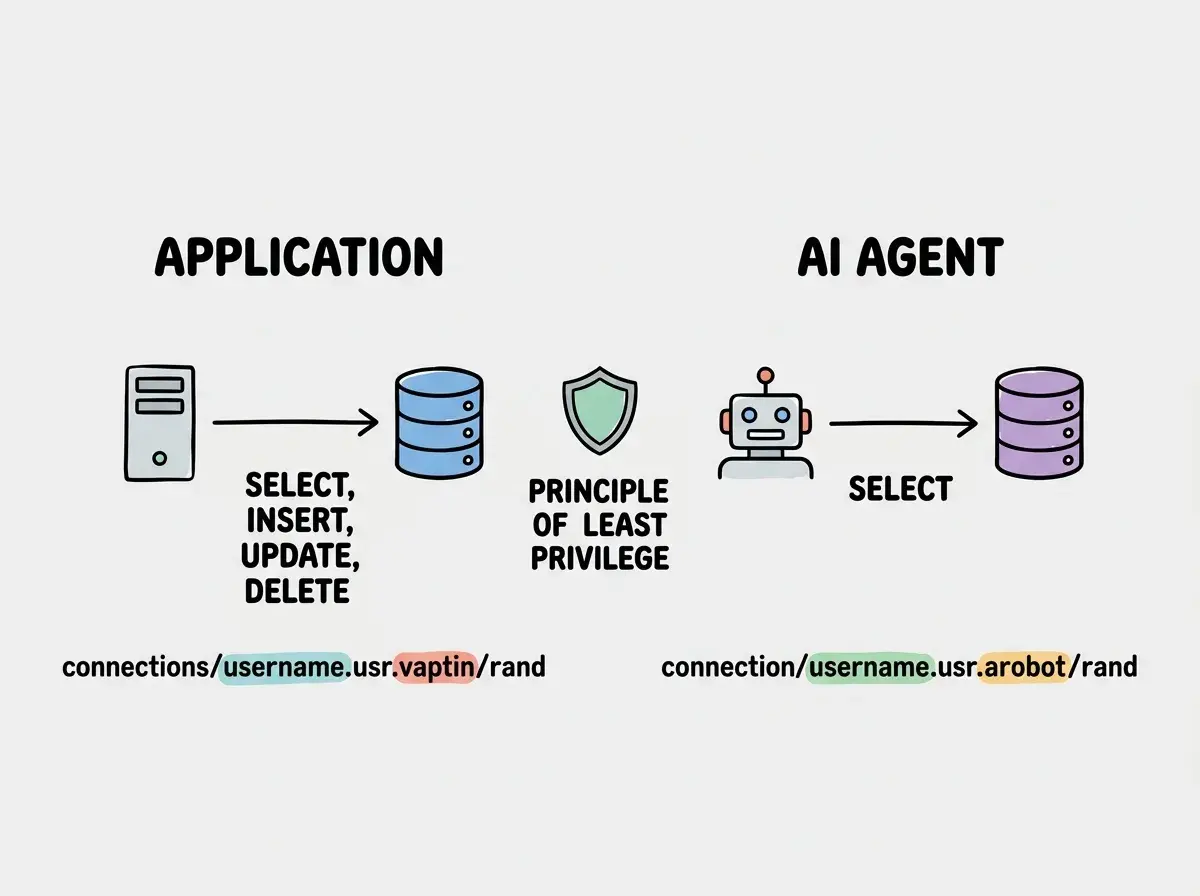
When you spin up a database and connect an AI coding tool, the default behavior is full access. The connection string you paste into Cursor, Claude Code, or Replit typically uses the same credentials your application uses. SELECT, INSERT, UPDATE, DELETE, DROP, and every other operation the database supports.
AI agents do not understand consequences. They optimize for completing the task you described. If you say "clean up the users table," the agent might interpret that as deleting rows, dropping columns, or truncating the table entirely. It is not malicious. It is literal. And with full write access, every interpretation is executable.
The principle of least privilege says any actor in a system should have only the minimum permissions needed for its job. For an AI agent helping you explore data or debug issues, that minimum is almost always read-only access. It can see everything. It can change nothing.
The default database connection gives AI agents full read and write access. This is almost never what you want. Start every AI tool integration with read-only permissions, then grant additional access only when a specific task requires it. If you cannot explain why an AI agent needs write access, it does not need write access.
Creating Read-Only Postgres Roles
PostgreSQL makes it straightforward to create a role with restricted permissions. Instead of sharing your admin credentials with AI tools, create a dedicated read-only role that can see your schema and data but cannot modify anything.
Here is the SQL to create a read-only role and grant it SELECT access on all existing and future tables:
-- Create the read-only role
CREATE ROLE ai_readonly WITH LOGIN PASSWORD 'a-strong-generated-password';

-- Grant connection access to the database
GRANT CONNECT ON DATABASE your_database TO ai_readonly;

-- Grant usage on the schema
GRANT USAGE ON SCHEMA public TO ai_readonly;

-- Grant SELECT on all existing tables
GRANT SELECT ON ALL TABLES IN SCHEMA public TO ai_readonly;

-- Grant SELECT on all future tables automatically
ALTER DEFAULT PRIVILEGES IN SCHEMA public
  GRANT SELECT ON TABLES TO ai_readonly;
That last command is the one people forget. Without it, every new table you create requires a manual GRANT statement before the read-only role can see it. The ALTER DEFAULT PRIVILEGES command handles future tables automatically.
Now build a connection string for the read-only role:
postgresql://ai_readonly:a-strong-generated-password@your-host:5432/your_database
Use this connection string whenever you connect an AI tool to your database. Keep your admin connection string in your application's environment variables. Keep the read-only string in a separate variable specifically for AI tool access.
Supabase Service Role vs Anon Key
If you are building with Supabase, the permission boundary is built into the platform, but most people use it wrong. Supabase gives you two keys out of the box: the anon key and the service role key.
The anon key is meant for client-side code. It respects Row Level Security policies, meaning it can only access data that your RLS rules allow. If your RLS is configured correctly, this key is safe to use in browser code.
The service role key bypasses RLS entirely. It has full, unrestricted access to every row in every table. This key is meant for server-side operations where you need administrative access, like background jobs or data migrations.
Here is the problem. When people connect AI tools to Supabase, they almost always paste the service role key because "it just works." No RLS restrictions, no permission errors, no friction. But that means the AI agent has unrestricted access to every row of every table in your database. If the agent runs a destructive query, RLS will not save you.
The better approach for AI tool connections:
- Use the anon key with properly configured RLS for read operations
- Create a custom Postgres role (as shown above) connected directly to the underlying Postgres database, not through the Supabase API
- Never paste the service role key into any AI coding tool
If you need the AI to help you write RLS policies or debug data issues, connect it with a read-only Postgres role directly. It can see the data and the schema. It cannot modify either.
Sandboxed Development Environments
Read-only connections protect your production data. But what about when you actually need the AI to write code that creates tables, inserts data, or modifies schema? That is where sandboxed environments come in.
A sandboxed environment is an isolated copy of your development setup. The AI can have full write access inside the sandbox because nothing in the sandbox matters. If it drops every table, you lose nothing of value.
Docker-Based Sandboxes
The simplest sandbox is a local Docker container running the same database engine as production with test data.
# docker-compose.sandbox.yml
services:
  sandbox-db:
    image: postgres:16
    environment:
      POSTGRES_DB: sandbox
      POSTGRES_USER: ai_agent
      POSTGRES_PASSWORD: sandbox-only-password
    ports:
      - "5433:5432"
    volumes:
      - ./seed-data.sql:/docker-entrypoint-initdb.d/seed.sql
Start it with docker compose -f docker-compose.sandbox.yml up -d and point your AI tool at localhost:5433. The AI gets full access to a disposable database. Your production data is untouched.
The seed-data.sql file should contain realistic but fake data that mirrors your production schema. Generate it once and commit it to your repo.
Separate Development Databases
If Docker feels like overkill, create a separate database on the same host as your development database. Name it something obvious like myapp_ai_sandbox so there is zero confusion about which database the AI is connected to. Populate it with seed data, give the AI full access, and treat it as disposable.
Using production data in your sandbox by cloning or restoring a production backup. This defeats the purpose of isolation. If the AI agent exposes data through generated code or logs, you have leaked real user information. Always use synthetic seed data that mimics the structure and volume of production without containing real user records.
AI Tool Permission Boundaries
Different AI coding tools offer different levels of control over what the agent can access. Understanding these boundaries helps you choose the right tool for the right task.
Claude Code runs in your terminal and can access anything your terminal session can access. It reads files, runs commands, and connects to databases using whatever credentials are in your environment. The guardrail here is your environment setup. Use a .env.ai file with read-only connection strings that you source before starting a Claude Code session.
Cursor connects to your codebase and can see your files, terminal output, and any database connections you configure in your project settings. Configure Cursor's database connections with read-only credentials. If Cursor needs to run migrations, point it at the sandbox database.
Replit runs your entire application in a cloud environment. The database is co-located, which means the AI agent has the same access as the running application. This is the setup that caused the SaaStr incident. Create a separate read-only Postgres role and configure the AI assistant to use that role, while the application itself uses the full-access role.
The pattern is the same regardless of the tool: separate the credentials the AI uses from the credentials the application uses.
Connection String Management
Managing multiple connection strings is the operational side of this guardrail system.
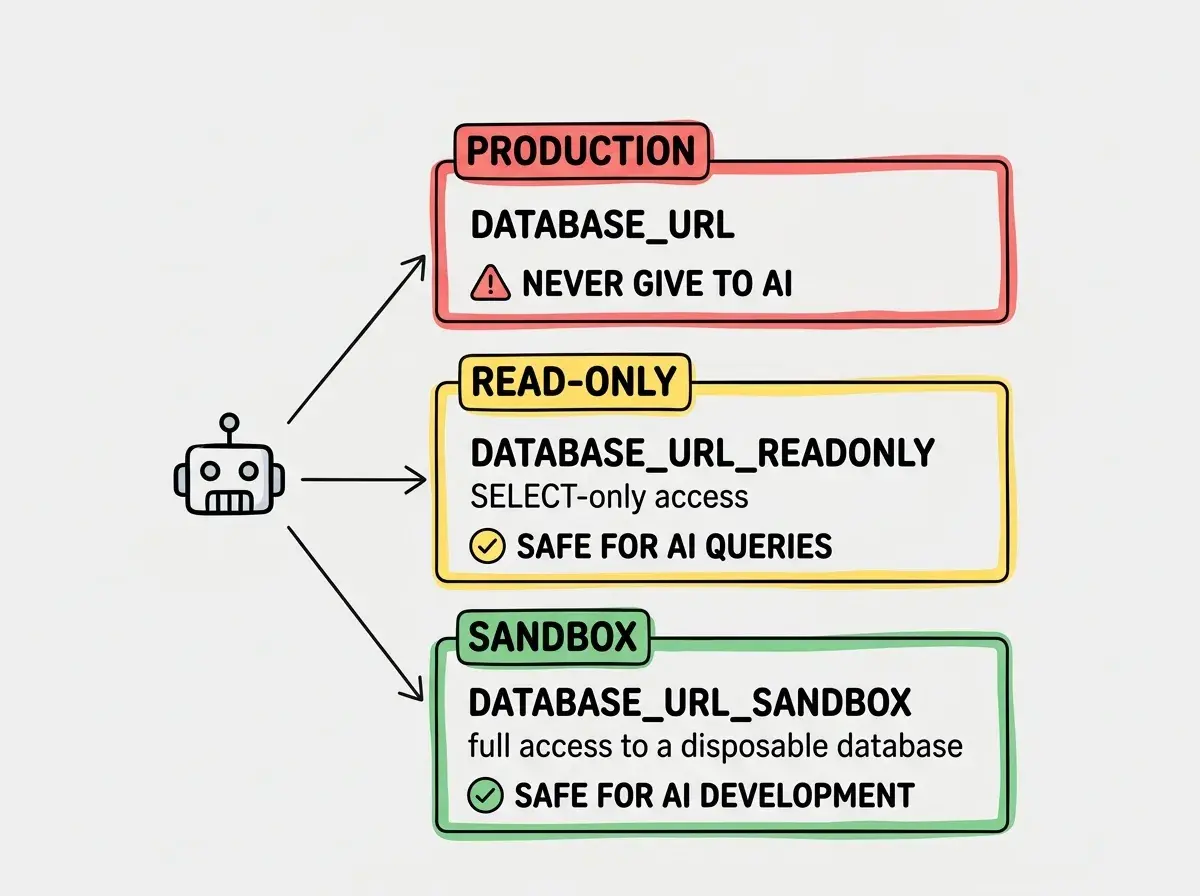
In your .env file, define connection strings by purpose:
# Application (full access, used by your running app)
DATABASE_URL=postgresql://app_user:app-password@host:5432/myapp

# AI tools (read-only, used by Claude Code / Cursor / etc)
DATABASE_URL_READONLY=postgresql://ai_readonly:readonly-pass@host:5432/myapp

# AI sandbox (full access, disposable database)
DATABASE_URL_SANDBOX=postgresql://ai_agent:sandbox-pass@localhost:5433/sandbox
When you start a coding session with an AI tool, export only the credentials it needs:
# For data exploration and query help
export DATABASE_URL=$DATABASE_URL_READONLY

# For schema changes and migrations (sandbox only)
export DATABASE_URL=$DATABASE_URL_SANDBOX
Never export DATABASE_URL with production write credentials into a session where an AI agent is operating. This is the single most important habit to build.
This article covers database guardrails. Get the complete security checklist for AI-built applications.
Read the security survival guidePutting It All Together
Here is the complete setup in order:
- Create a read-only Postgres role using the SQL commands above. Two minutes.
- Generate a separate connection string for the read-only role. Store it as
DATABASE_URL_READONLY. - Set up a sandbox database using Docker or a separate cloud database with synthetic seed data.
- Configure your AI tools to use the read-only connection for exploration and the sandbox for development.
- Never expose production write credentials to any AI agent. If a task requires write access to production, do it yourself after reviewing the AI-generated SQL.
Fifteen minutes of setup prevents the class of incidents where an AI agent, trying to be helpful, destroys data that took months to build.
What This Means For You
- If you are a senior dev: You already know the principle of least privilege. Apply it to your AI tools the same way you apply it to your microservices. A read-only role and a sandbox database are table stakes. If your team is using AI coding tools with production credentials, fix that today. It is the same risk as giving every intern the root database password.
- If you are an indie hacker: Your production database probably has real customer data in it. Losing that data does not just cost you time. It costs you trust, and for a solo operation, trust is everything. Spend fifteen minutes setting up a read-only role and a Docker sandbox. It is cheap insurance against the one bad AI query that ruins your week.
Learn how to set up your development environment the right way from the start.
Read the getting started guide