If you've been told to "just add a CLAUDE.md to your project" but nobody showed you what one actually looks like, this is the reference. We'll cover the literal file format, where it lives, the five sections it needs, and three full templates you can copy. For context, Anthropic's own internal CLAUDE.md sits at around 2,500 tokens, which is a useful ceiling to aim for.
This is the format reference. For the underlying philosophy and why CLAUDE.md improves output quality, that's covered separately in our deep-dive on CLAUDE.md quality.
The File Format in 60 Seconds
A CLAUDE.md is a plain markdown file named exactly CLAUDE.md (case sensitive on most systems, so don't rename it to claude.md). It lives at the root of your project repository, alongside package.json or pyproject.toml or whatever your project's manifest is. When Claude Code starts in a directory, it walks upward from your current working directory looking for this file and loads any it finds into the system prompt automatically.
There's also a personal-preferences version at ~/.claude/CLAUDE.md for things that should apply across every project on your machine. Examples: your name, your editor of choice, any global style rules that have nothing to do with the specific codebase. This file is private to you and never committed.
Finally, subdirectories can have their own CLAUDE.md files. If you're in apps/web/components/ and there's a CLAUDE.md in apps/web/, that file gets loaded too, layered on top of the project root file. This is the three-tier hierarchy: home, project, and subdirectory, in order of increasing specificity.
A CLAUDE.md file is just markdown with five sections: project context, conventions, commands, file structure, and rules. The structure matters more than the content; Claude reads it the same way every session.
Now let's walk through what actually goes inside.
The Five Sections Every CLAUDE.md Needs
There's no enforced schema, but the well-written examples we've seen from Anthropic, the Claude Code team, and high-output engineers converge on the same five sections. Here's each one with a real example block you can adapt.
1. Project context. One paragraph that tells Claude what this codebase is, what it does, who uses it, and what the stack looks like. Without this, Claude wastes its first three messages every session asking "what kind of app is this?"
## Project

A subscription billing dashboard built with Next.js 16 (App Router),
TypeScript strict, Tailwind v4, and shadcn/ui. Database is Postgres
via Drizzle ORM. Deployed to Vercel. Used by ~200 internal admins.
2. Conventions. Coding style, naming patterns, error-handling rules. Anything that's not enforced by your linter but matters for code review.
## Conventions

- Server Components by default; add `'use client'` only when needed
- Errors thrown from server actions must extend `AppError`
- Component files use PascalCase; utility files use kebab-case
- No default exports except in route files (page, layout, route)
3. Commands. The exact commands for dev, test, build, deploy, and any custom scripts. Claude will try to invent these otherwise and guess wrong half the time.
## Commands

- `pnpm dev` - Local dev server on port 3000
- `pnpm test` - Run Vitest in watch mode
- `pnpm test:ci` - Single run, used by CI
- `pnpm db:push` - Sync Drizzle schema to local Postgres
- `pnpm deploy` - Deploy to Vercel production
4. File structure. Where things live. Two or three sentences is usually enough; you don't need a full tree.
## File Structure

- `app/` - Next.js routes and pages
- `components/` - React components (UI primitives in `components/ui/`)
- `lib/` - Shared utilities and DB client
- `server/` - Server actions and API logic
5. Rules. Hard constraints, gotchas, and "don't do this" lessons learned. This is the section that grows over time and earns its keep.
## Rules

- Never edit files in `components/ui/` directly; regenerate via shadcn CLI
- Don't add new npm dependencies without asking first
- All migrations must run through Drizzle, never raw SQL
- Test files live next to the source file, named `*.test.ts`
Anytime we see Claude do something incorrectly we add it to the CLAUDE.md. Anthropic's is about 2.5k tokens.
That 2,500-token benchmark is worth internalizing. It's a ceiling, not a target. Most CLAUDE.md files start at 500 tokens, grow to about 1,500 over a few months, and then plateau. If yours is creeping past 3,000 tokens, you're probably documenting things Claude already infers from the codebase, or you're piling on rules that newer models no longer need. Boris periodically deletes lines that have stopped earning their place.
Templates for Common Projects
Three templates you can copy and adapt. Each covers the five sections, sized to fit comfortably under the 2.5k-token ceiling.
Next.js + Tailwind + Vercel
## Project
SaaS dashboard. Next.js 16 (App Router), TypeScript strict, Tailwind v4,
shadcn/ui, Postgres via Drizzle, deployed on Vercel.

## Conventions
- Server Components default; `'use client'` only when interactive
- Server actions for mutations; never client-side fetch to our own API
- Tailwind v4 syntax (no `tailwind.config.js`; use `@theme` in globals.css)
- Errors extend `AppError` and are caught in `error.tsx` boundaries

## Commands
- `pnpm dev` - Local server
- `pnpm test` - Vitest watch mode
- `pnpm build` - Production build
- `pnpm deploy` - Vercel production deploy

## File Structure
- `app/` - Routes (one folder per route segment)
- `components/` - React components
- `server/actions/` - Server actions
- `lib/db/` - Drizzle schema and client

## Rules
- Never edit `components/ui/` directly; use shadcn CLI to regenerate
- All forms use React Hook Form + Zod resolver
- New env vars must be added to `env.ts` (T3 env validation)
Python + FastAPI + uv
## Project
Internal REST API for inventory. FastAPI 0.115, Python 3.12, uv for
package management, Postgres via SQLAlchemy 2 + Alembic, deployed on
Railway.

## Conventions
- Async-first; all endpoints are `async def`
- Pydantic v2 models for request and response schemas
- Service layer in `app/services/`; routes are thin
- Type hints are required; we run `mypy --strict`

## Commands
- `uv run fastapi dev` - Local dev server with reload
- `uv run pytest` - Run test suite
- `uv run alembic upgrade head` - Apply migrations
- `uv run ruff check .` - Lint
- `uv run mypy app` - Type check

## File Structure
- `app/routes/` - FastAPI route modules
- `app/services/` - Business logic
- `app/models/` - SQLAlchemy ORM models
- `app/schemas/` - Pydantic request/response models
- `migrations/` - Alembic migrations

## Rules
- Never use `requests`; use `httpx` async client
- Database access only through service layer, never from routes
- All new endpoints need a corresponding test in `tests/`
Monorepo (Turborepo or similar)
## Project
Turborepo monorepo with two Next.js apps (`web`, `admin`) sharing a
`@acme/ui` package and a `@acme/db` Drizzle package. pnpm workspaces.

## Conventions
- Shared code goes in `packages/`; app-specific code stays in `apps/`
- Internal packages use `@acme/*` namespace
- Every package must export from a single `index.ts` barrel
- TypeScript project references handle inter-package types

## Commands
- `pnpm dev` - Run all apps in parallel via Turbo
- `pnpm dev --filter web` - Run just the web app
- `pnpm test` - Run all package tests
- `pnpm build` - Build everything (Turbo handles topological order)

## File Structure
- `apps/web/` - Customer-facing Next.js app
- `apps/admin/` - Internal admin Next.js app
- `packages/ui/` - Shared shadcn-based components
- `packages/db/` - Drizzle schema, shared DB client
- `packages/config/` - Shared ESLint, TS, Tailwind configs

## Rules
- Never import from another app; only from `packages/`
- New shared component goes in `packages/ui/` first, never in `apps/`
- Each `apps/*` directory may have its own CLAUDE.md for framework rules
- Run `pnpm changeset` before any package version bump
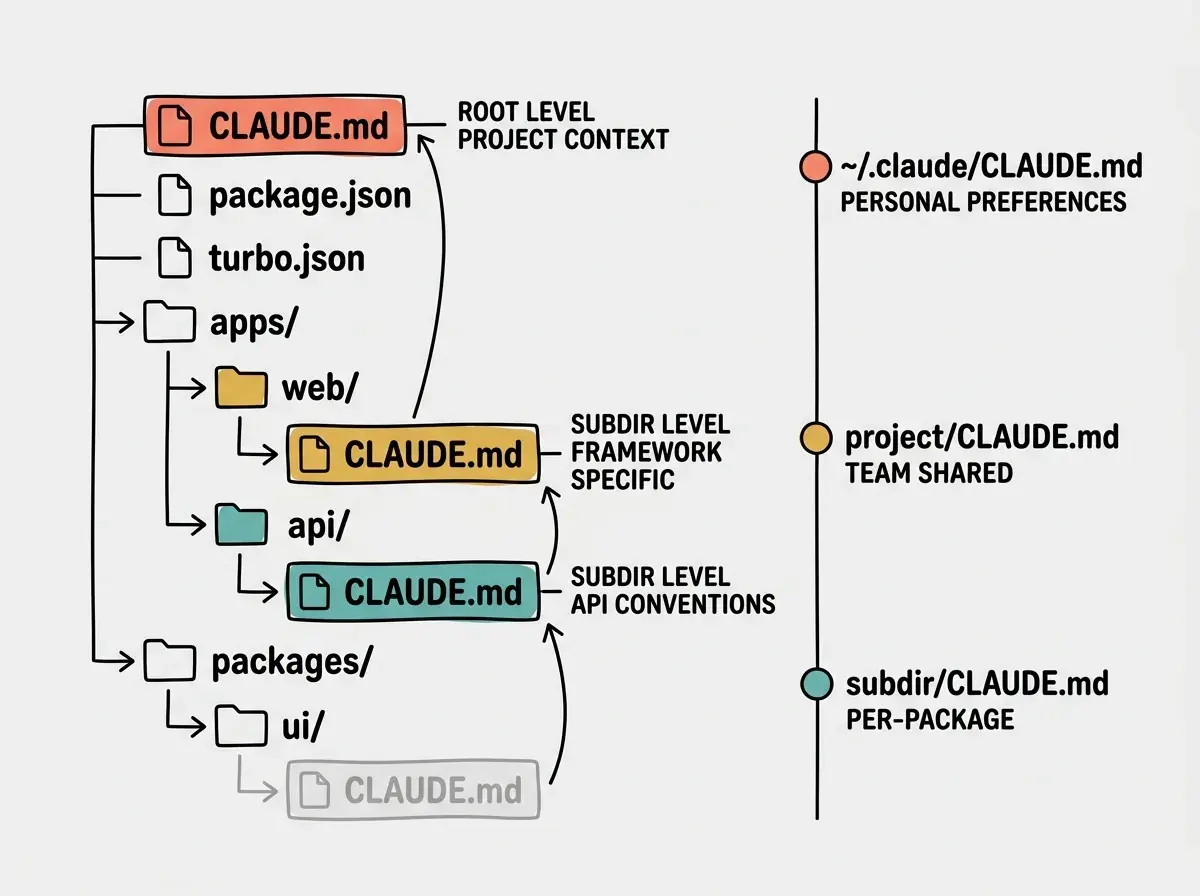
The monorepo template hints at the next thing worth understanding: when you have multiple CLAUDE.md files in play, how do they combine?
The 3-Tier Hierarchy and How Merging Works
The three tiers, from least specific to most specific, are: your personal ~/.claude/CLAUDE.md, the project root CLAUDE.md, and any subdirectory CLAUDE.md files. When Claude Code starts in a given directory, it loads all three (or however many apply) and concatenates them into the system prompt. There's no clever diffing or schema merging; the files stack.
When two files say contradictory things, the more specific level wins by virtue of being later in the prompt. In practice, this is a feature, not a bug. Your project root might say "use Tailwind v4 syntax everywhere" while a docs/CLAUDE.md says "this folder contains MDX content, no Tailwind classes expected, never modify the build configuration here." Claude reads both and behaves correctly in each location.
The most common useful split: project root holds team-shared rules (commands, conventions, file structure), and personal ~/.claude/CLAUDE.md holds things like "prefer concise commit messages" or "I work in VS Code, not Cursor, so use VS Code-style paths in examples." Don't put personal preferences in the project file; your teammates will inherit them.
We're publishing a deep-dive series on the doctrine Anthropic engineers actually use.
Browse our Claude Code coverageOnce your file structure is in place, the next question is how you edit it without breaking flow.
Editing CLAUDE.md Without Leaving Your Session
You almost never want to context-switch to a separate editor window to add a rule. Claude Code has two built-in shortcuts that keep you in the loop.
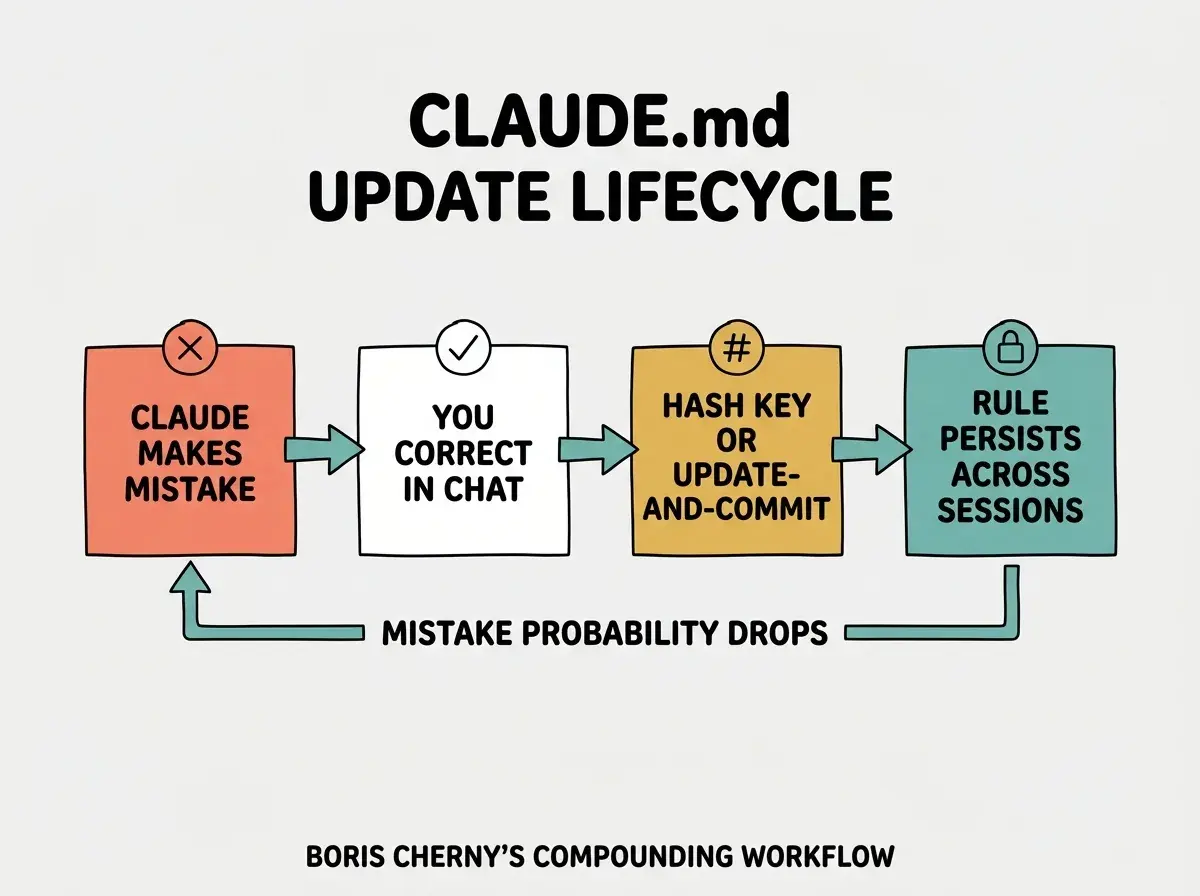
The # key, pressed at the start of a message, opens an inline memory-add prompt. Type the rule, hit enter, and it gets appended to your CLAUDE.md (with a prompt asking which file: project, personal, or subdirectory). This is the fastest way to capture a rule the moment you notice you need it.
Use the # key to add memories to CLAUDE.md inline. Tell Claude Code to remember specific tips and best practices.
The /memory command opens your CLAUDE.md in $EDITOR for a deeper rewrite. Use this when you want to reorganize, prune dead rules, or restructure a section. The third pattern, which Boris has documented publicly, is the update-after-correction loop: whenever you catch Claude making a mistake, end your correction with "and update CLAUDE.md so this doesn't happen again."
Invest in your CLAUDE.md. After every correction, end with: Update your CLAUDE.md so you don't make that mistake again. Claude is eerily good at writing rules for itself.
The compounding effect is real. Treat your CLAUDE.md as a living document that grows with the project, not a setup-day artifact you write once and forget. The teams getting the most out of Claude Code are the ones whose CLAUDE.md files have been touched in the last week.
A small caution about file size, because new users almost always overshoot.
Writing a 5,000-token CLAUDE.md that describes everything. Anthropic's is around 2,500 tokens, and Boris periodically deletes content that newer models no longer need. Treat it like code: short, specific, edited ruthlessly.
The last thing worth covering is the recent split between CLAUDE.md and Memory.md, because the two files do different jobs.
What to Put in CLAUDE.md vs Memory.md
CLAUDE.md is your file. You write it, you version-control it, and Claude reads it. It contains the rules and context you want Claude to honor.
You can now think of Claude.MD as your instructions to Claude and Memory.MD as Claude's memory scratchpad it updates.
Memory.md is Claude's file. It evolves automatically as Claude works in your codebase, recording things like "the deploy script lives at scripts/deploy.sh" or "tests are slow because of fixtures in conftest.py." You generally don't edit Memory.md by hand; you let Claude curate it.
A useful split rule: if a human teammate would benefit from reading it, it belongs in CLAUDE.md. If it's a low-level operational note that only Claude needs to remember between sessions, it belongs in Memory.md.
Dig deeper
A few hand-picked sources if you want to go further.
What This Means For You
- If you're a founder: Spend 30 minutes today writing a project-root CLAUDE.md with the five sections; copy the template that matches your stack and ship it with your next commit.
- If you're changing careers: Use the
#key to capture lessons as you build; reading your own CLAUDE.md a month later is the fastest learning loop you can give yourself. - If you're a student: Read about Anthropic's own CLAUDE.md philosophy (around 2,500 tokens, edited ruthlessly) before writing yours; it's the highest-leverage thirty minutes you can spend on Claude Code.
Five sections, three tiers, the # shortcut, and the update-after-correction rule. Setup in under an hour.
See the team's playbook