Claude Code's memory layer is more nuanced than most users realize. There are three distinct surfaces that quietly shape every session: CLAUDE.md (your instructions to Claude), Memory.md (Claude's own scratchpad), and the /memory command (the editor that lets you reach in and rewrite either). Cat Wu leads product on Claude Code, and she is direct about what matters most.
Your Claude.md file is so important.
She is not exaggerating. Investing thirty minutes here is the single highest-leverage setup you can do with the tool. It is also the area where almost everyone underinvests, because the first version you write usually looks fine, the tool seems to behave, and you move on. The people who built Claude Code keep coming back to this file, and the gap shows.
The Three Tiers of CLAUDE.md
Claude Code reads CLAUDE.md at three levels and merges them automatically. The home-directory file at ~/.claude/CLAUDE.md is the one that follows you across every project. Your coding style preferences, your preferred package managers, your "always use TypeScript strict mode" rules. The project-root CLAUDE.md is where the architecture lives. Constraints that only make sense for this codebase. The deploy target. The framework version. The subdirectory CLAUDE.md is the surgical layer. Drop one inside app/api/ if your API routes have specific patterns. Drop one inside infra/ if your infrastructure code has different conventions.
The merge happens silently. You do not need to import or reference the parent files. When Claude Code starts a session in a subdirectory, it walks upward, reads every CLAUDE.md it finds, and assembles the full context. This is the design choice that lets a CLAUDE.md scale. The home file can be opinionated about your taste. The project file can be opinionated about the code. The subdirectory file can be opinionated about a single module.
How long should it be? Shorter than you think. Boris Cherny is the tech lead on Claude Code, and he was direct about Anthropic's own setup.
Anytime we see Claude do something incorrectly we add it to the CLAUDE.md. Anthropic's is ~2.5k tokens.
That is the team behind the tool, with the most complex internal Claude Code setup in existence, running on roughly 2,500 tokens. If yours is longer than that and you are not Anthropic, you are probably padding.
The team's most-repeated advice across the entire Claude Code roster is to invest in your CLAUDE.md. Cat Wu calls it "so important." Boris Cherny says to ruthlessly edit it over time. Thariq Shihipar says everything is a file. The CLAUDE.md is the single highest-leverage configuration you can do, and it stays that way no matter how good the underlying model gets.
What goes into those 2,500 tokens matters more than how many you spend. Constraints that prevent mistakes beat descriptions that explain context. "Never use fs at runtime" beats "this app deploys to Cloudflare." The first prevents a specific error class. The second is trivia the model can probably infer from package.json.
CLAUDE.md vs Memory.md, The Split That Confuses Everyone
For most of Claude Code's history there was just CLAUDE.md. Then in February, Anthropic shipped Memory.md as a separate surface, and people immediately got confused about which file was for what. Thariq Shihipar, who works on Claude Code, gave the cleanest definition I have seen.
You can now think of Claude.MD as your instructions to Claude and Memory.MD as Claude's memory scratchpad it updates. If you ask Claude to remember something it will write it there.
That is the whole distinction. CLAUDE.md is human-curated. You write it. You commit it to git. You review changes in PRs. It is deliberate, version-controlled, and shared with your team. Memory.md is Claude-curated. Claude writes it. It evolves silently across sessions. It captures things like "the user prefers concise commit messages" or "last refactor used the migration pattern from /docs/migrations/v2.md." You can read it, edit it, even delete it, but the default mode is that Claude maintains it on your behalf.
A companion post from that same day sharpened the definition further.
Memory.MD as Claude's scratchpad across sessions.
The scratchpad framing matters. Memory.md is not meant to be precious. It is meant to capture working knowledge that would otherwise vanish at the end of a session. If you ask Claude to remember a preference, that is where it lands. If you correct Claude on a recurring pattern, that is where the lesson goes if you do not move it to CLAUDE.md yourself.
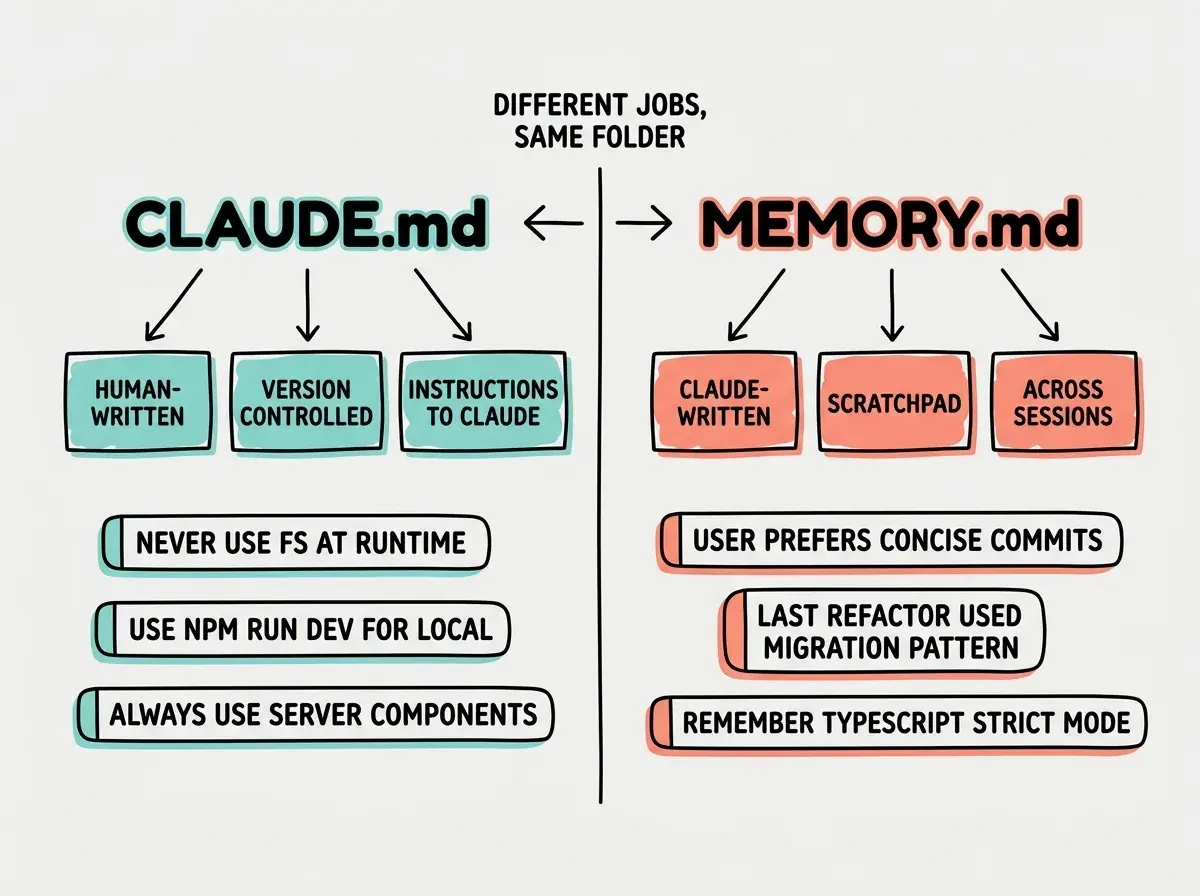
The practical workflow that emerges from this split is straightforward. Use CLAUDE.md for the rules you want to enforce on every session and share with your team. Use Memory.md for the rough edges that Claude figures out on its own. Periodically read Memory.md and promote anything important into CLAUDE.md, where it becomes a permanent, reviewable rule. Anything in Memory.md that is not worth promoting can be deleted or ignored.
The /memory Command and the # Key
The friction of editing memory matters as much as the structure. If adding a rule means opening a file in a separate editor, switching out of your Claude Code session, finding the right spot, writing the rule, saving, and switching back, you will not do it. The team built two shortcuts to make this almost frictionless.
The first is the # key. Cat Wu described the mechanic directly.
Use the
#key to add memories to CLAUDE.md inline. Tell Claude Code to remember specific tips and best practices, and it'll reference that information as context in future sessions. You can also edit existing memories with the /memory command.
Type # at the start of a line in your prompt and Claude Code captures whatever follows as a new memory entry, without ever leaving the session. No file switching. No save dialogs. The rule lands in the right place and you keep working.
The second is the /memory command. This opens the relevant memory file in your editor so you can do larger edits, reorganize sections, or delete entries that are no longer relevant. It is the surgical tool for when the # key is too fast and you want to deliberately curate. Together, these two surfaces mean there is almost no excuse to let a recurring mistake stay un-fixed. The cost of writing a rule has been driven low enough that you can do it in the moment.
We're publishing a deep-dive series on how Anthropic engineers actually use Claude Code.
Browse our Claude Code coverageThe cultural point underneath the shortcuts is that the team treats memory as a living artifact, not a setup step. They edit it constantly. They prune it constantly. They expect you to do the same.
Boris's Update-After-Every-Correction Rule
The most actionable single rule from the entire team comes from Boris Cherny.
Invest in your CLAUDE.md. After every correction, end with: "Update your CLAUDE.md so you don't make that mistake again." Claude is eerily good at writing rules for itself. Ruthlessly edit your CLAUDE.md over time. Keep iterating.
Read that carefully. It is not "after every correction, write a rule yourself." It is "after every correction, tell Claude to write the rule." Claude is genuinely good at distilling the lesson from a correction into a one-line constraint. You correct it once. You add the magic sentence. The rule gets written. The mistake stops happening. The probability of that error class drops to nearly zero in future sessions.
Boris extends this practice into code review. In the same Jan 2 thread, he described what that looks like in practice.
During code review, I will often tag @.claude on my coworkers' PRs to add something to the CLAUDE.md as part of the PR.
The CLAUDE.md becomes part of the team's institutional knowledge. When a reviewer catches a recurring pattern, the fix is not just the code change. It is the rule that prevents the next person from hitting the same problem.
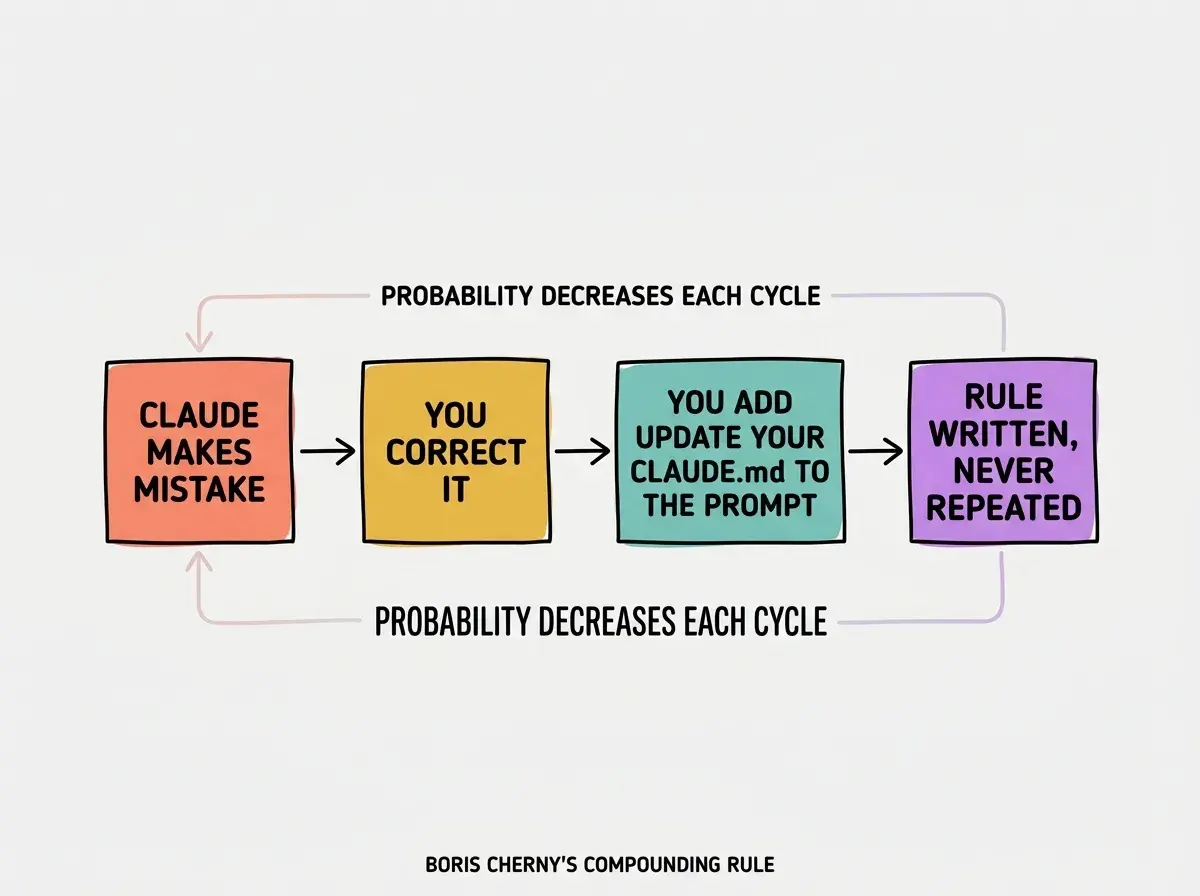
The compounding effect is the real point. Each individual rule looks small. But after a year of this discipline, your CLAUDE.md captures the institutional knowledge that would otherwise live only in your head, slowly leak out as you forget edge cases, and have to be rediscovered every time a new teammate joins. Treat it as a knowledge base that pays interest. Every correction is a deposit.
Writing a 5,000-token CLAUDE.md that describes your project. Anthropic's own CLAUDE.md is around 2,500 tokens. Boris periodically deletes prompt tokens that newer models no longer need. Treat CLAUDE.md like code, not documentation. Short, specific, and ruthlessly edited.
This is the other half of the discipline. Adding rules is easy. Deleting them is harder, and matters just as much. On the Every podcast, Boris described what active pruning looks like.
I just deleted like 2,000 tokens or something from the system prompt yesterday. Just because Sonnet 4.5 doesn't need it anymore.
The team prunes prompts when models improve. You should prune your CLAUDE.md when rules become obsolete. Sid Bidasaria, a founding engineer on Claude Code, put the cultural attitude plainly.
We absolutely love deleting code.
The same energy applies to your memory files.
Design for Prompt Caching First
The last layer of the memory story is the one most people never think about. Thariq Shihipar laid out the architectural rule.
Design for prompt caching first.
The layering order matters because of how Claude's cache invalidation works. The order is static system prompt and tools, then CLAUDE.md, then session context, then conversation messages. Things higher in the stack get cached. Things lower in the stack do not.
CLAUDE.md sits near the top of that hierarchy. Every change you make to CLAUDE.md invalidates the cache for every subsequent session until the next change. Conversation messages, at the bottom, do not affect the cache at all. The implication: keep your CLAUDE.md stable across many sessions. Rapid churn in CLAUDE.md is expensive both in latency and in cost. Slow, deliberate edits paired with aggressive use of Memory.md (which sits lower in the stack) gives you the best of both worlds. Stable cached context plus an evolving working memory.
This is also why Thariq's broader setup works the way it does. He has a root-level Claude.MD on his Mac that points at directories for memory, journals, ideas, code, and todos.
Everything is a file.
The root CLAUDE.md is small, stable, and cacheable. The directories it points at are where the volume lives, and those get read on demand. The architecture is built for cache friendliness from the start.
What This Means For You
- If you're a founder: Spend thirty minutes today writing a CLAUDE.md with constraints, not descriptions. Cap it at 2,500 tokens. Add the magic sentence "Update your CLAUDE.md so you don't make that mistake again" to your next correction and watch how fast the tool stops making the same mistake twice.
- If you're changing careers: Use the
#key to capture lessons as you go. Every time you correct something, hit#and let Claude write the rule. It builds intuition for the codebase faster than reading docs, because the lessons are tied to mistakes you actually made. - If you're a student: Start with the team's published CLAUDE.md examples and adapt. Read Memory.md after each major session to see what Claude is learning about your style. Promote anything important into CLAUDE.md so it becomes a permanent rule.
Three tiers, the # shortcut, and Boris's update-after-correction rule. Setup in under an hour.
See the team's playbook