Model Context Protocol, or MCP, is a standard way for an AI application to connect to external capabilities. A coding assistant can use an MCP server to retrieve project information or perform a defined action. The protocol describes the conversation between applications; the server determines what information and actions are available.
Retrospective edition for April 7, 2026. Researched and published September 9, 2026. Protocol examples use the November 2025 specification, which predates this edition.
The useful question is not how many servers your editor supports. It is which missing piece of information repeatedly interrupts your work. If you copy an error report, a ticket, or a database description into every coding session, you have a candidate. If your assistant already has everything it needs in the repository, another integration may add little value.
What problem does MCP solve
Imagine hiring an electrician who arrives with a different plug for every building. The electrician may be excellent, but each visit starts with adapter work. MCP standardizes part of that adapter layer. An application can implement a client, while a service exposes a compatible server, instead of both sides inventing an entirely new conversation for each pairing.
That does not make every connection interchangeable. The tool descriptions, credentials, supported features, and user experience still vary. A database server and a design server speak through a common protocol, but they do different work. You cannot swap one for the other and expect the same result.
The November 2025 architecture specification distinguishes three roles. The host is the AI application coordinating the experience. A client maintains a connection to one server. The server exposes particular capabilities. One host can manage several clients, each connected to a different server.
For a concrete example, picture a developer investigating a checkout bug. Their editor is the host. One connection reaches an error-monitoring server; another reaches a repository service. The assistant can retrieve an error and inspect relevant code. Whether it may also change a ticket or deploy a fix is a separate permission decision.
Start with one recurring information gap. A small integration that answers a useful question reliably is more valuable than a large collection of tools you rarely need.
This distinction also changes how you evaluate success. Count fewer interruptions, better evidence, or less repeated copying. Counting installed servers measures configuration, not useful work.
Tools, resources, and prompts do different jobs
A tool is a named operation with an input contract. A hypothetical lookup_incident tool might accept an incident identifier and return an error summary. Tool discovery tells a client which operations exist; invocation requests that one operation run. The tools specification defines this interface, including input schemas and result structures.
A resource is readable context identified by a URI. A server could expose a database schema, an architecture document, or a runbook. Resources help separate information retrieval from action-oriented interfaces, although a tool can also return information. How users select and include resources depends on the host application. See the resources specification.
A prompt is a reusable interaction template that a server makes available. It might structure an incident review by asking for the affected service and incident number. It supplies a starting pattern, not a guarantee that the final answer is correct. The prompts specification describes listing and retrieving these templates.
Think of a workshop. Resources are reference manuals. Tools are equipment. Prompts are job sheets. A job sheet may tell you to inspect a manual and use a tool, but none of the three replaces the person deciding whether the work is appropriate.
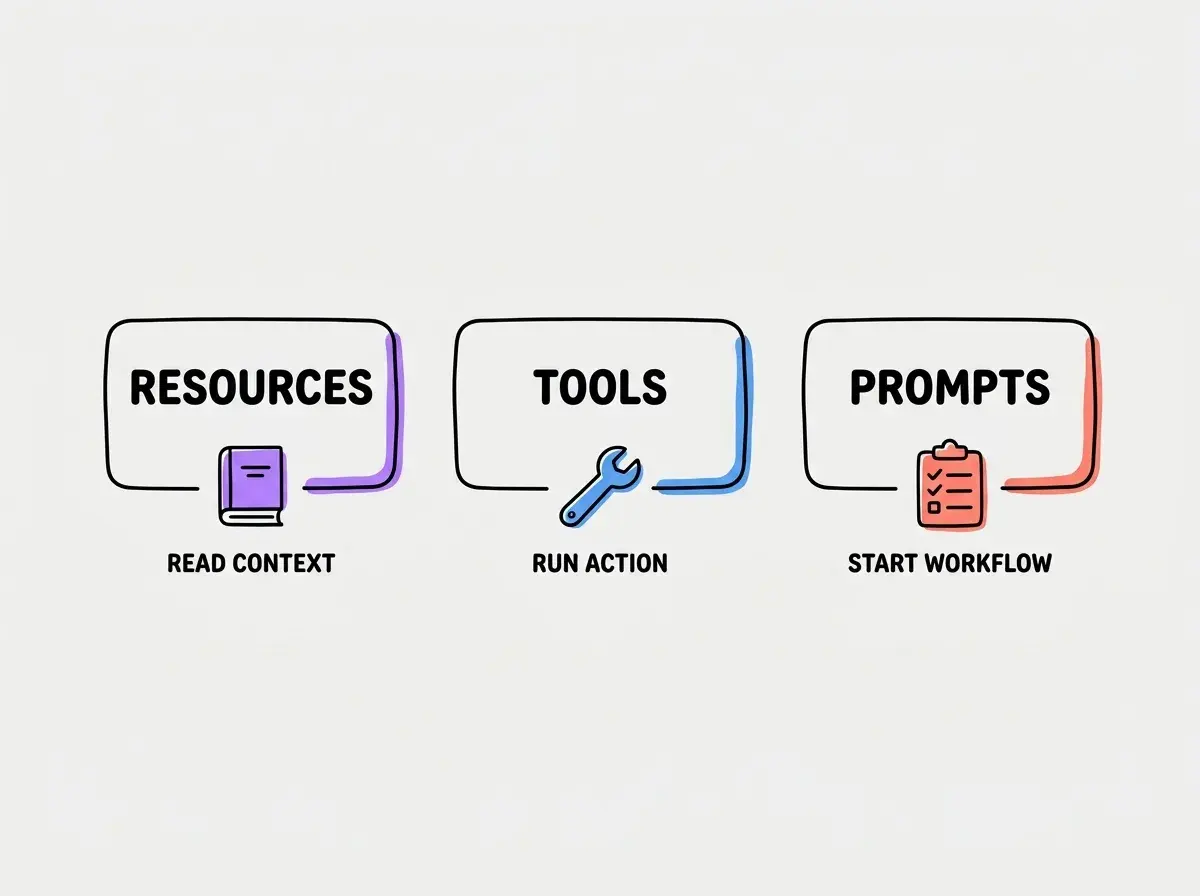
The distinction is especially useful when designing your own server. A narrow operation such as fetching one incident is easier to explain and review than a tool called do_anything. Clear contracts help both the model selecting an operation and the human inspecting what happened.
How a connection starts
Under the November 2025 protocol, a session begins with initialization. The client supplies its protocol version and capabilities; the server responds with its own supported information. The client then acknowledges initialization before normal operations proceed. A compatible connection needs agreement on the protocol version and must respect the negotiated features. These steps are specified in the connection lifecycle.
The practical implication is that “installed” and “working” are different states. A package can exist on your machine while its process exits immediately. A server can start while initialization fails. Initialization can succeed while the particular tool you want is unavailable.
Debug those stages separately. First verify the executable or remote address. Next inspect connection errors. Then confirm the expected tool is listed. Finally make one small request with a result you can independently recognize. Trying a complicated task before these checks makes several unrelated failures look like one mysterious model problem.
Local processes and remote services
The November 2025 specification defines standard input/output and Streamable HTTP transports. With stdio, the client launches a server process and exchanges protocol messages through its input and output streams. With Streamable HTTP, the server operates as an independent service accepting HTTP requests. The older HTTP-plus-SSE transport is a compatibility concern, not an interchangeable name for every HTTP connection. See the transport specification.
A local process is often convenient for a personal experiment. You can inspect the code, control its environment, and keep its lifecycle close to your editor. But “local” does not mean the process never sends information elsewhere. A local wrapper around a hosted API still contacts that API.
A remote service can simplify shared access and updates. It also creates operational questions: who hosts it, how identities map to accounts, what gets logged, and what happens when it is unavailable. Choose based on the system you need to reach and the responsibilities you can support.
Explore practical guides for turning project knowledge into repeatable coding workflows.
Explore the blogBefore adding a second connection, write down what the first one is supposed to do. That sentence becomes your acceptance test and prevents the project from becoming an open-ended tour of integrations.
A first project you can evaluate
Consider a fictional team whose deployment runbook lives outside its repository. Engineers repeatedly paste parts of it into their assistant. A useful first integration would retrieve a named runbook and return its revision alongside the text. It would not deploy anything.
Define the desired outcome before implementation: “Given the service name, retrieve the correct deployment checklist and identify its last reviewed revision.” Then select a harmless fixture with a recognizable sentence. Ask the assistant to retrieve it and show which source supplied the answer. Compare the returned revision with the original document.
Next test the failure paths. Request a nonexistent service. Revoke the test credential. Supply an invalid identifier. Return a document longer than expected. A usable integration should produce clear errors or bounded results, not silently substitute another document or claim the requested task succeeded.
Keep a small evaluation record with the request, expected source, observed result, and failure behavior. This is a proposed exercise, not a claim that a particular server has passed these tests. Your own environment determines what succeeds.
Once retrieval is dependable, consider whether an action would add value. If the next proposed feature is “deploy the service,” treat that as a new project with a different permission boundary. Do not let a successful document lookup quietly become authorization to mutate production.
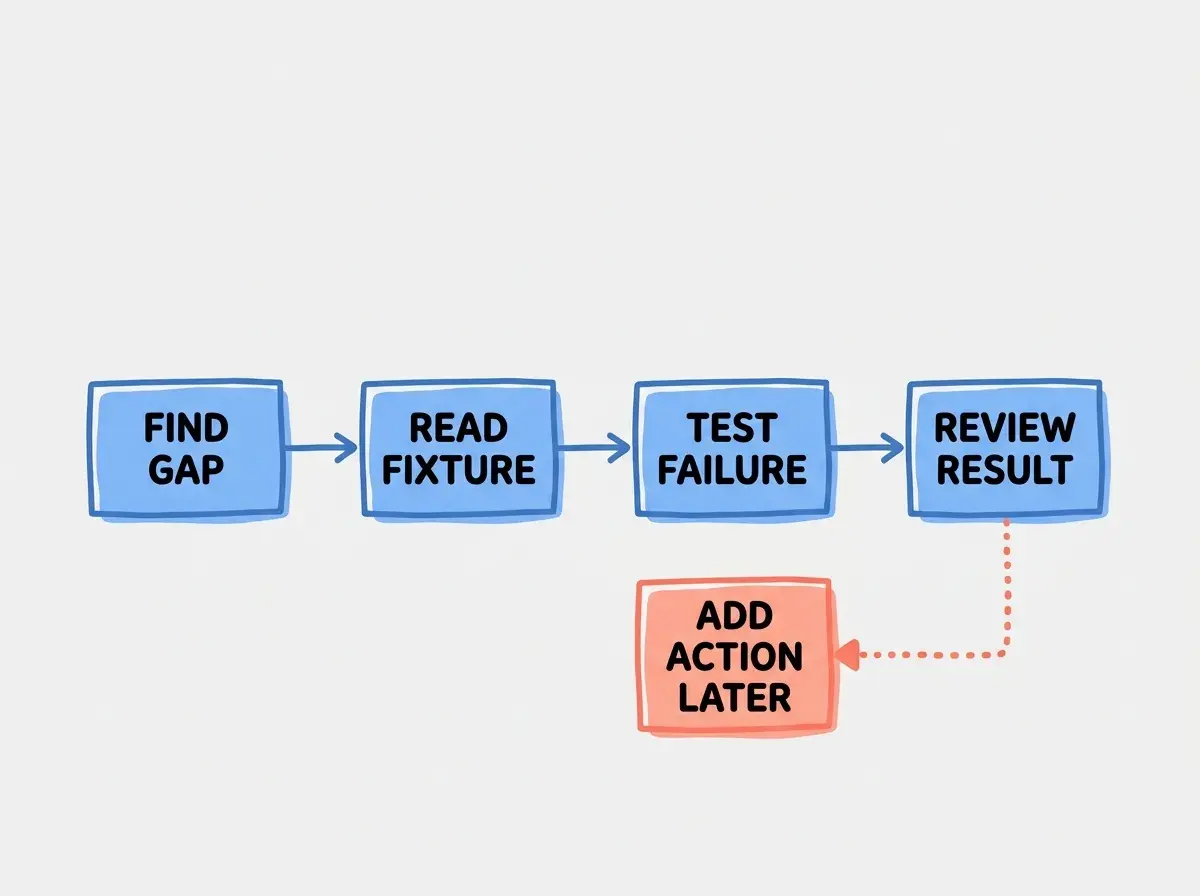
A good first project leaves you with a reusable test case and a clear decision. Keep the integration if it improves the task. Remove it if ordinary repository files or a small script solve the problem more simply.
Where permissions really live
The protocol does not make a powerful credential harmless. A server's effective reach depends on its implementation, execution environment, and downstream access. For HTTP-based connections, the authorization specification describes an authorization framework. It does not replace the permissions enforced by your database, issue tracker, or cloud account.
For the runbook example, use a credential that can retrieve only the intended collection. Keep secrets outside committed configuration. Inspect whether the server forwards document contents or logs them. Decide who owns credential rotation and how to disable access when the integration is retired.
Treating a successful connection as proof of safety. A server can connect correctly while having excessive access, returning untrusted instructions, or logging information you did not intend to share.
Treat returned documents as evidence to evaluate. A runbook containing text that asks the assistant to reveal credentials has not acquired authority merely because it arrived through a tool. Keep the original user task and the source's trust level distinct.
Questions before your first installation
The following answers are useful when deciding whether an integration belongs in your current workflow.
What this means for you
If you are a founder, identify a repeated handoff between your assistant and an existing business system. Ask for a small demonstration using test data before expanding access. The right question is whether the integration improves a real decision or delivery step.
If you are learning development, begin with one read-only example and trace the request from host to server to source. If you are an experienced engineer, focus on contracts, failure behavior, and ownership. Those are the parts your team will maintain after the novelty wears off.
Find more practical explanations of context, tools, and reliable AI-assisted development.
Read more guides