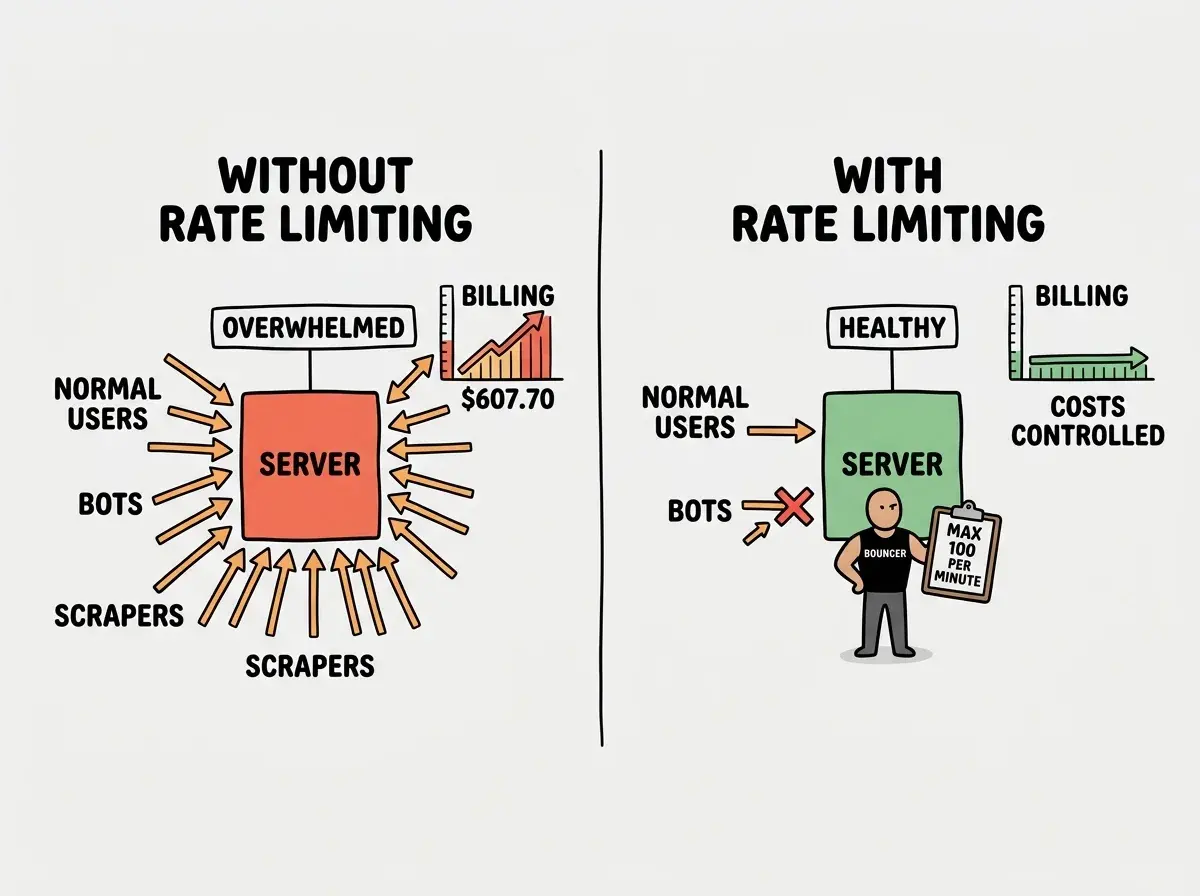
A Replit user recently shared their horror story. They launched an AI-powered app, went to bed, and woke up to a $607.70 bill. Not for the month. For a few days. They were projecting $8,000 per month from a single app that barely had users.
The app worked perfectly. It just had no limits on how often it could call external APIs. Bots hammered the endpoint, the meter kept running, and there was nothing standing between the internet and their wallet.
That missing thing was rate limiting.
The Bouncer at the Door
Think of your app as a nightclub. Anyone with a valid ID can walk in. That is authentication, and most AI-built apps handle it fine. But authentication only answers the question "are you allowed in?" It does not answer the much more important question: "how many times can you come in?"
Rate limiting is the bouncer who counts.
The bouncer lets you into the club. No problem. But if you walk out and try to re-enter two minutes later, and then again, and again, the bouncer starts paying attention. After your fifth re-entry in thirty minutes, the bouncer stops you. "You have hit your limit. Come back in an hour."
This is not punishment. It is protection. One person cycling in and out every two minutes clogs the entrance and degrades the experience for everyone else. In software terms, one user or bot sending hundreds of requests per second can overwhelm your server, spike your costs, and slow things down for all your other users.
Why This Confuses Everyone at First
This confuses everyone at first because rate limiting feels unnecessary when your app is small. Ten users, a few requests per minute, everything runs smoothly. Why add a bouncer to a club with ten people?
Because your club is not private. Your app is on the open internet. Bots, scrapers, and misconfigured clients can send thousands of requests without you knowing. And if your app calls paid external APIs (like OpenAI or Anthropic), every unchecked request costs you money.
That Replit user's $607.70 bill happened because there was no bouncer at all. The door was wide open.
How Rate Limiting Actually Works
The bouncer needs a system. He cannot just remember every face and count re-entries in his head. In practice, rate limiting uses a few well-defined strategies.
The simplest is a fixed window. The bouncer resets his count every hour on the hour. You get 100 entries per hour. At 2:00 PM the count resets to zero. Easy to implement, but with an edge case: 99 entries at 1:59 PM and 100 more at 2:01 PM means 199 entries in two minutes because the window reset fell in between.
A sliding window fixes this by counting the last 60 minutes from right now, not from the top of the hour. More accurate, slightly more complex.
The most elegant approach is the token bucket. The bouncer gives you a bucket with 10 tokens. Every entry costs one token. Tokens refill at a steady rate, one every six seconds. This allows short bursts while enforcing a steady average rate over time.
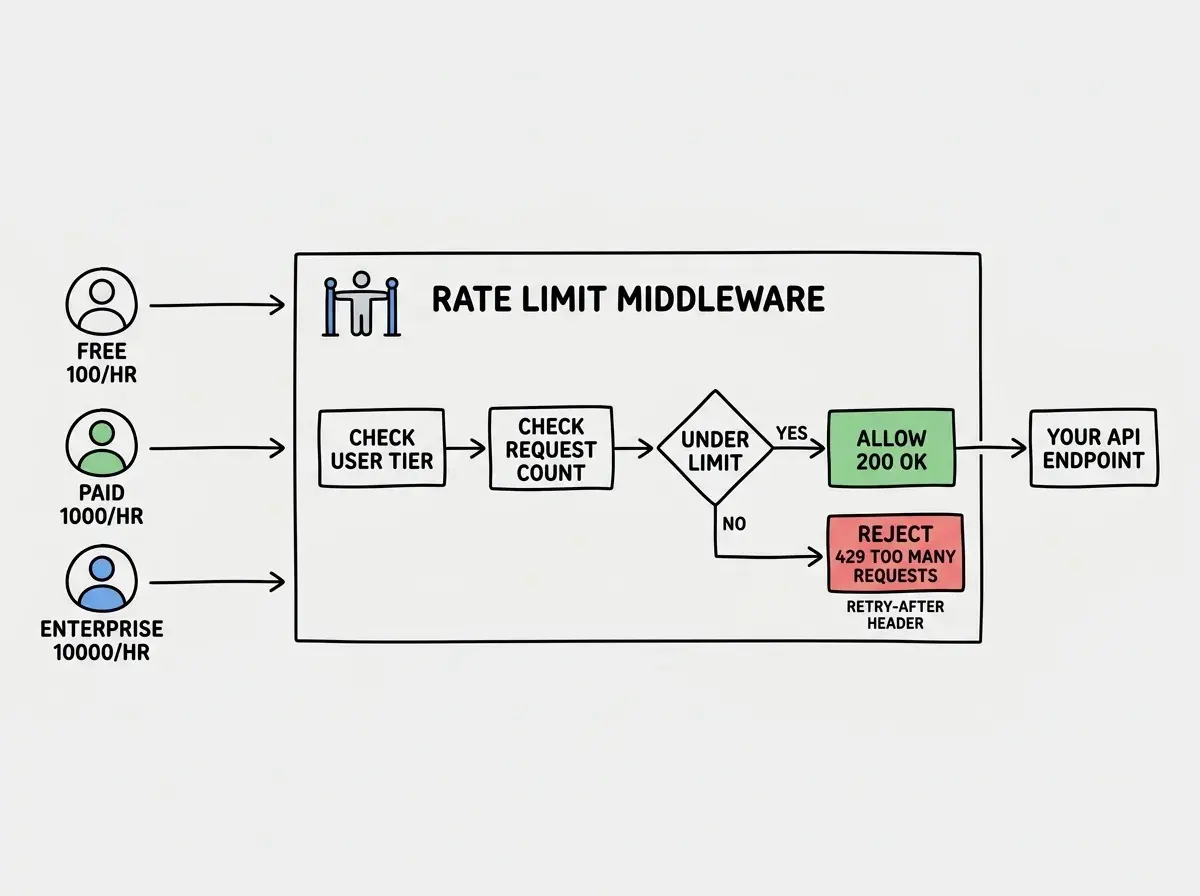
When you see an API respond with "429 Too Many Requests," that is the bouncer turning you away.
The Different Doors That Need Bouncers
Your app does not have just one entrance. It has multiple doors, and each one needs its own bouncer with different rules.
API endpoints are the most obvious. Every route should have rate limits. A common setup is 100 requests per minute per user for general endpoints, and stricter limits (maybe 10 per minute) for expensive operations like AI generation or file uploads.
Authentication endpoints need especially strict limits. Login pages are prime targets for brute-force attacks. Five attempts per minute per IP address is a common configuration.
Outbound API calls are where the cost story gets critical. When your app calls OpenAI, Anthropic, or any paid API, you need rate limiting on your side, not just theirs. The AI provider's limits protect their infrastructure, not your wallet. If you let users trigger unlimited AI calls, you are handing them a direct line to your credit card.
Rate limiting is not just about protecting your server. It is about protecting your wallet. Every unguarded API call to a paid service is an open line of credit to whoever finds your endpoint. The bouncer is not optional; he is your financial firewall.
You Might Think AI Tools Handle This
You might think that AI coding tools would add rate limiting automatically, since it is such a fundamental protection. But actually, AI tools almost never add it unless you explicitly ask.
AI tools build what you request. "Build me an endpoint that generates images using the OpenAI API" produces an endpoint that works, handles errors, and validates input. It does everything a good endpoint should, except limit how often it can be called.
The problem surfaces at 3 AM when a bot discovers your endpoint and makes 10,000 requests in an hour.
The fix is straightforward. After your AI builds an API route, add one follow-up: "Add rate limiting, 60 requests per minute per user, with a 429 response when exceeded." AI tools implement this correctly when asked. They just never volunteer it.
Implementing the Bouncer
Rate limiting lives in your middleware layer, the code that runs before every request reaches your endpoint. Think of it as the bouncer checking everyone before they reach the dance floor.
The key decisions are how you identify visitors (by IP address, API key, or user ID), what the limits should be, and what happens when exceeded. The standard response is HTTP 429 (Too Many Requests) with a Retry-After header.
Rate limiting is essential protection, but it is just one piece of building resilient apps. Learn the fundamentals.
Explore moreFor apps calling expensive external APIs, you also want a global rate limit on outbound calls. Even if individual users are within limits, total volume might exceed your budget. Set a global ceiling and queue requests when it is hit.
VIP Access and Tiered Limits
Not every visitor gets the same treatment. The bouncer might let VIP guests enter more frequently. Rate limiting works the same way.
Most production APIs use tiered limits. Free users get 100 requests per hour. Paid users get 1,000. Enterprise customers get 10,000. The bouncer checks your membership level before applying the rules.
This is also how you monetize API access. Stripe, Twilio, and every major API company uses tiered rate limits as a core part of their pricing. The technology that protects your app becomes the mechanism that drives revenue.
The Cost Spiral That Rate Limiting Prevents
Let us come back to that $607.70 story. The math is brutal.
If an AI API call costs $0.01 and your endpoint gets hit 1,000 times per hour by bots or runaway loops, that is $10 per hour. Manageable. But AI can accidentally trigger infinite API calls. A poorly written retry loop, a webhook that calls itself, or a user automating requests can push that to 10,000 calls per hour. Now it is $100 per hour, $2,400 per day, $72,000 per month.
Rate limiting caps the damage. Set a limit of 60 requests per minute per user, and the worst case is bounded. One abusive user can cost you at most $0.60 per minute, and you can detect and block them long before the bill gets serious.
Relying on the API provider's rate limits to protect your costs. OpenAI, Anthropic, and other AI services have rate limits, but those protect their infrastructure, not your budget. Their limits might allow thousands of requests per minute, far more than you can afford. You need your own rate limits, tuned to your own financial constraints, sitting between your users and any paid API call.
Rate limiting also caps infrastructure costs. With auto-scaling enabled (the default on most cloud platforms), a traffic spike means your compute bill scales up automatically. Rate limiting puts a ceiling on that.
Testing Your Bouncer
Write a script that sends 150 requests in rapid succession. Verify that the first 100 succeed and the last 50 get rejected with 429 status. If all 150 succeed, your bouncer is asleep.
Also test the user experience when limits are hit. A bare 429 is confusing. A friendly message like "You are making requests too quickly, please wait 30 seconds" is much better.
What This Means For You
Rate limiting is the bouncer for your app. It controls how often each user, bot, or script can make requests, protecting your server, your wallet, and your users.
- If you are a founder building a product: Add rate limiting before you launch, especially on endpoints that call paid APIs. The $607.70 nightmare is entirely preventable with a few lines of middleware. Ask your AI tool to add rate limiting to every API route, and set a global budget ceiling on outbound calls. This is financial protection, not a nice-to-have.
- If you are a senior dev evaluating AI-generated code: Check every API route for rate limiting. AI tools never add it proactively. Audit outbound API calls especially carefully, since a missing rate limit on an AI endpoint is an unbounded cost liability.
- If you are a student learning how apps work: Build a simple API with rate limiting from scratch. Use a token bucket implementation, hit the endpoint in a loop, and watch the 429 responses kick in. Understanding this early will save you from real financial pain when you build apps that call paid services.
Rate limiting is one essential protection. Learn the full set of fundamentals that keep your apps safe and your costs predictable.
Keep learning