Your AI coder has amnesia because every new conversation starts blank. It does not remember the architecture decisions you made last week, the libraries you ruled out yesterday, or the conventions you spent six months refining. The fix is the memory layer: a small set of files and tools (CLAUDE.md, AGENTS.md, a decisions log, MCP memory servers) that survive between sessions and rehydrate the AI with what your project already knows.
If you have ever watched your AI confidently rewrite a function in the deprecated style you removed three weeks ago, you have met the amnesia problem. This post explains why it happens, why it is worse than people think, and the four moves that make it go away in an afternoon.
Why The Amnesia Happens
There is a clean technical reason and a fuzzier social reason.
The clean reason is that LLMs have no inherent state between calls. Every API request is a fresh context window. The model has no memory of any previous request unless something in your tooling explicitly puts the previous conversation back into the new context. The "conversation" you see in your editor is a UI illusion: behind the scenes, the tool is replaying the entire chat history each time you press Enter. When you start a new chat, that replay starts empty. The model has no idea what you were doing yesterday.
The fuzzier reason is that we keep forgetting that fact and behaving as if the AI is a teammate who has been reading along. Teammates accumulate context. They overhear standup. They saw the Slack thread about why we are not using Redux anymore. They remember the post-mortem from the database migration. The AI saw none of that. It reads what you put in front of it, and only what you put in front of it.
The combination produces a familiar painful pattern. You spend an hour in a great conversation refining a component pattern. You feel productive. You ship. Two days later you start a new task in a fresh chat. The AI generates code that uses a state pattern you specifically rejected on Tuesday. You correct it. Five days after that, in another fresh chat, it does the same thing again. The amnesia compounds quietly.
The amnesia problem is not solved by switching models or upgrading to a larger context window. It is solved by writing down the things you want the AI to remember, in files the AI reads on every conversation. The fix is a set of habits and a few hundred lines of plain text, not a tooling upgrade.
The reason this matters more in 2026 than it did in 2023 is that AI now writes a much larger share of the code. When the AI was producing a snippet here and there, you reviewed every line and quietly fixed regressions. Now the AI is producing whole features. A regression to a deprecated pattern is no longer a one-line edit; it is a half-day of refactoring that should never have happened. The cost of amnesia scales with how much of the codebase the AI is responsible for.
The Brilliant Contractor Analogy
The way to internalise this is to picture your AI coder as a brilliant contractor who arrives every morning with no memory of yesterday.
She is genuinely talented. She can write any function you describe. She knows React, Python, SQL, and a dozen other things in real depth. Her code is clean. Her instincts are good. The only thing she lacks is continuity. Every morning she walks into the office, sits down, and starts from a fresh notepad.
This means a few things about how you have to work with her. First, you have to brief her every morning, or you have to leave a binder on her desk that she reads first. Second, you have to keep that binder current, because if it says "we use Redux" and your team moved off Redux last quarter, she will dutifully follow the binder and produce code you have to throw away. Third, the more decisions your project has accumulated, the longer the binder gets. By month six, it is no longer a one-page brief; it is a small handbook.
The memory layer is just that handbook, written down where the AI can reach it. The four working pieces are easy to name:
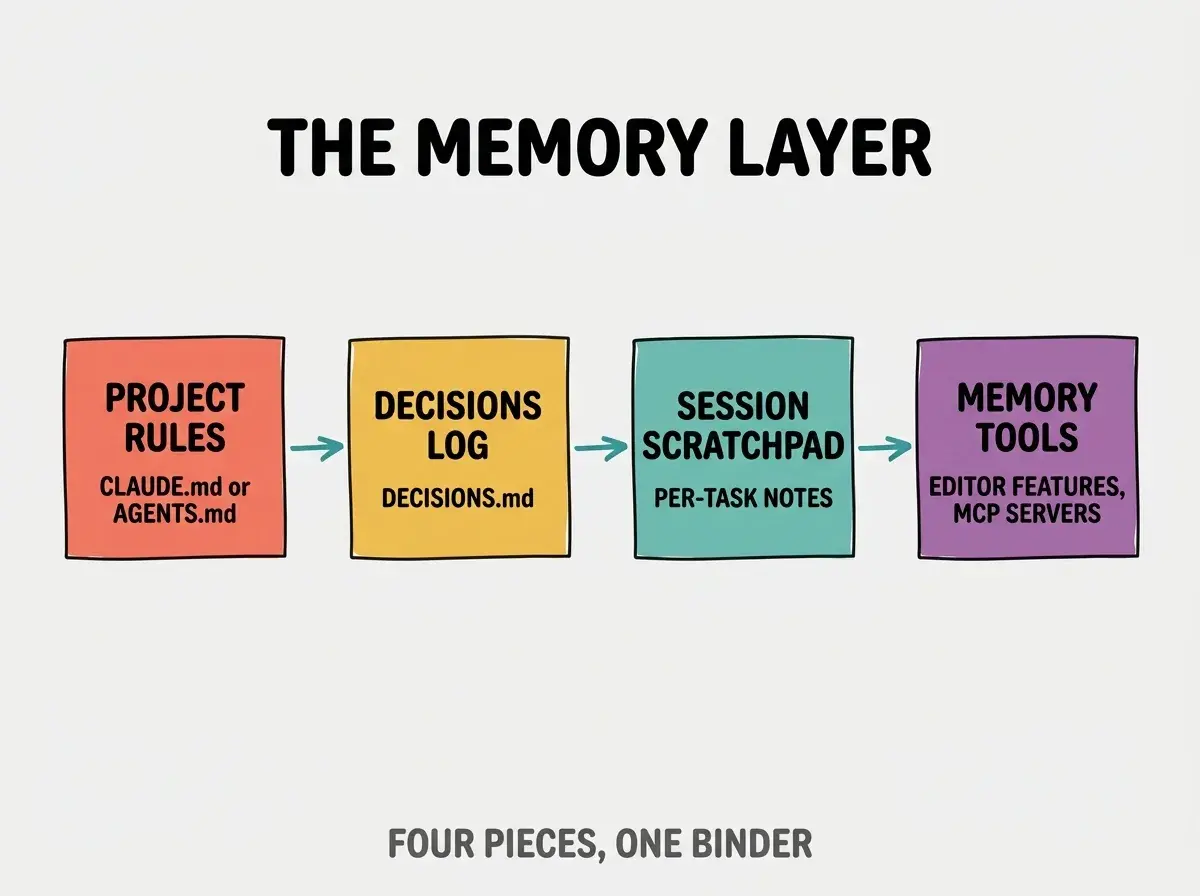
A project rules file (CLAUDE.md, AGENTS.md, .cursorrules, depending on your tool) holds the standing instructions. Stack, conventions, "do not" rules. A decisions log (DECISIONS.md) holds the architectural calls you made and why. A session scratchpad holds the messy notes for whatever task is open right now ("we tried approach A, it failed because of X, switching to B"). And the memory tools that ship with each editor (Claude Code's /memory command, Cursor's project rules, Cline's memory bank) wire it all together.
What You Can Do Today
You do not need to set all four up before you see results. Each one alone moves the needle. Here is the order to install them, fastest payoff first.
Step one, write a CLAUDE.md or AGENTS.md. Spend 30 minutes. Cover your stack with versions, your folder structure, your code style preferences, and three to five things the AI tends to get wrong on your project. Drop it at the root of your repo. The next time you open the project in Claude Code, Cursor, or whatever tool you use, the AI will read that file before answering anything. The amnesia drops noticeably within the first hour.
Step two, start a DECISIONS.md. Same root of repo. Add a line whenever you make a real architectural call. Format does not matter much; date and one sentence is enough. "2026-02-21: chose Drizzle over Prisma for the edge runtime. Prisma client too heavy on Cloudflare Workers." Reference DECISIONS.md from your CLAUDE.md so the AI reads both.
Get the memory-layer setup running in your project today
See the playbookStep three, retire conversations more aggressively. Long threads accumulate confusion faster than they accumulate context. When a task is done, close the conversation. Start the next task in a fresh one. The AI will rehydrate from CLAUDE.md and DECISIONS.md just fine; it does not need 90 minutes of stale chat history.
Step four (optional, more advanced), install one MCP memory server. Anthropic's reference Memory server is a good starting point. It lets the AI store key-value notes that survive between sessions, separate from your project files. Think of it as a sticky-note tray rather than a binder. Useful for things that are too transient for DECISIONS.md but that you want to outlive a single session.
How The Memory Layer Actually Works
It helps to see what happens at the mechanical level, because the abstraction can feel magical otherwise.
When you ask Claude Code a question, the tool builds a full context window before sending the request. The window includes a system prompt, your CLAUDE.md (the user-level one and the project-level one), any imports you referenced from CLAUDE.md, the conversation history so far, the file contents you @ mentioned, and your latest message. All of that goes into one big bundle. The model answers based on the whole bundle.
So when you write a line in CLAUDE.md saying "we use Drizzle, not Prisma, do not propose Prisma migrations," that line is literally in front of the model every time you ask anything. The model is not "remembering" your decision in any human sense. It is reading it freshly on every request. Which means stale lines in CLAUDE.md are exactly as harmful as the amnesia they were meant to cure: the model will dutifully follow whatever the file says, even if the file is wrong now.

This also explains why the memory layer is fundamentally a discipline, not a tool. The tools (Claude Code, Cursor, Cline) make it easy to set up. They cannot make it accurate. Only you can keep CLAUDE.md and DECISIONS.md current. The teams that get the most out of AI-assisted coding in 2026 treat those files like first-class source code: they are reviewed, refactored, and updated alongside the changes that made them necessary.
Everything is a File.
There is also a token economy to be aware of. Everything in your memory layer eats budget on every request. A 4000-line CLAUDE.md that nobody pruned in six months is not "more memory"; it is more noise. The model will pay less attention to it, not more. Aim for the tightest version of the binder that captures what actually matters. If a line has not influenced an answer in three months, delete it.
The most common memory layer failure is treating CLAUDE.md as a setup task that you finish on day one and never revisit. Six months later it lists a TypeScript version you no longer use, points at a folder that was renamed, and forbids a pattern that became your team's standard. The AI follows the file confidently and produces code you have to throw away. The fix is a habit, not a tool: every time you change something the file claims, update the file in the same PR. Treat stale memory as a higher-severity bug than missing memory, because at least missing memory feels obviously wrong.
The other failure mode is hoping that the AI editor's built-in memory will do the work for you. Cursor's project rules and Claude Code's /memory are useful, but they are not autonomous. They store what you tell them to store. If you do not actively curate, you end up with an empty memory bank or, worse, a memory bank full of half-truths the AI captured from a confused conversation.
What This Means For You
The amnesia problem is fixable, and the fix is largely free. A morning spent setting up the memory layer pays for itself within a week of AI-assisted work. The hard part is keeping the habit, not getting it started.
I just deleted like 2,000 tokens or something from the system prompt yesterday. Just because Sonnet 4.5 doesn't need it anymore.
- If you are a senior developer, the memory layer is your highest-leverage 2026 investment. A solid CLAUDE.md and DECISIONS.md outlast model upgrades, tool switches, and team changes. Treat them as part of the project, not a personal hack.
- If you are an indie hacker, the decisions log is the move that pays the most for the least work. You are the only person on the project, which means every "wait, why did I pick this stack again?" thought is pure friction. Twenty seconds of writing today saves you ten minutes of re-explaining tomorrow.
- If you are a founder or product manager, the same idea applies to non-code work. AI-assisted PRD writing, customer interview synthesis, and competitive analysis all benefit from a persistent context file plus a decisions log. The tools are the same; the binder just contains different content.
- If you are a student or career changer, learning to maintain a memory layer is one of the most transferable skills in modern software work. Every team you join will have some flavor of this problem. If you are the person who shows up and immediately writes a project rules file, you become useful fast.
The brilliant contractor with the five-minute memory is not going away. The fix is to leave a better binder on her desk, and to keep it current. Do that and the contractor starts to feel almost telepathic, even though nothing about her has changed. What changed is what she walked in with this morning.
From CLAUDE.md to MCP memory servers, the practical four-step setup
Read the next post