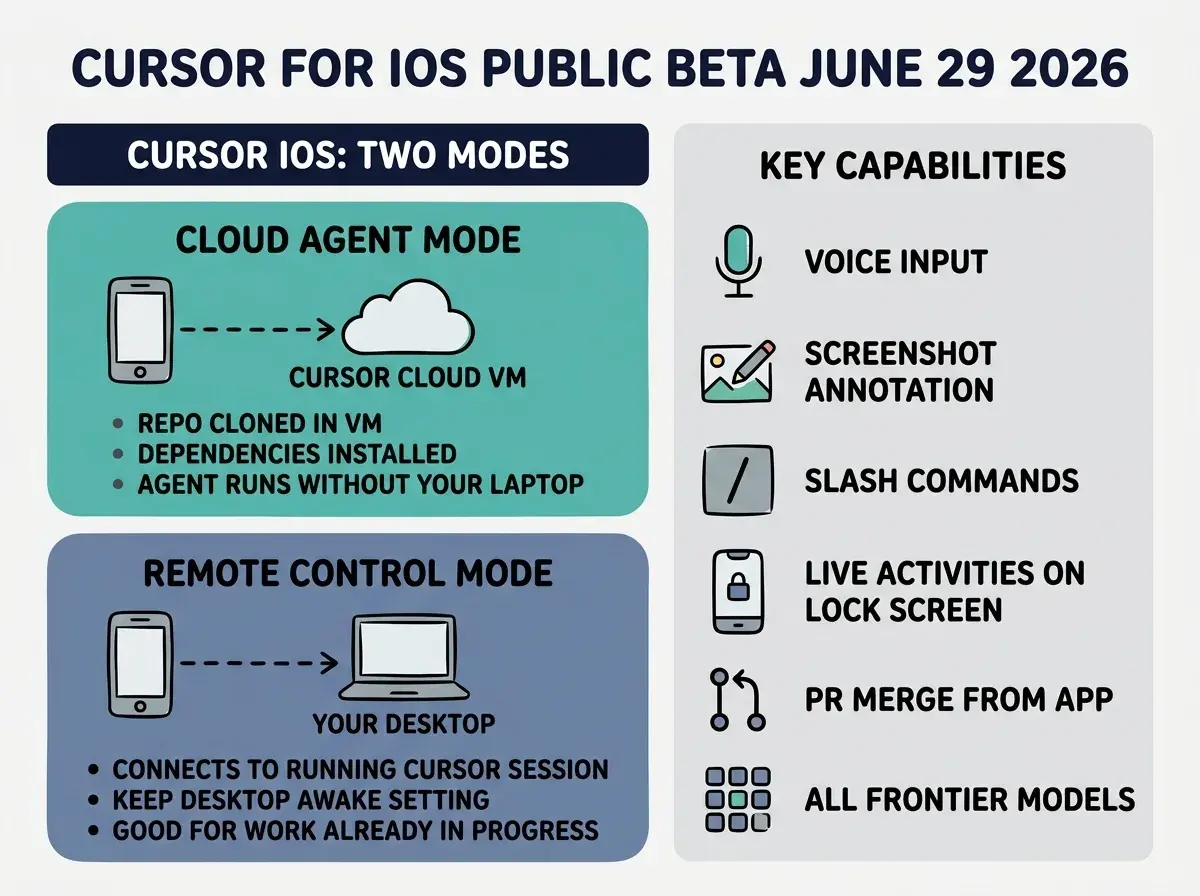
Cursor for iOS entered public beta on June 29, 2026, making cloud-based coding agents available to every paid Cursor subscriber from an iPhone or iPad. The app ships with two distinct modes: Cloud Agents, which run the agent entirely in an isolated virtual machine in Cursor's cloud, and Remote Control, which connects the phone to an existing agent running on a developer's desktop machine. Both are available now on all paid Cursor plans.
What shipped in the Cursor iOS public beta
The June 29 release is a native iPhone app, not a web view or a pairing workaround. It is distributed through the App Store, requires iOS 26.0 or later, and works across iPhone and iPad. It connects to the same Cursor account and project list as the desktop client.
The app supports every frontier model Cursor offers on desktop, including models from OpenAI, Anthropic, Google, and Cursor's own Composer family. Voice input is available across both modes: you can describe a task out loud and Cursor transcribes and submits it as a prompt. Slash commands work in the mobile composer, so the interaction model mirrors the desktop experience without forcing touch-only workarounds.
A feature unique to the mobile context is screenshot annotation. When you spot a UI bug or layout issue on your phone, you can take a screenshot, annotate it with arrows or highlights directly in the app, and send it to an agent as visual context. This removes the friction of describing visual problems in text. Instead of writing "the button on the left side of the header appears misaligned when the viewport is under 375px," you circle the button in the screenshot and send it.
Cursor for iOS is available in public beta at cursor.com on all paid plans. Download the app from the App Store, sign in with your existing Cursor account, and choose a repo. Cloud Agent sessions start in an isolated VM in Cursor's cloud; no laptop required. Remote Control connects to a Cursor session already running on your desktop. Until July 5, 2026, Composer 2.5 runs started from the mobile app cost 75% less than desktop runs, making now the best time to test long-running tasks from your phone.
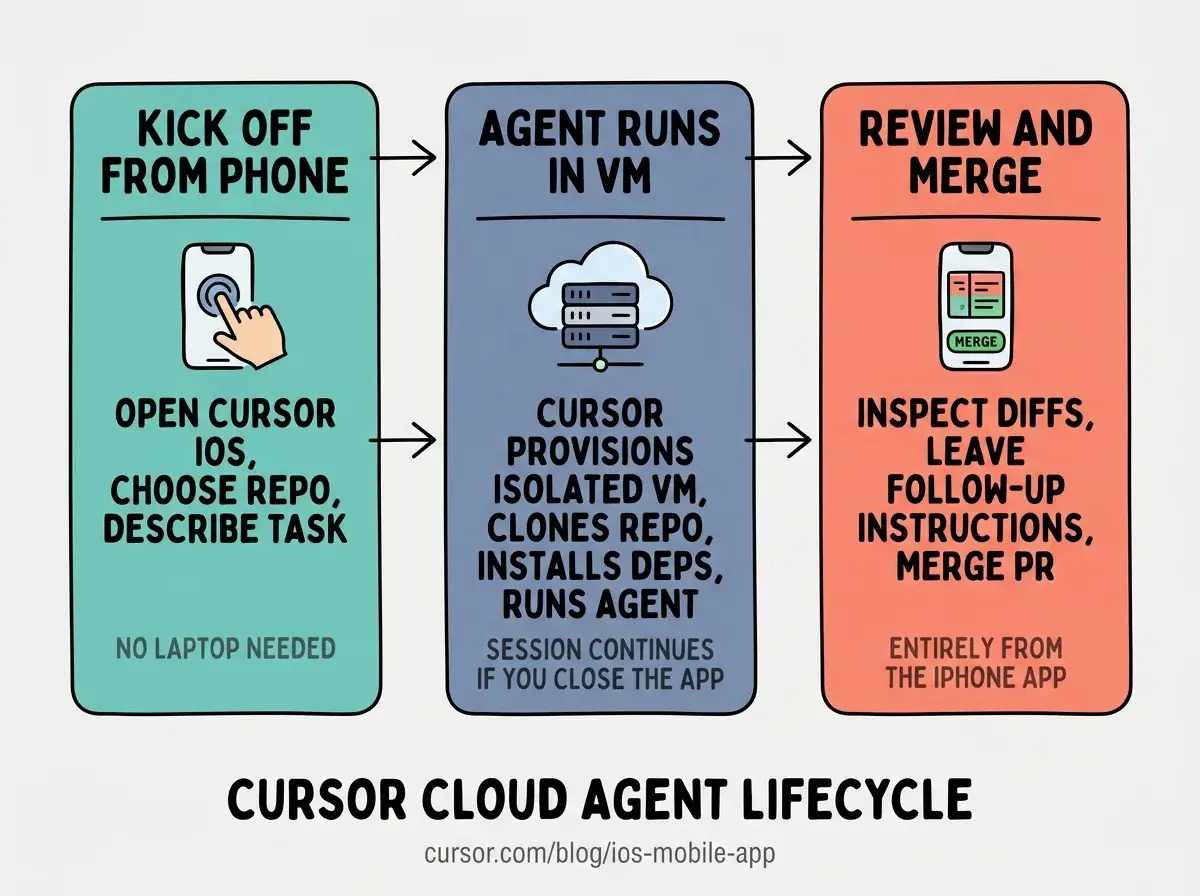
The review and merge flow is also fully native. When a cloud agent completes a task, the app shows the generated artifacts, a diff view, and a merge button. You can inspect the changes, leave follow-up instructions, or merge the pull request directly from the app without opening a browser or a laptop.
How do Cloud Agents work in the Cursor iOS app
Cloud Agents are the more significant of the two modes. When you start a Cloud Agent session, Cursor provisions an isolated virtual machine with your repository cloned, dependencies installed, and a full development environment ready. The agent runs inside this VM. Your laptop does not need to be powered on at any point during the session.
This matters because it removes the most common failure mode in long-running agentic sessions: the laptop going to sleep, the internet connection dropping, or the developer closing the lid because the task is taking longer than expected. A Cloud Agent session continues in the Cursor cloud regardless of what happens on the developer's end. When you reopen the app an hour later, the session is exactly where it left off.
The agent can run tests, build the project, and iterate on changes inside the VM. When it reaches a point that needs human input, a push notification arrives on your phone. You can review the current state in the app, annotate a screenshot if the issue is visual, leave follow-up instructions via voice or text, and let the agent continue.
For vibecoders shipping solo projects, this means a Cloud Agent session can run a large refactor or a batch of test generation while you are away from your desk. You kick it off from your phone in the morning, check in twice during the day from push notifications, and review the diff before merging in the evening.
What does Remote Control mode give you on mobile
Remote Control connects the Cursor iOS app to a Cursor session that is already running on your desktop machine. The model here is similar to Codex Remote: your laptop stays on, and the phone becomes a lightweight steering surface for the active session.
Cursor iOS includes a setting to keep your computer awake while Remote Control is active. This prevents sleep from breaking the connection when you step away. The app shows the current agent thread, lets you type or speak follow-up prompts, and updates in real time as the agent completes steps.
Remote Control is the right mode when you are mid-session on the desktop and need to step away before the task finishes. Rather than pausing and losing context, you hand off to the phone and keep the session moving. You can review the output from your couch and send the agent to the next step without returning to your desk.
The Vibe Coder Blog covers capability releases that change how builders work, focused on what is actionable this week.
Browse All PostsWhat can you do in Cursor iOS that you could not do before
The screenshot annotation workflow deserves its own callout. Before mobile coding apps with annotation support, reporting a visual bug to an AI agent required describing it in text. That description had to be accurate enough for the agent to locate the element in the codebase and understand what was wrong visually. The round trips to clarify were common.
Screenshot annotation collapses this. You see the bug on your phone, draw a circle or an arrow on the screenshot, and attach it to the agent prompt. The agent receives the image as visual context alongside the text. For UI bugs, layout regressions, or design feedback from a client, this is faster than any text-based workflow that existed before.
The live status surface is also new. Live Activities on the iOS lock screen show the current agent status without opening the app. If an agent is running through a large refactor, you can glance at your lock screen to see whether it is still working, finished, or waiting for input, without unlocking your phone and opening the app to check.
The most common mistake with Cursor iOS will be using Remote Control when Cloud Agents would serve better, and vice versa. Remote Control requires your laptop to stay on and reachable. If you are starting fresh work and plan to be away from your desk for more than an hour, start a Cloud Agent session instead. Cloud Agents do not depend on your local machine, so they survive sleep, network switches, and closed lids. Use Remote Control only when you already have a session in progress on your desktop that you want to continue steering without being physically at the machine.
The 75% discount on Composer 2.5 runs through July 5, 2026 is also worth acting on now. Composer 2.5 is Cursor's own model, optimized for coding tasks at a lower cost point than the top-tier frontier models. The discount makes long Cloud Agent sessions significantly cheaper to test, particularly for batch work like test generation or documentation that benefits from extended autonomous runs. After July 5, the standard pricing applies.
How does Cursor iOS compare to Codex Remote GA
Both Cursor iOS and Codex Remote (which reached general availability on June 25) let developers manage AI coding agents from their phones. The architectures are different in ways that matter.
Codex Remote connects the ChatGPT mobile app to an existing Codex session on your development machine or a DigitalOcean Droplet. The session always needs a host, whether that is your laptop or a cloud VM you provision yourself. Cursor iOS offers this same pattern through Remote Control mode but also ships Cloud Agents, where Cursor handles VM provisioning automatically. You do not choose or configure a Droplet; Cursor allocates the VM and manages it.
The other meaningful difference is the full-native experience. Cursor iOS is a purpose-built iPhone app with voice input, screenshot annotation, live lock screen activities, and diff review built in. The ChatGPT iOS interface works within the existing ChatGPT app, which is a more general-purpose surface.
For vibecoders who use Cursor as their primary coding environment, the iOS app is the more integrated option. For those whose workflows are already built around ChatGPT and Codex, Codex Remote is the natural fit. Both represent the same broader pattern: phone-based agent management is now a first-class feature in the major AI coding tools, not a workaround or a future roadmap item.
The official Cursor iOS announcement includes screenshots of both modes and a walkthrough of the setup flow. The Cursor changelog entry covers the technical details of the VM environment and model availability.
New posts on AI coding tool releases, workflow patterns, and what is actually worth using right now.
See All Posts