Claude Code Artifacts, launched June 18, 2026, lets Team and Enterprise users capture the output of any Claude Code session as a live, interactive HTML page hosted at a private org-only URL. The page updates in real time as Claude keeps working, and every version is preserved in history. For vibecoders running Claude Code on a team plan, this collapses the gap between "Claude finished a task" and "everyone on the team can see what happened."
Artifacts are not static exports. The page at the shared URL refreshes in place whenever Claude Code produces a new iteration, without losing the viewer's scroll position. This means a teammate reviewing a PR walkthrough artifact at 2 PM sees the same live document that updated when Claude ran the final linting pass at 1:47 PM, not a snapshot from when you first triggered the artifact. Version history is kept so earlier states are still accessible if something regresses.
The feature arrives at an interesting moment. Claude Code started as a solo terminal tool, but the last few months of shipping have pushed it steadily toward team territory: nested subagents, parameterized permission rules, and now a sharing layer. Artifacts is the first feature in Claude Code that is explicitly designed to produce output for someone other than the person running the session, and that shift in orientation matters for how teams will use it.
What does Claude Code Artifacts actually produce
Artifacts gives you a single self-contained interactive HTML page generated from the full context of your session. The page can include charts, tables, forms, and other interface elements based on whatever Claude Code was working on. Connect it to a live data source through MCP, and the page reflects the current state of that source whenever a viewer opens the link.
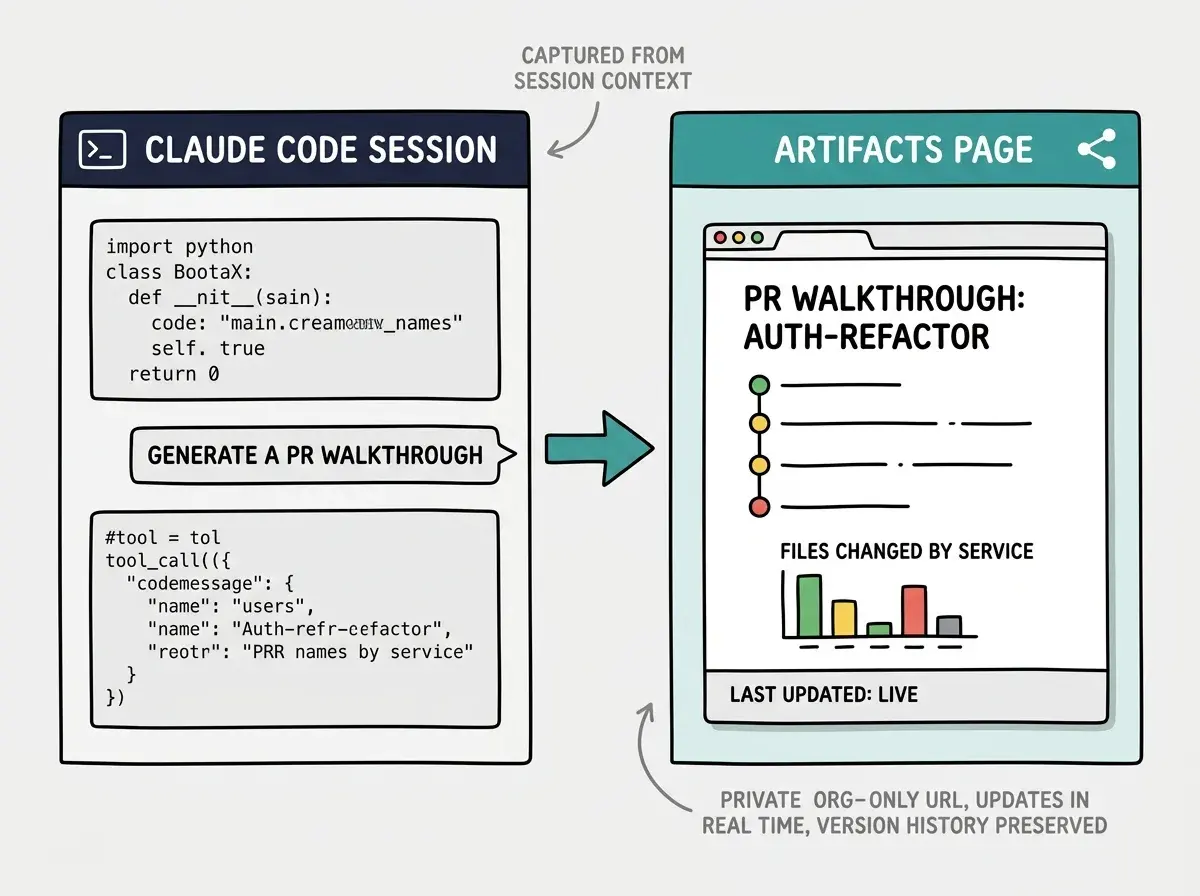
The page is generated from the full session context: code Claude wrote, tool call outputs, MCP results, and the conversation that produced all of it. That scope is what distinguishes a Claude Code Artifact from copy-pasting output into a doc. A PR walkthrough artifact can show exactly which files changed, the reasoning Claude applied for each change, the test results that came back, and a summary of what remains unresolved, all in one page a non-technical stakeholder can open without installing anything.
Artifacts are available from both the Claude Code CLI and the desktop app. There is no separate export step. You can request an artifact mid-session or at the end, and Claude generates the page from whatever has happened in the session so far.
Which plans support Artifacts and what are the restrictions
Artifacts in Claude Code is currently in beta on Team and Enterprise plans only. The Pro plan at $20 per month does not include it. This is the same scope restriction that applied to several earlier Claude Code collaborative features: Team starts at $30 per user per month, Enterprise is custom pricing.
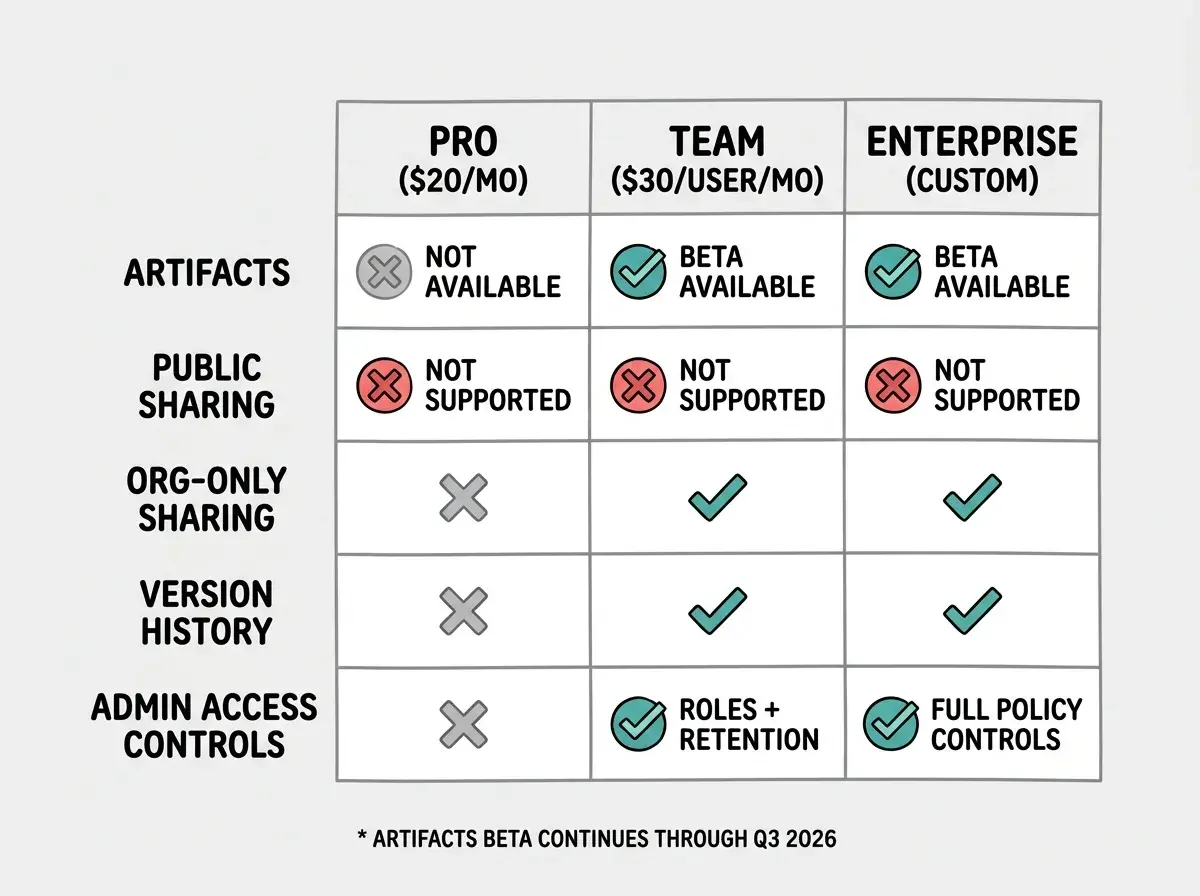
Unlike Claude.ai's consumer Artifacts feature, Claude Code Artifacts cannot be made public. Every page is locked to authenticated members of your specific organization. An admin can configure role-based access and retention policies through the Team or Enterprise dashboard. If someone leaves the org, their access to shared artifacts is revoked along with their account.
The Vibe Coder Blog covers capability shifts in AI coding tools focused on what teams can act on today.
Browse All PostsThis private-by-default design reflects how different Claude Code's use context is from the consumer product. The sessions that produce artifacts often contain unreleased code, internal architecture decisions, or data from production systems via MCP. Making public sharing even an option would create audit and compliance risk for any team handling sensitive data. Anthropic committed to keeping Artifacts in beta through Q3 2026 and said it will use the beta period to tune permissions, performance, and versioning before a wider release.
What are the most useful Artifacts for a vibecoder team
The use cases Anthropic highlighted in the announcement map closely to the friction points teams hit when using Claude Code on real projects. Here is how each one translates to a daily workflow.
PR walkthroughs. Before Artifacts, sharing a Claude Code session meant either screenshotting, pasting into a doc, or asking someone to replay your session. With Artifacts, you run Claude through the PR, generate a walkthrough, and drop a single URL in your PR description. Reviewers open the page, see the file-by-file breakdown, and can ask follow-up questions against the same context you used. The page updates if Claude does another pass.
Incident timelines. When something breaks in production, the standard response is frantic copy-pasting across Slack threads, runbooks, and postmortems. A Claude Code session that diagnoses the incident can produce a single artifact with the timeline, root cause, mitigation steps taken, and remaining risks, all in one page that updates as the incident response continues.
Architecture overviews. Claude Code can read an entire codebase and produce a system map. Artifacts turns that map into a shareable reference that links to the actual code through MCP connections. This works especially well when onboarding a new teammate who needs to understand a service they have never touched.
Release checklists. Teams using Claude Code to drive deploy pipelines can generate a release checklist artifact that reflects the actual state of the pipeline, not a template from three months ago. The checklist marks items as complete in real time as Claude executes them.
How should vibecoders on Pro plans think about this
The honest answer is that Artifacts does not change your workflow today if you are on the $20 Pro plan. The feature is not available to you during the beta period. What it does change is the trajectory of Claude Code as a product.
Anthropic is building collaborative infrastructure into Claude Code: the kind of features that only matter when multiple people are working with the same tool. That investment signals where the product is headed. If you are a solo vibecoder today but plan to grow a team, the pricing question is not whether Team at $30 per user is worth the premium over Pro, but whether the collaborative features that Team unlocks, including Artifacts, change the team's daily workflow enough to justify the delta. For teams already running Claude Code agents against shared codebases, the answer is increasingly yes.
Requesting an artifact at the very end of a long session produces a page built from the full session context, which can be sprawling and hard to navigate. The cleaner pattern is to open a focused session with a specific deliverable in mind, complete that one task with Claude, then generate the artifact. A PR walkthrough artifact from a session scoped to a single PR is more useful than an artifact from a three-hour session that wandered across five different tasks. You can always run another session and generate a separate artifact for the next task.
What is the forward-looking significance of this feature
Artifacts is the first time Claude Code has a native answer to the question "how do I share what just happened with someone who was not in the session." That question comes up constantly in team settings and, before June 18, had no good answer inside the tool. The workarounds, screen recordings, copied transcripts, and Notion docs, all required manual effort and lost the interactivity of what Claude Code actually produced.
The real shift here is that Claude Code's output is now a first-class artifact with a URL, version history, and access control. That puts it in the same category as a pull request or a deployment, something that lives in a system, can be linked to, and has a visible record of how it changed over time. That is a meaningful architectural addition to how a team uses an AI coding tool, not just a convenience feature.
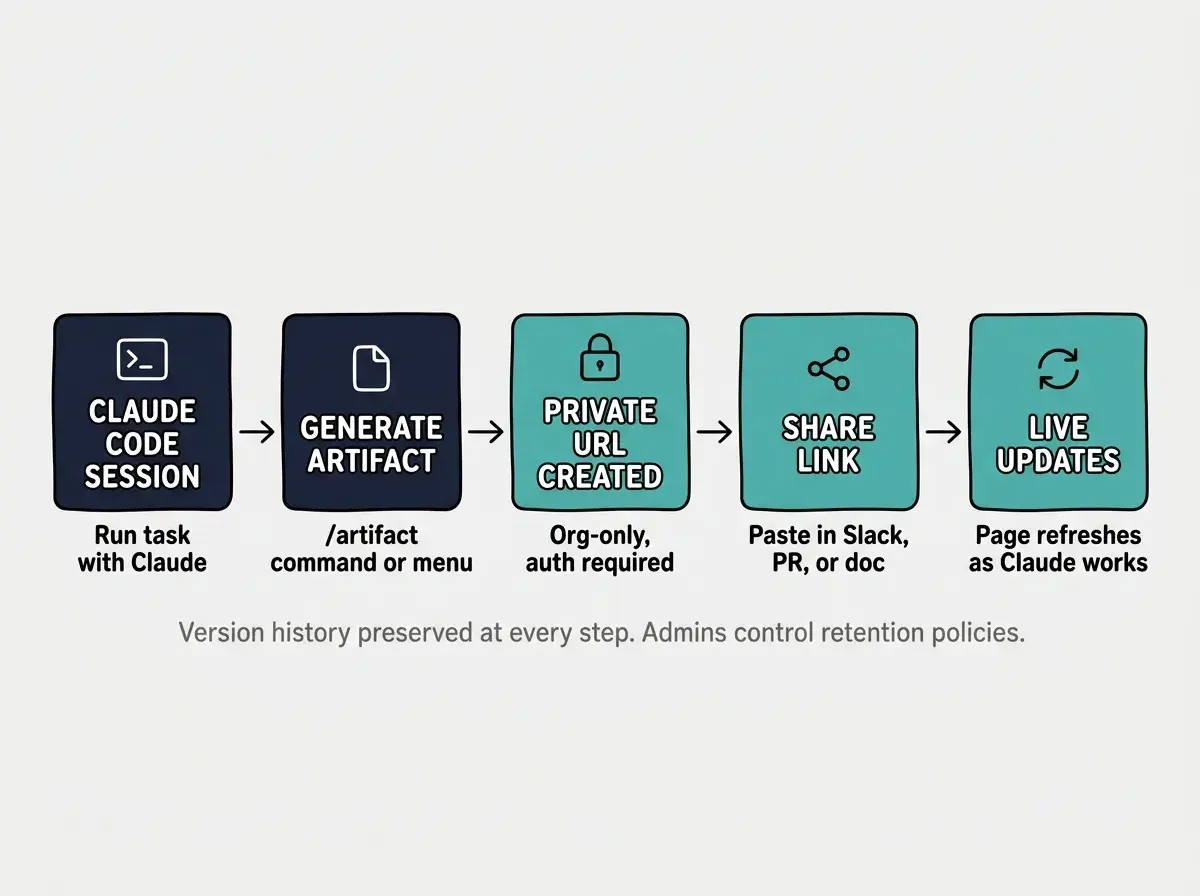
For now, the feature is in beta and Team/Enterprise-only. If you run Claude Code as part of a team plan, it is worth experimenting with the PR walkthrough use case first. It is the scenario where the gap between "Claude finished the task" and "the team can see what happened" is most expensive, and it is the use case that most directly demonstrates what makes a live-updating page more useful than a static export.
The full announcement on the Claude blog includes additional detail on the permissions model and beta access. If you are on a Team or Enterprise plan, the feature is available now from the CLI and desktop app.
The Vibe Coder Blog tracks capability shifts as they ship, focused on what builders can act on today.
Read More Posts