Claude Code v2.1.178, released June 15, ships parameterized permission rules that match against a tool's input parameters rather than just the tool name. The immediate use case is Agent(model:opus) in your settings to prevent any nested subagent from using Opus-class models, giving you direct budget control across multi-level agent workflows without touching individual agent definitions.
With Claude Code supporting subagent nesting up to five levels deep as of v2.1.172, Opus-class calls can compound through every level of a hierarchy. The new Agent(model:opus) deny rule stops Opus from appearing anywhere in a subagent tree, regardless of depth, without requiring changes to individual agent prompts. Add it to your permissions.deny list in settings.json and it applies globally from that session forward.
Claude Code's permission model was previously binary at the tool level. You could allow or block Bash, Read, Agent, and other tools by name. What you could not do was allow a tool in general while restricting specific uses of it. You could not say "Bash is fine, but not rm commands" or "subagents are fine, but not Opus subagents." v2.1.178 adds that second dimension.
What did v2.1.178 actually change
The syntax added in this release follows the form Tool(param:value), where Tool is any tool name, param is a key from that tool's input schema, and value is a literal string or a wildcard pattern using * at either end. The wildcards are positional: a trailing * matches any suffix, a leading * matches any prefix.
The changelog gives two concrete examples:
Agent(model:opus)
Bash(cmd:npm run *)
The first blocks any subagent whose model parameter contains the exact string "opus." The second matches any bash command starting with "npm run." Both go in the permissions.deny or permissions.allow array in your settings.json. The syntax is uniform across both lists.
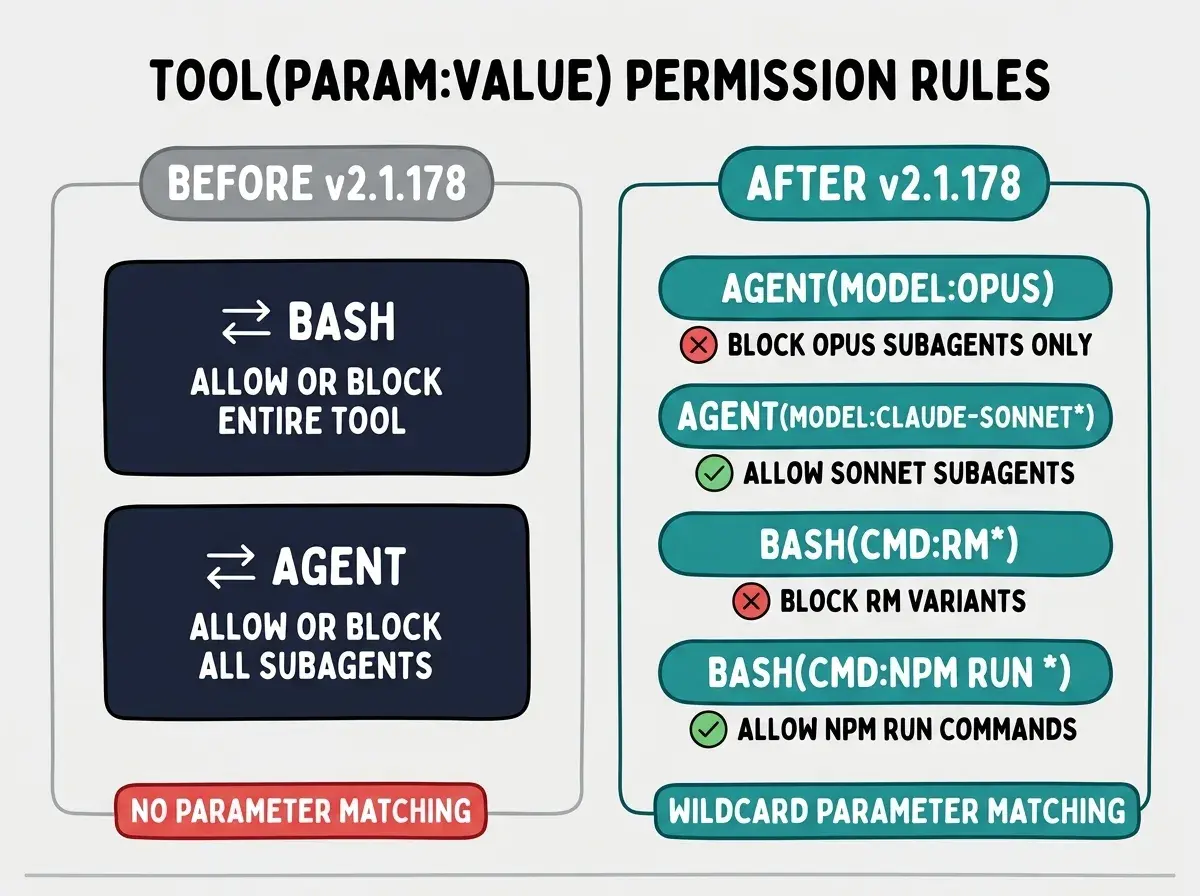
The rules evaluate in the usual order: deny matches first. If a tool call matches any deny rule, it is blocked regardless of any matching allow rule for the same tool name. Combining a deny rule for Opus with an allow rule for Sonnet lets you express a preference, not just a prohibition.
How does the Agent model rule cut subagent spending
Add the deny entry to settings.json in your project's .claude/ directory or in your global ~/.claude/settings.json:
{
  "permissions": {
    "deny": ["Agent(model:opus*)"]
  }
}
The trailing wildcard catches the full Opus family: opus, opus-4, opus-4-8, and any future Opus variants. When Claude Code attempts to spawn a subagent and the model name matches opus*, the spawn is blocked and a permission denial is written to the session transcript. The orchestrating agent sees the denial as a tool call failure. No tokens are consumed by the blocked subagent.
To pair this with a positive rule that explicitly allows Sonnet and nothing else:
{
  "permissions": {
    "deny": ["Agent(model:opus*)"],
    "allow": ["Agent(model:claude-sonnet*)"]
  }
}
This matters most in orchestration setups where a top-level agent spawns several level-1 subagents, each of which spawns its own children. Without a model constraint, each level defaults to whatever the session's plan allows, which on a Max or Team plan typically means Opus. A single settings entry caps the entire tree at Sonnet without editing any agent YAML files.
What other tool parameters can you match on
The syntax is not restricted to Agent and Bash. It applies to any tool, including MCP server tools. The pattern for MCP tools follows the existing mcp__server__tool(param:value) form.
Some practical patterns worth adding to a production setup:
Bash safety net without disabling Bash entirely
Bash(cmd:sudo*)       # block all sudo calls
Bash(cmd:git push*)   # block pushes in automated runs
Bash(cmd:curl * | *)  # block pipe-to-shell patterns
These let automated Claude Code sessions use Bash freely while excluding the commands most likely to cause irreversible damage if the agent misunderstands a task.
MCP database access
If your project connects to Postgres or another database through MCP, you can allow reads while blocking writes:
mcp__postgres__query(query:INSERT*)
mcp__postgres__query(query:DELETE*)
mcp__postgres__query(query:DROP*)
The wildcard position is flexible across tools. A single * in value position matches any string, making it equivalent to a bare tool-name deny. The practical rules use leading or trailing wildcards to scope the match.
The Vibe Coder Blog covers AI coding tool updates focused on what builders can act on today.
Browse All PostsThe community has already picked up on the scope of this change. A walkthrough titled "Claude Code v2.1.178: Surgical Subagent Permissions" appeared within hours of the release, covering the exact use cases above. "Surgical" is accurate: the feature makes it possible to allow a tool broadly while targeting a narrow slice of its behavior for restriction.
What is nested skills loading and why it matters
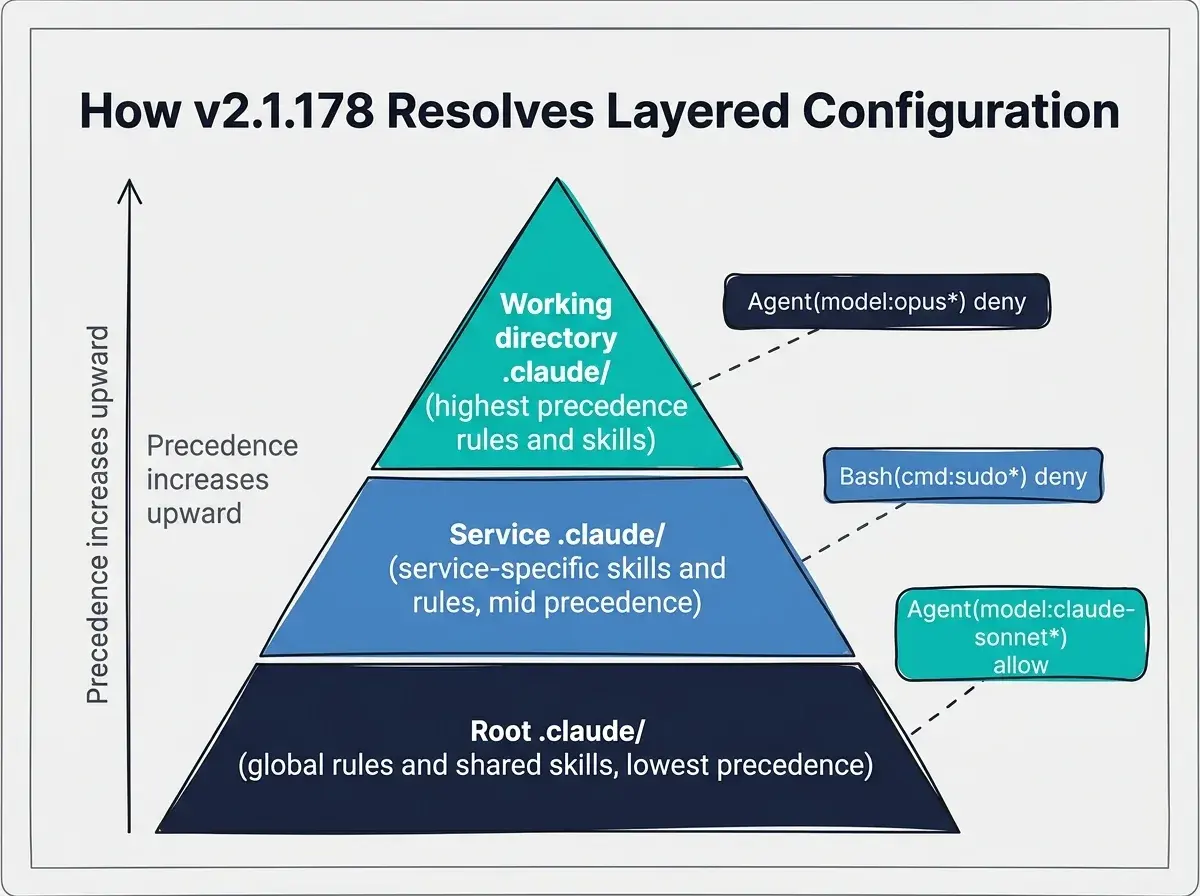
v2.1.178 ships a second feature alongside parameterized permissions: skills in nested .claude/ directories now load automatically, with collision resolution using <dir>:<name> naming.
Before this release, Claude Code loaded skills only from the root .claude/skills/ directory of a project. In a monorepo with a backend/ service and a frontend/ service, both with their own .claude/skills/ directories, only the root-level skills were visible from all contexts.
After v2.1.178, skills in any .claude/ directory along the path from the project root to the current working directory load automatically. The closest .claude/ to the working directory takes precedence for agents, workflows, and output styles. When two skills share a name, the conflict resolves by prefixing the directory: a deploy skill in backend/.claude/skills/ becomes backend:deploy, and a deploy skill in frontend/.claude/skills/ becomes frontend:deploy. Calling backend:deploy from anywhere in the repo runs the backend version.
Relying on the CLAUDE.md in your root directory to set a model preference that contradicts a deny rule in settings.json. If your root CLAUDE.md specifies claude-opus-4-8 as the preferred subagent model and your settings.json denies Agent(model:opus*), Claude Code will attempt the spawn, hit the deny rule, fail, and potentially retry or surface an error rather than silently falling back to Sonnet. Remove the model preference from CLAUDE.md and let the deny rule be the single authoritative constraint. Use an allow rule for Sonnet alongside the deny if you want a positive preference rather than just a prohibition.
For a vibecoder working in a monorepo, this means service-specific skills stay scoped to their directory without collisions. Switching working directories in the terminal is the only step needed to shift skill context. You do not need to update any configuration file or reload the session.
Why do these two features belong together
Parameterized permission rules and nested skills loading solve the same underlying problem: Claude Code in 2026 is used across complex, multi-directory projects with multiple agents running simultaneously, and the configuration model needs to match that reality.
Permission rules that only matched tool names were adequate when a single agent ran a handful of tools. They stop being adequate when five levels of nested subagents are each making independent tool calls. Similarly, a single root-level .claude/ directory worked fine for simple projects but breaks down in monorepos where different services need different behaviors.
v2.1.178 moves project configuration closer to a programming model rather than a flat list of settings. Rules have parameters and wildcards. Skills have namespaces and precedence. The earlier versions of Claude Code were the equivalent of a tool that only let you set feature flags on or off; this version starts to look like a configuration language.
The practical message for vibecoders is straightforward. If you run Claude Code in automated pipelines, in CI, or in multi-service projects, v2.1.178 gives you tools to set guardrails once rather than per-session. The Agent(model:opus*) deny is the most immediately useful: set it at the root or globally and you cannot accidentally kick off an expensive Opus-heavy subagent tree during an overnight run.
The full v2.1.178 release notes also include fixes for subagent transcript visibility, sandbox glob patterns, and plugin loading performance in remote sessions. The parameterized permissions and nested skills loading are the two changes that affect how you set up and govern Claude Code going forward.
The Vibe Coder Blog covers capability updates as they ship, focused on what builders can act on today.
Read More Posts