You can build a professional portfolio site with AI coding tools in about an hour, even if you have never touched a line of code before. Not a blank template with placeholder text, but a real portfolio with your name, your projects, and your story, live on the internet with a URL you can share with recruiters, professors, or potential clients.
Think of your portfolio like a shopfront on a busy street. The window display is the first thing people see. If it is well-lit and thoughtfully arranged, people walk in. If it is dark and cluttered, they keep walking. Your portfolio is that window display for your professional life. Every section you build (hero, about, projects, contact) is another element in that window, arranged to make the right people stop and pay attention.
Why a Portfolio Site Changes Everything
A resume tells people what you did. A portfolio shows them. That difference matters more than most people realize, especially if you are switching careers or just starting out. When a hiring manager sees a live website you built, they are not just reading about your skills. They are experiencing proof that you can ship something real.
For students, a portfolio site separates you from every other applicant who submitted the same PDF resume. For career changers, it tells a story that a resume format was never designed to tell: "I learned something new, I built with it, and here is the evidence."
The old way to build a portfolio meant learning HTML, CSS, and JavaScript, spending weeks on tutorials, and abandoning the project when the CSS refused to cooperate. AI coding tools collapsed that timeline from weeks to about sixty minutes. You describe what you want, the AI builds it, you refine through conversation, and you deploy.
A portfolio site is not about proving you can code. It is about proving you can build and ship. 63% of people using AI coding tools are not professional developers. They are founders, career changers, and students who need to demonstrate capability, not syntax knowledge. Your portfolio is evidence that you can take an idea from concept to live product.
This tutorial walks through every stage: the prompts that generate each section, customizing the design to feel like yours, and deploying to Vercel with a custom domain. By the end, you will have a real site at a real URL.
Building Your Portfolio Section by Section
Open your AI coding tool (Lovable, Bolt, or Cursor all work) and start with this first prompt. The key is being specific about structure, content, and visual style all at once.
The hero section prompt: "Build a personal portfolio website for [your name]. Start with a hero section that takes up the full viewport height. Include my name in large bold text, a one-line professional title below it (like 'Computer Science Student and Builder' or 'Career Changer Turning Ideas Into Products'), and a short tagline sentence underneath. Add a subtle gradient background from white to light blue. Include two buttons: 'See My Work' that scrolls to the projects section, and 'Get in Touch' that scrolls to the contact section."
Wait thirty seconds to two minutes for the AI to generate your site. You should see a full-screen hero with your name, title, and two buttons. It will not be perfect, and that is fine. You will refine it in a moment.
The about section prompt: "Below the hero, add an About Me section. Include a placeholder for a profile photo on the left (a rounded square, 200px), and two paragraphs of text on the right. The first paragraph should be: [write 2-3 sentences about who you are]. The second paragraph should be: [write 2-3 sentences about what you are interested in building]. On mobile, stack the photo above the text."
The projects grid prompt: "Add a Projects section with a heading 'What I Have Built.' Create a grid of three project cards, two columns on desktop and one column on mobile. Each card should have a colored placeholder image area at the top (300px tall), a project title, a one-line description, and two small buttons: 'Live Demo' and 'Source Code.' Use these three projects: [Project 1 name and description], [Project 2 name and description], [Project 3 name and description]."
The contact section prompt: "Add a Contact section at the bottom with a heading 'Let's Connect.' Include a simple form with fields for name, email, and message, plus a Send button. Below the form, add icons linking to GitHub, LinkedIn, and email. Use a slightly darker background color to distinguish this section from the rest."
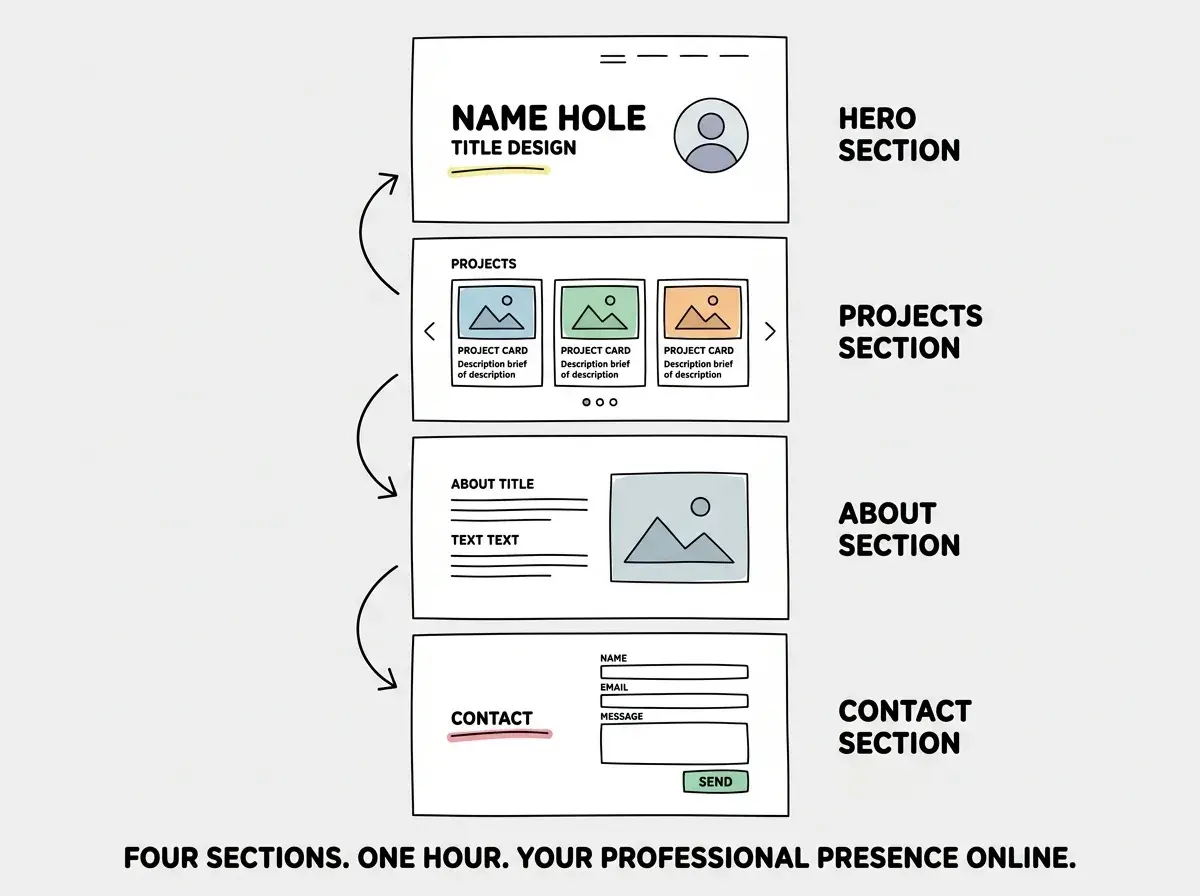
Send each prompt one at a time. Review the result after each before moving to the next. If the AI misunderstood something, tell it what to change before adding the next section. Building incrementally gives you much better results than describing the entire site in one massive prompt.
Refining the Design Until It Feels Like Yours
At this point you have a functional portfolio with all four sections. It probably looks decent but generic. Now you turn it from "template" into "yours."
Typography and spacing: "Increase the overall line height for readability. Add more vertical padding between sections, around 80px. Make the body text 18px. Use Inter for headings and system sans-serif for body text."
Color personality: "Change the accent color from blue to [your preferred color]. Apply it consistently to buttons, hover states, and section dividers. Keep the background white and text dark gray." Pick a color that reflects your personality. Teal feels modern. Coral feels energetic. Deep purple feels creative. This single change makes the site feel intentional rather than default.
Adding dark mode: "Add a dark mode toggle in the top right corner. In dark mode, use a very dark gray background (not pure black), light gray text, and keep the accent color the same but slightly brighter. Save the preference in localStorage so it persists between visits."
Dark mode is not just a nice-to-have. It signals that you understand modern web conventions. For a student or career changer, that small detail communicates a lot.
Learn the fundamentals that make every project easier.
Start with the basicsAdding your real projects: Replace the placeholders with things you have actually built. Even small projects count. A to-do app from a tutorial, a calculator, a landing page for a friend. If you have no projects yet, use this portfolio site itself as Project 1. You just built it. That counts.
For each card, tell the AI: "Update project card [number] with the title '[Your Project Name]', description '[one sentence about what it does]', and change the placeholder image color to [a color that matches the project]." Replace the color placeholders with actual screenshots later.
Deploying to Vercel With a Custom Domain
Your portfolio exists in your AI tool's preview. Now it needs to exist on the internet. Vercel is the fastest path for most AI-generated projects, and the free tier is more than enough for a portfolio site.
Step 1: Get your code into GitHub. If you are using Lovable or Bolt, look for a "Push to GitHub" button. If you are using Cursor, open the terminal and run git init, then create a new repository on github.com and push your code.
Step 2: Go to vercel.com and sign up using your GitHub account. This connects the two services automatically.
Step 3: Click "Add New Project" and import your GitHub repository. Vercel auto-detects the framework and fills in the build settings. The defaults work for most AI-generated projects.
Step 4: Click Deploy. Within two minutes, your portfolio will be live at a URL like your-project.vercel.app. Open it on your phone. Send it to someone. It is real.
Step 5 (optional): Add a custom domain. Buy one from Namecheap or Cloudflare for about $10 per year. In Vercel's project settings, go to Domains, add your domain, and follow the DNS instructions. Within minutes, your portfolio will be live at yourname.com.
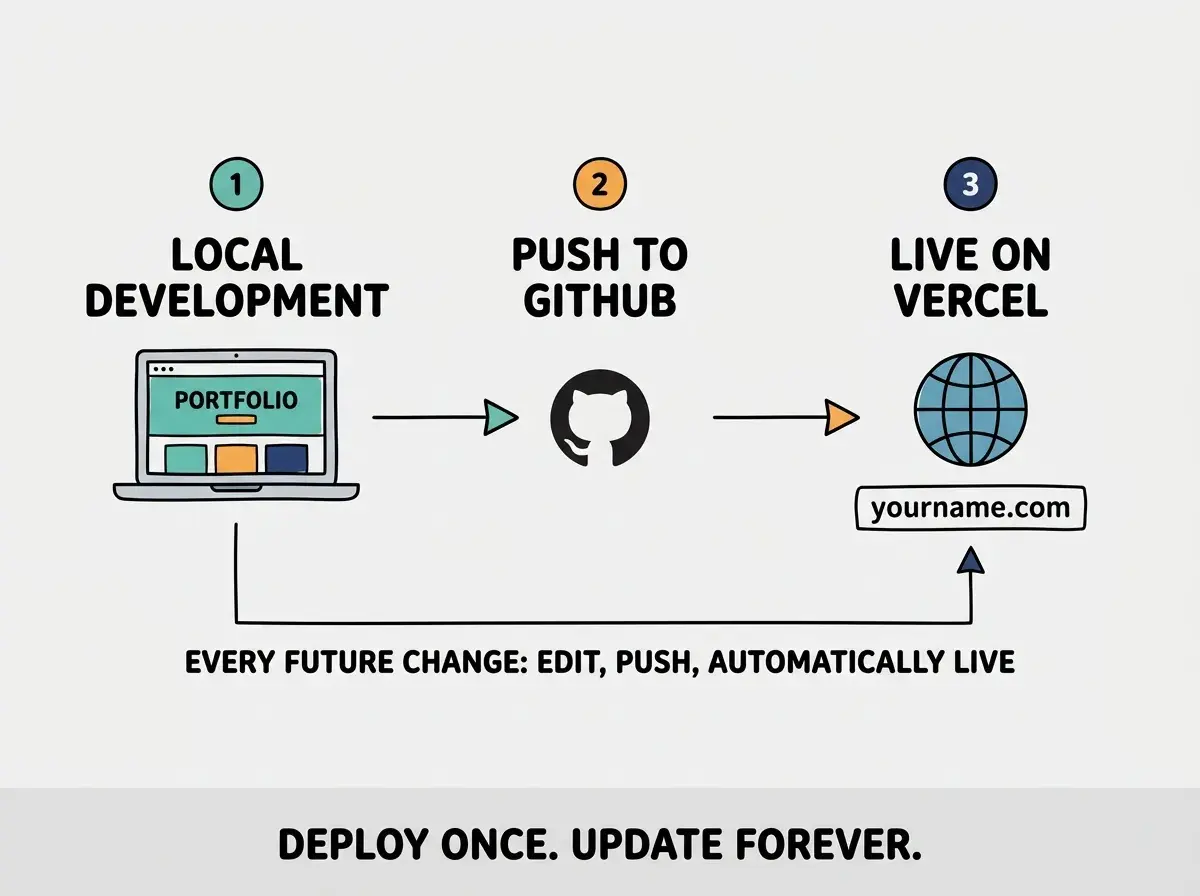
A custom domain is worth the $10 per year. When you put yourname.com on a resume or LinkedIn profile, it looks significantly more professional than a subdomain. It also signals that you understand the full lifecycle of shipping a web project.
Waiting to deploy until you have "enough" projects to display. This is the portfolio equivalent of waiting to go to the gym until you are already in shape. Deploy with one or two projects (or even zero, with placeholder cards). A live portfolio with two real projects is infinitely more impressive than a perfect portfolio that only exists on your laptop. Add projects as you build them. Your portfolio is a living document, not a finished product.
Once deployed, every future update is simple. Make changes in your AI tool, push to GitHub, and Vercel redeploys automatically. Adding a new project card takes five minutes. Changing your bio takes two. Your portfolio grows with you, one commit at a time.
Dig deeper
A few hand-picked sources if you want to go further.
What This Means For You
You just built and deployed a professional portfolio site in about an hour. That is not a shortcut. It is a genuine new capability, and it compounds with every project you add.
- If you are a student heading into internship or job applications: You now have something most of your classmates do not: a live, custom portfolio site that you built yourself. Add every class project, hackathon entry, and side project as a new card. By graduation, your portfolio tells the story of someone who builds things consistently. Put the URL in your resume header, your LinkedIn bio, and your email signature. When a recruiter asks "tell me about a project you built," you can pull up a live demo instead of describing it from memory.
- If you are a career changer building credibility in a new field: Your portfolio bridges your previous experience and your new direction. Each project is evidence that you are serious about this transition, not just thinking about it. The portfolio itself is Project 1. A landing page for a friend's business is Project 2. A simple tool that solves a problem at your current job is Project 3. Within a month, you have a portfolio that demonstrates momentum and capability, which is exactly what hiring managers evaluate when they see a non-traditional candidate.
Your shopfront is open. The window display is lit. Every project you build with AI is another piece in that display, and the right people will notice.
Keep shipping and add your next project to the collection.
Find your next build