Debugging authentication flows is a lot like going through airport security. You need the right ID (credentials), you have to pick the correct lane (auth provider), you collect your boarding pass (token), and sometimes you get pulled aside for extra screening (MFA). When any one step breaks, you are stuck at the gate, and the error message might as well be "see an agent" with no agent in sight.
If you have built anything with AI coding tools, you have probably hit an auth wall. The AI generates a login flow that works locally and falls apart in production. The redirect goes nowhere. The token expires mid-session. The cookie vanishes after a page refresh. 92% of US developers now use AI coding tools daily, and auth bugs remain the top category of issues that survive the local-to-production jump.
This guide walks through the most common authentication failures in AI-built apps, organized by symptom, with a systematic approach to diagnosing each one.
The Security Checkpoint Mental Model
Think of every authentication flow as a four-step security checkpoint. The user presents credentials (showing your passport), the auth provider validates them (TSA checking your ID), the server issues a token or session (your boarding pass), and the client stores that token for subsequent requests (flashing your boarding pass at the gate). When debugging, your first job is figuring out which step failed.
Most developers skip straight to reading error messages. That is like arguing with the TSA agent instead of checking whether you grabbed the right ID. Start by identifying the step, then investigate the details.
Redirect Loops and Broken Callbacks
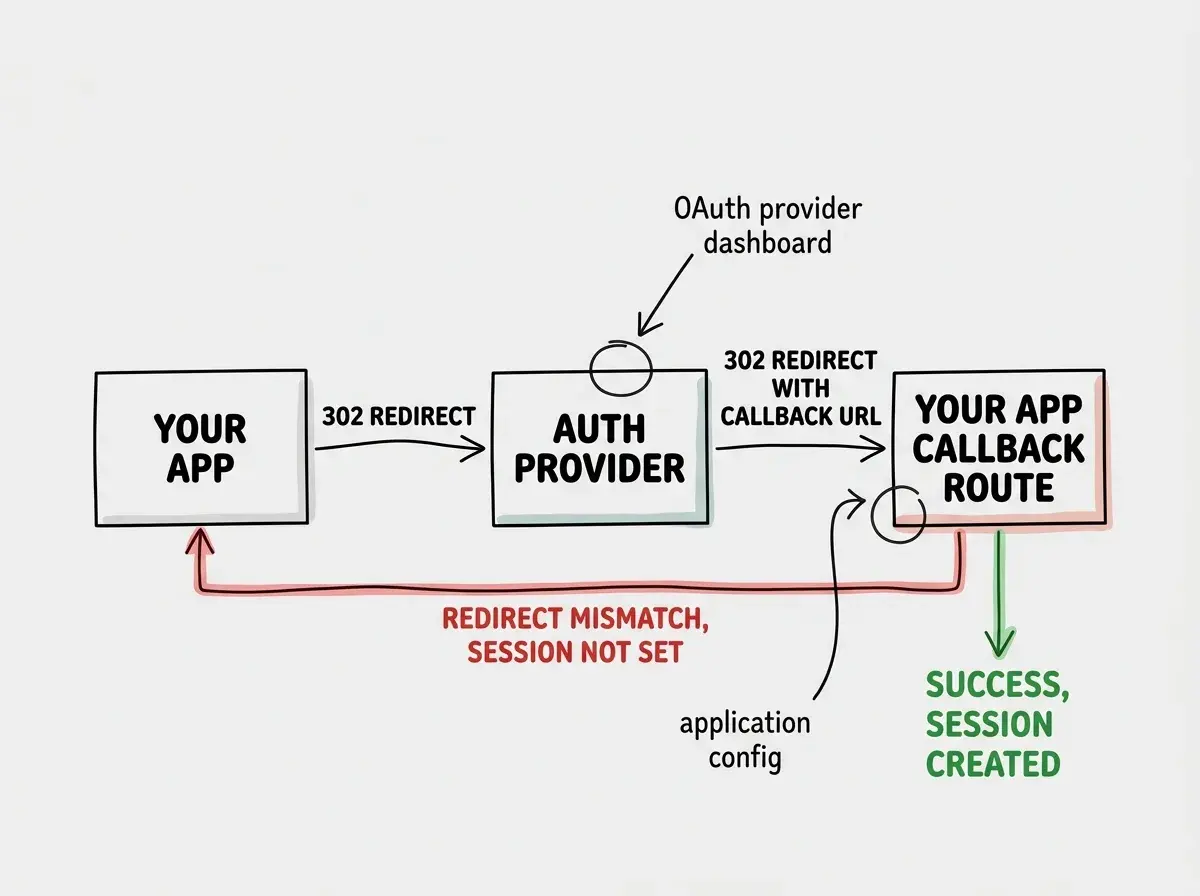
Redirect loops are the most common auth bug in AI-generated code, and they happen because the AI configures callback URLs for localhost:3000 and nobody updates them for production.
The symptom is obvious: your browser shows "this page redirected you too many times" or the URL bar flickers between two addresses. Here is what to check.
Open your browser's Network tab and watch the redirect chain. You will see a sequence of 302 responses bouncing between your app and the auth provider. Look at the Location header on each redirect. Somewhere in that chain, a URL points to the wrong domain or path.
The most common causes are mismatched redirect URIs in your OAuth provider dashboard versus your app config, middleware that redirects authenticated users to /login because it cannot read the session, and callback URLs using http:// instead of https:// in production.
// Common AI-generated mistake: hardcoded callback URL
const authConfig = {
  callbackUrl: "http://localhost:3000/api/auth/callback",
  // Should be: process.env.NEXT_PUBLIC_HOST + "/api/auth/callback"
};
Fix the redirect URI in both places (your code and your OAuth provider's dashboard), and the loop breaks. Think of it as making sure your airline ticket and your passport both show the same name. If they do not match, you are going back through the line.
Token Expiration and Refresh Failures
Token bugs are sneaky because they work perfectly for the first fifteen minutes, then silently break. The user logs in, everything looks fine, and then an API call returns a 401 because the access token expired and the refresh flow failed.
JWT access tokens typically expire in 15 to 60 minutes. Your app needs a refresh token to get a new one, and AI-generated code often skips refresh logic entirely or forgets to handle the race condition where multiple API calls try to refresh simultaneously.
To debug token issues, paste your JWT into jwt.io and check three things: the exp (expiration) claim, the iss (issuer) claim to confirm it matches your auth provider, and the aud (audience) claim to verify it matches your application.
// Decode a JWT without a library (for debugging only)
const payload = JSON.parse(
  Buffer.from(token.split(".")[1], "base64").toString()
);
console.log("Expires:", new Date(payload.exp * 1000));
console.log("Issued:", new Date(payload.iat * 1000));
console.log("Issuer:", payload.iss);
If the token is expired and no refresh is happening, you have found your bug. If the token is valid but your API still rejects it, check that your API uses the correct signing key and that clock skew between servers is not causing premature rejection.
This is the "expired boarding pass" scenario. Your pass was valid when printed, but if you show up four hours late, the gate agent will not accept it. The fix is not printing a new pass from scratch every time (forcing re-login), it is having an automatic renewal process in the background.
When debugging any auth issue, identify which step of the security checkpoint failed before touching code. Is the problem with credentials (step 1), provider validation (step 2), token issuance (step 3), or token storage and transmission (step 4)? Narrowing the step first saves hours of guessing.
OAuth Flow Debugging
OAuth adds complexity because your app talks to an external provider, and failures can happen on either side.
The flow has four parts: your app redirects to the provider, the user authenticates, the provider redirects back with a code, and your app exchanges that code for tokens. Each step can fail independently.
Common OAuth failures include the state parameter mismatch (your app sends one state value but receives a different one back, usually because the session storing the original state was lost), the authorization code being used twice (codes are single-use, and a retry or page refresh will fail), and scope issues where you request permissions the provider has not approved.
// Add this to your OAuth callback handler temporarily
export async function GET(request: Request) {
  const url = new URL(request.url);
  console.log("OAuth callback received:");
  console.log("  code:", url.searchParams.get("code"));
  console.log("  state:", url.searchParams.get("state"));
  console.log("  error:", url.searchParams.get("error"));
  console.log("  error_description:", url.searchParams.get("error_description"));
  // ... rest of handler
}
If the provider is returning an error, the error_description parameter usually tells you exactly what went wrong. AI tools often ignore these error parameters entirely, so the user sees a generic failure page.
Cookie and CORS Problems With Auth Headers
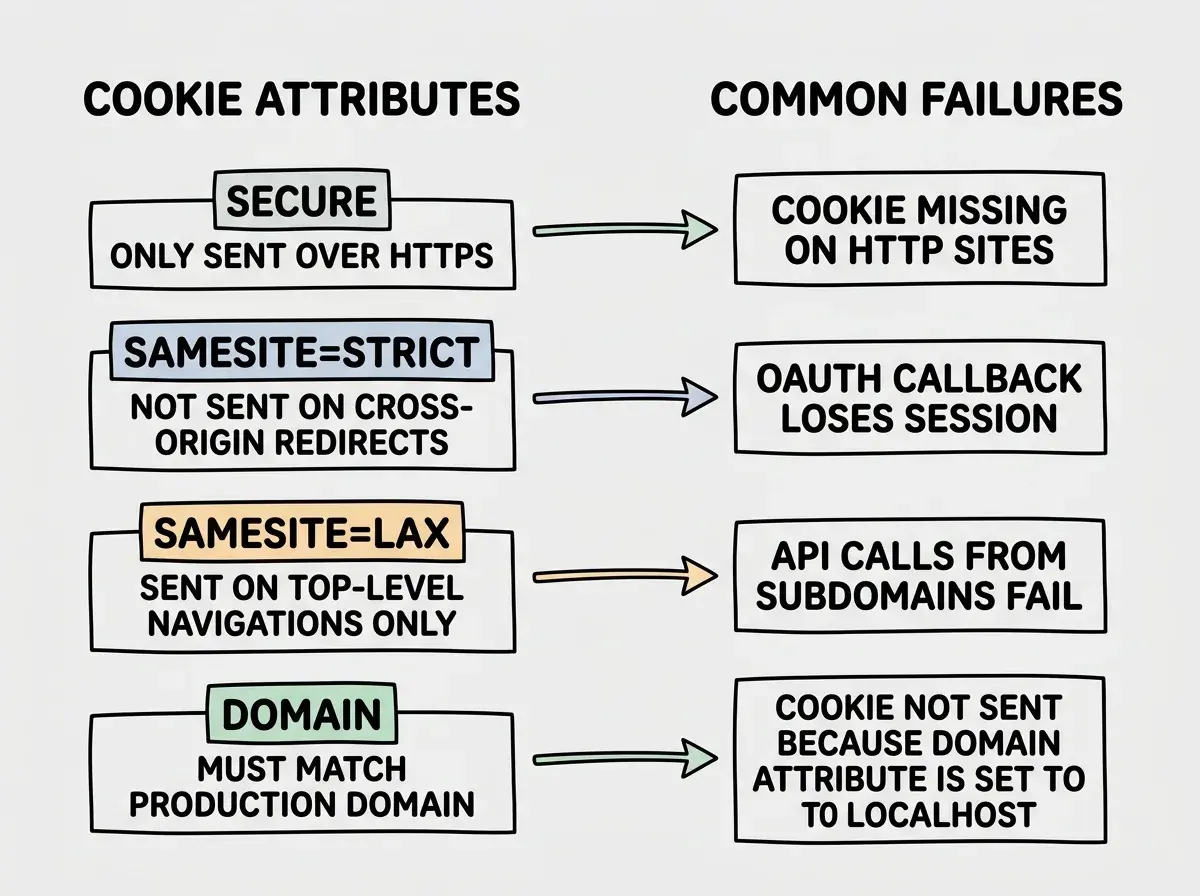
Cookies are where auth tokens live in most web apps, and they are also the most environment-sensitive part of the stack. A cookie that works on localhost will silently fail in production if the Domain, SameSite, or Secure attributes are wrong.
Check your auth cookies in the browser's Application tab (Chrome DevTools). Common problems: the Secure flag is set but your site runs on HTTP (cookie never sent), SameSite=Strict blocks the cookie on cross-origin redirects (breaking OAuth callbacks), and the Domain attribute does not match your production domain.
CORS issues compound cookie problems. If your frontend and API are on different origins, you need credentials: "include" on fetch calls and Access-Control-Allow-Credentials: true on API responses. AI tools often configure CORS for general API calls but forget auth-specific endpoints.
// Frontend: include credentials
const response = await fetch("/api/user", {
  credentials: "include",
  headers: {
    "Content-Type": "application/json",
  },
});

// Backend: allow credentials in CORS
const corsHeaders = {
  "Access-Control-Allow-Origin": "https://yourdomain.com", // NOT "*"
  "Access-Control-Allow-Credentials": "true",
};
Note that Access-Control-Allow-Origin cannot be * when credentials are included. This catches people constantly. You must specify the exact origin.
Supabase Auth Specific Issues
If you are using Supabase Auth (and many AI-built apps do), there are specific gotchas beyond the general auth debugging advice.
The most frequent Supabase auth bug is missing NEXT_PUBLIC_SUPABASE_URL or NEXT_PUBLIC_SUPABASE_ANON_KEY in production. Your .env.local has them, but they are not set in your hosting platform. The result is supabase.auth.getSession() silently returning null.
Supabase server-side auth requires cookie-based sessions via @supabase/ssr. If you are using the older @supabase/auth-helpers-nextjs, the middleware setup is different and commonly misconfigured by AI tools. Your middleware must create a new Supabase client per request and refresh the session.
// Supabase middleware pattern (correct version)
export async function middleware(request: NextRequest) {
  const response = NextResponse.next();
  const supabase = createServerClient(
    process.env.NEXT_PUBLIC_SUPABASE_URL!,
    process.env.NEXT_PUBLIC_SUPABASE_ANON_KEY!,
    {
      cookies: {
        getAll: () => request.cookies.getAll(),
        setAll: (cookies) => {
          cookies.forEach(({ name, value, options }) => {
            response.cookies.set(name, value, options);
          });
        },
      },
    }
  );
  await supabase.auth.getSession();
  return response;
}
Another common trap is Row Level Security (RLS) policies that depend on the auth user. Queries return data with the service role key but empty results with the anon key because RLS expects auth.uid() and the session is not being passed correctly.
Get the fundamentals right before you debug. Start with the basics.
Read the beginner's guideDebugging Session Management
Session bugs manifest as random logouts, stale data after login, or being authenticated on one page but not another. The most reliable debugging technique is adding a temporary /api/debug-session endpoint that returns the current session state.
// Temporary debug endpoint - remove before production
export async function GET(request: Request) {
  const session = await getSession(request);
  return Response.json({
    authenticated: !!session,
    userId: session?.user?.id,
    expiresAt: session?.expires,
    cookiesReceived: Object.keys(parseCookies(request)),
  });
}
Hit this endpoint from different contexts (same tab, new tab, incognito, different browser) to understand when sessions persist and when they disappear. If the session exists in one tab but not another, the cookie scope is too narrow. If it disappears after a few minutes, the session is not being refreshed.
Your boarding pass should work at every gate in the terminal, not just the one where you first showed it. If you have to re-authenticate at every gate, something is wrong with how the pass is stored or validated.
Using localStorage to store auth tokens instead of httpOnly cookies. AI tools frequently generate client-side token storage because it is simpler to implement. But localStorage is accessible to any JavaScript on the page, meaning a single XSS vulnerability exposes every user's auth token. Always use httpOnly cookies for token storage, and only keep non-sensitive data like user preferences in localStorage.
A Systematic Debugging Checklist
When you hit an auth bug, resist the urge to change random config values and redeploy. Walk through the security checkpoint in order.
- Credentials step. Can the user submit their login form? Check for validation errors, network failures, and CORS blocks on the login endpoint.
- Provider step. Is the auth provider accepting the request? Check the provider's dashboard for failed attempts or rate limits.
- Token step. Is a valid token being issued? Log the token endpoint response. Decode the JWT and check its claims.
- Storage step. Is the token stored correctly and sent on subsequent requests? Check cookies in the Application tab. Watch for missing
Authorizationheaders in the Network tab.
Identify which step fails and you have reduced your search space by 75%.
What This Means For You
Auth debugging is a skill that compounds. Every flow you fix teaches you patterns that show up in the next project. Credentials, provider, token, storage. Walk through them in order every time, and what used to take four hours starts taking ten minutes.
Catch broken login flows, missing env vars, and redirect issues right after deploy.
Get the post-deploy checklist