Zero stress maintenance for a vibe coded app is a 30 minute monthly checklist that keeps your AI-built product alive without requiring you to write code, read logs, or hire a developer. Most non-technical builders skip maintenance entirely, then panic three months later when something breaks. The honest truth is that 80% of the breakages can be prevented with a small predictable routine that fits inside a coffee break.
This guide walks through the checklist, explains what each item is checking and why, and gives you the script for what to do when something looks off without learning to code.
Why Maintenance Feels Scary
Most non-technical builders inherit a fear from movies and TV that "maintenance" means crawling through a cryptic terminal at 3am. The reality is much more boring. For a small vibe coded app, maintenance is mostly clicking through a few dashboards, looking for anything that turned red, and writing a small note when something looks unusual.
The actual scary thing is not maintenance, it is the absence of maintenance. Apps that nobody checks for three months accumulate small problems that compound into one large problem on the day a customer complains. The customer's complaint is the only signal, by which time the problem is already affecting users, your reputation, and possibly your revenue.
A 2024 survey of 600 non-technical SaaS founders found that 73% reported "fear of breaking something" as the main reason they avoided checking on their app, and that 58% had experienced an outage that lasted more than 24 hours specifically because they did not know it was happening. The fix was almost always a 15 minute monthly check.
The pattern to copy is checking on your car. You do not need to be a mechanic to check the oil light, the tire pressure, or the gas tank. The dashboard tells you what is normal and what is not. Your app has the equivalent dashboards, you just need to know which ones to look at and what each one means.
The 30 Minute Monthly Checklist
The checklist below is what I run on every small app I operate. It takes about 30 minutes the first time and 15 minutes after that, and it catches most of the issues that would otherwise become emergencies.
Item 1, can I sign up as a new user. Open your app in a browser you are not signed into. Try to sign up. If signup fails, that is the most important thing to know about your app right now. Most signup failures are silent, you only notice if you check.
Item 2, can I sign in as an existing user. Sign in with one of your test accounts. Walk through the main flow your customers care about. If anything feels different from a month ago, write it down.
Item 3, are payments working. If you charge customers, check your Stripe (or other) dashboard for the past month. Look for the trend in successful payments and the failure rate. A sudden drop usually means something is broken upstream.
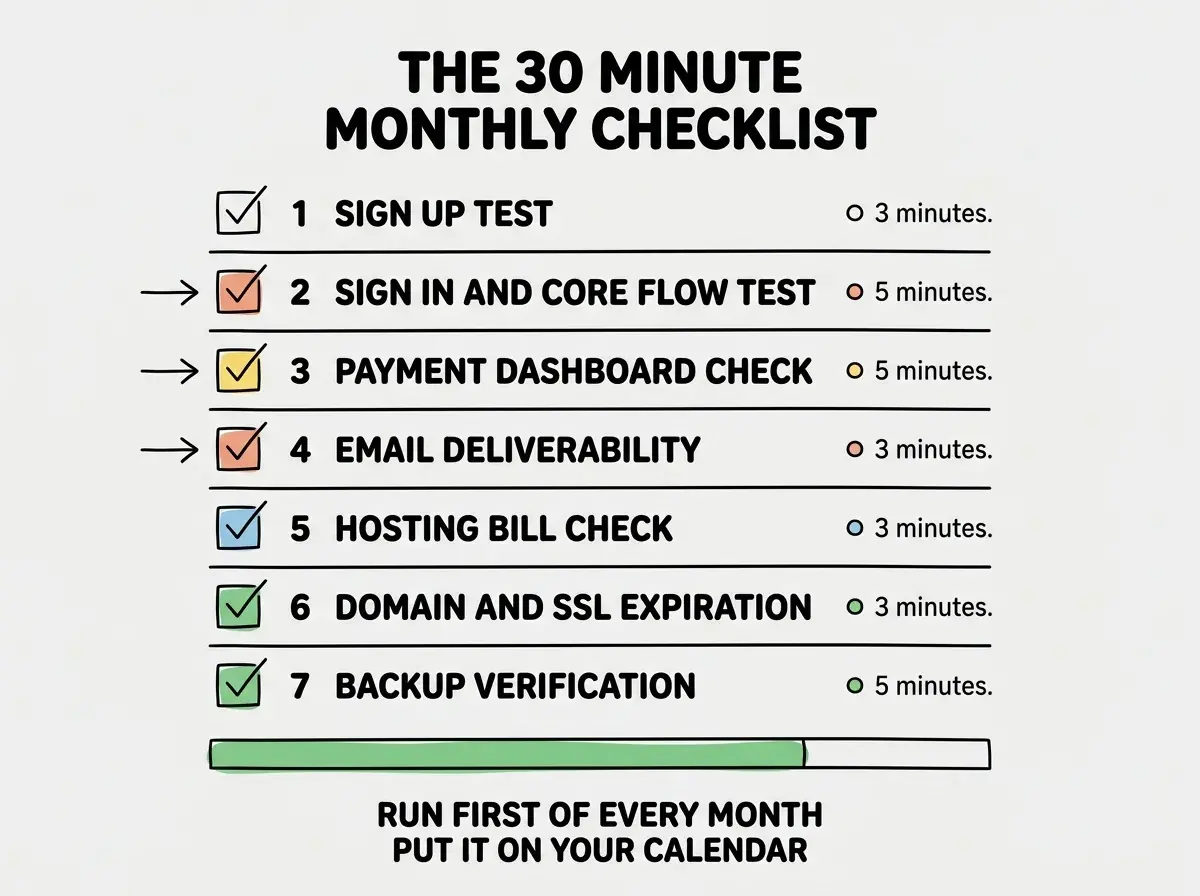
Item 4, are emails landing. Send a test welcome email to yourself. Check that it arrives in your inbox, not your spam folder. Open one of the recent emails your app sent customers and check that links work. Email deliverability silently degrades over time and is a common cause of "my customers are not converting."
Item 5, is the hosting bill normal. Open your hosting dashboard and look at the bill for the past month. Compare it to the previous three months. A 2x or 3x jump usually means something is misconfigured (a runaway loop, a misbehaving cron job, an unexpected traffic spike) and it is much cheaper to investigate the moment you notice.
Item 6, when do my domain and SSL expire. Look up the expiration dates for your domain registration and your SSL certificate. If either expires in the next 60 days, set a calendar reminder to handle it now. Expired SSL certificates take down your entire app instantly.
Item 7, did my backups run. If you have a database, your hosting provider almost certainly backs it up automatically, but only if you turned it on. Open the backups section of your provider and confirm a backup from the past 24 hours exists. If not, that is the most urgent item on the list.
Read more zero-stress operational guides for non-technical builders
Browse the grow categoryThe whole checklist takes less time than watching a sitcom. Schedule it for the first of every month, put it on your calendar, and treat it as non-negotiable.
What to Do When Something Looks Off
The honest answer to "what do I do if I find a problem" is, do not panic and do not try to fix it yourself if you do not know what you are doing. Most maintenance problems have a clear escalation path that does not require coding skill.
For payment issues, log into your payment provider's support and read the recent activity. Most issues are documented in their status page or recent updates. For email issues, send the test email again and check whether the delivery service shows it as delivered. For hosting bill spikes, the hosting provider's billing dashboard usually shows the source of the spike.
If you reach a problem you genuinely cannot diagnose, the right move is to ask. Use the AI you used to build the app, paste in the error message or the dashboard screenshot, and ask "what is this telling me." Most of the time, the AI can interpret the situation and suggest the next step. The fallback is to hire a developer for an hour through a service like Codementor, which is much cheaper than a full retainer.
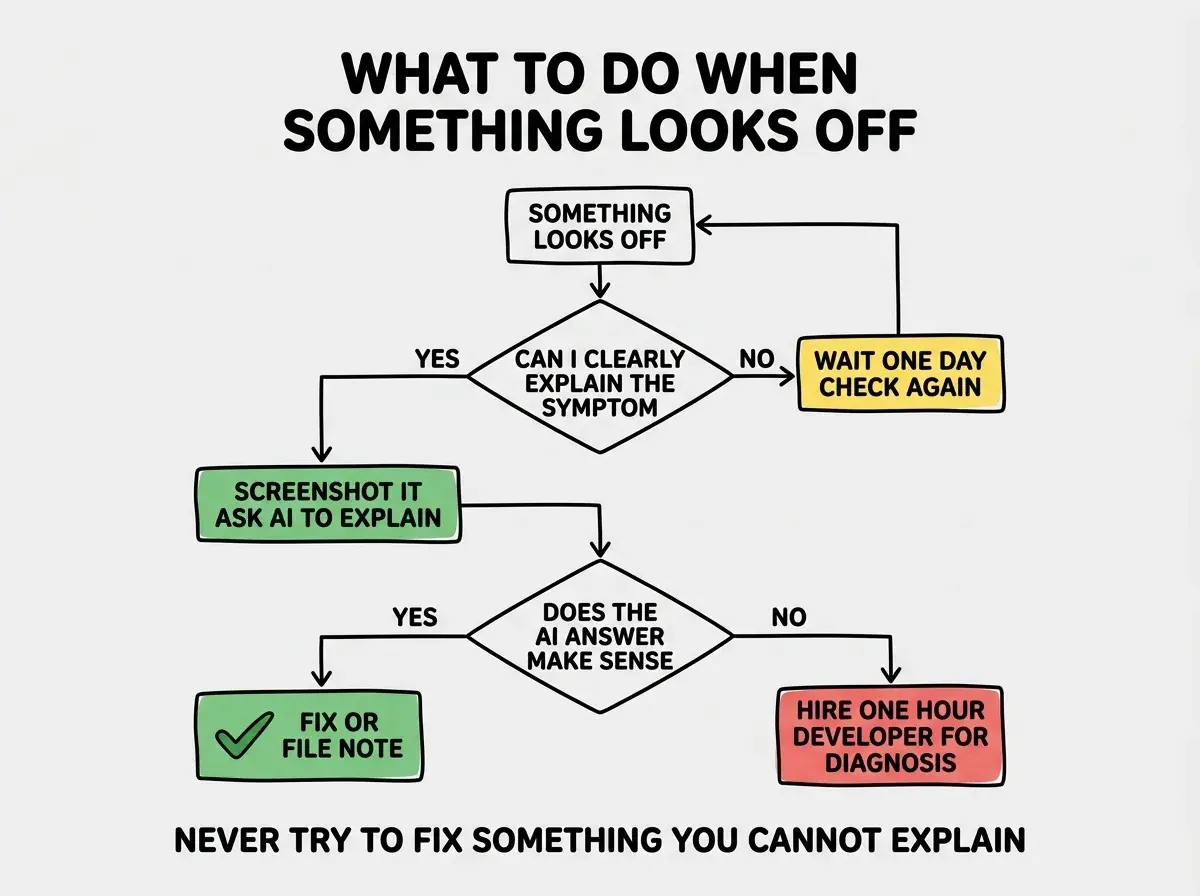
The most expensive non-technical maintenance mistake is "fixing" something you do not understand by clicking buttons until the symptom goes away. The original problem usually returns, often worse, and now there is an additional change you cannot reverse. When in doubt, take a screenshot, write down what changed, and ask before clicking.
The corollary is that the maintenance work is mostly observation, not intervention. You are the smoke detector for your app, not the firefighter. When you smell smoke, your job is to call the firefighter quickly, not to put out the fire yourself.
What This Means For You
Maintenance does not require coding skill, but it does require a routine and the willingness to look. Thirty minutes per month is small enough to fit in any schedule, and the savings are enormous compared to the cost of a real outage.
- If you're a founder: Put the checklist on your calendar today. The first time you catch a problem before a customer does, the discipline pays for itself.
- If you're changing careers: Running this checklist on a small project is excellent practice for the operational thinking you will need professionally. Even non-engineering roles benefit from understanding what healthy software operations looks like.
- If you're a student: Build a tiny app, share it with friends, then run the checklist monthly. The discipline is more valuable than any single technical skill.
Browse more zero-stress operational guides
Read more grow guides