Every few years, a new editor shows up and asks developers to reconsider their defaults. Zed is the latest, and it is making the most compelling argument we have heard in a long time. Think of it like this: if VS Code and Cursor are the fully loaded SUVs of the editor world (comfortable, packed with features, a little heavy), Zed is the lightweight sports car. It strips away the bulk, rebuilds everything from scratch in Rust, and delivers raw performance that makes you wonder why editors ever felt slow in the first place.
With 92% of developers now using AI daily in their workflows, the question is not whether your editor should have AI features. The question is whether the editor can keep up with the speed at which you think. Zed thinks it can.
What Makes Zed Different
Zed is not another VS Code fork. That matters more than it sounds. Cursor, for all its excellent AI features, inherits the Electron runtime from VS Code, which means it inherits the memory overhead and rendering pipeline of a web browser wrapped in a desktop app. Zed threw all of that out and built a native application in Rust using a custom GPU-accelerated rendering engine called GPUI.
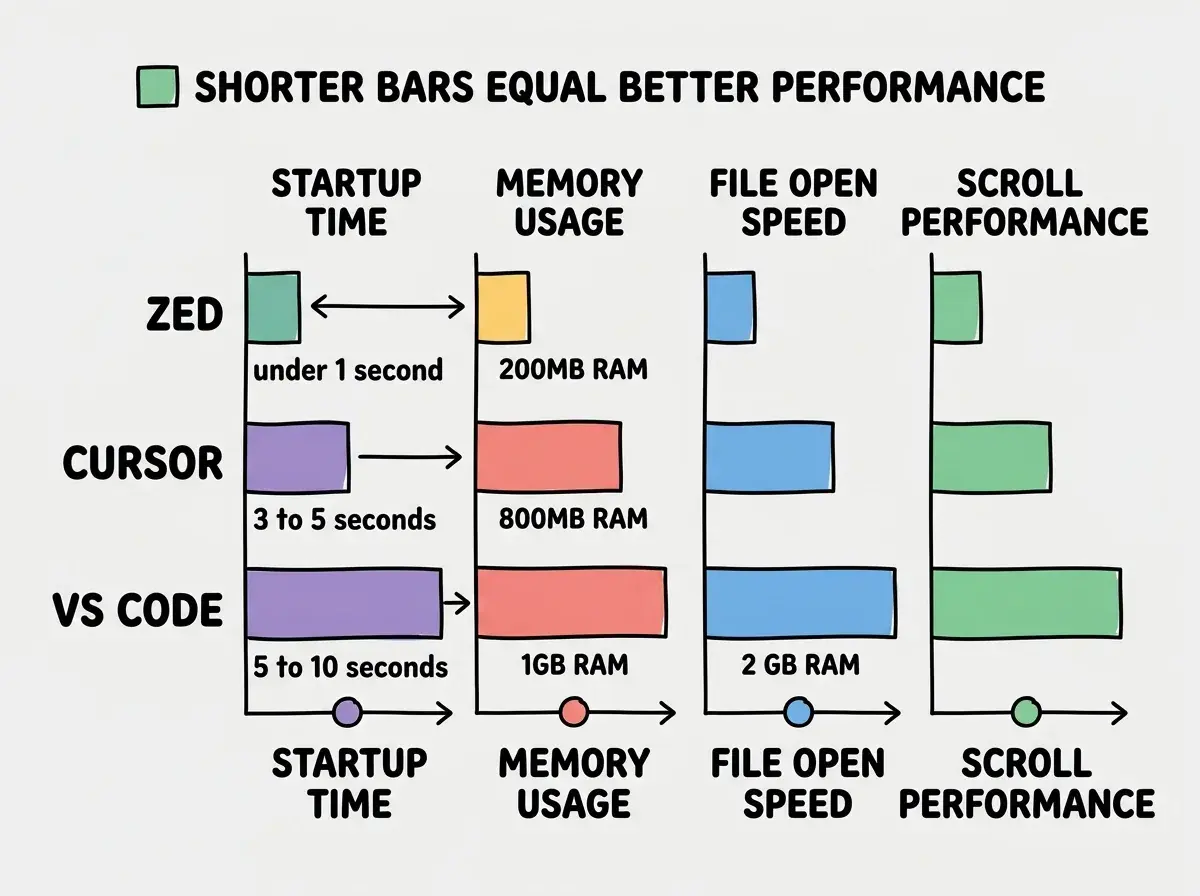
The practical result is that Zed opens large files instantly. Not "fast enough that you don't notice" but genuinely instantly. Scrolling through a 50,000-line file feels like scrolling through a PDF. Switching between files has zero perceptible delay. For developers who work with large codebases, monorepos, or generated code (which is increasingly common in AI-assisted workflows), this performance gap is not a nice-to-have. It is the difference between staying in flow and waiting for your tools to catch up with your brain.
Startup time tells a similar story. A cold launch takes under a second on most machines. Compare that to VS Code or Cursor, where a project with a few dozen extensions can take five to ten seconds to fully load.
Built-In AI That Feels Native
Zed's AI features are not bolted on. They ship as part of the core editor, which means the AI has access to the same low-level editor primitives that power everything else. You get inline completions, a conversational assistant panel, and the ability to pipe selections through AI transforms, all without installing a single extension.
The assistant panel is where most AI interaction happens. You can open it alongside your code, ask questions about your codebase, and get responses that reference specific files and line numbers. Zed supports multiple model providers out of the box, including Anthropic's Claude, OpenAI's GPT models, and local models through Ollama. You bring your own API key, choose your model, and start working. There is no proprietary model lock-in, which is a meaningful differentiator from Cursor's approach of routing everything through their own proxy.
Inline transforms let you select a block of code, describe what you want changed, and see the AI's edit applied directly in your buffer. The experience is fast because the editor itself is fast. There is no lag between requesting a transform and seeing the result start streaming in. This tight feedback loop matters when you are iterating quickly on a function signature or refactoring a component.
Zed also recently shipped an agent panel that can perform multi-step tasks, reading files, making edits across your project, and running terminal commands. It is still newer than Cursor's Composer or Claude Code's agentic workflow, but the foundation is solid and the integration with Zed's native performance makes it feel responsive in a way that Electron-based agents cannot match.
Zed's AI features are competitive with Cursor's on core functionality like inline completions and chat. Where Zed pulls ahead is latency. Every AI interaction feels faster because the editor underneath is faster. Where Cursor pulls ahead is ecosystem maturity. Cursor has had more time to refine its AI workflows, and its Composer mode for multi-file edits is still more polished than Zed's equivalent.
Multi-Cursor Editing Done Right
Zed's multi-cursor support deserves its own section because it is genuinely best-in-class. Multi-cursor editing has existed in other editors for years, but Zed's implementation is noticeably smoother. You can place cursors with precision, use keyboard shortcuts to add cursors at every occurrence of a selection, and perform complex edits across dozens of locations simultaneously without the editor struggling to keep up.
This matters for AI-assisted workflows more than you might expect. When an AI suggests a pattern change that needs to be applied in multiple places, multi-cursor editing lets you make those changes manually in seconds rather than asking the AI to do another pass. It is the perfect complement to AI assistance: let the AI figure out what to change, then use multi-cursor to apply the change faster than the AI could regenerate the file.
The combination of AI suggestions and fluid multi-cursor editing creates a workflow where you bounce between AI-assisted generation and precise manual editing without friction. The sports car analogy holds here. Zed gives you direct, responsive control when you want it, and AI assistance when you need it, with instant switching between the two modes.
Real-Time Collaboration Without the Overhead
Zed includes built-in real-time collaboration that works like Google Docs for code. You share a project link, your collaborator joins, and you both edit the same files simultaneously with live cursors and presence indicators. No extension needed. No third-party service. No configuration.
This is an area where Zed offers something that neither VS Code nor Cursor matches natively. VS Code has Live Share, but it is an extension that requires setup on both ends and occasionally struggles with latency. Cursor inherits Live Share but does not improve on it. Zed's collaboration is built into the same Rust runtime, so it benefits from the same performance characteristics as everything else.
For remote pair programming, this is a significant advantage. Two developers can work in the same file with AI assistance available to both, and the experience stays smooth because the editor is not buckling under the weight of real-time synchronization.
How Zed Stacks Up Against Cursor and VS Code
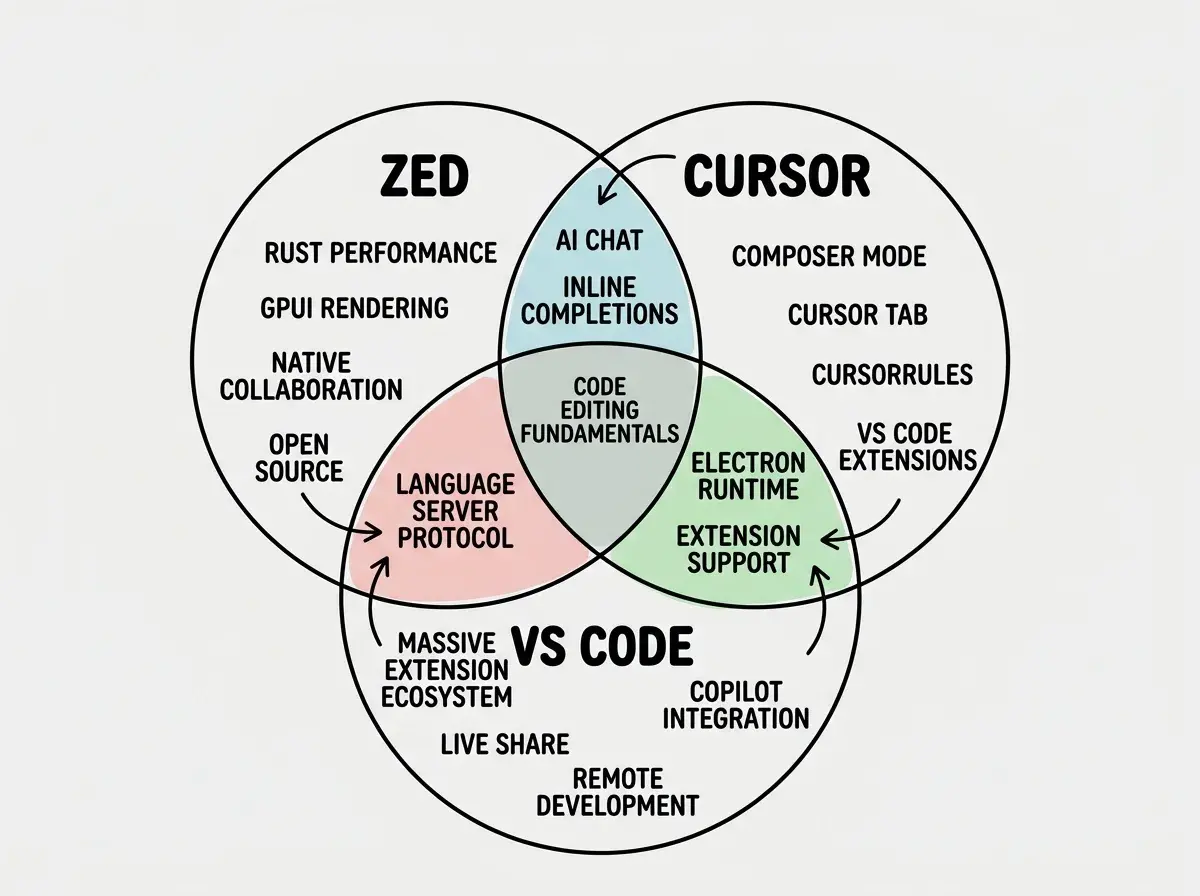
The honest comparison depends on what you value most. If you want the richest extension ecosystem and the widest community support, VS Code is still the default. If you want the most mature AI-assisted coding experience with proven multi-file editing workflows, Cursor is the current leader. If you want raw speed, a clean architecture, and AI features that are catching up fast, Zed is the most exciting option.
Zed's open-source nature (it went fully open source under the GPL in early 2024) gives it a transparency advantage. You can read the source code, understand how the AI features work, and contribute improvements. Cursor is closed source. For developers who care about software freedom or who want to audit what their editor is doing with their code, this matters.
The extension story is where Zed still lags behind. VS Code has over 40,000 extensions. Cursor inherits all of them. Zed has a growing extension system, but the catalog is much smaller. If your workflow depends on a specific niche extension (a particular language server, a database client, a deployment tool), check whether it exists for Zed before committing to the switch.
Switching to Zed because of the performance benchmarks without checking extension compatibility first. If you rely on five VS Code extensions daily and three of them do not exist for Zed yet, the speed gains will not compensate for the functionality you lose. Check the Zed extension registry before making the jump, and keep your previous editor installed as a fallback.
Current Limitations Worth Knowing
Zed is still younger than its competitors, and that shows in a few areas. The settings system is JSON-based and less discoverable than VS Code's searchable settings UI. Remote development over SSH is still evolving and not as polished as VS Code's Remote SSH extension. Windows support only recently arrived and may have rough edges compared to the more mature macOS experience.
The AI agent capabilities, while promising, are not yet at the level of Cursor's Composer or Claude Code's autonomous workflows. If agentic multi-file editing is your primary use case, Cursor is still the safer bet today.
Debugging support is another gap. VS Code and Cursor have mature debugging integrations with breakpoints and step-through execution for most languages. Zed's debugging support is more limited, which could be a dealbreaker for developers who rely on visual debugging.
Find honest comparisons and guides for every major AI-assisted development tool.
Browse tool reviewsWho Should Try Zed Right Now
If you are a senior developer who values performance above all else and you are willing to tolerate a smaller extension ecosystem, Zed is worth a serious trial. Once you experience instant file switching and zero-lag scrolling, going back to an Electron-based editor feels like wading through mud.
If you frequently pair program or collaborate in real time, Zed's native collaboration eliminates the need for screen sharing or clunky Live Share sessions. This alone might justify the switch for distributed teams.
If you are deeply invested in the VS Code extension ecosystem or need Cursor's mature Composer workflows, Zed is not ready to be your only editor. But it is ready to be your fast editor, the one you reach for when you want to move quickly through code without waiting for your tools.
The sports car analogy comes full circle here. You might own an SUV for the school run and the grocery store. But when you want to feel the road, you take the sports car. Zed is that sports car for code editing, and the AI features it is building are quickly making it capable enough for the daily commute too.
Start with the fundamentals every developer needs for working with AI coding tools.
Learn the basics