You have spent years inside WordPress. You know how to pick the right theme, wire up plugins, troubleshoot broken layouts, and manage content for clients who change their minds every other week. You have built dozens of sites, maybe hundreds. And now you keep hearing about "vibe coding" and AI-powered development, and a quiet voice in your head says: I should learn this, but I'd be starting from scratch.
That voice is wrong. You are not starting from scratch. Not even close.
Think of it this way. You have been riding a bicycle through your city for years. You know every street, every shortcut, every pothole to avoid. Vibe coding is like upgrading to an electric car. The vehicle is faster and more powerful, but the roads are the same. The rules of the road are the same. Your sense of direction, your knowledge of which neighborhoods connect, your instinct for finding the fastest route? All of that transfers. The only new thing is learning where the pedals are.
That is the honest truth about moving from WordPress to vibe coding. The skills you already have are the hard ones. The new parts are genuinely the easy ones.
Why WordPress People Have an Unfair Advantage
A recent Stack Overflow survey found that 92% of developers now use AI tools daily. Even more telling, 63% of vibe coding users are non-developers. People with no technical background at all are building functional applications with AI. So if non-developers can do it, imagine the head start you have as someone who already understands how websites work.
WordPress taught you things that most people spend months trying to learn. You understand that a website is not one big blob of code. It has structure, it has content, it has styling, and it has functionality. You know that things can break when you update one piece without checking the others. You have debugged white screens of death, plugin conflicts, and CSS that looks perfect on desktop and terrible on mobile. That mental model of how software fits together is exactly what vibe coding requires.
The people who struggle most with AI coding tools are the ones who have never built anything before. They do not know what to ask for because they have never seen the pieces. You have seen all the pieces. You have assembled them by hand, over and over, for years.
Vibe coding rewards people who understand how websites are structured and what users need. WordPress gave you both. The 63% of non-developers succeeding at vibe coding are proof that domain knowledge matters more than syntax, and you have far more domain knowledge than they do.
Your WordPress Skills Already Have Modern Equivalents
Here is what surprises most WordPress people when they start exploring modern development. Almost everything you know maps directly to something in the new world. The names changed, the principles did not.
Themes map to components. In WordPress, you pick a theme that defines layout, typography, colors, and the overall structure of your site. In modern frameworks like Next.js or React, that same concept exists as components. A header component, a footer component, a card component. You already think in terms of reusable layout pieces. You just called them template parts instead of components.
Plugins map to packages. Need a contact form? In WordPress, you install a plugin. In modern development, you install a package (also called a library or dependency). The concept is identical: someone else already built the thing you need, so you grab it off the shelf and configure it for your project. You have been evaluating, installing, and configuring third-party code for years. You just did it through the WordPress dashboard instead of a terminal.
Page builders map to AI builders. If you have used Elementor, Divi, or WPBakery, you already understand the core promise of vibe coding tools. You describe what you want visually, and the tool generates the underlying code. The difference is that AI builders like Cursor, Bolt, or Lovable generate real, production-quality code instead of shortcodes and nested divs. Your instinct for layout, spacing, and user flow transfers directly. You are just working with a smarter builder now.
Content management maps to MDX and headless CMS. WordPress is, at its core, a content management system. You understand structured content: titles, slugs, categories, tags, featured images, publish dates. Modern stacks use the same concepts in tools like MDX (Markdown with components), Contentful, or Sanity. The vocabulary changes slightly, but the mental model is one you already own.

The bicycle-to-electric-car analogy holds perfectly here. The pedals look different, but turning left is still turning left. Navigating to a destination still requires knowing the city.
What Actually Feels Different
Let me be honest about the parts that will feel unfamiliar, because pretending the transition is seamless would not help you.
The terminal. WordPress lives in a browser dashboard. Modern development involves a terminal (that black window with text commands). This is genuinely new, and it can feel intimidating. But here is the thing: AI tools can help you with terminal commands too. You can literally type "how do I start my development server" into your AI tool, and it will tell you. The terminal is not a wall. It is a speed bump.
File structure. WordPress hides most of its complexity behind the admin panel. Modern projects have visible folder structures with files you can see and edit. This actually gives you more control, not less. Once you get used to seeing your project laid out in folders (pages here, components there, styles here), you will realize it is more organized than WordPress ever was.
No visual preview by default. In WordPress, you click "Preview" and see your page. In code-based development, you run a local server and check your browser. It is one extra step, and tools like Lovable and Bolt already eliminate it by showing live previews as you build.
Version control. WordPress has revisions. Modern development uses Git, which is revisions on steroids. It tracks every change, lets you undo anything, and makes collaboration safe. It sounds complex, but the AI handles most Git operations for you. Remember, you already understand the concept of saving versions and rolling back. Git is just a more powerful version of what you already do.
None of these differences require months of study. They require a weekend of hands-on exploration, ideally with an AI tool guiding you through each step. You learned WordPress by clicking around and figuring things out. This is the same process with a different interface.
The Emotional Journey Nobody Talks About
The hardest part of this transition is not technical. It is emotional.
You have built an identity around WordPress. You are "the WordPress person" in your circle. Clients come to you for WordPress sites. Leaving that feels like abandoning something you are good at for something you might fail at.
But you are not leaving WordPress skills behind. You are building on top of them. Every hour you spent learning how themes work, how content should be structured, how users navigate a site, and how to translate a client's vague request into a functioning website? That is the foundation. Vibe coding is the next floor of the building, and the foundation is already poured.
Treating the move from WordPress to vibe coding as starting over. WordPress veterans who try to forget everything they know and learn "from scratch" waste months re-learning concepts they already understand under different names. Start with what you know. Build a project similar to something you have already built in WordPress. Let the familiar patterns guide you into the new tools.
The people who struggle are the ones who try to become someone different. The people who thrive are the ones who recognize they already are most of what they need to be.
Start with the fundamentals that make everything else click.
Learn the basicsYour First Steps (This Week)
Here is a concrete plan, because encouragement without direction is just noise.
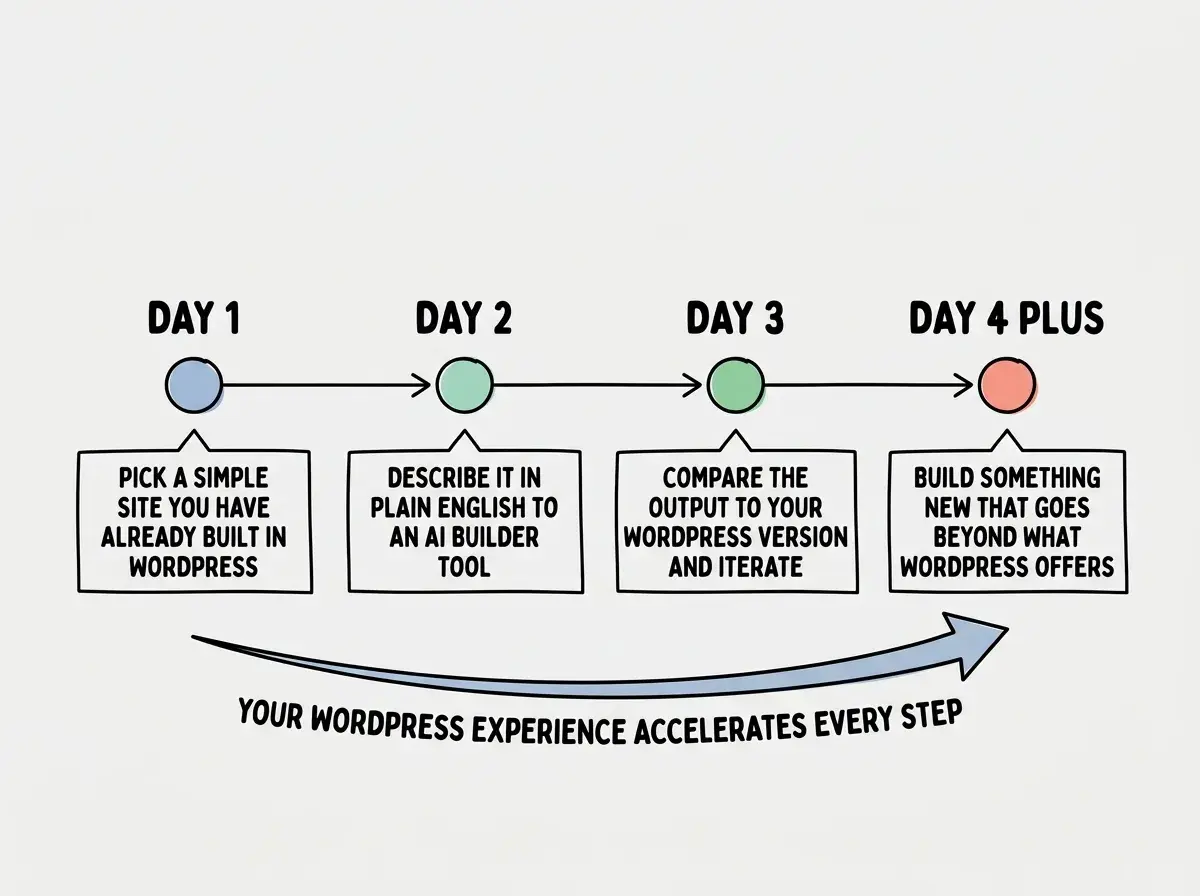
Day one. Pick a simple WordPress site you have already built. A landing page, a portfolio, a small business site. Something you could rebuild in your sleep.
Day two. Open an AI coding tool. Lovable or Bolt are the most WordPress-friendly starting points because they show you a visual preview as you build. Describe the site in plain English. "I need a landing page for a bakery with a hero section, a menu grid, an about section, and a contact form." Watch what happens.
Day three. Compare the result to your WordPress version. Notice what is similar (layout structure, content hierarchy, responsive behavior). Notice what is different (the code is cleaner, there is no plugin bloat, the page loads faster). Start making changes by asking the AI to adjust things. "Make the hero image full-width. Change the font to something warmer. Add a testimonials section."
Day four and beyond. Build something you could not easily build in WordPress. An interactive calculator. A dashboard that pulls data from an API. A tool that saves user preferences. This is where the electric car starts doing things the bicycle never could, and you will realize you already know which roads to take.
You have been building websites for years. You understand users, structure, content, and the messy reality of client work. The only thing that changed is the vehicle, and you already know the roads.
The electric car is waiting. You already have the license.
Dig deeper
A few hand-picked sources if you want to go further.
Explore the tools and concepts that bridge WordPress to modern development.
Explore more