You already know how to build things with logic. If you have written VLOOKUP formulas, built pivot tables, or automated reports with VBA macros, you have been programming this whole time. You just did it inside a spreadsheet. Sixty-three percent of people using AI coding tools today are non-developers, and a huge number of them started exactly where you are now, with years of Excel skills and a nagging feeling that their spreadsheets have hit a ceiling.
Think of it this way. You have been cooking in a home kitchen for years. You know how to follow recipes, improvise with ingredients, and feed a crowd. Moving to app development with AI tools is like graduating to a restaurant kitchen. The skills transfer directly. You already know how to cook. The professional kitchen just has better equipment and more capacity. You are not starting from zero. You are upgrading your workspace.
Why Excel Power Users Have a Hidden Advantage
Most people who learn to code start from nothing. They have never written a logical expression, never debugged a broken formula, never thought about how data flows from one place to another. You have done all of that, probably hundreds of times.
Every Excel formula you have written trained your brain to think in inputs and outputs. Every IF statement taught you conditional logic. Every time you traced through a broken VLOOKUP to find the error, you were debugging. These are the exact same mental muscles that professional developers use every day.
The gap between an Excel power user and someone building their first web app is much smaller than it looks from the outside. And with AI coding tools handling the syntax and boilerplate, that gap has shrunk to almost nothing. Ninety-two percent of developers now use AI tools daily, and most of them are using those tools the same way you use Excel formulas: describe what you want, get a working result, tweak it until it is right.
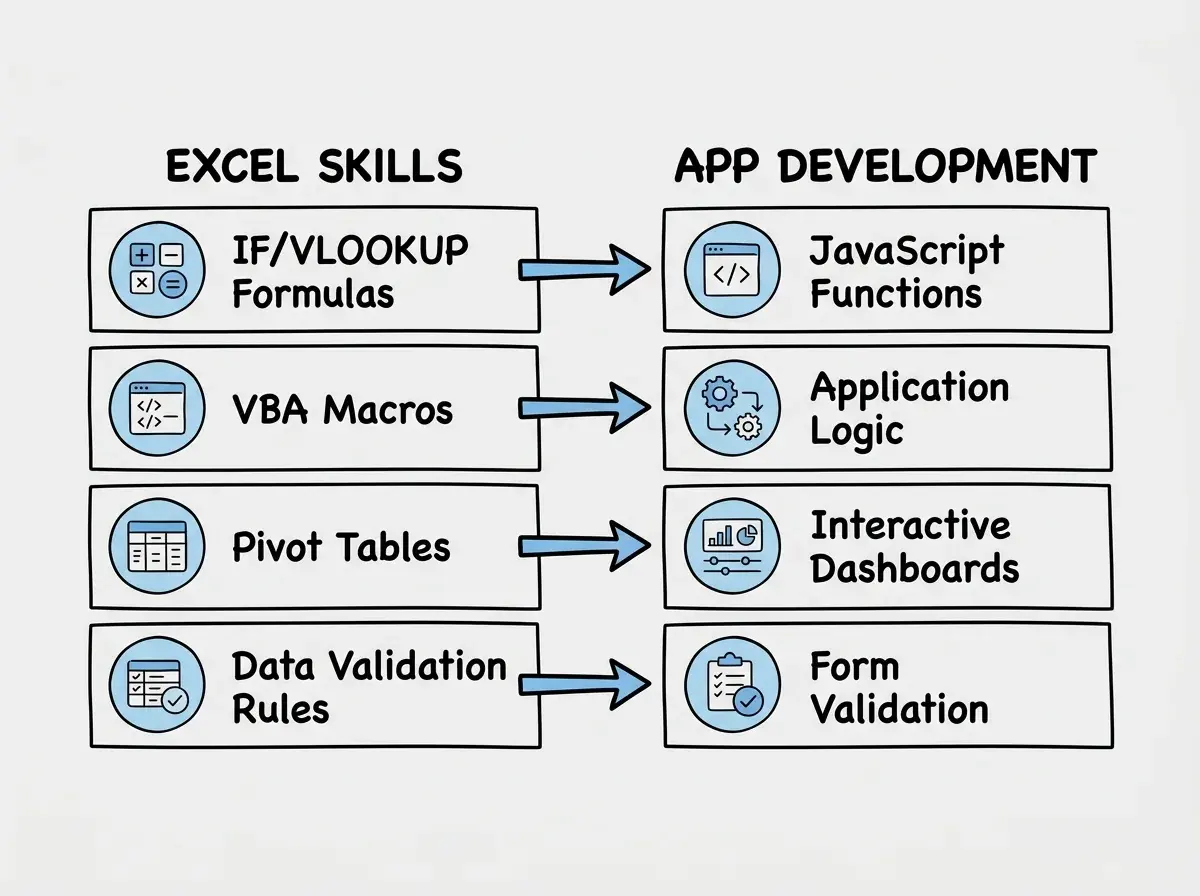
Your spreadsheet skills are not a detour on the way to "real" programming. They are the foundation. Formulas become functions, VBA becomes JavaScript, pivot tables become dashboards, and data validation becomes form validation. The concepts are identical. Only the kitchen is different.
How Your Spreadsheet Skills Map to App Development
The translation between Excel and app development is surprisingly direct. Here is how your existing knowledge maps to the new world.
Formulas become functions. In Excel, you write =IF(A1>100, "High", "Low") to transform data. In JavaScript, you write a function that does the same thing: take an input, apply logic, return an output. The structure is the same. The syntax is slightly different. AI tools will handle the syntax for you.
VBA macros become application logic. If you have written VBA to automate a report, loop through rows, or send emails, you have already written procedural code. VBA's For Each loops, If...Then blocks, and subroutines work the same way in JavaScript or Python. Your macro that reformats a sales report every Monday morning? That is the same pattern as a web app that processes data and displays results on a dashboard.
Pivot tables become interactive dashboards. A pivot table takes raw data and lets you slice, filter, and summarize it. A web dashboard does the same thing, but with richer visuals and the ability to share it with anyone via a link. When you ask an AI tool to "build a dashboard that shows monthly sales grouped by region with filters for date range and product category," you are describing a pivot table. You just do not know it yet.
Data validation becomes form validation. Those dropdown lists, input restrictions, and conditional formatting rules you set up in Excel? They are form validation. When you tell Excel that a cell must contain a number between 1 and 100, you are writing the same rule that a web form uses to check user input. The concept transfers perfectly.
Building Your First App That Replaces a Spreadsheet
Let us make this concrete. Pick a spreadsheet you actually use at work. Maybe it is a client tracker, an inventory list, a project status board, or an expense logger. Something with at least a few columns of data and some formulas or conditional formatting.
Now open an AI coding tool like Cursor, Lovable, or Bolt. Here is a prompt template you can adapt for your specific spreadsheet:
"Build a web app that replaces my Excel spreadsheet for tracking [your use case]. It needs a data table with columns for [list your columns]. Add the ability to add new entries through a form, edit existing entries by clicking on them, and delete entries with a confirmation step. Include a summary section at the top showing [list the calculations your formulas currently do, like total revenue, average order size, or count of overdue items]. Store everything in the browser's local storage so data persists between sessions."
The AI will generate a working app in about a minute. It will probably look better than your spreadsheet on the first try. But more importantly, it will be shareable, accessible from any device, and not limited by Excel's row and column constraints.
Test it by entering some of your real data. Check that the calculations match what your spreadsheet produces. If something is off, tell the AI exactly what is wrong: "The total revenue calculation is not including entries from the current month. Fix it to sum all entries regardless of date." This is the same debugging process you use when an Excel formula returns an unexpected value. Trace the logic, find the mismatch, fix it.
Back in the kitchen analogy, this is like making your signature dish for the first time in the new restaurant kitchen. Same recipe, same ingredients, same technique. Just better equipment and a nicer presentation.
Trying to recreate your entire spreadsheet in one prompt. Complex workbooks with multiple sheets, cross-references, and dozens of formulas will overwhelm any AI tool in a single request. Start with one sheet and its core functionality. Get that working perfectly, then add features one at a time. This iterative approach works better with AI tools and mirrors how professional developers build software: small, working pieces that grow into a complete system.
Your Practical First Steps This Week
You do not need to quit your job or take a bootcamp. You need about two hours and a willingness to experiment. Here is a concrete plan.
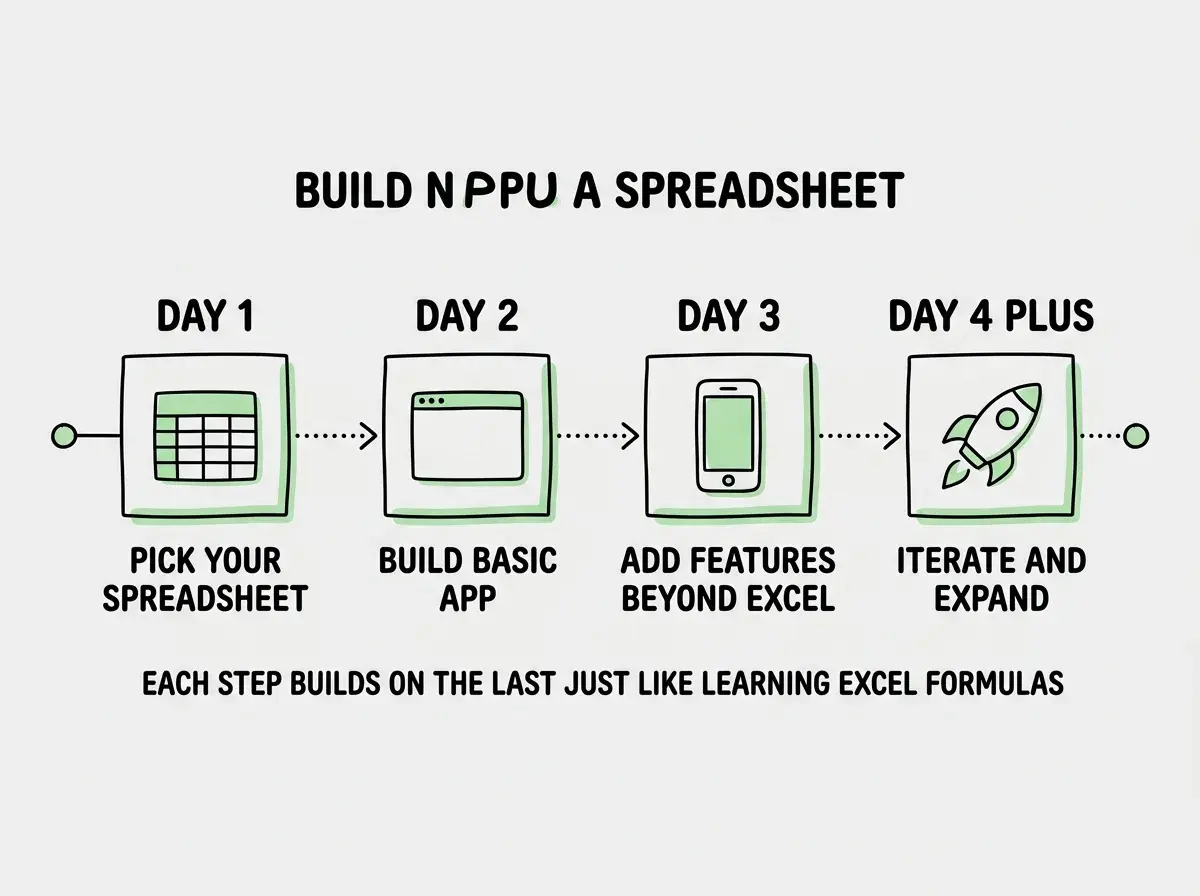
Day one: Pick your spreadsheet and write the prompt. Choose the spreadsheet you use most often. Write a plain-English description of what it does, what data it holds, and what calculations matter. That description is your first prompt.
Day two: Build the basic version. Open an AI coding tool and paste your prompt. Spend thirty minutes testing and refining. Focus on getting the data entry and core calculations right. Do not worry about making it pretty yet.
Day three: Add the features Excel cannot do. This is where things get exciting. Ask the AI to add features that were impossible or painful in Excel. "Add a search bar that filters the table in real time." "Add a chart that updates automatically when I add new data." "Make it work on my phone." Each of these is a simple prompt, and each one takes your tool beyond what a spreadsheet can offer.
Start with the fundamentals that make every project easier.
Learn the basicsDay four and beyond: Iterate and expand. Add a login page so colleagues can use it. Connect it to a real database so multiple people can see the same data. Add email notifications for overdue items. Each feature is a single conversation with the AI tool, building on what you already have.
The progression feels natural because it mirrors how you learned Excel. Nobody sat down and mastered pivot tables on day one. You started with SUM, graduated to VLOOKUP, eventually tackled VBA. App development with AI tools follows the same curve. The only difference is that the curve is faster because the AI handles the parts that used to take months to learn.
Dig deeper
A few hand-picked sources if you want to go further.
What This Means For You
You have spent years building expertise in a tool that 750 million people use. That expertise is not wasted. It is your foundation. The logical thinking, the data modeling, the debugging instincts, the ability to turn a messy business problem into a structured solution. All of that transfers.
The restaurant kitchen has better equipment. It has professional ovens, industrial mixers, and walk-in refrigerators. But the person who succeeds there is still the one who knows how to cook. That is you. You know how to cook. AI tools are just the better kitchen that lets you serve more people, work faster, and build things that were not possible in your home setup.
- If you are thinking about a career change: You do not need to learn to code from scratch. Start by rebuilding one of your spreadsheets as a web app. That single project proves you can build software, and it gives you a concrete story to tell in interviews. "I replaced a spreadsheet that three departments relied on with a web app that anyone could access from their phone." That sentence gets people hired.
- If you want to stay in your current role but level up: Building apps that replace spreadsheets makes you the most valuable person in any department. You become the one who solves problems that everyone else works around. That client tracker everyone complains about? You can fix it in an afternoon. That reporting process that takes two hours every Friday? You can automate it into a dashboard that updates itself.
Your spreadsheet skills got you this far. Now they are going to take you further than you expected.
Explore beginner-friendly projects designed for people with exactly your background.
See projects