Establishing reliable conventions for your AI coding assistant is the foundation of a productive workspace. When your tools understand your architectural preferences, you spend less time correcting minor deviations and more time building core features. This guide walks through configuring workspace rules for your stack, focusing on the evolution of these configuration files and how to structure them effectively.
Retrospective edition for March 21, 2026. Researched and published September 9, 2026. Product details reflect documentation checked at publication unless explicitly identified as historical.
The landscape of AI coding assistants evolves rapidly. The tool historically known as Windsurf is now officially part of Devin Desktop. While many developers still search for "Windsurf rules" out of habit, the underlying mechanisms have matured significantly. Understanding how to leverage these rules requires looking at both the legacy approaches and the current, more modular directory structures.
Modern workspace rules rely on a modular directory structure rather than a single monolithic file. Splitting files improves organization; configuring and verifying their activation determines which instructions enter a task.
Understanding the Directory Structure
In the early days of these tools, developers relied on a single root file named .windsurfrules. This monolithic approach worked for small projects but quickly became unmanageable as codebases grew. A single file meant the AI had to parse frontend styling conventions even when working on backend database migrations.
The current preferred setup utilizes a dedicated directory. The system looks for .devin/rules/*.md files as the primary source of truth. However, to maintain backward compatibility, it also provides a fallback to .windsurf/rules/*.md. Furthermore, the legacy root .windsurfrules file is still read, though it is no longer the recommended approach for new projects.
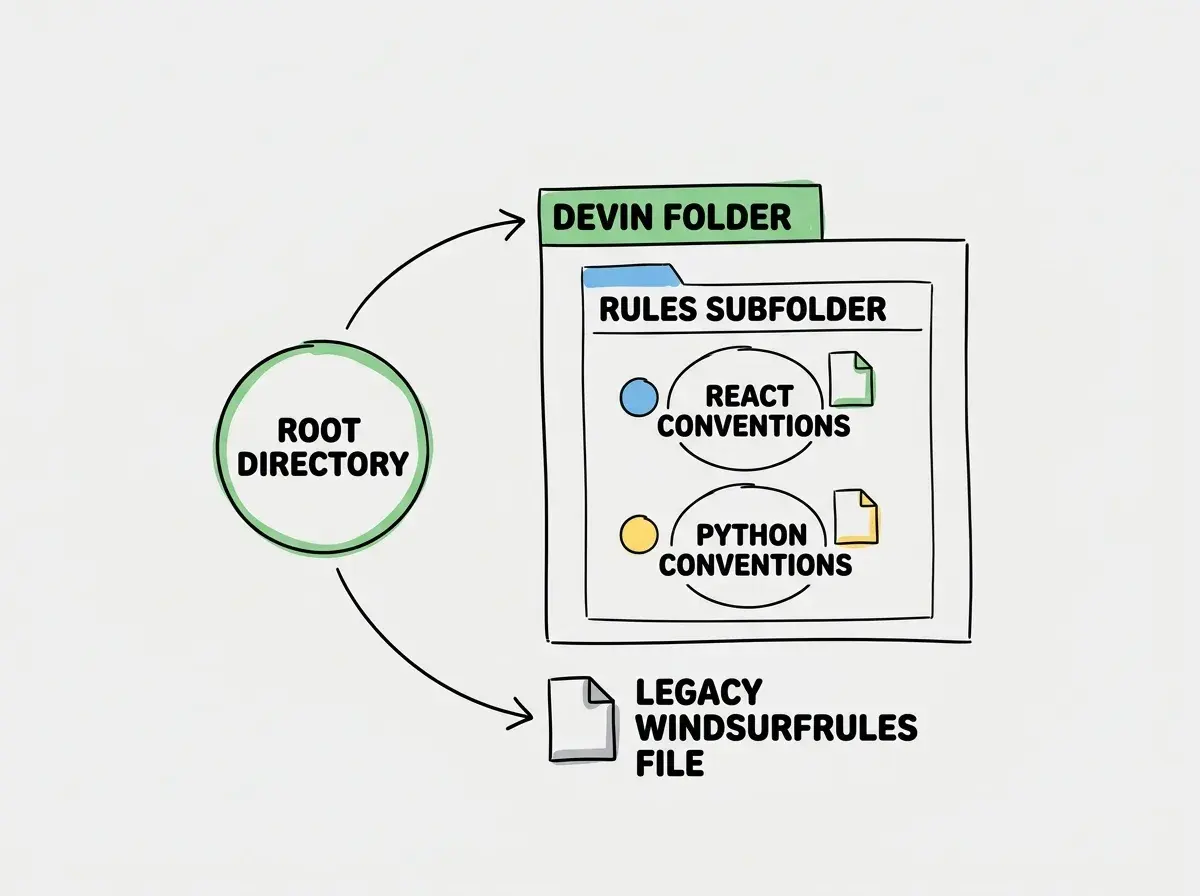
The rule body is Markdown, while activation is configured through the rule metadata. Create a workspace rule through the Rules panel, choose its activation mode, and preserve the frontmatter the client generates. The examples below show the body to paste beneath that metadata. This simplicity means you can draft rules using the same language you would use in a pull request review or a team onboarding document.
Writing Effective Rules for React
Let us look at a practical example for a React frontend. Instead of dumping all JavaScript rules into one file, you create a specific .devin/rules/react-components.md file. This file should define your exact expectations for component structure, state management, and styling.
# React Component Conventions

When creating or modifying React components in this workspace, adhere to the following guidelines.

1. Use functional components with TypeScript interfaces for all props.
2. Avoid default exports. Use named exports for all components and utility functions.
3. For state management local to the component, use the standard useState hook. For complex state involving multiple sub-values, prefer useReducer.
4. Style components using Tailwind CSS utility classes directly in the className attribute. Do not create separate CSS modules unless explicitly requested.
5. Keep pure helpers outside components when they do not depend on component state or props; preserve correct closures when they do.
This rule file is highly specific. It leaves no ambiguity about exports or styling preferences. When the AI assistant activates this rule, it knows exactly how to scaffold a new button or layout component without needing you to specify "use Tailwind and named exports" in every single prompt.
Explore clear explanations of AI coding tools, project context, and reliable development workflows.
Explore the blogWriting Effective Rules for Python
Similarly, backend conventions require their own dedicated space. A file named .devin/rules/python-api.md can handle your API development standards. By keeping this separate from the React rules, you prevent the AI from confusing frontend and backend paradigms.
# Python FastAPI Conventions

When working on the backend API, follow these architectural guidelines.

1. Use async endpoints with the existing asynchronous database client; do not place blocking database calls directly in the event loop.
2. Use Pydantic models for all request and response validation. Place these models in the schemas directory, separated by domain.
3. Dependency injection should be used for database sessions. Never instantiate a database connection directly within the route handler.
4. Return standard HTTP status codes. Use 201 for creation, 204 for deletion, and appropriate 400-level codes for client errors.
5. Type hints are mandatory for all function arguments and return values.
These sample policies describe one fictional project. Verify that its assumptions fit your application before adopting them, and check the resulting endpoints against the actual architecture. The modularity of the .devin/rules directory makes this separation of concerns trivial to implement and maintain.
Rule Activation Mechanisms
Having well-written rules is only half the battle. The AI must know when to apply them. The system employs several activation mechanisms to determine which rules are relevant to the current context.
The first mechanism is the "always-on" rule. These are general guidelines that apply to every interaction within the workspace. You might use an always-on rule for broad communication preferences, such as instructing the AI to provide concise explanations rather than verbose tutorials.
The second mechanism is manual activation. Through the user interface, you can explicitly instruct the AI to reference a specific rule file. This is useful when you are starting a new feature and want to guarantee the AI reviews the architectural guidelines before writing any code. Note that UI labels for this feature may vary depending on the specific version of the desktop client you are running.
The third and most powerful mechanism is the model decision. The AI analyzes your prompt and the files you are working on to automatically activate relevant rules. If you ask it to "update the user profile component," it will likely activate the React rules file based on the context of the request.
Finally, glob patterns provide a deterministic way to trigger rules. You can configure the system to always activate the Python API rules whenever a file matching backend/api/**/*.py is modified. This ensures consistency without relying solely on the model's contextual understanding.
| Feature | Legacy Setup | Current Setup |
|---|---|---|
| Primary Location | .windsurfrules file | .devin/rules/ directory |
| Format | Monolithic text | Modular Markdown files |
| Context Loading | Loads everything always | Loads based on activation triggers |
| Maintainability | Difficult for large projects | Highly scalable |
Generated Memories Versus Explicit Rules
As you interact with the AI, it learns about your workspace. According to the current rules and memories documentation, the system distinguishes between generated memories and explicitly maintained rules.
Generated memories are automatic. The AI notes that you prefer a certain testing framework or that a specific API key is stored in a particular environment variable. These memories help the AI adapt to your project organically over time without requiring you to document every single detail.
Explicitly maintained rules, on the other hand, are the markdown files you create in the .devin/rules directory. These are explicit working instructions. They remain guidance for the assistant, not a security boundary or a guarantee of compliance. Tests and access controls still enforce important requirements independently.
Do not rely on generated memories for critical architectural decisions. If a specific pattern is mandatory for your codebase, write it down as an explicit rule in the rules directory. Memories can be overwritten or misinterpreted, but explicit rules provide a stable foundation.
Migrating From a Single Legacy File
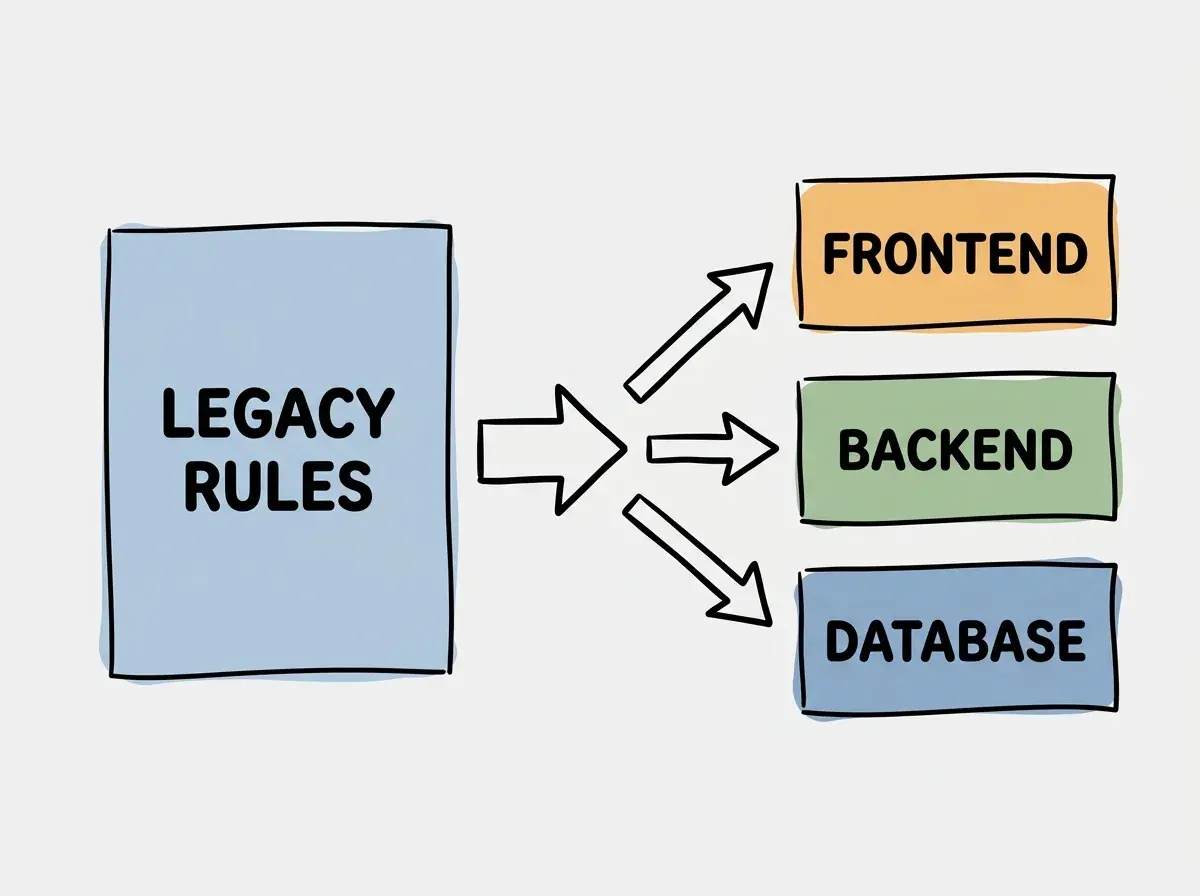
If you are currently using a massive .windsurfrules file, migrating to the new directory structure is a straightforward process. The goal is to break the monolithic document into logical, context-specific pieces.
Start by creating the .devin/rules directory at the root of your workspace. Open your legacy file and identify the broad categories of instructions. You likely have sections for frontend, backend, testing, and general workflow.
Create a new markdown file for each category. Copy the relevant instructions from the legacy file into the new modular files. Take this opportunity to rewrite the rules using clear, declarative language. Remove any outdated instructions or rules that the AI now handles natively.
After verifying the new rules load and activate correctly, remove duplicated content from the legacy file in a reviewable commit. Keep the migration reversible. Measure any effect on context size or output quality instead of assuming that more files automatically improve performance.
Testing Your Rule Configuration
After setting up your new rules directory, it is crucial to verify that the activation mechanisms are working correctly. You can perform a simple test task to ensure the AI respects your conventions.
Open a new session and provide a generic prompt that should trigger a specific rule. For example, if you created the React conventions file detailed earlier, ask the AI to "create a new user profile card component."
Observe the generated code. Did it use a named export? Did it use Tailwind CSS classes? Did it use TypeScript interfaces for the props? Also inspect the active rule context. Matching output alone is not proof that a rule loaded; the assistant might have chosen the same convention without it.
If the AI deviates from your instructions, you may need to adjust the wording in your markdown file. Ensure your rules are unambiguous. Instead of saying "prefer named exports," say "always use named exports." Strong, declarative language leaves less room for interpretation.
You can also test the scope and conflicts of your rules. If you have a general rule that says "always write verbose comments" and a specific Python rule that says "keep comments minimal," ask the AI to write a Python function. See which rule takes precedence. Generally, the more specific, context-aware rule should override the broader guideline, but testing this ensures your workspace behaves as expected.
Frequently Asked Questions
What this means for you
Configuring your workspace rules is an investment in your future productivity. By transitioning from a legacy monolithic file to a modular directory structure, you provide the AI with precise, context-aware instructions. This reduces friction, minimizes required corrections, and ensures that the code generated aligns seamlessly with your team's architectural standards.
Take the time to audit your current conventions. Break them down into clear, declarative markdown files within the .devin/rules directory. Test the activation triggers and refine the language until the AI consistently produces code that looks like it was written by a senior member of your team.
Read more practical articles for choosing tools, reviewing changes, and shipping useful software.
Read more guides