Every platform offers a free tier, and every free tier upgrade decision feels like a gamble. You are running your vibe-coded app on generous starter plans, things are working fine, and then one morning you wake up to a $607 Replit bill you never saw coming. Free tiers are marketing tools, not charity. Understanding exactly when to upgrade and when to stay put saves you real money.
That story is not an outlier. With 92% of US developers now using AI tools daily, more people than ever are shipping apps on free-tier infrastructure without understanding where the walls are. The platforms know this. They design free tiers to get you building, get you invested, and then nudge you toward paid plans at the exact moment switching feels painful. This guide gives you a clear framework for making the upgrade call on your terms, not theirs.
The Free Tier Landscape in 2026
Before you can decide when to upgrade, you need to know exactly what you are working with. Here is what the most common platforms offer for free, with the limits that actually matter.
| Platform | Free Tier Limit | What Catches You |
|---|---|---|
| Vercel Hobby | 100 GB bandwidth, 10s function timeout | No commercial use allowed |
| Supabase Free | 500 MB storage, 2 projects, shared CPU | Paused after 1 week of inactivity |
| Netlify Free | 100 GB bandwidth, 300 build minutes | Build minutes run out fast with CI/CD |
| Cloudflare Pages | Unlimited bandwidth, 500 builds/month | Truly free for static and SSR |
| Resend Free | 3,000 emails/month | Hard cap, no overage option |
| Neon Free | 0.5 GiB storage, 1 project | Compute scales to zero after 5 min |
Some of these limits are soft walls you can optimize around. Others are hard ceilings that no amount of clever engineering can bypass. The difference matters enormously for your upgrade decision.
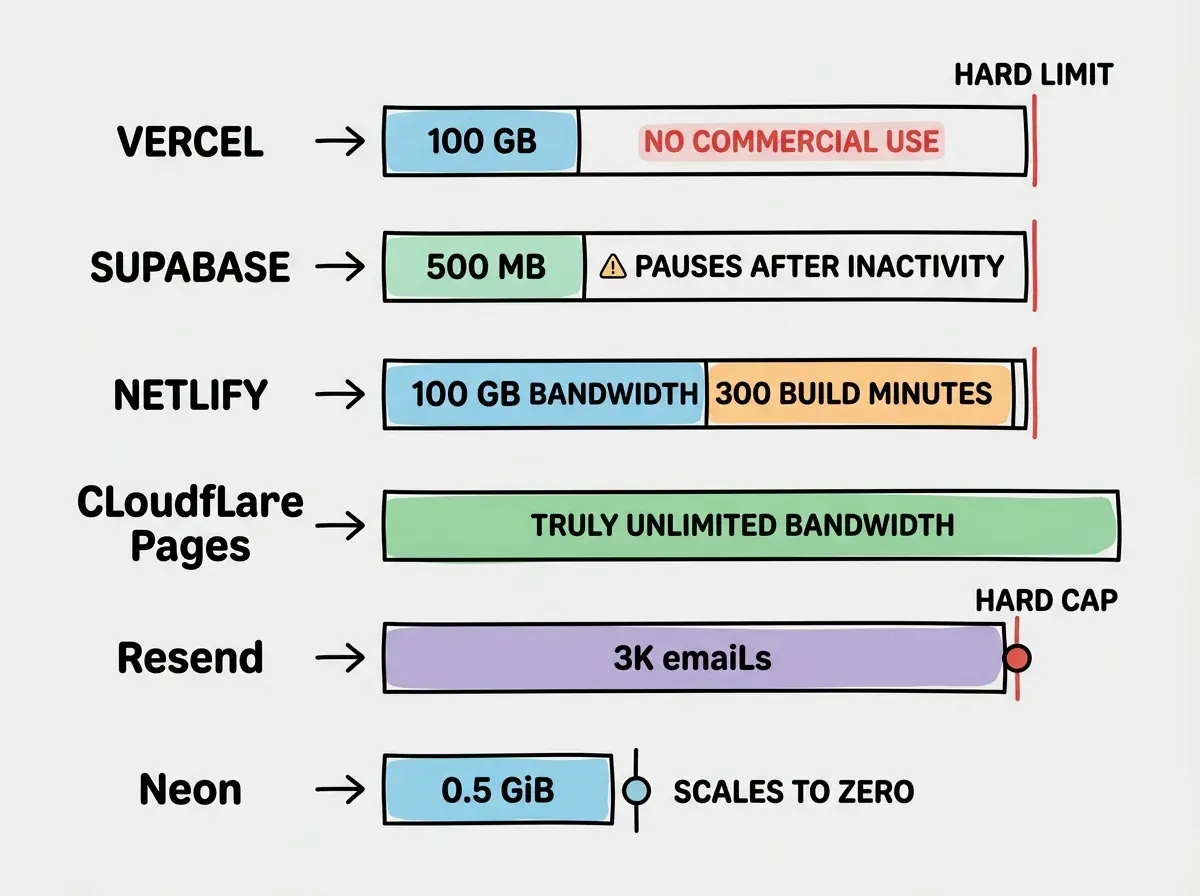
Notice that Cloudflare Pages stands out. Unlimited bandwidth on a free tier is rare and real. If bandwidth is your primary cost driver, this matters more than any other factor in your decision.
Five Signals That Mean It Is Time to Upgrade
Forget gut feelings. Here are the five concrete signals that tell you a free tier upgrade is overdue.
Signal 1: You are hitting rate limits or timeouts weekly. If your users are experiencing errors because your serverless functions timeout at 10 seconds (Vercel Hobby) or your database queries are slow on shared CPU (Supabase Free), the free tier is actively hurting your product. One timeout per month is noise. Weekly timeouts are a pattern.
Signal 2: You are spending engineering time working around limits. When you find yourself writing custom caching layers, splitting one project into two Supabase accounts, or compressing images manually to stay under bandwidth caps, you are trading your time for $20 per month. If your time is worth anything at all, this trade is a bad one.
Signal 3: You have paying customers or revenue. This is the clearest signal. If anyone is paying you money for something that runs on free infrastructure, upgrade immediately. Vercel Hobby explicitly prohibits commercial use in its terms of service. Running a paid product on a free plan is not clever budgeting. It is a terms-of-service violation that can get your account suspended.
Signal 4: Your usage is above 70% of any single limit. Do not wait until you hit 100%. At 70% of your bandwidth, storage, or email allocation, you are one viral tweet or one press mention away from exceeding the limit. The upgrade should happen before the crisis, not during it.
Signal 5: You need features that only exist on paid plans. Team collaboration, custom domains on preview deployments, daily database backups, priority support. If the feature gap is blocking your workflow, the free tier has already cost you more than the paid plan would.
What Happens When You Exceed Free Tier Limits
This is the question most builders avoid until it is too late. The answer depends on the platform, and the differences are significant.
Vercel sends you a warning email and then suspends your deployments if you exceed bandwidth on Hobby. On Pro, bandwidth overages are billed at $40 per 100 GB. Your site stays up, but the bill grows.
Supabase pauses your free project after one week of inactivity. If you exceed the 500 MB storage limit, you cannot insert new data. Your app does not crash, but writes fail silently, which can be worse.
Netlify stops building your site once you exhaust 300 build minutes. Your existing deployment stays live, but you cannot push updates. This is the "your site is frozen in time" scenario.
AWS Free Tier deserves a special mention because it has a 12-month expiration on many services. After 12 months, your "free" EC2 instance starts billing at full rate with no warning email. Builders who launched a side project on AWS Free Tier and forgot about it have woken up to bills in the hundreds of dollars.
The cost of exceeding a free tier is not always money. It can be downtime, failed writes, frozen deployments, or terms-of-service violations. Know which failure mode each platform uses before you hit the wall, because the wrong failure mode at the wrong time can lose you customers permanently.
The pattern across all platforms is the same. Free tiers fail gracefully for the platform, not for you. The platform protects itself first. Your users experience the consequences.
The Upgrade Decision Framework
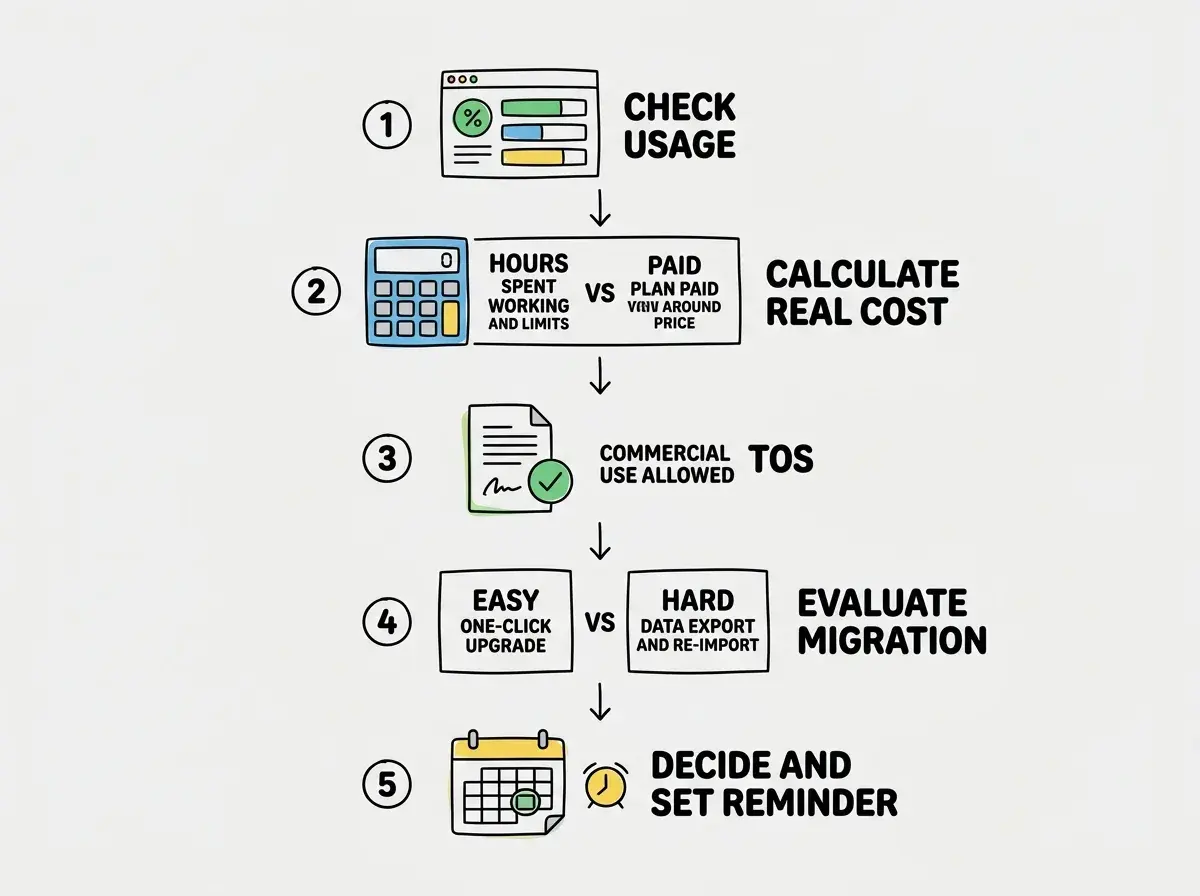
Use this checklist every time you are evaluating whether to upgrade a service. Run through it once per month for any app with real users.
Step 1: Check your usage numbers. Log into every platform dashboard and note your current usage as a percentage of the free limit. Write them down. Bandwidth, storage, compute, emails, build minutes. If any single metric is above 70%, flag it.
Step 2: Calculate the real cost of the free tier. Add up the hours you spent this month working around free-tier limitations. Multiply by your hourly rate (even if you do not bill hourly, pick a number). If that number exceeds the paid plan price, the free tier is already the more expensive option.
Step 3: Check the terms of service. If your app generates revenue, verify that each free tier allows commercial use. Vercel Hobby does not. Netlify Starter does. Cloudflare Pages does. One violation notice can take your entire app offline.
Step 4: Evaluate the upgrade path. Some upgrades are smooth. Supabase Free to Pro is a toggle in the dashboard. Others involve migration. Moving from Neon Free (1 project limit) to a different database provider means exporting and re-importing data. Factor migration friction into your decision.
Step 5: Decide, then set a calendar reminder. Either upgrade now or set a specific date to re-evaluate. "I'll upgrade when I need to" is not a plan. "I'll check my usage on May 1st and upgrade if bandwidth exceeds 80 GB" is a plan.
Where to Stay Free as Long as Possible
Not every service needs an upgrade at the same time. Here is where to prioritize.
Keep free longest: Cloudflare Pages. Unlimited bandwidth, 500 builds per month, and no commercial use restriction. Unless you need more than 500 builds (which means you are deploying more than 16 times per day), the free tier covers everything.
Keep free longest: Resend. 3,000 emails per month is plenty for most apps until you have thousands of active users. A transactional email on signup plus a weekly digest for 500 users burns about 2,500 emails per month. You have headroom.
Upgrade first: your database. Supabase pausing projects after inactivity and limiting you to shared CPU creates the most user-facing problems. If your app has any consistent traffic, the $25 Pro plan gives you 8 GB of storage, daily backups, and dedicated compute. This is the single best $25 you can spend on infrastructure.
Upgrade first: your hosting (if commercial). If your app makes money, move off Vercel Hobby to Pro ($20/month) or switch to Cloudflare Pages. The terms-of-service risk alone justifies this.
Upgrading every service at once because one service hit its limit. Each platform has different usage patterns and different ceilings. Upgrade only the service that is actually constrained. Running Supabase Pro while keeping Cloudflare Pages free and Resend free is completely normal and smart budgeting.
The goal is not to avoid paying forever. The goal is to pay for the right things at the right time, and keep the rest free until the numbers force your hand.
The Monthly Cost Check Routine
Build this fifteen-minute routine into the first Monday of every month.
Open your Vercel, Supabase, Netlify, or Cloudflare dashboard. Note your usage percentages and compare them to last month. If everything is under 70%, close the tabs and move on. If anything is above 70%, run the five-step framework above.
Set spending alerts on every platform that supports them. Vercel, AWS, and most cloud providers let you configure email notifications at custom thresholds. Set them at 50%, 75%, and 90% of your limits.
See exact monthly breakdowns for vibe-coded apps at every scale, from $0 to $500 per month.
Read the full cost guideWhat This Means For You
- If you are a founder: Run through the five-step framework this week for every free tier your app depends on. Focus your first upgrade dollars on your database and hosting, because those two affect uptime directly. Keep email and edge hosting free until your numbers force a change. The total jump from all-free to "upgraded where it matters" is typically $45 to $65 per month, not the hundreds you might fear.
- If you are an indie hacker: Free tiers are your best friend during validation. Stay on them aggressively while you are testing ideas and finding product-market fit. But the moment you have paying customers, audit every platform's terms of service. One suspended account during a launch week can kill momentum you spent months building. Upgrade strategically, not emotionally, and always let the data make the decision.
Start with deployment fundamentals before worrying about scaling costs.
See all guides