You have been staring at the same bug for two hours. The stack trace points to a line that looks correct. The logs show data flowing in the right direction. Every fix you try either does nothing or breaks something else. And somewhere in the back of your mind, a quiet voice whispers: "What if I just started this part over?"
That voice is not weakness. It is pattern recognition. And learning when to listen to it is one of the most valuable skills you can develop as a builder.
The Renovation vs. Demolition Problem
Think of debugging like renovating a house. You discover a crack in the wall, so you patch it. Then you find water damage behind the patch, so you tear out the drywall. Behind the drywall, the framing is rotted. Behind the framing, the foundation has shifted. Each layer reveals a deeper problem, and each fix costs more than the last.
Sometimes patching the wall is the right call. The crack is cosmetic, the structure is sound, and a $50 fix saves you from a $50,000 rebuild. But sometimes the foundation is so compromised that every patch you apply is temporary. You will spend more on renovation than demolition and rebuilding would have cost. The trick is knowing which situation you are in before you have already spent the $50,000.
Software debugging follows the same pattern. A simple bug in a well-structured codebase is a wall crack. You find it, fix it, move on. But a bug that touches three different systems, relies on assumptions buried deep in your architecture, and resists every fix you throw at it? That is a foundation problem. And foundation problems do not get cheaper with more patches.
The Sunk Cost Fallacy Is Eating Your Hours
Here is a stat that should make you uncomfortable: 92% of developers now use AI tools daily, generating code faster than ever before. But 41% of that AI-generated code ends up being reverted. The gap between those two numbers represents an enormous amount of wasted debugging effort, hours spent trying to fix code that should have been rewritten from the start.
The sunk cost fallacy is the psychological force that keeps you debugging long past the point of diminishing returns. You have already spent two hours on this bug. If you start fresh, those two hours feel wasted. So you spend another hour. The logic is seductive: "I am so close, I just need to find one more thing." But each additional hour makes the next hour feel even more justified, creating a spiral that experienced developers call the exhaustion wall.
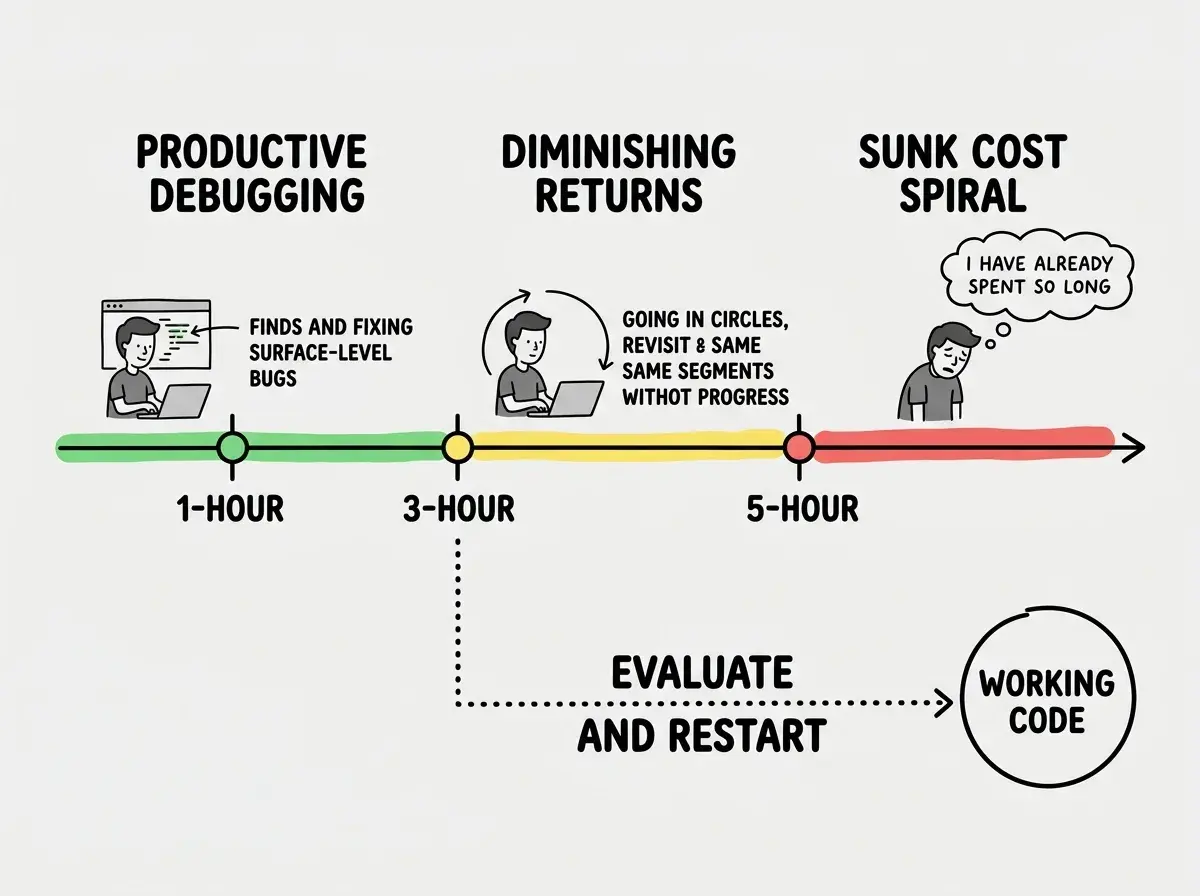
One developer documented investing over 400 hours into debugging an AI-assisted project before hitting total exhaustion. Four hundred hours. That is ten full work weeks spent not building, not shipping, not learning, just fighting code that had accumulated so many patches and workarounds that the original architecture was unrecognizable. The renovation had cost more than tearing down and rebuilding ever would have.
The sunk cost fallacy hits especially hard when you are building alone. With a team, someone can look at your struggle and say, "Maybe we should try a different approach." Solo builders do not have that external perspective. You are both the developer and the project manager, and the developer keeps saying "just five more minutes" while the project manager is not paying attention.
The Three-Hour Rule
Here is a simple framework that saves an unreasonable amount of time: if you have been debugging the same issue for three hours without meaningful progress, stop debugging and evaluate whether starting fresh would be faster.
Not three hours total on the project. Three hours on the same issue. The same error, the same behavior, the same mysterious failure that resists every approach you have tried.
Three hours is the threshold because it represents the point where most productive debugging strategies have been exhausted. In the first hour, you are reading error messages, checking logs, and testing hypotheses. In the second hour, you are going deeper, examining edge cases and tracing data flow. By the third hour, if you still have not found the root cause, the problem is almost certainly architectural rather than superficial. You are not looking at a cracked wall anymore. You are looking at a shifted foundation.
The three-hour rule is not about giving up. It is about recognizing that the information you have gathered in three hours of debugging is incredibly valuable for a fresh start. You now know what does not work, where the real complexity lives, and what the code actually needs to do. Starting fresh with that knowledge is not starting from zero.
When you hit the three-hour mark, ask yourself three questions. First, can you clearly articulate what the bug is and why it is happening? If not, the problem is likely deeper than the symptom you are chasing. Second, has each fix attempt made the situation simpler or more complex? If the code is getting more complex with each attempt, you are adding renovation on top of renovation. Third, would you build it this way if you were starting today? If the honest answer is no, that tells you everything you need to know.
How to Start Fresh Without Losing Everything
"Starting fresh" sounds terrifying because people imagine it means deleting everything and beginning from an empty file. That is not what it means. Starting fresh means returning to the last known working state and taking a different path forward. It is demolishing the addition with the cracked foundation while keeping the rest of the house intact.
Here is the practical workflow for starting fresh safely.
Step one: preserve everything. Before you change a single line, run git stash or create a branch from your current state. Call it something like debug-attempt-jan-06 so you can reference it later. This eliminates the emotional cost of "throwing away" your work. You are not throwing it away. You are setting it aside. Some of the code in that branch might be perfectly good, and you will cherry-pick the pieces that work once you have a clean foundation.
Step two: identify the last working state. Scroll through your git log and find the last commit where the feature (or the whole app) worked correctly. This is your new starting point. Check it out into a new branch. You now have a clean, working foundation to build on.
Step three: write down what you learned. Before you write any code, spend five minutes documenting what you discovered during debugging. What did you try? What broke? What assumptions turned out to be wrong? This knowledge makes your fresh start dramatically faster than your first attempt. You are not starting from zero. You are starting from informed.
Step four: rebuild selectively. You do not need to rewrite the entire feature. Often the problem lives in one specific module or one particular approach to data flow. Rewrite that piece using the lessons from your debugging session while keeping everything else the same. Targeted demolition, not scorching the earth.
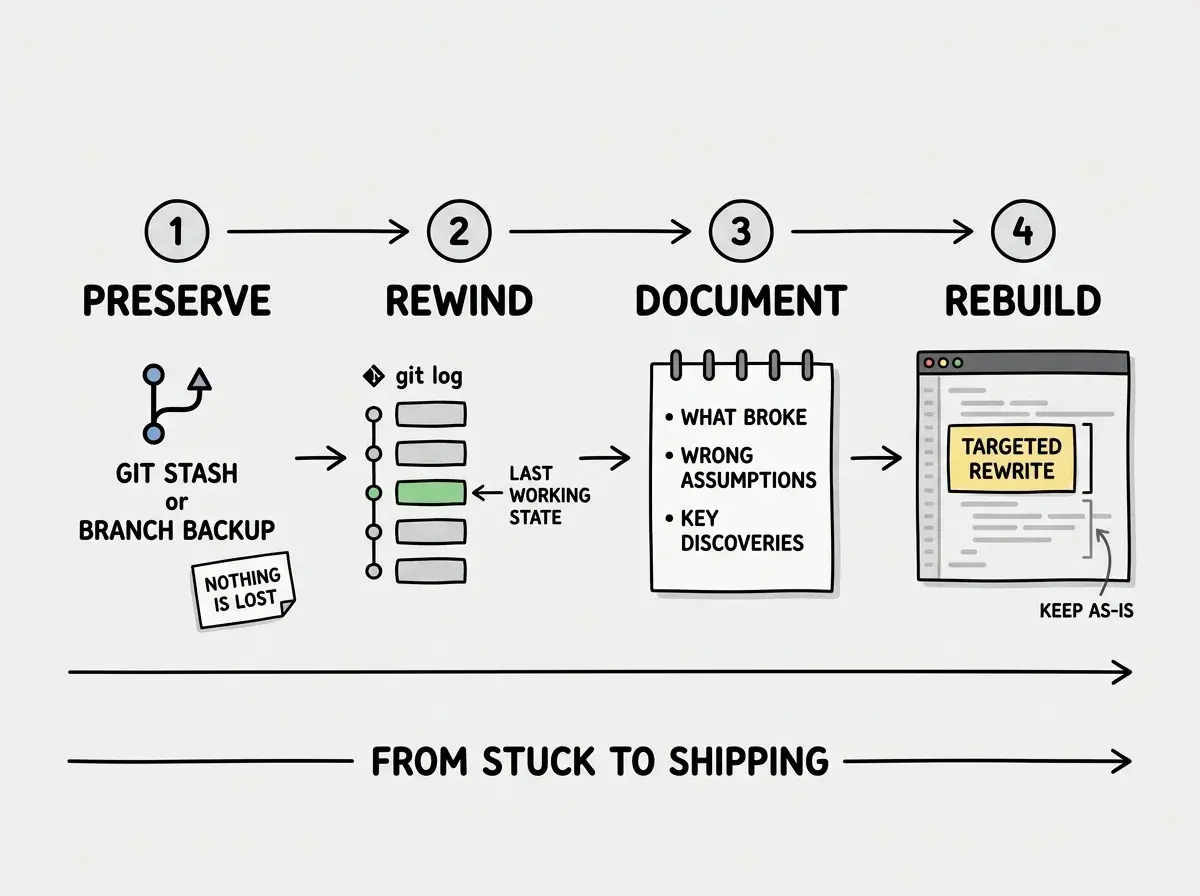
The beauty of this approach is that it turns your debugging time into research time retroactively. Those three hours were not wasted. They were an investigation that revealed the real problem. Now you can solve the real problem instead of continuing to patch the symptoms.
When Fixing Really Is the Right Call
To be fair, starting fresh is not always the answer. The renovation analogy cuts both ways. Sometimes the crack really is just a crack, and patching it takes twenty minutes while demolition would take a week.
Fixing is probably the right call when you can clearly identify the root cause and explain it to someone else. It is the right call when the fix is isolated, touching one file or one function without rippling through the system. It is the right call when your tests still pass and the bug is a narrow edge case rather than a fundamental design flaw.
Treating "start fresh" as an all-or-nothing decision. Developers often resist the idea because they imagine rewriting everything from scratch. In reality, most fresh starts involve rewriting 10-20% of the code, the part with the broken foundation, while keeping the 80-90% that works fine. The question is never "should I throw everything away?" It is "which specific piece needs a new approach?"
The renovation wins when the structure is sound and the problem is contained. The demolition wins when the problems are interconnected, when every fix creates a new bug, and when the architecture itself is fighting against what you need the code to do.
Building the Instinct
The developers who ship consistently are not the ones who never get stuck. They are the ones who recognize when they are stuck and change strategies quickly. They treat debugging time as information gathering, not as a commitment they cannot abandon.
Here is what this looks like in practice. You hit a bug. You investigate for an hour. You try a fix, it does not work. You try another approach, it partially works but introduces a new problem. Three hours in, you stop, stash your work, check out the last working commit, and rebuild the problematic piece with fresh eyes and hard-won knowledge.
That sequence takes less total time than pushing through to hour six or seven and arriving at a fragile fix that breaks again next week. The fresh start is almost always the faster path, because you are building on solid ground instead of patching cracks in a shifting foundation.
The best builders are not the ones who never get stuck. They are the ones who get unstuck faster.
Explore moreThe next time you find yourself deep in a debugging session, losing track of time, trying the same approaches with slight variations, remember the renovation analogy. Ask yourself honestly: am I patching a wall crack, or am I pouring money into a house with a broken foundation?
If it is the foundation, save your work, rewind to solid ground, and rebuild. Your future self will thank you for the hours you did not waste.
Know when to push through and when to pivot. That instinct separates builders who ship from builders who stall.
Start here